
Rhagymadrodd
This manual provides detailed instructions for the setup, operation, and maintenance of your MASTER & DYNAMIC MH40 Over-Ear Wireless Headphones Gen II. Please read this manual thoroughly to ensure optimal performance and longevity of your device.

Image: MASTER & DYNAMIC MH40 Wireless Over-Ear Headphones banner, showcasing the product name and design.
Cynnyrch Drosview
The MH40 Wireless Over-Ear Headphones Gen II are designed for superior audio quality and comfort. Key features include:
- Custom Titanium Drivers: Enhanced, precise sound with deep bass and clear treble.
- Oes batri estynedig: Hyd at 30 awr o amser chwarae ar un tâl.
- Gallu Codi Tâl Cyflym: 6 hours of listening after just 15 minutes of charging.
- Bluetooth 5.2: Reliable wireless connectivity up to 30 meters (100 ft).
- Optional USB-C Audio: Digital audio support up to 24-bit/96kHz via USB-C to USB-C cable.
- Arae Meicroffon Deuol: Features proprietary wind noise reduction technology for clear calls.
- Deunyddiau Premiwm: Constructed with lightweight anodized aluminum, coated canvas, and soft lambskin-leather for durability and comfort.
- Removable Magnetic Ear Pads: Offers superior noise isolation and ease of maintenance.

Delwedd: Blaen view of the MH40 Gen II headphones in Silver Metal / Tan Leather.

Delwedd: Llun agos view of the MH40 earcups and headband, highlighting the material and design.

Image: MH40 headphones shown in a folded position, demonstrating their portability.
Gosod
1. Codi Tâl y Clustffonau
Before initial use, fully charge your MH40 Gen II headphones. Connect the provided USB-C charging cable to the headphone's charging port and to a power source (e.g., computer USB port or USB wall adapter).
- Mae gwefr lawn yn darparu hyd at 30 awr o amser gwrando.
- For quick charging, 15 minutes of charge time yields approximately 6 hours of listening.

Image: MH40 headphones illustrating the "Boundless Battery" feature, emphasizing long battery life.

Image: Close-up of the power buttons on the MH40 headphones, showing the LED indicator.
2. Pâr Bluetooth
- Gwnewch yn siŵr bod y clustffonau wedi'u gwefru a'u diffodd.
- Pwyswch a daliwch y botwm pŵer nes bod y golau dangosydd yn fflachio, gan nodi modd paru.
- Ar eich dyfais (ffôn clyfar, tabled, cyfrifiadur), ewch i'r gosodiadau Bluetooth.
- Select "MH40 Gen II" from the list of available devices.
- Once connected, the indicator light on the headphones will change to a steady color or turn off, depending on the model.
The MH40 Gen II uses Bluetooth 5.2 for a stable connection up to 30 meters (100 ft).
Cyfarwyddiadau Gweithredu
Rheolaethau
The MH40 Gen II headphones feature intuitive controls for managing audio playback and calls. Specific control functions may vary slightly but generally include:
- Botwm Pŵer: On/Off, Pairing mode.
- Rheolaethau Cyfrol: Addaswch lefel allbwn sain.
- Botwm Aml-swyddogaeth: Chwarae/Saib, Hepgor traciau, Ateb/Gorffen galwadau.
- Botwm Munud: Located on the right side for quick microphone muting during calls.
For detailed control mapping, refer to the companion mobile application (if available) or the quick start guide included with your product.

Delwedd: Llun agos view of the controls on the MH40 headphones, showing buttons and ports.
Gwneud a Derbyn Galwadau
The dual microphone array with wind noise reduction ensures clear communication.
- Ateb / Diwedd Galwad: Pwyswch y botwm amlswyddogaethol.
- Gwrthod Galwad: Pwyswch a daliwch y botwm amlswyddogaethol.
- Tewi meicroffon: Use the dedicated mute button during a call.
Cysylltiad Wired
For digital audio up to 24-bit/96kHz, connect the headphones to your device using a USB-C to USB-C cable. This bypasses Bluetooth and can be useful for high-fidelity audio or when battery is low.
Cynnal a chadw
Proper care will extend the life and maintain the performance of your MH40 Gen II headphones.
- Glanhau: Use a soft, dry cloth to clean the exterior surfaces. For leather parts, use a specialized leather cleaner if necessary. Avoid harsh chemicals or abrasive materials.
- Padiau Clust: The magnetic ear pads are removable for easy cleaning or replacement. Gently detach them and clean as needed. Ensure they are securely reattached.
- Storio: When not in use, store the headphones in a cool, dry place, away from direct sunlight and extreme temperatures. Use the provided carrying pouch to protect them from dust and scratches.
- Osgoi Lleithder: Peidiwch ag amlygu'r clustffonau i ddŵr na lleithder gormodol.

Image: MH40 headphones with one ear pad removed, demonstrating the magnetic attachment for easy maintenance.
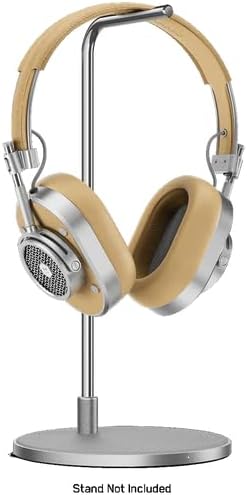
Image: MH40 headphones displayed on a stand, illustrating proper storage.
Datrys problemau
If you encounter issues with your MH40 Gen II headphones, refer to the following common solutions:
| Problem | Ateb |
|---|---|
| Nid yw clustffonau'n troi ymlaen. | Gwnewch yn siŵr bod y clustffonau wedi'u gwefru'n llawn. Cysylltwch â ffynhonnell bŵer a gwiriwch y dangosydd gwefru. |
| Methu paru drwy Bluetooth. |
|
| Dim sain neu ansawdd sain gwael. |
|
| Nid yw'r meicroffon yn gweithio yn ystod galwadau. |
|
Manylebau
| Nodwedd | Manylyn |
|---|---|
| Enw Model | MH40 |
| Technoleg Cysylltedd | Wireless (Bluetooth), Wired (USB-C) |
| Technoleg Cyfathrebu Di-wifr | Bluetooth 5.2 |
| Amrediad Bluetooth | 30 metr (100 troedfedd) |
| Cydrannau wedi'u Cynnwys | Headphones, USB-C Charging Cable, USB-C to USB-C Audio Cable (specific cables may vary by package) |
| Deunydd | Aluminum, Leather, Canvas |
| Dull Rheoli | App, On-ear controls |
| Bywyd Batri | Hyd at 30 awr |
| Siâp clustffon | Dros Glust |
| Rheoli Sŵn | Unigedd Sain |
| Pwysau Eitem | 2.38 pwys |
| Gwneuthurwr | MASTER & DYNAMIC |
| UPC | 850060736537 |
Gwarant a Chefnogaeth
MASTER & DYNAMIC products are engineered to last and are covered by a limited warranty. For specific warranty terms and conditions, please refer to the warranty card included with your product or visit the official MASTER & DYNAMIC websafle.
For technical support, product inquiries, or warranty claims, please contact MASTER & DYNAMIC customer service through their official channels. You can often find support information on the manufacturer's website or by referring to the contact details provided in your product packaging.
Gwneuthurwr: MASTER & DYNAMIC
Am gymorth pellach, ewch i'r MASTER & DYNAMIC Store on Amazon.