
AULA AULA F108
AULA F108 PRO Wireless Mechanical Keyboard User Manual
Model: AULA F108
Brand: AULA
1. Rhagymadrodd
This manual provides detailed instructions for the setup, operation, maintenance, and troubleshooting of your AULA F108 PRO Wireless Mechanical Keyboard. Please read this manual thoroughly to ensure optimal performance and longevity of your device.

Image: The AULA F108 PRO Wireless Mechanical Keyboard, showcasing its full-size layout, integrated screen, and multi-function knob.
2. Beth sydd yn y Bocs
Wrth ddadbocsio, gwiriwch fod yr holl eitemau canlynol wedi'u cynnwys:
- Bysellfwrdd Mecanyddol x1
- Keycap/Switches Puller x1
- English User Manual x1
- Cebl USB x1
- Derbynnydd 2.4GHz x1
- Replace Linear Switches x2
- Gorchudd Llwch x1

Image: A visual representation of the AULA F108 PRO keyboard and its accessories, including the dust cover, USB cable, 2.4GHz receiver, keycap/switch puller, and two replacement linear switches.
3. Gosod
3.1 Paratoi Cychwynnol
- Codi tâl: Before first use, ensure the keyboard is fully charged using the provided USB-C cable. The 8000mAh battery provides approximately 32 hours with backlight on and 76 hours with backlight off.
- Ffilm amddiffynnol: The intelligent TFT color display screen comes with a transparent protective film. For optimal clarity, this film can be carefully peeled off before use.
Video: This short video demonstrates that the screen on the AULA F108 Pro keyboard has a peelable protective film, clarifying that any perceived scratches are not on the screen itself.
3.2 Dulliau Cysylltiad
The AULA F108 PRO supports three connection modes:
- Bluetooth 5.0 (BT5.0): Connects wirelessly to up to three devices (FN+1/2/3). Ideal for quick switching between PC, Mac, laptop, and tablets.
- Di-wifr 2.4GHz: Provides stable and fast wireless connection with a 1000Hz polling rate. Use the included 2.4GHz receiver. (FN+~)
- USB-C â Gwifrau: Plug and play connection for reliable performance and charging.

Image: The AULA F108 PRO keyboard connected to various devices, illustrating its versatile tri-mode connectivity options: USB-C wired, Bluetooth 5.0, and 2.4GHz wireless.

Image: A banner highlighting the AULA F108 PRO's tri-mode connection capabilities, including Type-C plug and play, BT5.0 for up to 3 devices, and stable 2.4GHz wireless.
3.3 Setting Screen Language and Time
The intelligent TFT color display screen may default to Chinese. To change the language and calibrate date/time:
- Ensure the keyboard is in modd gwifrau (USB-C connected).
- Download the official driver software from: bit.ly/m/AULA (Note: The driver only supports Windows systems).
- Install and open the driver software.
- Use the software to set the screen language (e.g., to English) and calibrate the date and time.
- You can also set custom GIF images via the software.
Alternatively, for language change directly on the keyboard (as per user review):
- From the clock screen, rotate the knob 8 clicks to the right until the purple circle is selected.
- Press the knob to enter the sub-menu.
- Rotate the knob one click to select "En" for English.
- Press the knob again to confirm the selection.
Video: This video demonstrates how to calibrate the screen date and time, and how to customize GIF images on the AULA F108 Pro keyboard's display.
4. Gweithrediad
4.1 Smart Display Screen & Multi-function Knob
The integrated TFT color display and multi-function knob provide real-time information and control:
- Gwybodaeth Arddangos: Shows date, time, battery status, connection mode (WIN/MAC/IOS/Android), Caps Lock, Num Lock, and Bluetooth device indicators (BT1/BT2/BT3).
- Swyddogaethau Knob:
- Rotate to select sections on the display (Config, Brightness, Speed, Volume, Language, Effect, Colour).
- Pwyswch i gadarnhau'r dewis.
- Rheoli cyfaint: Long press the FN key and press the knob down to toggle the knob's default function to volume control. Rotate for Volume+ / Volume-. Press to mute/unmute. Long press FN and knob again to revert to original function.

Delwedd: Manwl view of the AULA F108 PRO's LCD screen and multi-functional knob, illustrating how to adjust display settings, volume, and other configurations.

Image: A banner providing a comprehensive overview of the smart LCD screen's indicators (date, time, battery, system mode) and the multi-function knob's controls for display adjustment and volume.
4.2 RGB Backlight & Programmable Software
The keyboard features extensive RGB backlighting and customizable software:
- Effeithiau RGB: Supports multiple dynamic RGB effects, monochrome, and multi-color modes with over 16.8 million colors.
- Addasiadau:
- Switch Lighting Effects: FN+ | (19 effects)
- Lliwiau Goleuadau Newid: FN+ Tab
- Lighting Speed + / -: FN+ [ / ]
- Lighting Brightness + / -: FN+ { / }
- Side-light Effect: FN + Shift Dde
- Side-light Color: FN+ /?
- Side-light Brightness: FN + Alt Dde
- Programmable Software: The F108 Pro driver (Windows only, wired mode required) allows for macro customization, key remapping, GIF upload to the screen, and syncing screen time.

Image: The AULA F108 PRO keyboard displaying its vibrant RGB backlighting, along with a guide to shortcut keys for adjusting lighting effects, colors, speed, and brightness.
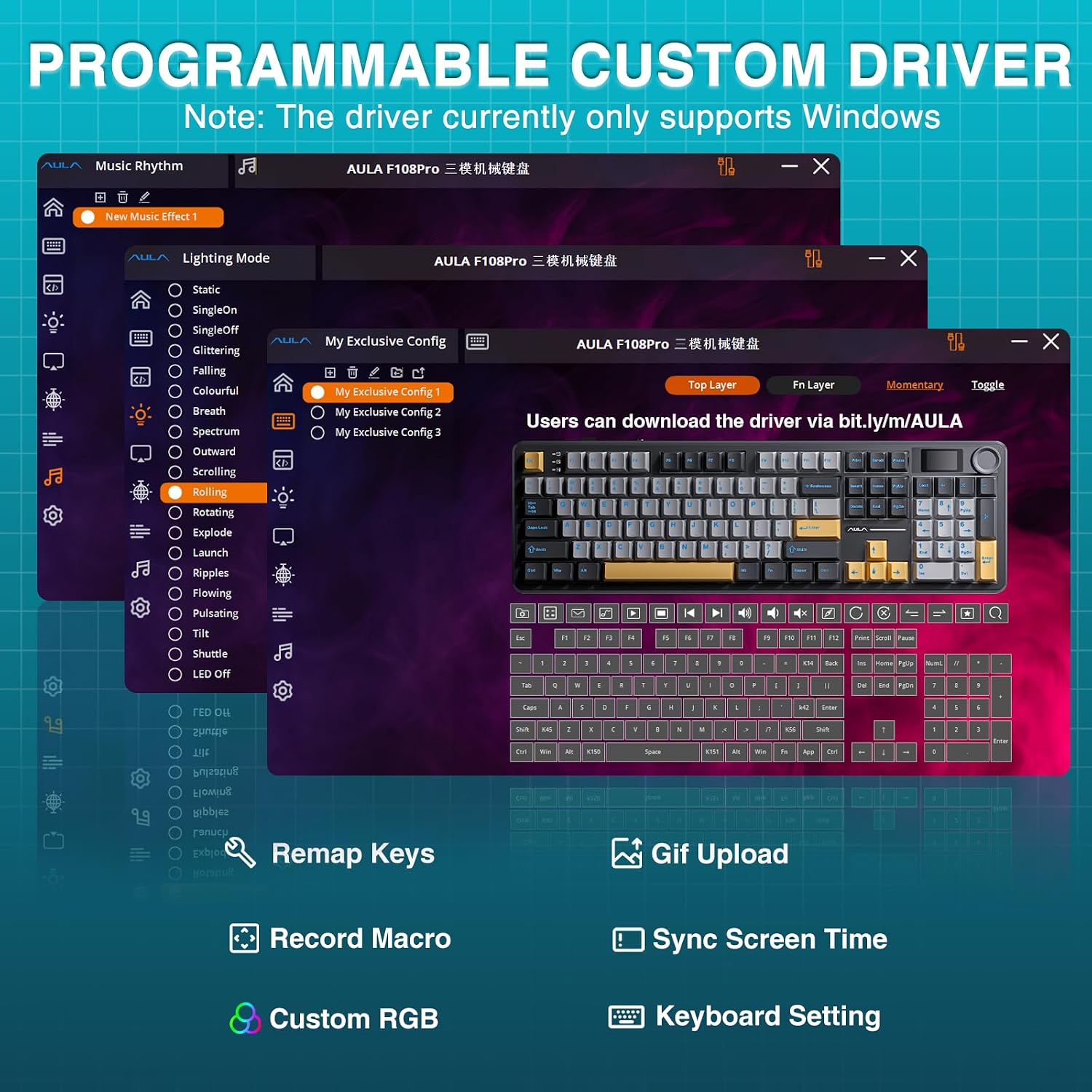
Image: Screenshots of the AULA F108 PRO's custom driver software interface, showing options for lighting modes, key remapping, GIF upload, and other keyboard settings.
Fideo: Sioe fideo cynnyrch swyddogolasing the AULA F108 PRO Wireless Mechanical Keyboard, highlighting its screen and knob features.
4.3 Switshis Cyfnewidiadwy'n Boeth
The F108 Pro features a hot-swappable base, allowing for easy switch replacement without soldering. It is compatible with 3-pin or 5-pin switches.
- Use the included keycap/switch puller to remove and install switches.
- The keyboard comes with pre-lubricated Caramel Latte linear switches for a smooth typing experience.
- Pwysig: Power off the keyboard when replacing hot-swappable shafts.

Image: A diagram illustrating the hot-swappable PCB socket compatible with 3-pin/5-pin switches, along with a close-up of the Caramel Latte linear switches and their specifications.

Image: A banner visually demonstrating the hot-swap switch feature of the AULA F108 PRO, showing keycaps and switches removed to reveal the PCB sockets.
Video: An official product video demonstrating the "creamy" sound and feel of the AULA F108 Pro keyboard, including its number pad.
4.4 Advanced Five Layers Filling Structure
The keyboard incorporates an advanced five-layer filling structure designed to optimize resilience, stability, and sound dampening, providing a softer and more elastic feel with reduced cavity noise.

Delwedd: Ffrwydrad view diagram of the AULA F108 PRO keyboard's internal components, highlighting the five layers of sound-shock absorbing foam and other structural elements.
5. cynnal
- Glanhau: Use a soft, dry cloth to wipe the keyboard surface. For deeper cleaning, remove keycaps using the provided puller and use compressed air to clear debris. Avoid liquid cleaners directly on switches or electronics.
- Gofal Batri: To prolong battery life, avoid fully discharging the keyboard frequently. Charge it regularly, especially if not in use for extended periods. Store in a cool, dry place.
- Gofal Cap Allweddi: The two-color injection-moulded PBT keycaps are durable and fade-resistant. Clean them with a damp cloth if necessary, ensuring they are dry before reattaching.
6. Datrys Problemau
6.1 Screen Display Issues (Chinese Language / Incorrect Time)
If the screen displays Chinese characters or the date/time is incorrect, refer to section 3.3 "Setting Screen Language and Time" for instructions on using the driver software or direct keyboard knob adjustment.
6.2 Problemau Cysylltedd
- Di-wifr 2.4GHz: Ensure the 2.4GHz receiver is securely plugged into a USB port on your computer. Verify the keyboard is in 2.4GHz mode (FN+~). Try a different USB port.
- Bluetooth 5.0: Ensure Bluetooth is enabled on your device. Verify the keyboard is in BT mode (FN+1/2/3) and paired correctly. Forget the device on your computer and re-pair if issues persist.
- Cysylltiad â gwifrau: Gwnewch yn siŵr bod y cebl USB-C wedi'i gysylltu'n ddiogel â'r bysellfwrdd a'ch cyfrifiadur. Rhowch gynnig ar borthladd neu gebl USB gwahanol.
6.3 Driver Software Issues (Linux Systems)
As noted in the product description, in Linux systems, incompatible driver versions may cause abnormal F-zone functionality. This is a known phenomenon. The driver software is primarily designed for Windows systems and requires wired mode for full functionality.
6.4 Allweddi Ddim yn Ymateb / Teipio Dwbl
- Gwnewch yn siŵr bod y bysellfwrdd wedi'i wefru'n llawn neu wedi'i gysylltu trwy USB-C.
- If a specific key is not responding, try hot-swapping the switch for that key with one of the included spare switches or another working switch to diagnose if the switch itself is faulty.
- Clean under the keycap to remove any debris that might be obstructing the switch.
7. manylebau
| Nodwedd | Manylyn |
|---|---|
| Rhif Model | AULA F108 |
| Technoleg Cysylltedd | 2.4GHz Wireless, BT5.0, USB-C |
| Disgrifiad Bysellfwrdd | Mecanyddol |
| Nifer yr Allweddi | 108 |
| Gallu Batri | 8000mAh |
| Bywyd Batri (Goleuadau Cefn YMLAEN) | Tua. 32 awr |
| Battery Life (Backlit OFF) | Tua. 76 awr |
| Backlighting bysellfwrdd | RGB (16.8 miliwn o liwiau) |
| Capiau bysell | Side Printed PBT Keycaps (two-color injection-moulded) |
| Switsys | Pre-lubed Linear Switches (Caramel Latte) |
| Poeth-Swappable | Yes (3-pin or 5-pin switches) |
| Nodweddion Arbennig | Smart TFT Color Display Screen, Multi-function Knob, Programmable Keys, Rechargeable |
| Dyfeisiau Cydnaws | Gliniadur, Cyfrifiadur Personol, Consol Gemau, Tabled, Ffôn Clyfar |
| Systemau Gweithredu | Windows, Mac, iOS, Android |
| Pwysau Eitem | 2.65 pwys |
| Dimensiynau Pecyn | 18.46 x 6.93 x 2.36 modfedd |
| Gwlad Tarddiad | Tsieina |
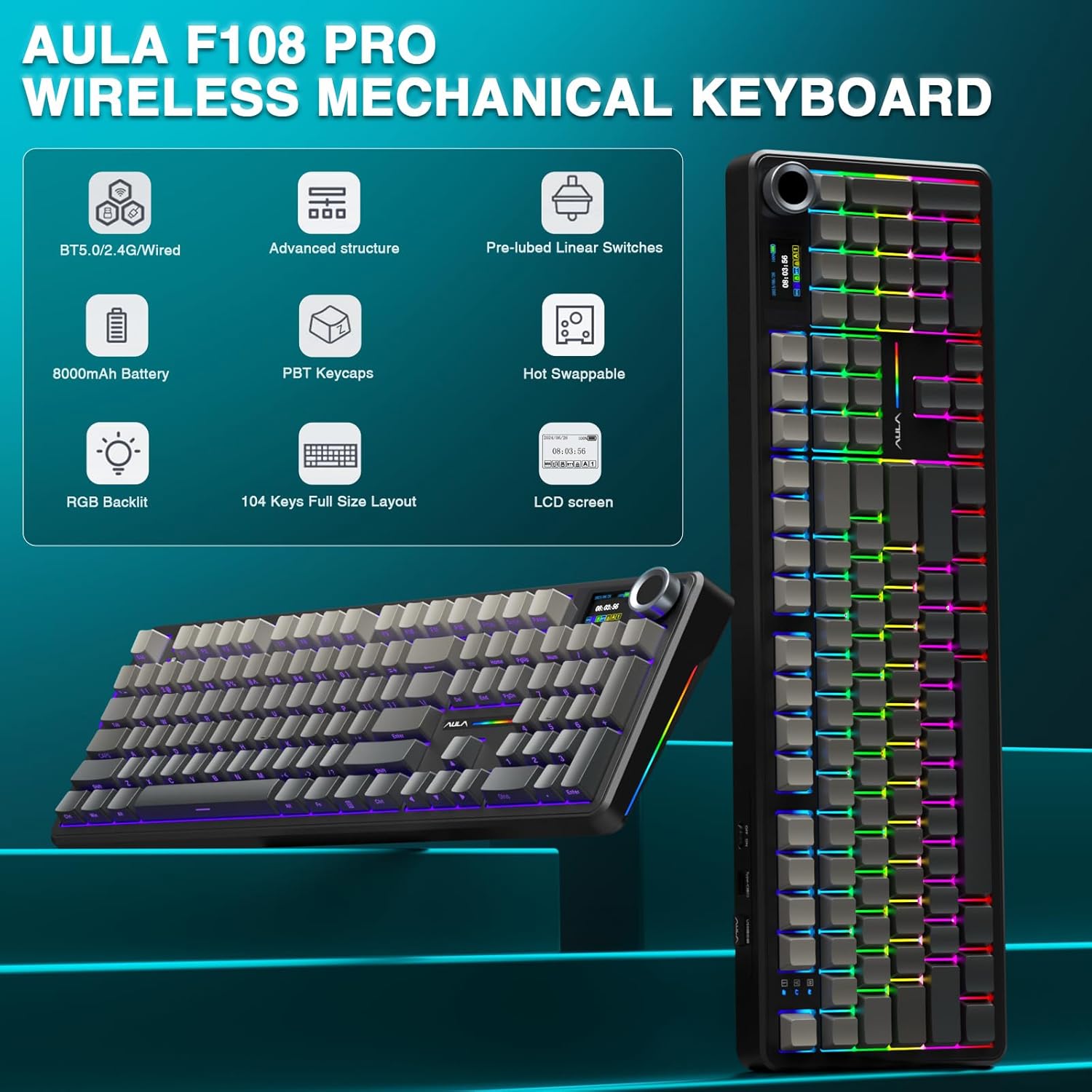
Image: An infographic summarizing key features of the AULA F108 PRO, including BT5.0/2.4G/Wired connectivity, advanced structure, pre-lubed switches, 8000mAh battery, PBT keycaps, hot-swappable design, RGB backlight, 104 keys full size layout, and LCD screen.
8. Gwarant a Chefnogaeth
For warranty information and technical support, please refer to the official AULA website or contact AULA customer service directly. Keep your purchase receipt as proof of purchase for any warranty claims.
Official AULA Store on Amazon: AULA Store
Dogfennau Cysylltiedig - AULA F108
 |
AULA MK87 Triple Mode Mechanical Keyboard User Manual Comprehensive user manual for the AULA MK87 mechanical keyboard, detailing its triple mode connectivity (wired, Bluetooth, 2.4GHz), RGB lighting, hot-swappable switches, specifications, and troubleshooting guide. |
 |
AULA F108 Pro 3-in-1 Mechanical Keyboard: User Manual & Features Comprehensive guide to the AULA F108 Pro 3-in-1 mechanical keyboard. Details connectivity (Wired, 2.4G, Bluetooth), RGB lighting, LCD screen functions, shortcut keys, system compatibility, and specifications. |
 |
AULA F108 PRO Mechanical Keyboard User Manual and Guide Comprehensive user manual for the AULA F108 PRO mechanical keyboard, detailing its features, connectivity options (wired, 2.4G, Bluetooth), LCD screen functions, shortcut keys, charging instructions, product specifications, and warranty information. |
 |
Llawlyfr Defnyddiwr Bysellfwrdd Mecanyddol AULA F75: Gosod, Nodweddion, a Manylebau Llawlyfr defnyddiwr cynhwysfawr ar gyfer bysellfwrdd mecanyddol tair modd AULA F75. Dysgwch sut i gysylltu trwy wifrau, 2.4G, neu Bluetooth, addasu goleuadau cefn, a deall manylebau cynnyrch a gwarant. |
 |
AULA F108 Pro 3-in-1 Mechanical Keyboard User Manual Comprehensive user manual for the AULA F108 Pro 3-in-1 Mechanical Keyboard, covering setup, connection methods (wired, 2.4G, Bluetooth), RGB lighting customization, system switching, shortcut keys, and charging instructions. |
 |
Llawlyfr Defnyddiwr Bysellfwrdd Mecanyddol AULA F108 Comprehensive user manual for the AULA F108 mechanical keyboard. Includes product features, safety guidelines, battery handling, and usage instructions. |
Ask a question about this manual
Ask about setup, troubleshooting, compatibility, parts, safety, or missing instructions. Manuals+ will review the question and use this page’s manual context to help answer it.