
1. Rhagymadrodd
The ACMER S2 4W Laser Engraver Machine is designed for high-precision engraving and cutting across a variety of materials. Featuring a 4W laser module and a 300x300mm working area, it offers a 0.08x0.08 mm laser spot for detailed results and can achieve speeds up to 10,000 mm/min. This manual provides essential information for safe and effective operation of your device.
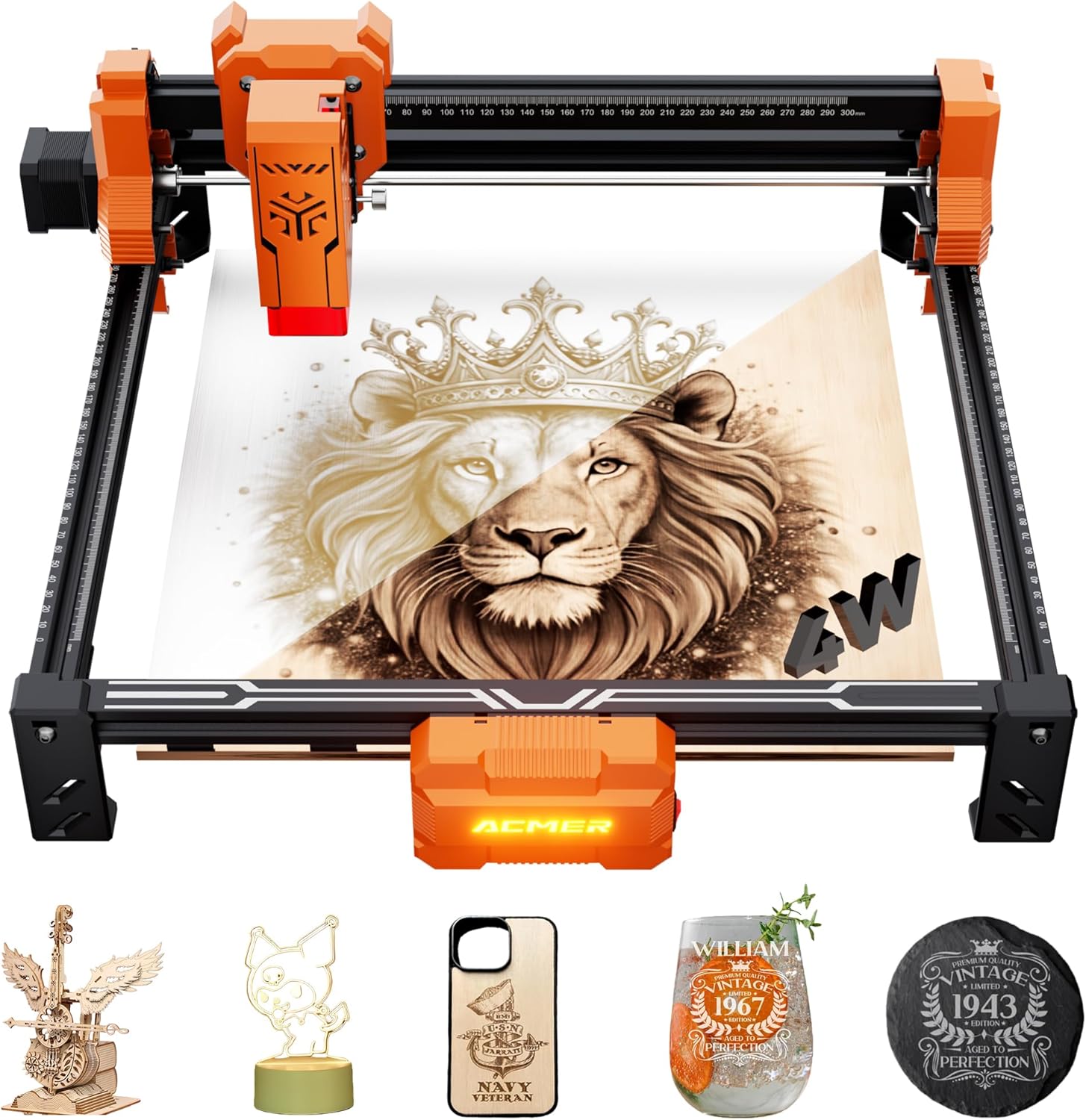
Figure 1: ACMER S2 4W Laser Engraver Machine and exampgyda phrosiectau.
2. Canllawiau Diogelwch
Operating a laser engraver requires strict adherence to safety protocols to prevent injury. Always wear the provided protective laser goggles during operation. Ensure the protective laser shield is in place. Operate the machine in a well-ventilated area to dissipate smoke and fumes. Avoid direct exposure to the laser beam. Keep children and pets away from the operating area.
3. Cynnwys Pecyn
Verify all components are present upon unpacking:
- Laser module x1
- X-axis component x1
- Addasydd x1
- Blaen profile x1
- Optical axis assembly x1
- Pro cywirfile x1
- Focus column x1
- Foot base x4
- Cefn profile x1
- Pro chwithfile (with limiter) x1
- Cyfarwyddiadau x1
- Bag sgriw x4
- Cebl data USB x1
- Pecyn offer x1
- Motherboard box x1
- Right slider component x1
- Left slider component x1
- Laser Goggle x1
- Bwrdd x2
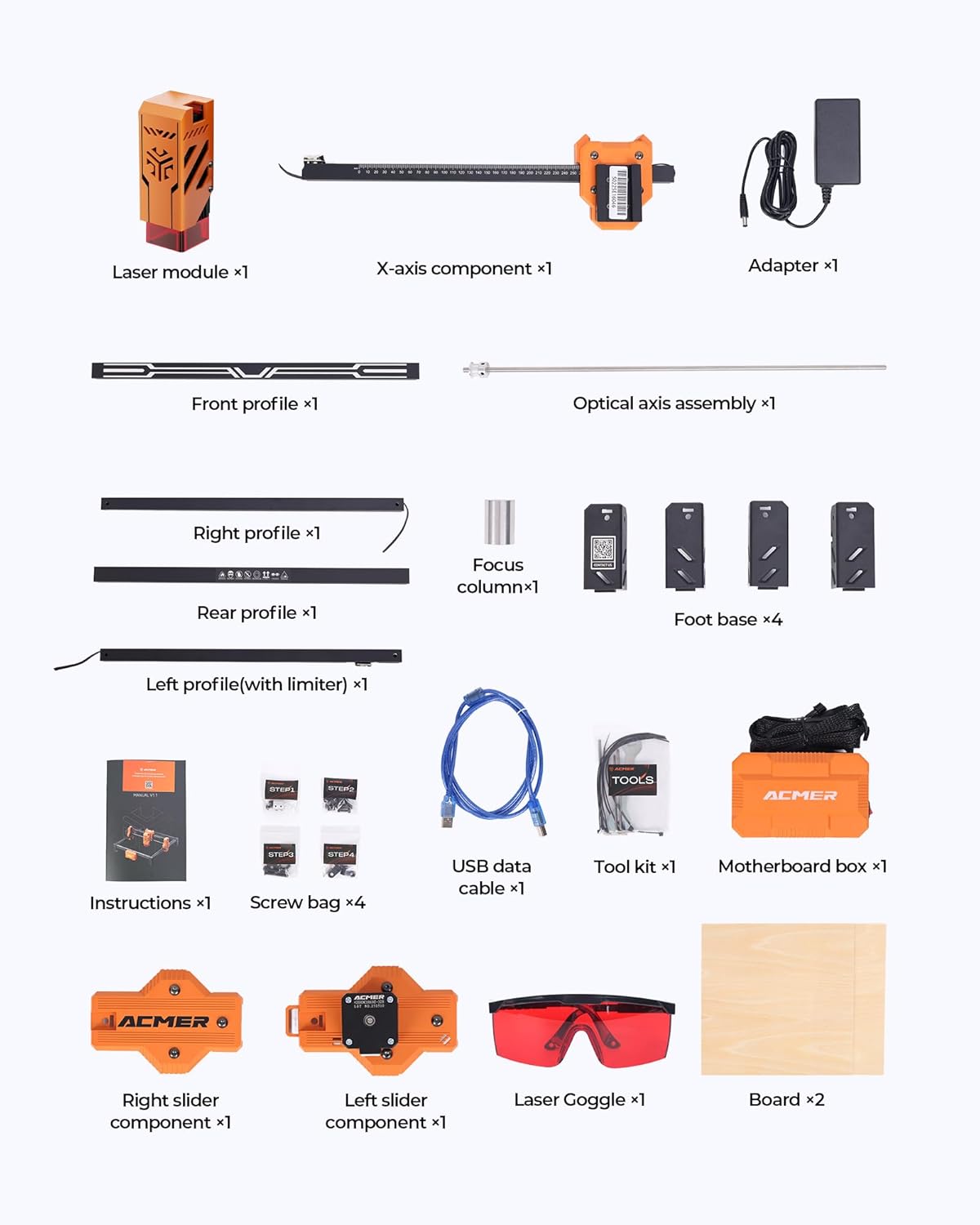
Figure 2: Included components of the ACMER S2 4W.
4. Canllaw Gosod
4.1 Cynulliad
Follow the detailed instructions provided in the included manual for step-by-step assembly of the laser engraver. Ensure all screws are tightened securely and components are correctly aligned.
4.2 Gosod Meddalwedd
The ACMER S2 4W is compatible with popular engraving software such as LightBurn and LaserGRBL. Install the software on your computer (Windows, macOS, or Linux systems are supported). Connect the engraver to your computer using the provided USB data cable.
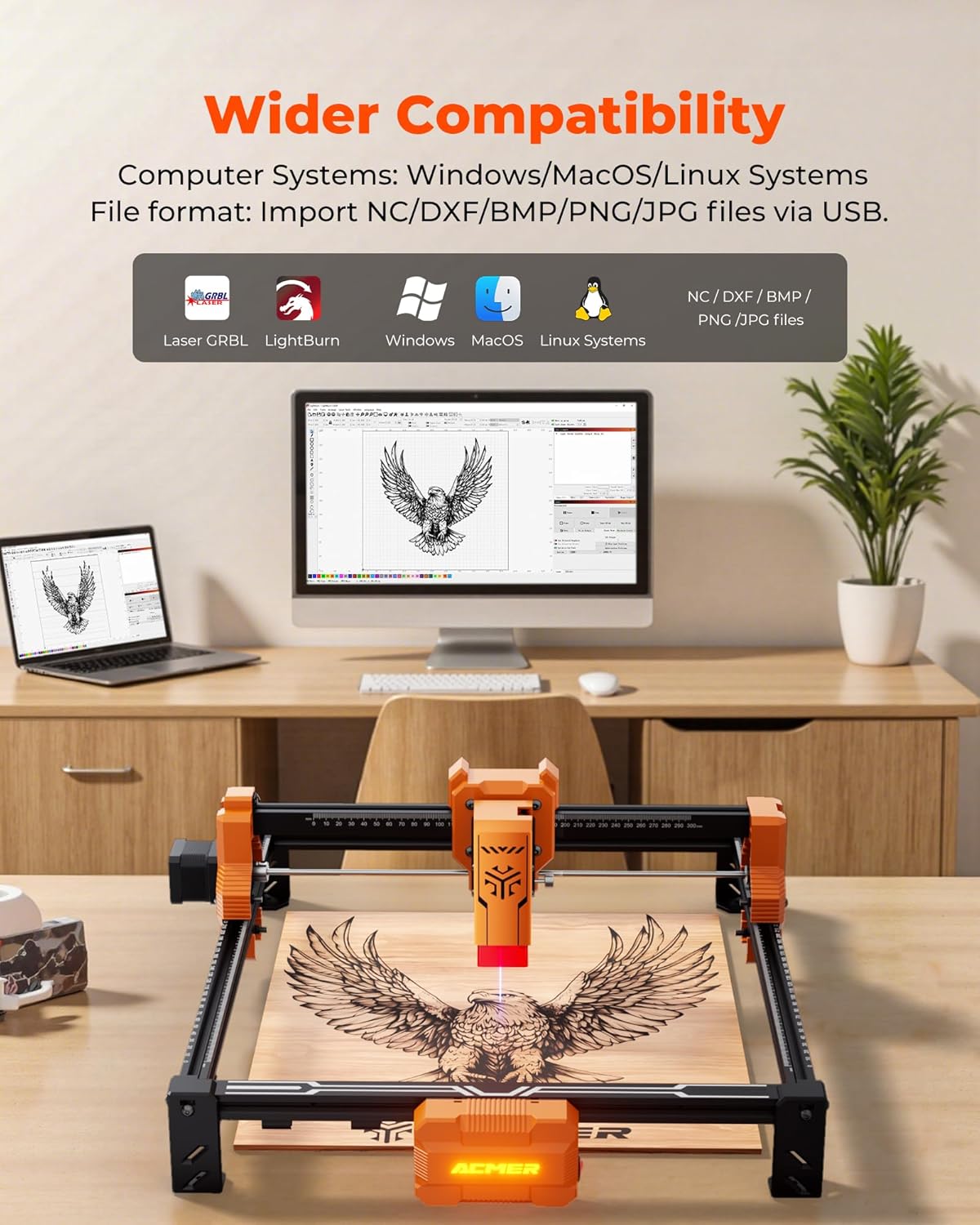
Figure 3: Software compatibility and connection setup.
5. Cyfarwyddiadau Gweithredu
5.1 Lleoli Deunyddiau
Place your material (e.g., wood, acrylic, leather) on the working surface. Ensure it is flat and securely positioned. The 300x300mm workspace allows for various project sizes.
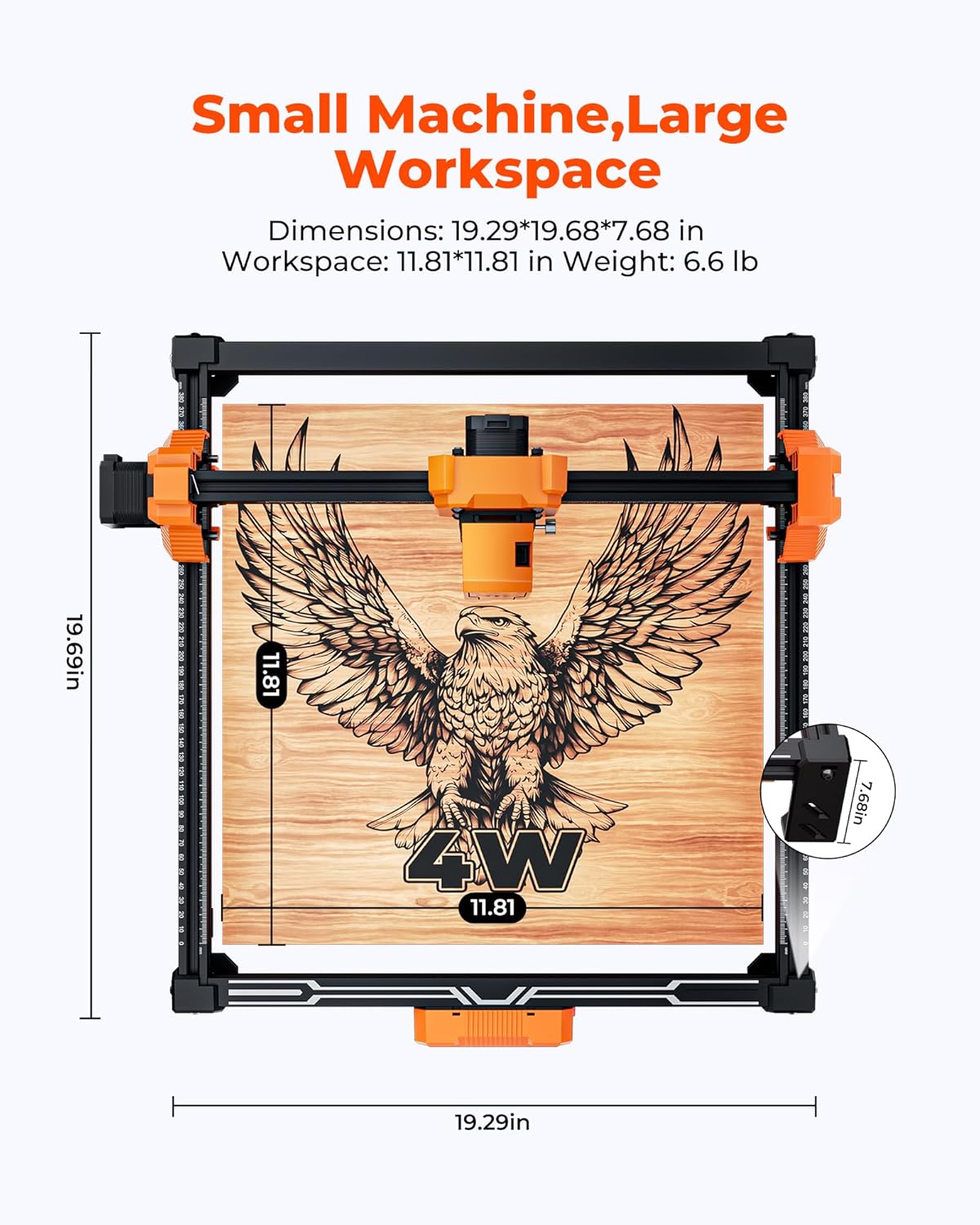
Figure 4: Large working area for diverse projects.
5.2 Addasiad Ffocws
Use the focus column to set the correct distance between the laser module and the material surface. Proper focus is crucial for achieving optimal engraving and cutting results.
5.3 Design and Software Settings
Import or create your design in the chosen software. Adjust parameters such as laser power, speed, and number of passes according to the material and desired effect. The ACMER S2 4W offers ultra-high engraving precision with a 0.08x0.08 mm laser spot.

Figure 5: High-precision laser engraving technology.
5.4 Starting Engraving/Cutting
Once settings are configured, initiate the engraving or cutting process from the software. Monitor the operation and ensure safety goggles are worn. The machine can achieve processing speeds up to 10,000 mm/min for efficiency.

Figure 6: Processing speed comparison.
The 4W laser module provides powerful cutting performance, capable of cutting through 8 mm poplar wood (multi-pass) and 6 mm black acrylic (single pass).

Figure 7: Versatility across multiple materials.
6. cynnal
Regular maintenance ensures optimal performance and longevity of your engraver.
- Glanhau: Periodically clean the laser lens and the working area to remove dust and debris. Use a soft, lint-free cloth.
- Iro: Apply a small amount of lubricant to the guide rails as recommended in the full instruction manual to ensure smooth movement of the laser module.
- Arolygiad: Archwiliwch geblau a chysylltiadau yn rheolaidd am unrhyw arwyddion o draul neu ddifrod.
7. Datrys Problemau
Refer to these common issues and solutions:
| Problem | Achos Posibl | Ateb |
|---|---|---|
| Laser ddim yn tanio | Power cable disconnected, software error, laser module fault | Check power connection, restart software, contact support |
| Engraving is too light | Incorrect focus, low power setting, high speed setting | Adjust focus, increase laser power, decrease speed |
| Material not cutting through | Insufficient power, too high speed, too few passes | Increase laser power, decrease speed, increase number of passes |
| Peiriant heb gysylltu â chyfrifiadur | USB cable issue, driver not installed, software port error | Check USB cable, install drivers, verify software port settings |
8. manylebau
- Dimensiynau Cynnyrch: 23.5 x 25.59 x 7.87 modfedd
- Rhif Model yr Eitem: P2-10
- Pwysau Eitem: 8.18 pwys
- Gwneuthurwr: Acmer
- Dyddiad Ar Gael Cyntaf: Mawrth 21, 2025
- Maint Smotiau Laser: 0.08x0.08 mm
- Engraving Precision: Hyd at 0.01 mm
- Cyflymder prosesu: Up to 10,000 mm/min
- Laser Module Power: 4W
- Pŵer System: 48W
- Maes Gwaith: 300x300 mm
- Lefel Sŵn: Llai na 45 dB
- Deunyddiau Cydnaws: Wood, acrylic, leather, metal coatings, paper, glass, stone, ceramic
- Cydnawsedd Meddalwedd: LaserGRBL, LightBurn (Windows, macOS, Linux)
9. Gwarant a Chefnogaeth
ACMER provides lifetime technical support for the S2 4W Laser Engraver Machine. For any issues or inquiries, please refer to the contact information provided in your product packaging or visit the official ACMER websafle am gymorth.
10. Fideos Cynnyrch
Video 1: Demonstrating the ACMER S2 4W laser engraver's cutting and engraving capabilities on various materials.
Video 2: Short video showcasing the ACMER S2 4W laser engraver in action, highlighting its precision and ease of use.
Video 3: Promotional video for the ACMER S2 4W laser engraver, demonstrating its features and applications.