
SZBOX SZ-JP-N1 N150-02
SZBOX N1 N150 Mini PC User Manual
Model: SZ-JP-N1 N150-02
1. Rhagymadrodd
Welcome to the user manual for your new SZBOX N1 N150 Mini PC. This guide provides essential information on setting up, operating, maintaining, and troubleshooting your device. Please read this manual thoroughly before using the product to ensure optimal performance and longevity.
Gwybodaeth Ddiogelwch Bwysig
- Peidiwch ag amlygu'r ddyfais i ddŵr, lleithder, na thymheredd eithafol.
- Osgoi gosod y ddyfais ger ffynonellau gwres neu mewn golau haul uniongyrchol.
- Defnyddiwch yr addasydd pŵer a ddarperir yn unig i atal difrod.
- Peidiwch â cheisio dadosod na thrwsio'r ddyfais eich hun. Cysylltwch â chymorth os bydd problemau'n codi.
- Sicrhewch awyru digonol o amgylch y ddyfais yn ystod y gweithrediad.
2. Cynnyrch Drosview
Nodweddion Allweddol
- Prosesydd Perfformiad Uchel: Equipped with an Intel Alder Lake N150 processor (up to 3.6GHz) for efficient multitasking and various applications.
- Delweddau syfrdanol: Features Intel UHD Graphics (1GHz, 24EUs) with dual HDMI outputs supporting 4K@60Hz for a high-quality visual experience and dual-monitor setups.
- Storfa Ehangadwy: Comes with 8GB DDR4 RAM and 128GB M.2 NVMe SSD, with support for additional storage expansion.
- Dyluniad Compact: Ultra-mini size (115x113x40mm) makes it highly portable and space-saving.
- Oeri Effeithlon: Integrated smart silent fan ensures effective temperature control while minimizing noise.
- Cysylltedd: Includes 4x USB 3.2 ports, Gigabit LAN, WiFi, and Bluetooth for comprehensive connectivity.
Cynnwys Pecyn
Gwiriwch y pecyn am yr eitemau canlynol:
- 1 x SZBOX N1 N150 Mini PC
- 1 x Addasydd Pŵer (12V/3A)
- 1 x Llawlyfr Defnyddiwr (y ddogfen hon)
Adnabod Cydran
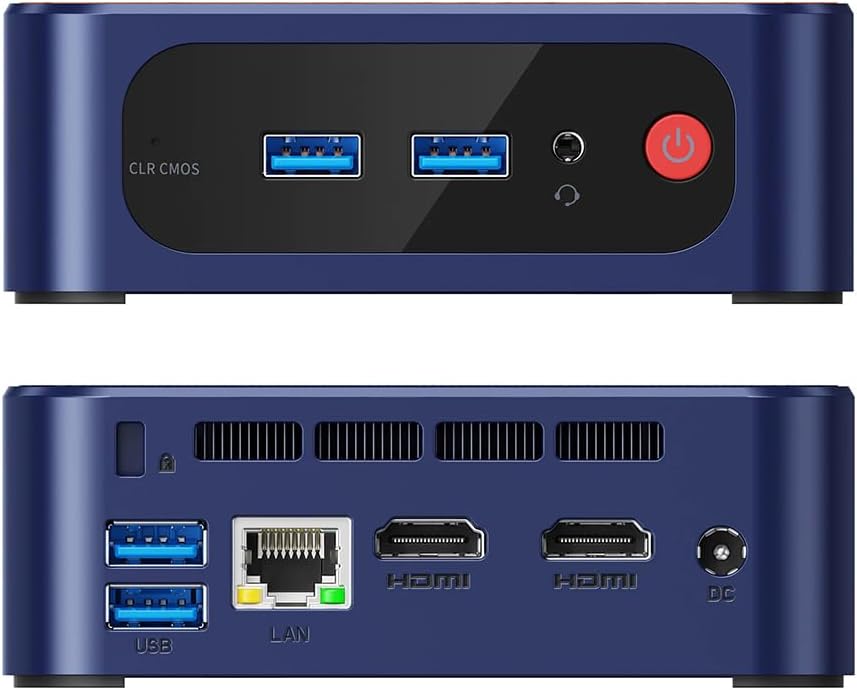
Figure 2.1: Front and Rear Ports Overview
This image displays the front and rear panels of the SZBOX N1 N150 Mini PC. The front features USB 3.2 ports, an audio jack, and the power button. The rear panel includes additional USB 3.2 ports, a LAN port, two HDMI ports, and the DC power input.
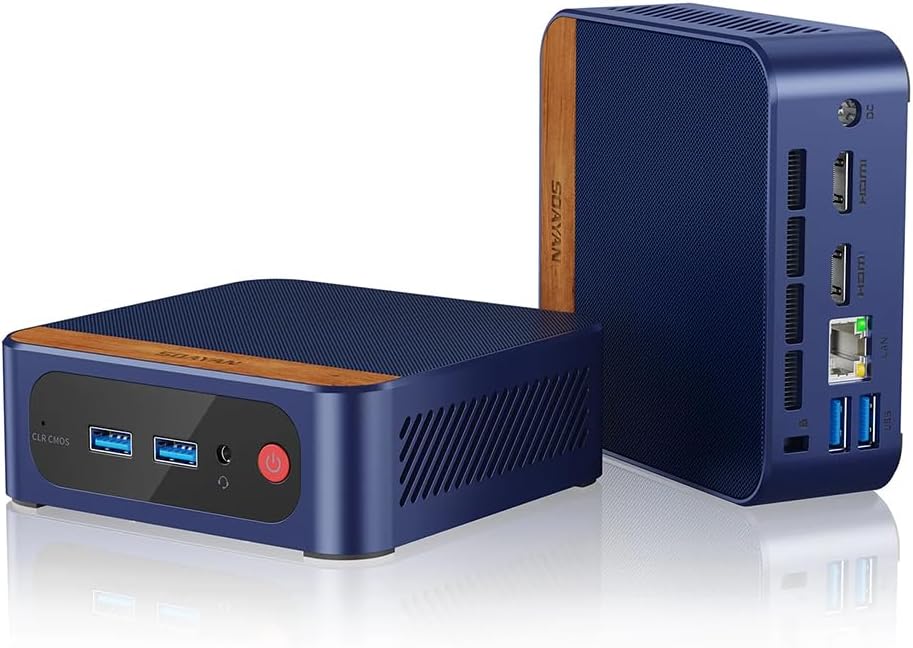
Figure 2.2: Angled Product View
Mae'r ddelwedd hon yn rhoi golwg onglog view of the SZBOX N1 N150 Mini PC, highlighting its compact size and the wooden accent on the top. It shows the front panel with USB ports and the power button, and a glimpse of the rear ports.
- Panel blaen:
- CLR CMOS Button: Used to clear CMOS settings.
- USB 3.2 Ports (x2): For connecting peripherals like keyboards, mice, and USB drives.
- Audio Jack: For headphones or speakers.
- Power Button: To turn the PC on or off.
- Panel cefn:
- USB 3.2 Ports (x2): Additional ports for peripherals.
- LAN Port (RJ45): For wired network connection.
- HDMI Ports (x2): For connecting to displays.
- DC IN Port: For connecting the power adapter.
3. Gosod
Follow these steps to set up your SZBOX N1 N150 Mini PC:
- Cysylltu ag Arddangosfa: Connect your monitor(s) to the HDMI ports on the rear panel of the Mini PC using HDMI cables. The device supports up to two displays simultaneously.
- Cysylltu Perifferolion: Plug your USB keyboard and mouse into any of the available USB 3.2 ports on the front or rear panel.
- Cysylltu â'r Rhwydwaith (Dewisol):
- For wired connection: Connect an Ethernet cable from your router or modem to the LAN port on the rear panel.
- For wireless connection: The Mini PC has built-in WiFi. You can configure it after the initial boot.
- Pwer Cysylltu: Connect the provided power adapter to the DC IN port on the rear panel, then plug the adapter into a power outlet.
- Pŵer Ymlaen: Press the power button on the front panel of the Mini PC. The device will boot up, and you should see the operating system loading on your display.
4. Cyfarwyddiadau Gweithredu
Troi Ymlaen/Diffodd
- I droi ymlaen: Pwyswch y botwm pŵer ar y panel blaen.
- I'w Diffodd: Click the Start button in Windows, then select Power > Shut down. Alternatively, you can press and hold the power button for a few seconds to force a shutdown (not recommended for regular use).
Cysylltiad Rhwydwaith
- LAN â gwifrau: If you connected an Ethernet cable during setup, your PC should automatically connect to the network.
- Di-wifr (Wi-Fi):
- In Windows, click the Wi-Fi icon in the taskbar.
- Dewiswch eich rhwydwaith Wi-Fi dymunol o'r rhestr.
- Enter the network password if prompted and click Connect.
Using Multiple Displays
The SZBOX N1 N150 Mini PC supports connecting two monitors via its two HDMI ports. After connecting both monitors, Windows will automatically detect them. You can configure display settings (extend, duplicate, or show only on one) by right-clicking on the desktop and selecting "Display settings".
Ehangu Storio
The Mini PC supports M.2 NVMe 2280 SSDs for storage expansion. If you wish to upgrade or add storage, please consult a qualified technician or refer to detailed upgrade guides available online for this model. Ensure the device is powered off and unplugged before attempting any internal modifications.
5. cynnal
Glanhau
- Always power off and unplug the Mini PC before cleaning.
- Defnyddiwch frethyn meddal, sych, heb lint i sychu'r arwynebau allanol.
- Ar gyfer marciau ystyfnig, ychydig yn dampjw.org cy y brethyn â dŵr neu lanhawr ysgafn nad yw'n sgraffiniol.
- Use compressed air to gently clear dust from ventilation holes and ports. Do not insert objects into the vents.
Storio
- When not in use for extended periods, store the Mini PC in a cool, dry place away from direct sunlight and extreme temperatures.
- Keep the device in its original packaging or a protective case to prevent dust accumulation and physical damage.
Diweddariadau Meddalwedd
Regularly update your Windows operating system and device drivers to ensure optimal performance, security, and compatibility. You can check for updates through Windows Update settings.
6. Datrys Problemau
If you encounter issues with your Mini PC, refer to the following common problems and solutions:
| Problem | Achos Posibl | Ateb |
|---|---|---|
| Dim pŵer / Nid yw'r ddyfais yn troi ymlaen. | Power adapter not connected properly; Power outlet issue; Faulty power adapter. | Ensure the power adapter is securely connected to both the PC and the power outlet. Try a different power outlet. Verify the power adapter is working. |
| Dim arddangosfa ar y monitor. | HDMI cable loose or faulty; Incorrect input source on monitor; Monitor off or faulty. | Check HDMI cable connections. Ensure your monitor is set to the correct HDMI input. Test with a different monitor or HDMI cable if possible. |
| No network connection (wired/wireless). | Ethernet cable disconnected; Wi-Fi disabled; Router/modem issue; Driver issue. | For wired: Check Ethernet cable. For wireless: Ensure Wi-Fi is enabled in Windows settings. Restart your router/modem. Check device manager for network adapter drivers. |
| Perfformiad araf. | Too many applications running; Low storage space; Outdated drivers; Overheating. | Close unnecessary applications. Free up disk space. Update Windows and drivers. Ensure proper ventilation and clean dust from vents. |
If the problem persists after trying these solutions, please contact SZBOX customer support for further assistance.
7. manylebau
| Cydran | Manylyn |
|---|---|
| Model | SZ-JP-N1 N150-02 |
| Prosesydd | Intel Alder Lake N150 (4 Cores / 4 Threads, Max 3.6GHz) |
| Graffeg | Intel UHD Graphics (1GHz, 24EUs) |
| HWRDD | 8GB DDR4 3200MHz |
| Storio | 128GB M.2 NVMe SSD (PCIe 3.0) |
| System Weithredu | Windows 11 Pro (Supports Windows 10) |
| Allbwn Fideo | 2 x HDMI (4K @ 60Hz) |
| Porthladdoedd USB | 4 x USB 3.2 |
| Rhwydwaith | 1 x RJ45 Gigabit LAN (1000M), Wi-Fi, Bluetooth |
| Dimensiynau (L x W x H) | 115 x 113 x 40 mm (4.53 x 4.45 x 1.57 modfedd) |
| Pwysau | 293 g (0.65 pwys) |
| Cyflenwad Pŵer | 12V/3A |
| Oeri | Smart Silent Fan |
8. Gwarant a Chefnogaeth
SZBOX is committed to providing high-quality products and excellent customer service. Your purchase is just the beginning of our support. We offer technical guidance and assistance to help you resolve any usage issues you may encounter.
For technical support, warranty claims, or any other inquiries, please contact SZBOX customer service through the platform where you purchased the product or refer to the official SZBOX websafle ar gyfer gwybodaeth cyswllt.
Cadwch eich prawf prynu at ddibenion gwarant.
Ask a question about this manual
Ask about setup, troubleshooting, compatibility, parts, safety, or missing instructions. Manuals+ will review the question and use this page’s manual context to help answer it.