
1. Rhagymadrodd
This manual provides detailed instructions for the assembly, operation, and maintenance of your Merax 95.5" Entertainment Wall Unit Set. Please read this manual thoroughly before assembly and use to ensure safe and correct installation and to maximize the lifespan of your product.
2. Gwybodaeth Diogelwch
RHYBUDD: Gall methu â dilyn y cyfarwyddiadau diogelwch hyn arwain at anaf neu ddifrod i'r cynnyrch.
- Byddwch yn ofalus o amgylch ymylon miniog wrth ymgynnull a thrin.
- Always assemble the unit strictly according to the provided instructions.
- Ensure all adjustable shelves are securely fastened before placing items on them.
- To prevent tip-over, it is hollbwysig to secure the furniture to the wall using the appropriate anti-tipping hardware.
- Keep children and pets away from the assembly area and ensure they do not climb on or play with the unit.

Image: Diagram showing the anti-tipping device and its installation. This device helps prevent the unit from falling forward.
3. Cynnyrch Drosview a Nodweddion
The Merax Entertainment Wall Unit is designed to provide comprehensive storage and display solutions for your living space. It accommodates televisions up to 80 inches and features a modern aesthetic with practical functionalities.
3.1 Multi-Functional Display Shelves
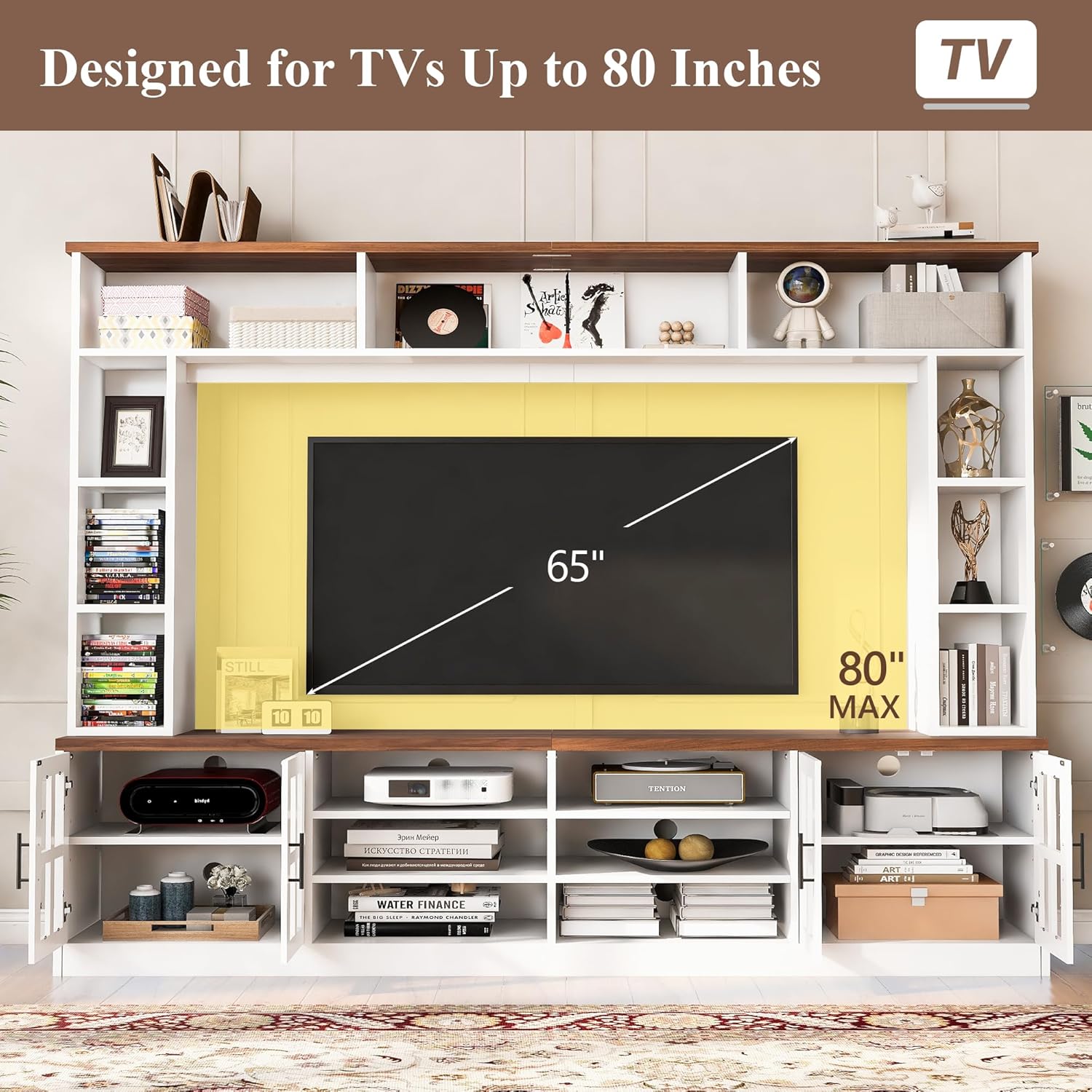
Image: The fully assembled entertainment wall unit, showcasing a television and various decorative items on the shelves.
- Top Shelves: Three shelves located at the top are suitable for decorative items, small plants, or personal belongings.
- Side Display Shelves: Six additional display shelves are positioned on either side of the central TV area, ideal for books, collectibles, or other display items.

Delwedd: Manwl view of the various shelves, highlighting their capacity for books, photo frames, and collections.
3.2 Storio a Threfnu
- TV Cabinet: The central TV cabinet includes two storage cabinets and six open display shelves.
- Silffoedd Addasadwy: The storage cabinets feature adjustable shelves, allowing for customized interior configurations to suit your storage needs.

Image: The TV console section, illustrating the two enclosed cabinets (A) and six open shelves (B). Insets show adjustable shelves and cable management holes.
3.3 Wire Management System
- 10 Wire Management Holes: Integrated holes provide a solution for organizing cables and wires, maintaining a tidy appearance.
- This system facilitates the setup of sound systems, gaming consoles, and other electronic devices.
3.4 Material Construction

Image: Visual representation of the high-quality materials used, including MDF board, tempered glass doors, and metal handles.
- Constructed from engineered wood (MDF Board) and tempered glass for durability and aesthetic appeal.
- Features sturdy metal handles.
4. manylebau
| Priodoledd | Manylyn |
|---|---|
| Rhif Model | Merax |
| Dimensiynau Cyffredinol (W x D x H) | 95.5" x 15.7" x 78.7" |
| Accommodates TV Size | Hyd at 80 modfedd |
| Deunydd | Engineered Wood (MDF), Tempered Glass |
| Lliw | Gwyn |
| Pwysau Eitem | 99 pwys |
| Wire Management Holes | 10 |

Image: Technical drawing displaying all key dimensions of the entertainment wall unit in inches.
5. Gosod a Chynulliad
Assembly of the Merax Entertainment Wall Unit requires careful attention to detail. It is recommended to have at least two adults for assembly due to the size and weight of the components.
5.1 Cyn i Chi Ddechrau
- Dadbacio: Dadbacio'r holl gydrannau a chaledwedd yn ofalus. Rhowch nhw allan ar arwyneb glân, meddal (e.e., blanced neu garped) i atal crafiadau.
- Adnabod Rhannau: Refer to the parts list (usually included in the packaging) to identify all pieces and hardware.
- Offer Angenrheidiol: Typically includes a screwdriver (Phillips head), hammer, and possibly an Allen wrench (often provided).
5.2 Camau Cydosod (Canllawiau Cyffredinol)
- Cynulliad Sylfaen: Begin by assembling the base TV console section. Attach side panels to the bottom panel using the provided fasteners.
- Internal Shelving: Install the fixed and adjustable shelves within the TV console and side cabinets. Ensure adjustable shelf pins are fully inserted.
- Back Panels: Secure the back panels to the assembled sections.
- Upper Bookshelves: Assemble the upper bookshelf sections separately, then carefully attach them to the top of the TV console.
- Drysau: Attach the tempered glass doors to the cabinets using the hinges. Adjust hinges as needed for proper alignment.
- Dolenni: Install the metal handles on the cabinet doors.
- Rheoli gwifrau: Ensure all wire management holes are clear for cable routing.
- Dyfais Gwrth-Tipio: Crucially, install the anti-tipping device. Secure one end to the top rear of the unit and the other end to a wall stud using appropriate wall anchors and screws. This step is vital for safety.
Image: The TV console section with all doors open, revealing the internal shelving and structure, which is part of the assembly process.
6. Gweithrediad a Defnydd
Once assembled and secured, your Merax Entertainment Wall Unit is ready for use.
- Lleoliad Teledu: Carefully place your television (up to 80 inches) in the central opening. Ensure it is stable and centered.
- Rheoli Ceblau: Route all power and signal cables through the designated wire management holes to keep them organized and out of sight.
- Shelf Loading: Distribute weight evenly across all shelves. Avoid overloading any single shelf. Place heavier items on lower shelves or within the enclosed cabinets for better stability.
- Defnydd Drws: Open and close cabinet doors gently to prevent wear and tear on hinges.
7. Gofal a Chynnal a Chadw
Proper care will help maintain the appearance and longevity of your entertainment wall unit.
- Glanhau: Sychwch arwynebau gyda meddal, damp brethyn. Osgowch lanhawyr sgraffiniol neu gemegau llym a all niweidio'r gorffeniad.
- Gollyngiadau: Sychwch unrhyw ollyngiadau ar unwaith i atal staenio neu ddifrod dŵr i'r pren wedi'i beiriannu.
- Golau'r haul: Osgowch amlygiad hirfaith i olau haul uniongyrchol i atal pylu neu afliwio.
- Tymheredd a Lleithder: Cynnal tymheredd a lefel lleithder ystafell sefydlog i atal y pren rhag ystofio neu gracio.
- Gwiriad Caledwedd: Periodically check all fasteners and connections, including the anti-tipping device, to ensure they remain tight and secure. Retighten if necessary.
8. Datrys Problemau
Dyma atebion i broblemau cyffredin y gallech ddod ar eu traws:
| Problem | Achos Posibl | Ateb |
|---|---|---|
| Mae'r uned yn teimlo'n sigledig neu'n ansefydlog. | Fasteners are loose; anti-tipping device not installed or improperly secured. | Ensure all screws and connections are tightened. Verify the anti-tipping device is correctly anchored to a wall stud. |
| Cabinet doors do not align properly. | Hinges are not adjusted correctly. | Addaswch y sgriwiau ar y colfachau i alinio'r drysau. Cyfeiriwch at y cyfarwyddiadau cydosod am fanylion addasu'r colfachau. |
| Anhawster yn ystod y cydosod. | Incorrect part orientation; missing a step; complex instructions. | Review the assembly manual carefully, paying attention to diagrams. If issues persist, contact customer support. |
9. Cymorth a Gwarant i Gwsmeriaid
For any questions, concerns, or issues regarding your Merax Entertainment Wall Unit, please contact our customer care team.
- E-bost: csr@merax.com
- Ffôn: 626-912-8886
Please have your model number (Merax) and purchase information ready when contacting support.
9.1 Gwybodaeth Gwarant
Information regarding the product warranty is typically included with your purchase documentation. Please refer to the warranty card or contact customer support for details on coverage and terms.