
Rhagymadrodd
Thank you for choosing the zelotes T80 Ergonomic Gaming Mouse. This wired optical mouse is designed for both gaming and office use, offering adjustable DPI, customizable LED lighting, and a comfortable ergonomic design for extended use. Please read this manual carefully to ensure proper setup and operation of your new mouse.
Nodweddion Cynnyrch
- 7 Buttons & Quick Fire Button: Includes forward, backward, and a rapid fire (double click) button for enhanced control in gaming and productivity.
- 5 Adjustable DPI Levels: Easily switch between 1000/1600/2400/3200/7200 DPI to match your speed and precision needs.
- 7 LED Backlit Modes: Personalize your setup with various lighting effects.
- Dyluniad ergonomig: Crafted for comfort with skin-friendly material, sweat-resistant, and anti-slip features to prevent fatigue during long sessions.
- Cydnawsedd Eang: Compatible with Windows 11/10/8/7 and Mac OS, suitable for various applications including MMD, FPS games, and office tasks.
Cynnwys Pecyn
- 1 x zelotes T80 Wired Gaming Mouse
- 1 x Llawlyfr Cyfarwyddiadau
Gosod
- Dadbacio: Carefully remove the mouse and its accessories from the packaging.
- Tynnu Ffilm Amddiffynnol: Before use, please remove the protective film from the mouse's foot pads.
- Cysylltu: Plug the USB cable of the zelotes T80 Gaming Mouse into an available USB port on your computer (PC or Laptop).
- Gosod Gyrrwr: Mae'r llygoden yn un plygio-a-chwarae. Bydd eich system weithredu yn canfod ac yn gosod y gyrwyr angenrheidiol yn awtomatig. Fel arfer nid oes angen gosod meddalwedd ychwanegol ar gyfer swyddogaethau sylfaenol.
Cyfarwyddiadau Gweithredu
Esboniadau Botwm
The zelotes T80 mouse features 7 buttons for versatile control:
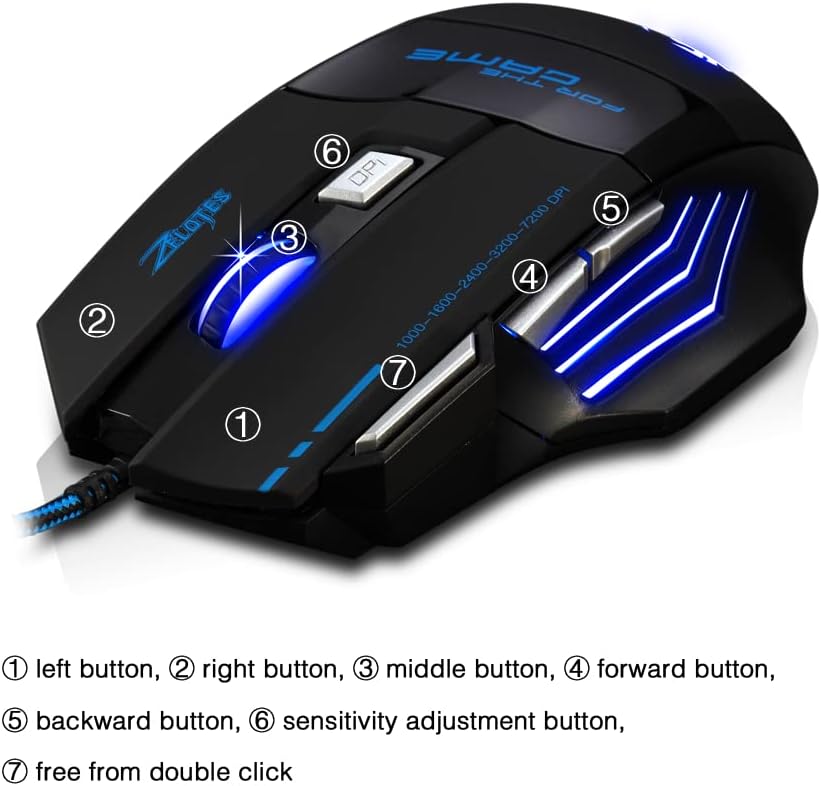
- Left Button (1): Swyddogaeth clic chwith safonol.
- Right Button (2): Swyddogaeth clic dde safonol.
- Middle Button / Scroll Wheel (3): Scrolls up/down. Pressing it acts as a middle-click.
- Forward Button (4): Yn llywio ymlaen yn web porwyr neu file fforwyr.
- Backward Button (5): Yn llywio yn ôl i mewn web porwyr neu file fforwyr.
- Botwm DPI (6): Adjusts mouse sensitivity (DPI) and changes LED colors.
- Rapid Fire Button (7): Functions as a double-click of the left button, useful for continuous firing in games.
Addasiad DPI
The mouse offers 5 adjustable DPI levels to suit different tasks and preferences:
- 1000 DPI
- 1600 DPI
- 2400 DPI
- 3200 DPI
- 7200 DPI
Gwasgwch y Botwm DPI (6) to cycle through these sensitivity levels. Each change will be indicated by a corresponding LED color change.
Rheoli Goleuadau LED
The mouse features 7 LED lighting modes. To change the LED color, long press the DPI button (6). The LED will flash rapidly 7 times and then remain constant on the selected color.

Cynnal a chadw
- Glanhau: Defnyddiwch frethyn meddal, sych i lanhau wyneb y llygoden. Ar gyfer baw ystyfnig, defnyddiwch frethyn ychydig yn sych.amp cloth can be used, ensuring no liquid enters the mouse.
- Gofal Cebl: Osgowch blygiadau miniog neu dynnu gormodol ar y cebl USB i atal difrod.
- Storio: Store the mouse in a dry, cool place away from direct sunlight and extreme temperatures.
Datrys problemau
Llygoden Ddim yn Ymateb
- Gwnewch yn siŵr bod y cebl USB wedi'i blygio'n ddiogel i borthladd USB sy'n gweithio.
- Rhowch gynnig ar blygio'r llygoden i borthladd USB gwahanol ar eich cyfrifiadur.
- Profwch y llygoden ar gyfrifiadur arall i benderfynu a yw'r broblem gyda'r llygoden neu'r cyfrifiadur.
LED Lights Not Working/Changing
- Verify the mouse is properly connected to the computer.
- Ensure you are long-pressing the DPI button to cycle through colors. A short press changes DPI.
DPI Not Changing
- Ensure you are short-pressing the DPI button to cycle through DPI levels.
- Os yw'r broblem yn parhau, ceisiwch ailgysylltu'r llygoden.
Manylebau
| Nodwedd | Manylyn |
|---|---|
| Rhif Model | T80 |
| Botymau | 7 (with scroll wheel) |
| DPI addasadwy | 1000/1600/2400/3200/7200 DPI |
| Goleuadau LED | 7 dull goleuo |
| Cysylltedd | USB Wired |
| System Olrhain | Optegol |
| Dylunio Ergonomig | Oes |
| Newid Bywyd | 5 miliwn o gylchoedd |
| Dimensiynau | 130x105x45mm |
| Pwysau | 160±5g |
| Hyd Cebl USB | 1.5m |
| Cydweddoldeb | Win11, Win10, Win8, Win7, Mac OS |
Gwarant a Chefnogaeth
For warranty information and technical support, please refer to the product packaging or contact zelotes customer service through the retailer where the product was purchased. Keep your purchase receipt for warranty claims.