
Oilsky M303
Oilsky M303 Android 9.0 MP3 Player User Manual
Model: M303
1. Rhagymadrodd
The Oilsky M303 is a versatile digital audio and video player running on Android 9.0. It features a 4-inch full-touch screen, 8-core processor, 2GB RAM, 16GB internal storage (expandable with a 64GB microSD card included), Wi-Fi, and Bluetooth connectivity. This manual provides essential information for operating your device.
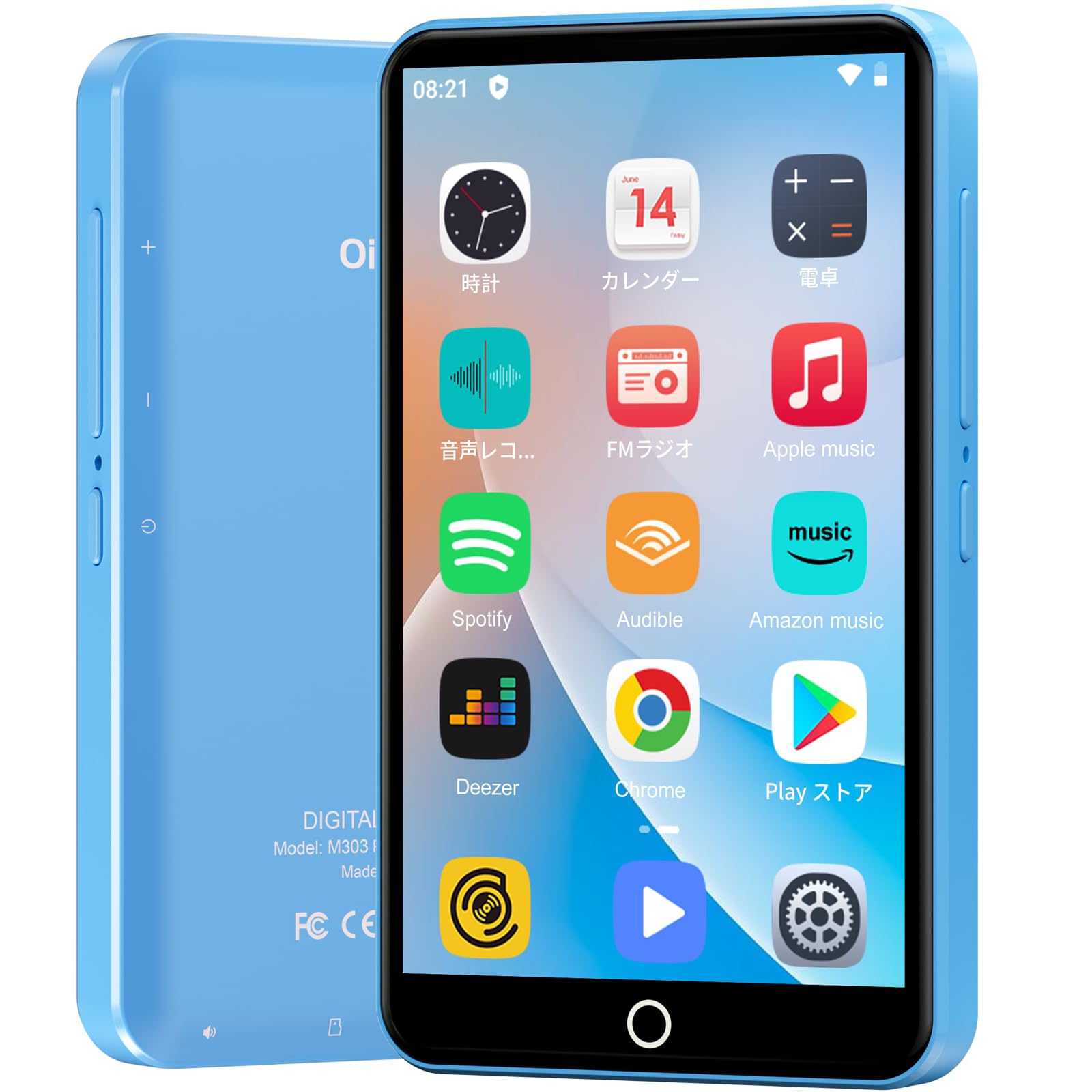
Delwedd: Blaen view of the Oilsky M303 MP3 Player, showcasing its compact design and touchscreen interface.
2. Beth sydd yn y Bocs
Gwiriwch fod yr holl eitemau canlynol wedi'u cynnwys yn eich pecyn:
- Oilsky M303 Main Unit
- Clustffonau
- Cebl Data Math-C
- Protective Film (one pre-installed, one spare)
- Multi-language User Manual (including Japanese)
- Cas Amddiffynnol Silicon
- Cerdyn Cof 64GB

Image: All included accessories for the Oilsky M303 MP3 Player, neatly arranged.
3. Cynnyrch Drosview
Familiarize yourself with the device's physical features and controls.
3.1. Cynllun Dyfais

Delwedd: Ochr view of the Oilsky M303, highlighting the volume buttons, power button, and USB-C port.
- Botwm Pŵer: Press and hold to power on/off or restart. Short press to turn the screen on/off.
- Botymau Cyfrol: Addaswch y sain.
- Porthladd USB-C: Ar gyfer codi tâl a throsglwyddo data.
- Jack clustffon 3.5mm: Cysylltwch glustffonau â gwifrau.
- Slot Cerdyn MicroSD: Insert a microSD card for expanded storage.
- Siaradwr adeiledig: Ar gyfer chwarae sain heb glustffonau.
4. Gosod
4.1. Gwefru Cychwynnol
Before first use, fully charge the device. Connect the provided Type-C data cable to the player and a USB power adapter (not included). A full charge takes approximately 3 hours. The device has a 2000mAh battery for extended use.
4.2. Pŵer Ymlaen / I ffwrdd
- I Bweru Ymlaen: Pwyswch a dal y botwm Power nes bod y sgrin yn goleuo.
- I Bweru i ffwrdd: Pwyswch a daliwch y botwm Pŵer, yna dewiswch "Diffodd" o'r opsiynau.
- Sgrin ymlaen / i ffwrdd: Short press the Power button to turn the screen on or off.
4.3. Gosodiadau Iaith
Upon first boot, you may need to set the language. Navigate to Settings > System > Languages & input > Languages to select your preferred language, such as English or Japanese.
4.4. Cysylltiad Wi-Fi
To access online features and download apps, connect to a Wi-Fi network:
- Ewch i Gosodiadau > Rhwydwaith a'r rhyngrwyd > Wi-Fi.
- Togglo Wi-Fi On.
- Dewiswch eich rhwydwaith dymunol o'r rhestr a nodwch y cyfrinair os gofynnir amdano.
4.5. Siop Google Play
The Oilsky M303 supports Google Play Store, allowing you to download various applications.
- Ensure you are connected to Wi-Fi.
- Agorwch y Storfa Chwarae app from the home screen.
- Mewngofnodwch gyda'ch cyfrif Google.
- Chwiliwch am and install desired applications like YouTube, Spotify, or other streaming services.

Image: The Oilsky M303 screen showing the Google Play Store interface with various app icons.
5. Cyfarwyddiadau Gweithredu
5.1. Chwarae Cerdd
The device supports various audio formats including MP3, WMA, WAV, FLAC, OGG, AAC, APE, and M4A.
- Transfer Music: Connect the player to your computer using the Type-C cable and transfer audio files to the device's internal storage or the microSD card.
- Chwarae Cerddoriaeth: Open the Music app. You can browse by artist, album, song, or create custom playlists.
- Equalizer: Adjust sound settings using the built-in equalizer for a personalized audio experience.
- Online Lyrics: The player supports displaying online lyrics for songs.

Image: The Oilsky M303 displaying its music playback interface, showing options for song classification, search, playlist creation, and equalizer settings.
5.2. Chwarae Fideo
Enjoy videos on the 4-inch IPS full-touch screen with 480x800px resolution, supporting up to 1080P Full HD video playback. Supported formats include RM, AVI, RMVB, FLV, MP4, DAT, MKV, MPG, MOV, TS.
- Transfer Videos: Trosglwyddo fideo files o'ch cyfrifiadur i'r ddyfais.
- Chwarae Fideos: Open the Video app and select your desired video.
- Opsiynau Chwarae: Features include loop or random playback, variable speed playback, sleep timer, and gesture controls for zoom.

Image: The Oilsky M303 displaying a video on its 4-inch screen, illustrating its video playback capabilities.
5.3. Cysylltiad Bluetooth
Connect your player to Bluetooth headphones, speakers, or car audio systems.
- Ewch i Gosodiadau > Dyfeisiau cysylltiedig > Bluetooth.
- Toglo Bluetooth On.
- Make sure your Bluetooth accessory is in pairing mode.
- Dewiswch yr affeithiwr o'r rhestr o ddyfeisiau sydd ar gael i'w paru.

Image: The Oilsky M303 demonstrating its Bluetooth connectivity with various audio devices like speakers and headphones.
5.4. Radio FM
The device includes an FM radio function. Connect wired earphones to act as an antenna for optimal reception.
5.5. Cofiadur Llais
Use the built-in voice recorder for capturing audio notes or lectures. Open the Recordydd Sain app to start recording.
5.6. File Rheolaeth
The player comes with 16GB of internal storage and a 64GB microSD card, providing a total of 80GB usable storage. This can be expanded further up to 512GB using a larger microSD card. Use the File Manager app to organize your media and documents.
6. cynnal
- Glanhau: Defnyddiwch frethyn meddal, sych i lanhau'r ddyfais. Osgowch lanhawyr hylif neu ddeunyddiau sgraffiniol.
- Storio: Storiwch y ddyfais mewn lle oer, sych i ffwrdd o olau haul uniongyrchol a thymheredd eithafol.
- Gofal Batri: Er mwyn ymestyn oes y batri, osgoi rhyddhau'r batri'n llwyr yn aml. Gwefrwch ef yn rheolaidd.
- Diweddariadau Meddalwedd: Check for system updates periodically in Gosodiadau > System > Uwch > Diweddariad system i sicrhau perfformiad a diogelwch gorau posibl.
7. Datrys Problemau
| Problem | Ateb Posibl |
|---|---|
| Nid yw'r ddyfais yn pweru ymlaen. | Gwnewch yn siŵr bod y batri wedi'i wefru. Cysylltwch â gwefrydd am o leiaf 30 munud cyn ceisio ei droi ymlaen eto. |
| Methu cysylltu â Wi-Fi. | Check if Wi-Fi is enabled in settings. Ensure the password is correct. Restart the device and your Wi-Fi router. |
| Mae'r cysylltiad Bluetooth yn ansefydlog neu'n datgysylltu. | Ensure the player and Bluetooth accessory are within close range. Avoid areas with strong electromagnetic interference. Try re-pairing the devices. |
| Apps are slow or unresponsive. | Close unnecessary background applications. Clear app cache (Settings > Apps & notifications > See all apps > [App Name] > Storage & cache > Clear cache). Restart the device. |
| Device gets warm during use. | It is normal for the device to warm up during intensive use (e.g., video playback, gaming). If it becomes excessively hot, close applications and let it cool down. |
| Cannot charge with USB-C PD charger. | The device may not support USB-C Power Delivery (PD) protocols. Use a standard USB-A to USB-C cable with a compatible USB-A power adapter (5V, up to 900mA). |
8. manylebau
| Brand | Oilsky |
| Model | M303 |
| System Weithredu | Android 9.0 |
| Sgrin | 4-inch Full-touch IPS LCD (480x800px) |
| Prosesydd | 8-core (MTK 8-Core) |
| HWRDD | 2GB |
| Storio Mewnol | 16GB |
| Storfa Ehangadwy | MicroSD card up to 512GB (64GB card included) |
| Batri | 2000mAh |
| Cysylltedd | Wi-Fi, Bluetooth |
| Fformatau Sain â Chymorth | MP3, WMA, WAV, FLAC, OGG, AAC, APE, M4A |
| Fformatau Fideo â Chymorth | RM, AVI, RMVB, FLV, MP4, DAT, MKV, MPG, MOV, TS (up to 1080P) |
| Dimensiynau (D x W x H) | 1 x 6.1 x 10.3 cm |
| Nodweddion | Touchscreen, Voice Recorder, Built-in Speaker, Video Playback, FM Radio, Calculator, Calendar, Alarm |
| Tarddiad | Tsieina |
9. Gwarant a Chefnogaeth
The Oilsky M303 MP3 Player comes with a Gwarant 1 mlynedd o ddyddiad y pryniant. Cadwch eich prawf prynu ar gyfer hawliadau gwarant.
For technical support or warranty inquiries, please contact the retailer or manufacturer directly. Refer to the contact information provided in the packaging or on the official Oilsky websafle.
Ask a question about this manual
Ask about setup, troubleshooting, compatibility, parts, safety, or missing instructions. Manuals+ will review the question and use this page’s manual context to help answer it.