1. Cynnyrch Drosview
The TABWEE T20 is a versatile 10-inch Android tablet designed for both productivity and entertainment. It features a high-resolution Incell display, a powerful Octa-Core processor, and ample memory and storage, making it suitable for a wide range of applications from content creation to multimedia consumption.
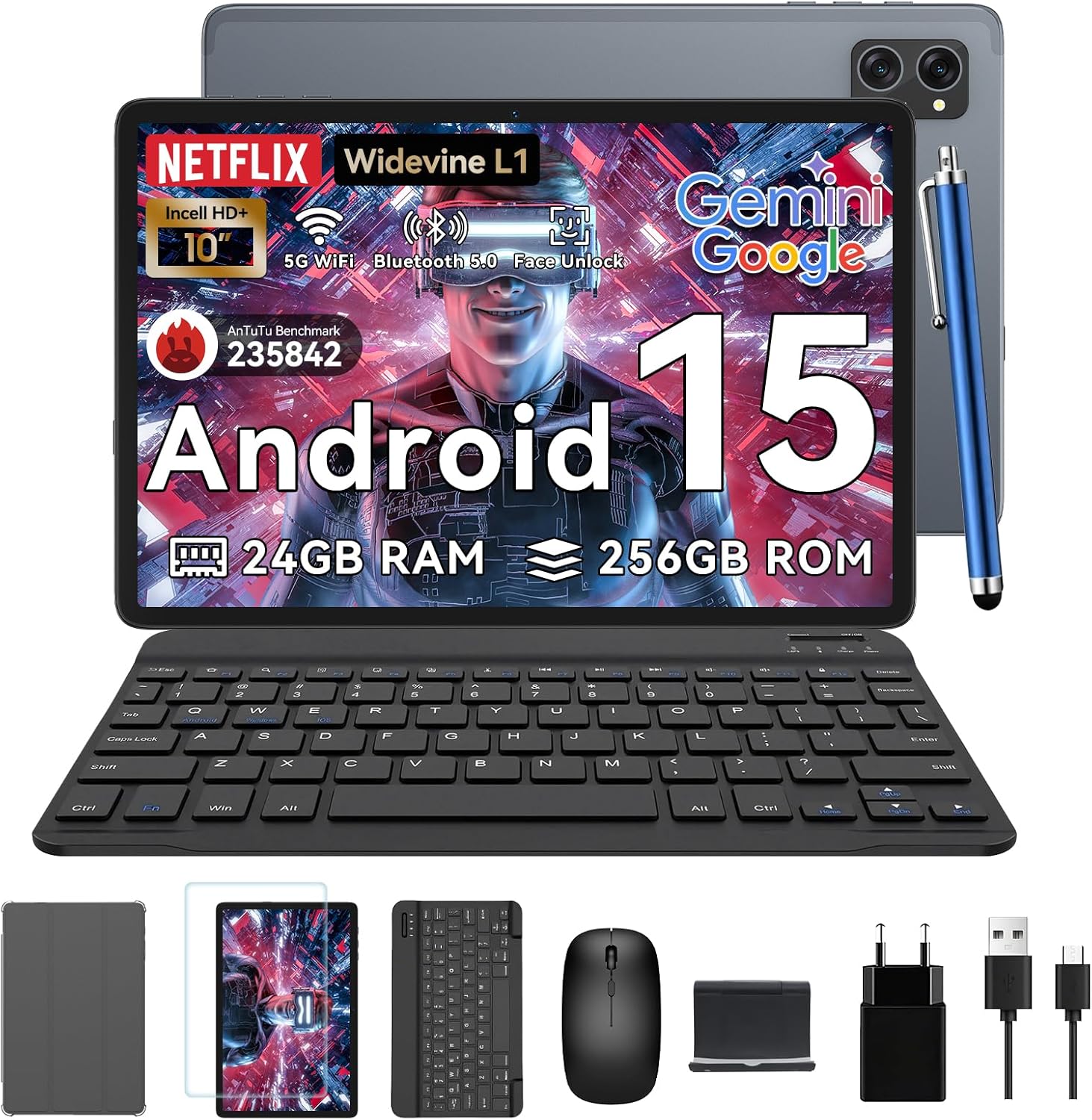
Figure 1.1: TABWEE T20 Tablet and its complete accessory package, including a Bluetooth keyboard, mouse, stylus, protective case, screen protector, charger, and USB cable.
Beth Sydd yn y Bocs
Upon unboxing your TABWEE T20 Tablet, verify that all components are present:

Figure 1.2: Contents of the TABWEE T20 Tablet retail package.
- 1x TABWEE T20 Tablet
- Bysellfwrdd Bluetooth 1x
- 1x Llygoden
- 1x Stylus
- 1x Achos Amddiffynnol
- 1x Screen Protector
- 1x Stand Tabled
- Gwefrydd 1x
- Cebl USB 1x
2. Gosod a Defnydd Cychwynnol
Codi Tâl y Dabled
Before first use, fully charge the tablet using the provided charger and USB cable. Connect the charger to a power outlet and the USB cable to the tablet's charging port. The charging indicator will illuminate.
Pweru Ymlaen/Diffodd
- I Bweru Ymlaen: Press and hold the Power button until the TABWEE logo appears on the screen.
- I Bweru i ffwrdd: Pwyswch a daliwch y botwm Pŵer nes bod y ddewislen opsiynau pŵer yn ymddangos. Dewiswch "Diffodd" a chadarnhewch.
- I ailgychwyn: O'r ddewislen opsiynau pŵer, dewiswch "Ailgychwyn" a chadarnhewch.
Dewin Gosod Cychwynnol
Ar ôl ei droi ymlaen am y tro cyntaf, bydd y dabled yn eich tywys trwy ddewin gosod cychwynnol. Dilynwch yr awgrymiadau ar y sgrin i:
- Dewiswch eich iaith.
- Cysylltwch â rhwydwaith Wi-Fi.
- Mewngofnodwch gyda'ch cyfrif Google neu crëwch un newydd.
- Gosodwch glo sgrin (PIN, patrwm, cyfrinair, neu Datgloi Wyneb).
- Review a derbyn telerau ac amodau.
Cysylltu Affeithwyr
The TABWEE T20 comes with a Bluetooth keyboard and mouse for enhanced productivity.
- Bysellfwrdd Bluetooth:
- Gwnewch yn siŵr bod y bysellfwrdd wedi'i wefru ac wedi'i bweru ymlaen.
- Ar y tabled, ewch i Gosodiadau > Dyfeisiau cysylltiedig > Bluetooth.
- Turn on Bluetooth and tap "Pair new device".
- Select the keyboard from the list of available devices and follow pairing instructions.
- Llygoden Bluetooth:
- Sicrhewch fod y llygoden wedi'i phweru ymlaen ac yn y modd paru.
- Ar y tabled, ewch i Gosodiadau > Dyfeisiau cysylltiedig > Bluetooth.
- Tap "Pair new device" and select the mouse from the list.
- Stylus: The included stylus can be used directly on the screen for navigation, drawing, and note-taking. It features palm-rejection precision.
3. Gweithredu'r Tabled
System Weithredu Android 15
The TABWEE T20 runs on Android 15, offering enhanced privacy controls, seamless cross-device collaboration, and improved multitasking capabilities.

Figure 3.1: Key features of the Android 15 operating system.
Gemini AI Integration
The tablet integrates Google Gemini AI, which intelligently optimizes tasks, from photo editing to document formatting, while prioritizing security with a dedicated encrypted privacy space.

Ffigur 3.2: Drosoddview of Gemini AI capabilities on the tablet.
Display and Multimedia
The 10.1-inch Incell HD+ display (1280x800 resolution) provides vivid colors and crisp details. With Widevine L1 certification, you can enjoy 1080P streaming on platforms like Netflix, Disney+, and Hulu.

Figure 3.3: Display features and eye-friendly modes.
The tablet also features Dual Smart-K Box Speakers for an immersive audio experience.

Figure 3.4: Dual Smart-K Box Speakers for enhanced audio.
Nodweddion Camera
Equipped with an 8MP rear camera and a 5MP front camera, the tablet supports Google Lens integration for smart scanning and object recognition. Face Unlock is also supported for convenient security.

Figure 3.5: Camera specifications and features.

Figure 3.6: Smart Google Lens functionalities.
Cysylltedd
The TABWEE T20 supports dual-band 5G WiFi and Bluetooth 5.0 for fast and stable connections.
- Wi-Fi: Connect to 2.4GHz or 5GHz networks for seamless streaming and quick downloads.
- Bluetooth 5.0: Pair with wireless earbuds, speakers, or other Bluetooth-enabled devices with 20% faster data transfer speed.
- Cefnogaeth OTG: Allows for easy transfer of files to and from external storage devices.

Figure 3.7: Advanced Bluetooth 5.0 connectivity.

Figure 3.8: Lightning Fast WiFi 5 Technology.
4. Cynnal a Chadw a Gofal
Proper maintenance ensures the longevity and optimal performance of your TABWEE T20 Tablet.
Rheoli Batri
The 5000mAh battery provides extended usage times. To maximize battery life:
- Osgoi tymereddau eithafol.
- Use the provided charger.
- Enable smart power-saving modes in settings.
- Cau cymwysiadau nas defnyddir sy'n rhedeg yn y cefndir.

Figure 4.1: 5000mAh Mega Battery performance metrics.
Cleaning the Tablet
- Defnyddiwch frethyn meddal, di-lint i lanhau'r sgrin a'r corff.
- Ar gyfer smwtshis ystyfnig, ychydig yn dampgolchwch y lliain gyda dŵr neu lanhawr sgrin.
- Ceisiwch osgoi defnyddio cemegau llym neu ddeunyddiau sgraffiniol.
Storio a Rheoli Cof
The tablet comes with 256GB of internal storage and supports up to 2TB TF card expansion. It also features 24GB RAM (8GB physical + 16GB virtual) for smooth multitasking.

Figure 4.2: Storage and RAM expansion capabilities.
To optimize performance and storage:
- Regularly clear cache and temporary files.
- Dadosod cymwysiadau nas defnyddir.
- Utilize the 2TB TF card slot for large files like 4K videos and design documents.
5. Datrys Problemau
This section addresses common issues you might encounter with your TABWEE T20 Tablet.
| Problem | Achos Posibl | Ateb |
|---|
| Nid yw'r tabled yn troi ymlaen. | Batri isel; damwain system. | Gwefrwch y dabled am o leiaf 30 munud. Os nad yw'n ymateb o hyd, pwyswch a daliwch y botwm Pŵer am 10-15 eiliad i orfodi ailgychwyn. |
| Problemau cysylltiad Wi-Fi. | Incorrect password; router issues; out of range. | Verify Wi-Fi password. Restart your router. Ensure tablet is within Wi-Fi range. Forget the network and reconnect. |
| Bluetooth accessories not pairing. | Accessory not in pairing mode; Bluetooth off on tablet. | Ensure accessory is in pairing mode. Turn Bluetooth off and on again on the tablet. Restart both devices. |
| Slow performance or app crashes. | Gormod o apiau yn rhedeg; lle storio isel; meddalwedd sydd wedi dyddio. | Close background apps. Clear app caches. Free up storage space. Check for system updates in Gosodiadau > System > Diweddariad system. |
| Sgrin yn anymatebol. | Gwall meddalwedd dros dro. | Force restart the tablet by holding the Power button for 10-15 seconds. |
Os yw'r broblem yn parhau ar ôl rhoi cynnig ar yr atebion hyn, cysylltwch â chymorth cwsmeriaid.
7. Gwarant a Chefnogaeth
TABWEE is committed to providing excellent customer service and support for your T20 Tablet.
Gwybodaeth Gwarant
Your TABWEE T20 Tablet is covered by a Gwarant 2 Flynedd from the date of purchase. This warranty covers manufacturing defects and ensures risk-free ownership.
Cefnogaeth i Gwsmeriaid
For any technical assistance, troubleshooting, or warranty claims, please contact our support team:
- Cefnogaeth E-bost: serviceplus.linda@gmail.com
- Online Call Support: Available 24/7 for US/CA customers.
- Repair Support: 2-Year Repair Support is provided.

Figure 7.1: TABWEE Customer Support Services.
Please have your purchase details and tablet model number ready when contacting support to expedite the process.

