
1. Rhagymadrodd a Throsoddview
The Ulefone Armor 28 Ultra Thermal is a cutting-edge 5G AI rugged smartphone designed for durability and high performance. It features advanced thermal imaging capabilities, a powerful MediaTek Dimensity 9300+ processor, a unique dual-screen design, and a robust camera system. This manual provides essential information for setting up, operating, maintaining, and troubleshooting your device.
This device is built to withstand harsh environments, meeting IP68/IP69K and MIL-STD 810G standards for water, dust, and shock resistance. Its 10600mAh battery with 120W fast charging ensures extended usage and quick power-ups.
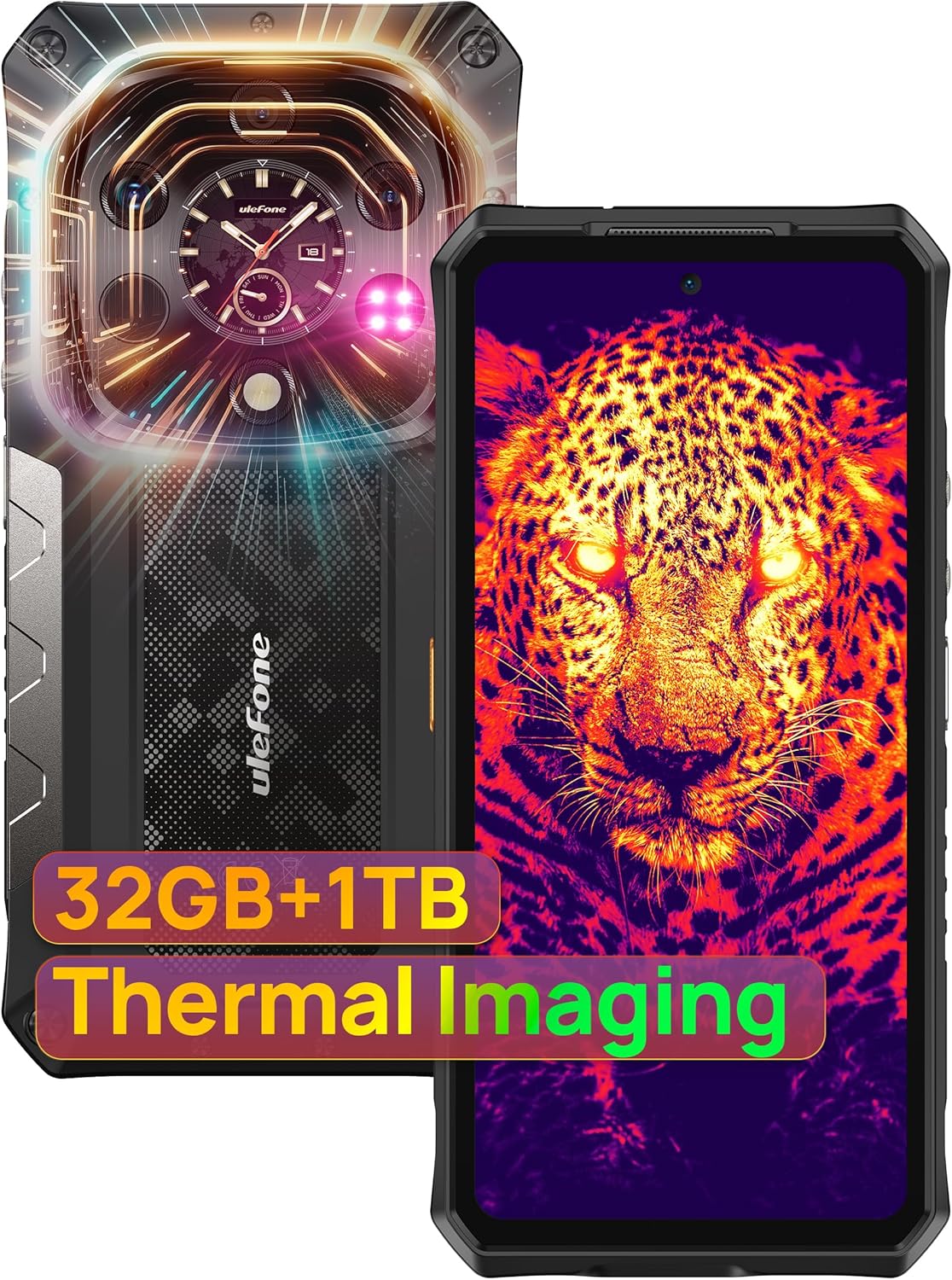
Figure 1.1: Ulefone Armor 28 Ultra Thermal - Front and Rear View
2. Beth sydd yn y Bocs
Gwiriwch fod yr holl eitemau canlynol wedi'u cynnwys yn eich pecyn cynnyrch:
- Ulefone Armor 28 Ultra Thermal Phone
- AC power charger (100~240V)
- Type-C to Type-C Data cable (100cm)
- Screen Protector (pre-applied or included)
- Ejector Hambwrdd SIM
- Lanyard
- Llawlyfr Defnyddiwr a Cherdyn Gwarant

Ffigur 2.1: Cynnwys Pecyn
3. Gosod
3.1 Pŵer Cychwynnol Ymlaen
- Press and hold the Power Key (located on the right side of the phone) until the Ulefone logo appears.
- Follow the on-screen prompts to complete the initial setup, including language selection and network connection.
3.2 Ehangu Cerdyn SIM a Storio
- Lleolwch y slot cerdyn SIM/TF ar ochr y ddyfais.
- Use the provided SIM tray ejector tool to open the tray.
- Insert your Nano-SIM cards and/or a microSD card (up to 2TB) into the designated slots.
- Gwthiwch yr hambwrdd yn ôl i'r ddyfais yn ysgafn nes ei fod yn clicio i'w le.
3.3 Cysylltiad Rhwydwaith
- For Wi-Fi: Go to Gosodiadau > Rhwydwaith a Rhyngrwyd > Wi-FiDewiswch eich rhwydwaith dymunol a nodwch y cyfrinair os oes angen.
- For Mobile Data (5G): Ensure your SIM card is active and mobile data is enabled in Gosodiadau > Rhwydwaith a Rhyngrwyd > Rhwydwaith symudol.
3.4 Gosod Diogelwch
- Set up Fingerprint Unlock: Go to Gosodiadau > Diogelwch a phreifatrwydd > Datgloi Olion Bysedd. Follow the instructions to register your fingerprint on the side-mounted sensor.
- Set up Face Unlock: Go to Gosodiadau > Diogelwch a phreifatrwydd > Datgloi Wyneb. Follow the instructions to register your face.
Fideo 3.1: Drosoddview of the Armor 28 Ultra Thermal Version, including setup and features.
4. Cyfarwyddiadau Gweithredu
4.1 Nodweddion Arddangos
The Ulefone Armor 28 Ultra Thermal features a 6.67-inch flexible AMOLED Main Display with 120Hz responsiveness, reaching up to 2200 nits peak brightness. It also includes a 1.04-inch flexible AMOLED Sub-Display on the rear.
- Prif Arddangosfa: Enjoy vibrant colors and smooth scrolling.
- Sub-Display: Offers touch controls, an always-on view for notifications, music control, and quick selfies. Customize your watch face to suit your style.

Figure 4.1: Main Display Capabilities

Figure 4.2: Rear Sub-Display Customization
Video 4.1: Demonstration of the Ulefone Armor 28 Ultra Sub-Display.
4.2 System Camera
The device boasts a versatile camera setup:
- Prif gamera: 50MP with 1-inch type IMX989 sensor, capable of 8K video recording.
- Ultra-wide Macro Lens: 50MP with JN1 sensor, 117° field of view.
- Camera Gweledigaeth Nos: 64MP with OV64B sensor and NightEif Uitra 3.0 algorithm, enhanced with 4 infrared LEDs.
- Camera blaen: 50MP ar gyfer hunluniau o ansawdd uchel.
Utilize the Custom Key for quick access to camera functions, including underwater camera mode.

Figure 4.3: Ultra-High Resolution Imaging System

Figure 4.4: 50MP Main Camera with IMX989 1" Largest Sensor

Figure 4.5: 50MP Ultra-wide Macro Camera

Figure 4.6: 64MP Night Vision Camera

Figure 4.7: 50MP Ultra Front Camera

Figure 4.8: 8K Video Recording
4.3 Thermal Imaging
The device integrates AI-powered thermal imaging with the ThermoVue T2 chip, offering a 640 x 512 resolution and 25Hz high refresh rate for accurate and clear thermal images. It supports various modes and color palettes for diverse applications.
- Access the ThermoVue Pro app to utilize thermal imaging.
- Explore modes like PIP (Picture-in-Picture) and SPO (Spot) for enhanced information management and heat source detection.
- Generate professional PDF reports from thermal data.
- Applications include pipe blockages inspection, mechanical and electrical maintenance, building science, hidden camera searching, and wildlife monitoring.

Figure 4.9: AI-Powered Thermal Imaging

Figure 4.10: Thermal by ThermoVue T2

Figure 4.11: Thermal Imaging Modes and Palettes

Figure 4.12: Thermal Imaging Applications
Video 4.2: Showcase of Ulefone Armor 28 Ultra Thermal imaging capabilities.
4.4 Performance & Storage
Powered by the 4nm MediaTek Dimensity 9300+ processor (up to 3.4GHz), the Armor 28 Ultra ensures robust and efficient performance. It features up to 32GB RAM (16GB physical + 16GB virtual) and 1TB ROM, expandable up to 2TB via SD card.

Figure 4.13: MediaTek Dimensity 9300+ & AI Engine

Figure 4.14: MediaTek Dimensity 9300+ 5G AI SoC
4.5 Battery & Charging
The 10600mAh large battery provides up to 576 hours of standby time, 58 hours of talk time, and 14 hours of video playback. It supports 120W fast charging (40% in 10 minutes), 50W wireless charging, and wireless reverse charging.

Figure 4.15: 10600mAh Mega Battery

Figure 4.16: 10600mAh Mega Battery Performance
4.6 Connectivity & Other Features
- Global 5G Network: Supports dual SIM dual standby.
- Wi-Fi 7: For ultra-fast wireless connections.
- Bluetooth 5.4: For seamless accessory pairing.
- NFC: Supports Google Pay for convenient transactions.
- USB 3.2 Gen 2: Up to 10Gbps transfer speeds, supports screen casting.
- IR Blaster: Control compatible home appliances.
- GPS: GPS + GLONASS + Beidou + Galileo for precise navigation.
- uSmart Expansion Connector: Compatible with professional accessories like endoscopes and microscopes (sold separately).
- AI Toolbox: Features AI removal, AI background, AI digital human, and AI photography.
- Allwedd Personol: Programmable button for quick access to functions.
- Gwinwydden Eang L1: For high-definition streaming content.

Figure 4.17: More Additional Functionalities

Figure 4.18: Comprehensive Additional Features

Figure 4.19: uSmart Expansion Connector
5. cynnal
5.1 Gofal Cyffredinol
- Glanhewch y ddyfais yn rheolaidd gyda meddal, damp brethyn. Osgowch gemegau llym neu ddeunyddiau sgraffiniol.
- Ensure all port covers are securely closed to maintain IP68/IP69K water and dust resistance.
- Avoid exposing the device to extreme temperatures (hot or cold) for prolonged periods.
5.2 Hirhoedledd y Batri
- For optimal battery life, avoid fully discharging the battery frequently.
- Use only Ulefone-approved chargers and cables.
6. Datrys Problemau
If you encounter issues with your Ulefone Armor 28 Ultra Thermal, try the following steps:
- Dyfais ddim yn ymateb: Press and hold the Power Key for about 10-15 seconds to force a restart.
- Problemau cysylltedd rhwydwaith: Toggle Wi-Fi or Mobile Data off and on. Restart the device. Check your SIM card.
- Problemau codi tâl: Ensure the charging cable and adapter are securely connected. Try a different charger and cable. Clean the charging port if necessary.
- Mae'r ap yn damwain/rhewi: Close the app and reopen it. Clear the app's cache and data in Gosodiadau > Apiau.
- Thermal imaging not working: Ensure the ThermoVue Pro app has all necessary permissions. Check for app updates.
For persistent issues, refer to the detailed user manual available on the device or contact Ulefone customer support.
7. manylebau
| Nodwedd | Manyleb |
|---|---|
| Enw Model | Armor 28 Ultra Thermal |
| System Weithredu | Android 14 (Upgradable to Android 15) |
| CPU | MediaTek Dimensity 9300+ (4nm, 3.4 GHz) |
| HWRDD | 32 GB (16GB ffisegol + 16GB rhithwir) |
| Storio | 1024 GB (1TB), expandable up to 2TB |
| Prif Arddangosfa | 6.67 Inches AMOLED, 120 Hz Refresh Rate, 2200 nits Peak Brightness |
| Is-Arddangos | AMOLED 1.04 modfedd |
| Camera Cefn | 50MP (Main) + 50MP (Ultra-wide Macro) + 64MP (Night Vision) |
| Camera blaen | 50MP |
| Datrysiad Fideo | Hyd at 8K |
| Delweddu Thermol | ThermoVue T2 chip, 640 x 512 resolution, 25Hz |
| Gallu Batri | 10600 mAh |
| Codi Tâl Cyflym | 120W |
| Codi Tâl Di-wifr | 50W (supports reverse wireless charging) |
| Gwydnwch | IP68/IP69K, MIL-STD 810G, Corning Gorilla Glass 5 |
| Cysylltedd | 5G, Wi-Fi 7, Bluetooth 5.4, NFC, USB 3.2 Gen 2, IR Blaster, GPS |
| Dimensiynau | 6.86 x 3.29 x 0.76 modfedd |
| Pwysau | 15.9 owns (450 gram) |
8. Gwarant a Chefnogaeth
Ulefone provides a 12-month manufacturer warranty service in the US for the Armor 28 Ultra Thermal. For any questions or support regarding your product, please contact Ulefone customer service.
For further assistance, you may visit the official Ulefone website or contact their support channels. Keep your purchase receipt and warranty card for service claims.


