
1. Cynnyrch Drosview
The zelotes C-12 Professional Wired Gaming Mouse is designed for high-performance gaming and office use. It features an ergonomic design, 12 programmable buttons, adjustable DPI settings, multi-modes RGB backlighting, and a customizable weight system.

Image 1.1: The zelotes C-12 Professional Wired Gaming Mouse, showcasing its ergonomic shape and customizable RGB lighting.
Cynnwys y Pecyn:
- 1 x zelotes C-12 Gaming Mouse
- 1 x Llawlyfr Cyfarwyddiadau
- 1 x CD Meddalwedd
- 1 x Foot Pad Set
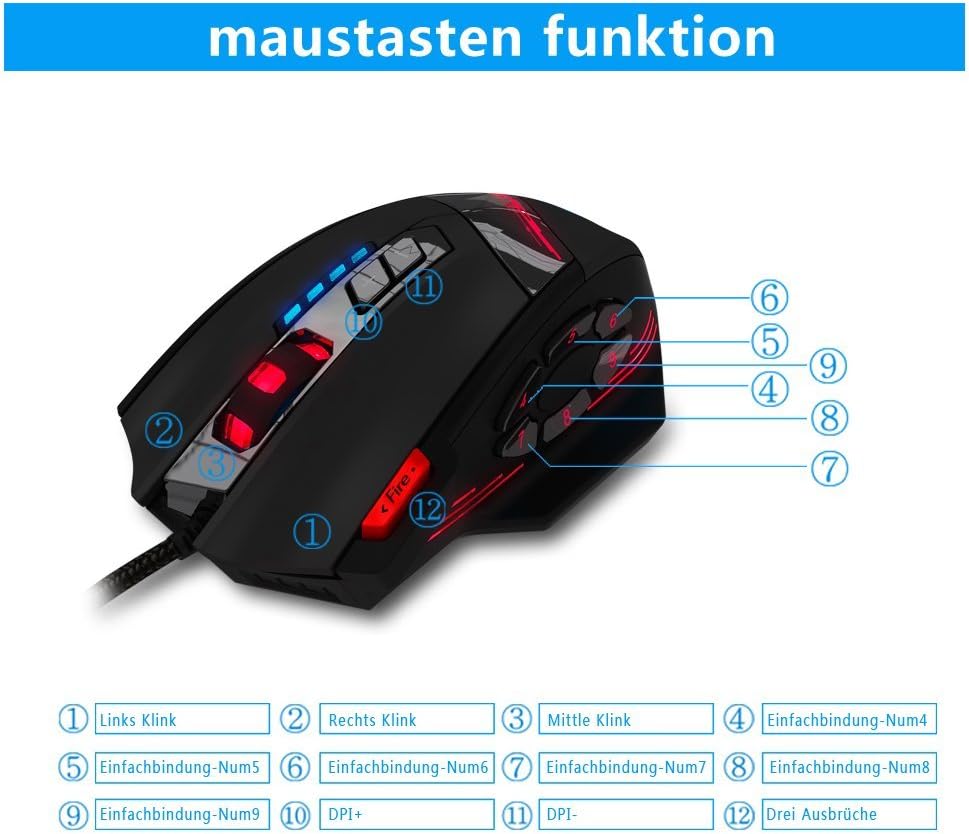
Image 1.2: The complete package contents of the zelotes C-12 Gaming Mouse.
2. Gosod
2.1 Cysylltu'r Llygoden
Connect the USB cable of the zelotes C-12 Gaming Mouse to an available USB port on your computer. The mouse is plug-and-play for basic functionality.
2.2 Gosod Meddalwedd (Dewisol)
For full customization of buttons, DPI, and lighting, install the provided software from the included CD. Insert the CD into your computer's optical drive and follow the on-screen instructions. If your computer does not have an optical drive, please visit the official zelotes website to download the latest software driver.
Note: The programming software is not fully compatible with Mac operating systems.
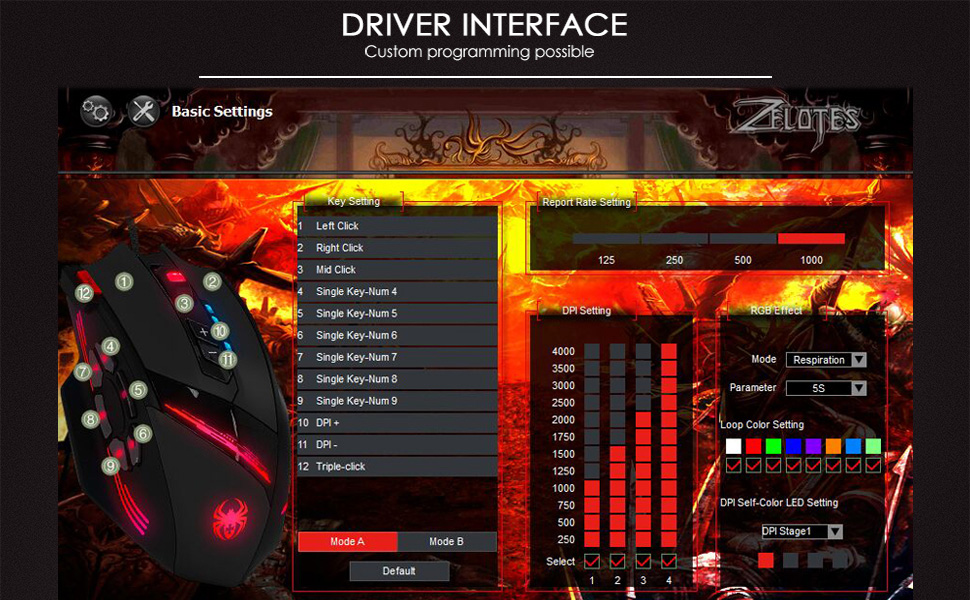
Image 2.1: The software interface for customizing the zelotes C-12 Gaming Mouse.
2.3 Weight Tuning
The mouse includes 8 removable weight blocks, each weighing 2.5 grams, located in a compartment on the underside of the mouse. To adjust the mouse's weight:
- Gently twist and remove the circular cover on the bottom of the mouse.
- Add or remove the 2.5g weight blocks as desired to achieve your preferred mouse feel.
- Replace the circular cover by twisting it back into place.
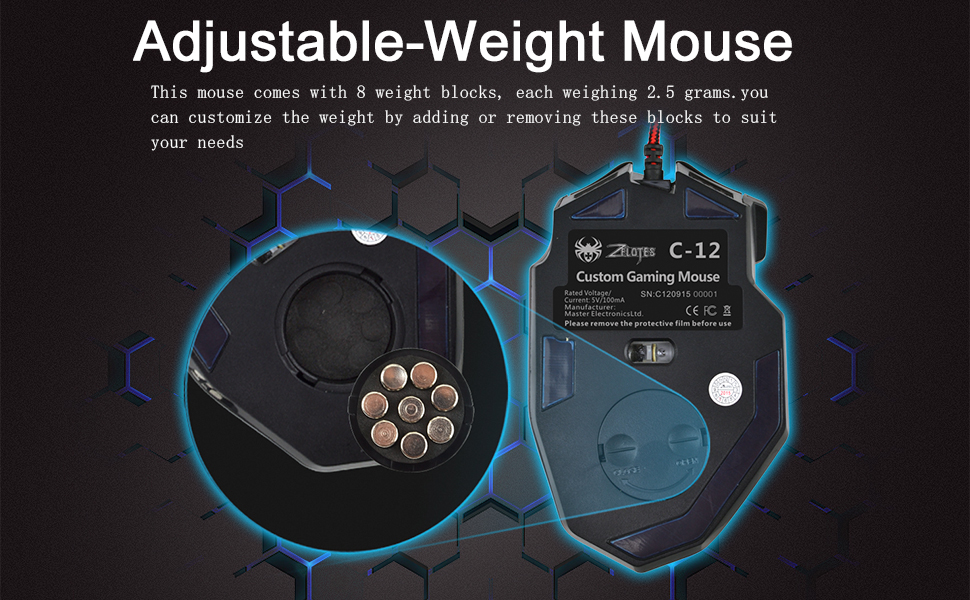
Image 2.2: Adjusting the weight of the zelotes C-12 mouse by adding or removing the 2.5g blocks.
Video 2.1: A demonstration of the weight tuning feature and programmable buttons on the zelotes C-12 Gaming Mouse.
3. Cyfarwyddiadau Gweithredu
3.1 Swyddogaethau Botwm
The zelotes C-12 mouse features 12 programmable buttons. The default functions are:
- Cliciwch Chwith (Botwm 1)
- Cliciwch ar y dde (Botwm 2)
- Clic Canol / Olwyn Sgroliwch (Botwm 3)
- Botymau Ochr (Buttons 4-9): Default to various functions, customizable via software.
- DPI+ (Button 10): Increases DPI sensitivity.
- DPI- (Button 11): Decreases DPI sensitivity.
- Botwm Tân (Button 12): Default to triple-click, customizable via software.

Image 3.1: Labeled diagram of the zelotes C-12 mouse buttons.
3.2 Addasiad DPI
The mouse offers 4 default DPI levels: 1000/1500/2000/4000 DPI. You can cycle through these levels using the dedicated DPI+ and DPI- buttons. For finer control and to reach up to 8000 DPI, use the included software.
Goleuadau RGB 3.3
The mouse features multi-modes RGB backlighting, including 7-color cycle breathing and monochromatic constant bright modes. Lighting effects can be customized through the software to match your preferences.
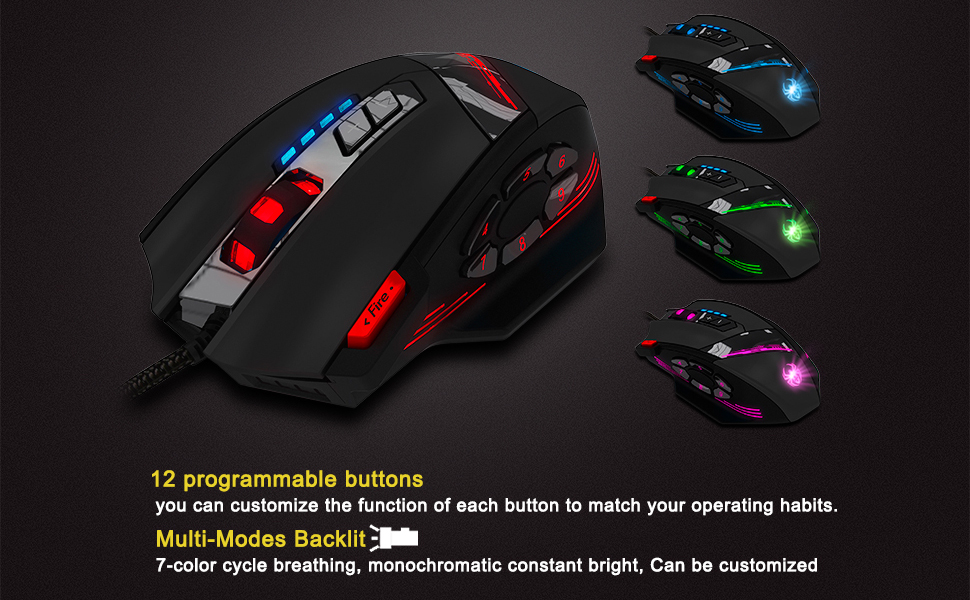
Image 3.2: The zelotes C-12 mouse showcasing its multi-color RGB lighting options.
3.4 Dylunio Ergonomig
The mouse is designed for comfort during extended use, featuring a sweat-resistant and anti-slip rubber surface. Its ergonomic shape helps prevent wrist fatigue.

Image 3.3: The ergonomic design of the zelotes C-12 mouse provides a comfortable grip.
4. cynnal
To ensure the longevity and optimal performance of your zelotes C-12 Gaming Mouse, follow these maintenance guidelines:
- Glanhau: Defnyddiwch frethyn meddal, sych i sychu wyneb y llygoden. Ar gyfer baw ystyfnig, sychwch ychydigampgolchwch y brethyn gyda dŵr neu doddiant glanhau ysgafn. Osgowch gemegau llym neu ddeunyddiau sgraffiniol.
- Gofal Synhwyrydd: Cadwch y synhwyrydd optegol ar ochr isaf y llygoden yn lân ac yn rhydd o lwch na malurion. Defnyddiwch swab cotwm neu aer cywasgedig os oes angen.
- Rheoli Ceblau: Osgowch blygiadau miniog neu dynnu gormodol ar y cebl USB i atal difrod.
- Storio: Pan nad yw'n cael ei ddefnyddio, storiwch y llygoden mewn amgylchedd glân, sych i ffwrdd o dymheredd eithafol.
5. Datrys Problemau
5.1 Llygoden Ddim yn Ymateb
- Sicrhewch fod y cebl USB wedi'i gysylltu'n ddiogel â'ch cyfrifiadur.
- Rhowch gynnig ar gysylltu'r llygoden â phorthladd USB gwahanol.
- Profwch y llygoden ar gyfrifiadur arall i ddiystyru problem sy'n benodol i'r cyfrifiadur.
- Ailgychwyn eich cyfrifiadur.
5.2 DPI or Button Settings Not Changing
- Ensure the zelotes C-12 software is correctly installed and running.
- Check if the settings are saved within the software after making changes.
- For Mac users, note that the programming software has limited compatibility. Basic DPI changes via mouse buttons should still function.
5.3 RGB Lighting Not Working or Incorrect
- Verify lighting settings within the zelotes C-12 software.
- Gwnewch yn siŵr bod y llygoden wedi'i chysylltu'n iawn ac yn derbyn pŵer.
5.4 Mouse Movement Is Erratic
- Glanhewch y synhwyrydd optegol ar waelod y llygoden.
- Gwnewch yn siŵr eich bod chi'n defnyddio'r llygoden ar arwyneb addas (e.e. pad llygoden). Osgowch arwynebau sy'n adlewyrchu'n fawr neu'n dryloyw.
6. manylebau
| Nodwedd | Disgrifiad |
|---|---|
| Brand | zelotes |
| Enw Model | C-12 |
| Technoleg Cysylltedd | USB Wired |
| Technoleg Canfod Symudiad | Optical (A3050 Gaming Chip) |
| Gosodiadau DPI | 1000/1500/2000/4000 (Adjustable up to 8000 DPI via software) |
| Nifer y Botwm | 12 Botwm Rhaglenadwy |
| Tiwnio Pwysau | 8 x 2.5g removable weights |
| Cyfeiriadedd Llaw | Llaw dde |
| Cydweddoldeb System Weithredu | Win11, Win10, Win8, Win7, Mac OS (limited software compatibility for Mac) |
| Dimensiynau (L x W x H) | 130mm x 81.5mm x 39.8mm |
| Cyfradd Bleidleisio | 125-1000Hz |
| Hyd Cebl | 1.8m |
| Deunydd | Plastig (Gorffeniad Mat) |

Image 6.1: Detailed technical specifications and dimensions of the zelotes C-12 Gaming Mouse.
7. Gwybodaeth Gwarant
The zelotes C-12 Professional Wired Gaming Mouse comes with a Gwarant Gwneuthurwr 1 Flwyddyn o ddyddiad y pryniant. Mae'r warant hon yn cwmpasu diffygion mewn deunyddiau a chrefftwaith o dan ddefnydd arferol. Nid yw'n cwmpasu difrod a achosir gan gamddefnydd, damwain, addasiad heb awdurdod, neu achosion allanol.
Cadwch eich prawf prynu ar gyfer hawliadau gwarant.
8. Cefnogaeth
For further assistance, technical support, or warranty inquiries, please refer to the contact information provided with your product packaging or visit the official zelotes websafle.