
Rhagymadrodd
The Memorex MX-BCD20 is a versatile portable stereo system designed to provide high-quality audio playback from multiple sources. It features a top-loading CD player, AM/FM radio, and an auxiliary input for connecting external devices. Its compact design and flexible power options make it suitable for use at home or on the go.
Gwybodaeth Ddiogelwch Bwysig
Please read all instructions carefully before operating this unit. Keep this manual for future reference.
- Peidiwch â gwneud yr uned hon yn agored i law neu leithder.
- Peidiwch â rhwystro unrhyw agoriadau awyru.
- Ensure proper power supply (AC adapter or 6 'C' batteries).
- Peidiwch ag agor c yr unedasing; cyfeiriwch yr holl waith cynnal a chadw at bersonél cymwys.
- Osgowch osod yr uned ger ffynonellau gwres neu mewn golau haul uniongyrchol.
- Glanhewch â lliain sych yn unig.
Cynnwys Pecyn
- Memorex MX-BCD20 Portable CD Player
- Addasydd Pwer AC
- Llawlyfr Cyfarwyddiadau (y ddogfen hon)
Cynnyrch Drosview
Familiarize yourself with the various parts and controls of your Memorex Portable CD Player.
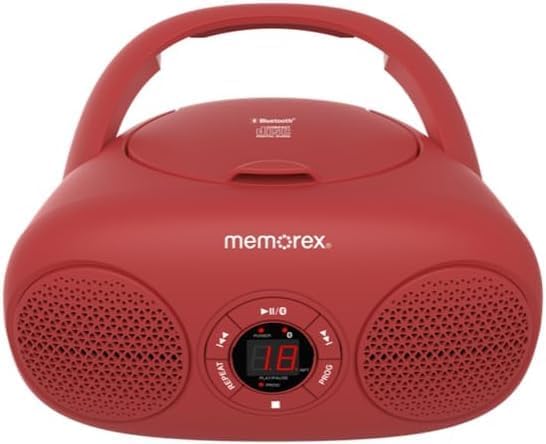
Ffigur 1: Blaen view of the Memorex MX-BCD20 Portable CD Player, showing the main controls and speakers.

Ffigur 2: Cefn view illustrating the battery compartment and a side view highlighting the tuning dial and function switch.
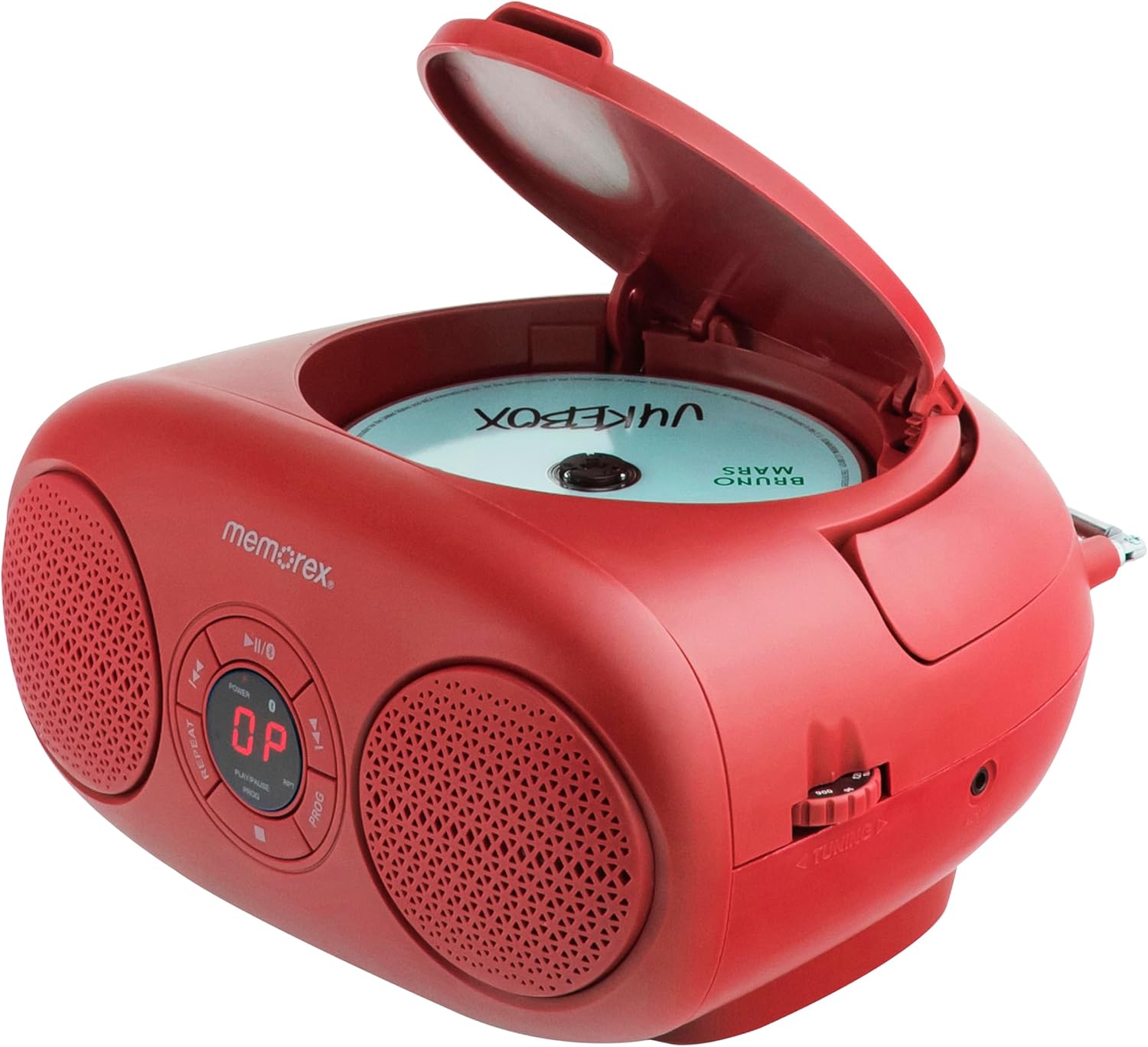
Ffigur 3: Uchaf view with the CD compartment lid open, ready for disc insertion.
Rheolaethau a Dangosyddion:
- Botwm POWER: Yn troi'r uned ymlaen/i ffwrdd.
- Botwm CHWARAE/SAIBIO (►/▮▮): Yn cychwyn neu'n oedi chwarae CD.
- Botwm STOPIO (■): Yn stopio chwarae CD.
- SKIP/SEARCH Buttons (◀◀ / ►►): Skips tracks or searches within a track on CD.
- REPEAT Button (RPT): Yn ailadrodd y trac cyfredol neu'r holl draciau ar y CD.
- PROGRAM Button (PROG): Programs CD tracks for custom playback.
- VOLUME Dial: Yn addasu'r lefel allbwn sain.
- FUNCTION Switch: Selects between CD, AM, FM, or AUX modes.
- TUNING Dial: Tunes AM/FM radio frequencies.
- Arddangosfa LED: Shows CD track number or radio frequency.
- Antena telesgopig: Ar gyfer derbyniad radio FM.
- Jack Mewnbwn AUX: Ar gyfer cysylltu dyfeisiau sain allanol.
- AC Input Jack: Ar gyfer cysylltu'r addasydd pŵer AC.
- Adran Batri: Holds 6 'C' batteries for portable use.
Gosod
Pweru'r Uned:
The Memorex MX-BCD20 can be powered by either the included AC adapter or 6 'C' batteries (not included).
Pŵer AC:
- Insert the small end of the AC power adapter into the AC input jack on the back of the unit.
- Plug the other end of the AC power adapter into a standard AC wall outlet (120V ~ 60Hz).
Pŵer Batri:
- Agorwch y gorchudd compartment batri sydd wedi'i leoli ar waelod yr uned.
- Insert 6 'C' size batteries (not included), ensuring correct polarity (+/-) as indicated inside the compartment.
- Caewch y clawr adran batri yn ddiogel.
Note: When the unit is connected to AC power, battery power is automatically disconnected. Remove batteries if the unit will not be used for an extended period.
Gosod Antena:
For optimal FM radio reception, fully extend the telescopic antenna. For AM reception, the unit has a built-in antenna, so no adjustment is needed, but you may need to rotate the unit for better signal.

Figure 4: The unit with its telescopic antenna extended for improved FM radio reception.
Cyfarwyddiadau Gweithredu
Gweithrediad Cyffredinol:
- Gwasgwch y GRYM botwm i droi'r uned ymlaen.
- Addaswch y CYFROL dial to your desired listening level.
- Defnyddiwch y SWYDDOGAETH switch to select your desired mode: CD, AM, FM, or AUX.
Chwarae CD:
- Gosodwch y SWYDDOGAETH switch to "CD".
- Open the CD compartment lid by gently lifting it.
- Place a CD (or CD-R/RW) onto the center spindle with the label side facing up.
- Close the CD compartment lid firmly until it clicks. The LED display will show the total number of tracks.
- Gwasgwch y CHWARAE/SEIBIANT (►/▮▮) button to begin playback. The current track number will be displayed.
- I oedi chwarae, pwyswch CHWARAE/SEIBIANT (►/▮▮) again. Press it once more to resume.
- I atal chwarae, pwyswch y AROS (■) button.
Traciau Sgipio:
- Yn ystod chwarae, pwyswch SKIP / CHWILIO (►►) to skip to the next track.
- Gwasgwch SKIP / CHWILIO (◀◀) to skip to the beginning of the current track. Press it twice to skip to the previous track.
Searching Within a Track:
- Yn ystod chwarae, gwasgwch a dal SKIP / CHWILIO (►►) to fast-forward through the current track.
- Pwyswch a dal SKIP / CHWILIO (◀◀) to fast-reverse through the current track.
- Rhyddhewch y botwm i ailddechrau chwarae arferol.
Ail-chwarae:
- Gwasgwch y AILDDANGOS (RPT) button once during playback to repeat the current track. "REPEAT 1" will appear on the display.
- Gwasgwch y AILDDANGOS (RPT) button a second time to repeat all tracks on the CD. "REPEAT ALL" will appear.
- Gwasgwch y AILDDANGOS (RPT) button a third time to cancel repeat playback.
Chwarae Rhaglen:
You can program up to 20 tracks to play in a specific order.
- Yn y modd STOP, pwyswch y RHAGLEN (PROG) button. "PROG" will flash on the display.
- Defnyddiwch y SKIP / CHWILIO (◀◀ / ►►) buttons to select the first track you wish to program.
- Gwasgwch RHAGLEN (PROG) again to confirm the selection. The display will show the program number (e.g., "01" for the first programmed track).
- Repeat steps 2 and 3 to add more tracks to your program.
- After programming all desired tracks, press the CHWARAE/SEIBIANT (►/▮▮) button to start programmed playback.
- To clear the program, open the CD compartment lid or press the AROS (■) button twice.
Ymgyrch Radio:
- Gosodwch y SWYDDOGAETH switch to "AM" or "FM".
- For FM reception, extend the telescopic antenna fully.
- Cylchdroi y DYNIO dial to select your desired radio station. The frequency will be shown on the LED display.
- Addaswch y CYFROL dial as needed.
Tip: For better AM reception, try rotating the entire unit. For FM, adjust the position and extension of the telescopic antenna.
Mewnbwn Ategol (AUX):
You can connect an external audio device (e.g., smartphone, MP3 player) to the unit using a 3.5mm audio cable (not included).
- Gosodwch y SWYDDOGAETH switch to "AUX".
- Connect one end of a 3.5mm audio cable to the AUX input jack on the unit.
- Cysylltwch ben arall y cebl â'r jac clustffonau neu allbwn sain eich dyfais allanol.
- Start playback on your external device. The audio will be routed through the Memorex unit's speakers.
- Adjust the volume using both the unit's CYFROL dial and your external device's volume control.
Cynnal a chadw
- Glanhau: Sychwch yr uned gyda lliain meddal, sych. Peidiwch â defnyddio glanhawyr sgraffiniol na thoddyddion.
- Gofal CD: Trinwch CDs wrth eu hymylon. Cadwch nhw'n lân ac yn rhydd o grafiadau. Storiwch nhw yn eu casys pan nad ydyn nhw'n cael eu defnyddio.
- Storio: If storing the unit for a long period, remove the batteries to prevent leakage.
Datrys problemau
| Problem | Achos Posibl | Ateb |
|---|---|---|
| Dim pŵer | AC adapter not connected properly; Batteries depleted or inserted incorrectly. | Gwiriwch y cysylltiad AC; Amnewidiwch y batris neu sicrhewch fod y polaredd yn gywir. |
| CD ddim yn chwarae | CD inserted incorrectly; CD is dirty or scratched; CD compartment lid not closed. | Re-insert CD label side up; Clean CD with a soft cloth; Close lid firmly. |
| Derbyniad radio gwael | Antenna not extended (FM); Unit position (AM). | Fully extend FM antenna; Rotate unit for better AM signal. |
| Dim sain o'r AUX | AUX cable not connected; External device volume too low. | Ensure AUX cable is securely connected; Increase volume on external device. |
Manylebau
- Model: MX-BCD20
- Ffynhonnell Pwer: AC 120V ~ 60Hz or 6 x 'C' Batteries (DC 9V)
- Cydnawsedd CD: CD, CD-R / RW
- Amleddau Radio: AM/FM
- Mewnbwn Ategol: Stereo Jack 3.5mm
- Dimensiynau (L x W x H): 10 x 10 x 6 modfedd (tua)
- Pwysau: 2.14 pwys (tua)
Gwarant a Chefnogaeth
Memorex products are designed for reliability and performance. For warranty information or technical support, please refer to the contact details provided on the product packaging or visit the official Memorex websafle. Cadwch eich derbynneb prynu fel prawf o brynu ar gyfer hawliadau gwarant.