
1. Rhagymadrodd
The Wingtech Celero 5G smartphone is designed to provide reliable performance and connectivity. This manual offers comprehensive guidance on its features, setup, operation, and maintenance to ensure optimal use of your device.
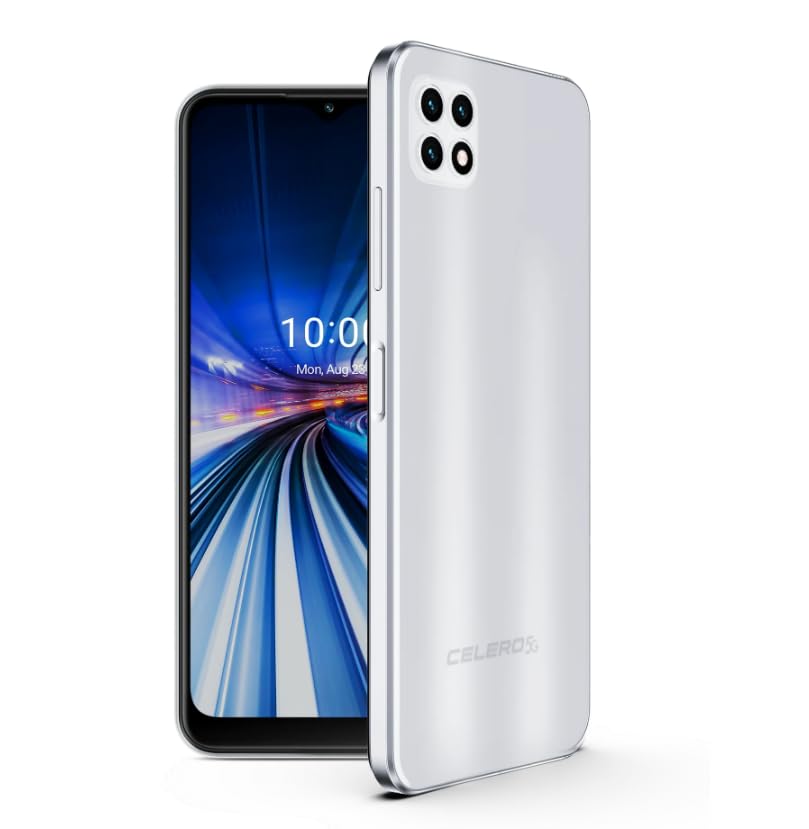
Figure 1: Wingtech Celero 5G Smartphone (Silver)
2. Beth sydd yn y Bocs
Gwiriwch fod yr holl eitemau yn bresennol ym mhecynnu'r cynnyrch:
- Wingtech Celero 5G Smartphone
- Cebl USB
- Ejector Hambwrdd SIM
- Canllaw Cychwyn Cyflym (gall gael ei gynnwys ar wahân)
3. Gosod
3.1. Mewnosod y Cerdyn SIM
- Lleolwch y hambwrdd cerdyn SIM ar ochr eich dyfais.
- Mewnosodwch yr offeryn alldaflu hambwrdd SIM i'r twll bach wrth ymyl yr hambwrdd a gwthiwch yn ysgafn nes bod yr hambwrdd yn popio allan.
- Rhowch eich cerdyn(iau) Nano-SIM a/neu gerdyn microSD yn y hambwrdd gyda'r cysylltiadau aur yn wynebu i lawr.
- Ailosodwch yr hambwrdd yn y ddyfais yn ofalus.
3.2. Troi ymlaen a gosod cychwynnol
- Press and hold the Power button until the device vibrates and the screen turns on.
- Dilynwch yr awgrymiadau ar y sgrin i ddewis eich iaith, cysylltu â rhwydwaith Wi-Fi, a sefydlu eich cyfrif Google.
- Cwblhewch y dewin gosod i bersonoli gosodiadau eich dyfais.
4. Gweithredu
4.1. Mordwyo Sylfaenol
- Sgrin Cartref: Swipe left or right to access different home screen panels.
- Drôr Ap: Sychwch i fyny o'r sgrin gartref i view holl gymwysiadau gosod.
- Panel Hysbysiadau: Sweipiwch i lawr o frig y sgrin i gael mynediad at hysbysiadau a gosodiadau cyflym.
4.2. Gwneud Galwadau ac Anfon Negeseuon
- Tap y Ffon icon to open the dialer and make calls.
- Tap y Negeseuon icon to send and receive text messages.
4.3. Defnydd Camera
- Tap y Camera icon to launch the camera application.
- Select different modes (Photo, Video, Portrait, etc.) by swiping across the screen.
- Tapiwch y botwm caead i dynnu lluniau neu ddechrau/stopio recordio fideo.
5. manylebau
| Nodwedd | Manylyn |
|---|---|
| Enw Model | Celero 5G |
| Rhif Model yr Eitem | DSH98123 |
| System Weithredu | Android 11.0 |
| Maint Sgrin | 6.52 modfedd |
| Datrysiad | 1920 x 1080 |
| Cynhwysedd Storio Cof | 4 GB (RAM) |
| Storio Mewnol | 64GB (as per product title, though description mentions 64GB built-in memory) |
| Gallu Batri | 4000 Miliamp Oriau |
| Technoleg Cysylltedd | 5G |
| Lliw | Arian |
| Gwneuthurwr | Wingtech |
6. cynnal
- Keep your device clean using a soft, dry cloth.
- Avoid exposing the device to extreme temperatures, direct sunlight, or liquids.
- Gwnewch gopi wrth gefn o'ch data yn rheolaidd i atal colled.
- Install software updates as they become available to ensure optimal performance and security.
7. Datrys Problemau
7.1. Dyfais Ddim yn Troi Ymlaen
- Ensure the battery is charged. Connect the device to a charger and wait a few minutes before attempting to power on.
- Pwyswch a daliwch y botwm Pŵer am o leiaf 10-15 eiliad i gyflawni ailgychwyn gorfodol.
7.2. Cysylltedd Rhwydwaith Gwael
- Gwiriwch a yw eich cerdyn SIM wedi'i fewnosod yn iawn.
- Verify that mobile data is enabled in your device settings.
- Restart your device or toggle Airplane Mode on and off.
- Contact your wireless carrier to confirm service availability in your area.
7.3. Apiau'n Chwalu neu'n Rhewi
- Clear the cache and data for the problematic app via Settings > Apps.
- Dadosod ac ailosod yr app.
- Gwnewch yn siŵr bod meddalwedd eich dyfais yn gyfredol.
8. Gwarant a Chefnogaeth
This product is offered as an Amazon Renewed device. Amazon Renewed products are inspected, tested, and refurbished as necessary to be fully functional. Your purchase is eligible for Amazon Renewed coverage in conjunction with Amazon's Return Policy and the A-to-z Guarantee.
For specific warranty details, return policies, or technical support, please refer to the documentation provided with your purchase or visit the Amazon Renewed support page.