
Bellemave FST00146-Q-AB1
Bellemave Queen Size Metal Loft Bed with Desk
Llawlyfr Defnyddiwr
1. Rhagymadrodd
Thank you for choosing the Bellemave Queen Size Metal Loft Bed with Desk. This product is designed to optimize your living space by combining a comfortable sleeping area with a functional workspace, complete with modern amenities like a USB charging station and integrated LED lighting. This manual provides essential information for safe assembly, operation, and maintenance of your new loft bed.

Ffigur 1.1: Drosoddview of the Bellemave Queen Size Metal Loft Bed with Desk. This image shows the complete loft bed setup, featuring the elevated bed frame, integrated desk area below, and the ladder for access.
2. Gwybodaeth Diogelwch
Your safety is paramount. Please read and adhere to all safety warnings and instructions before assembling or using this product.
- Always use the guardrails to prevent falls. The upper bunk is not suitable for children under six years of age.
- This bed is not suitable for children who cannot safely use the ladder.
- Be cautious when using the desk and power output to prevent electrical hazards. Ensure all electrical connections are secure and not overloaded.
- Always follow the assembly instructions precisely to ensure the bed frame's stability and safety. Do not modify the bed structure.
- Regularly check all bolts and connections to ensure they remain tight. Retighten as necessary.
- Do not hang or swing from any part of the bed frame.
- Ensure the mattress used on the upper bunk is of the correct size and thickness to maintain adequate guardrail height.
This loft bed has passed the Children's Product Certificate (CPC) test, ensuring it meets safety standards for children's products.
3. Nodweddion Cynnyrch
The Bellemave Loft Bed is designed with functionality and space-saving in mind. Key features include:
- Integrated Desk: The loft bed features a spacious desk area beneath the bed, providing a dedicated space for work, study, or leisure.
- Gorsaf Codi Tâl USB: Conveniently located on the desk, a built-in USB charging station allows for easy charging of electronic devices.
- DIY Smart LED Lighting: Enhance your space with customizable LED lights, offering various modes to create a desired ambiance.
- Ffrâm Metel Gadarn: Constructed from durable metal, ensuring long-lasting stability and reliability.
- Rheiliau Gwarchod Diogelwch: The upper bed is equipped with protective guardrails on all four sides to prevent accidental falls.
- Integrated Ladder: A secure ladder provides easy and safe access to the upper bunk.
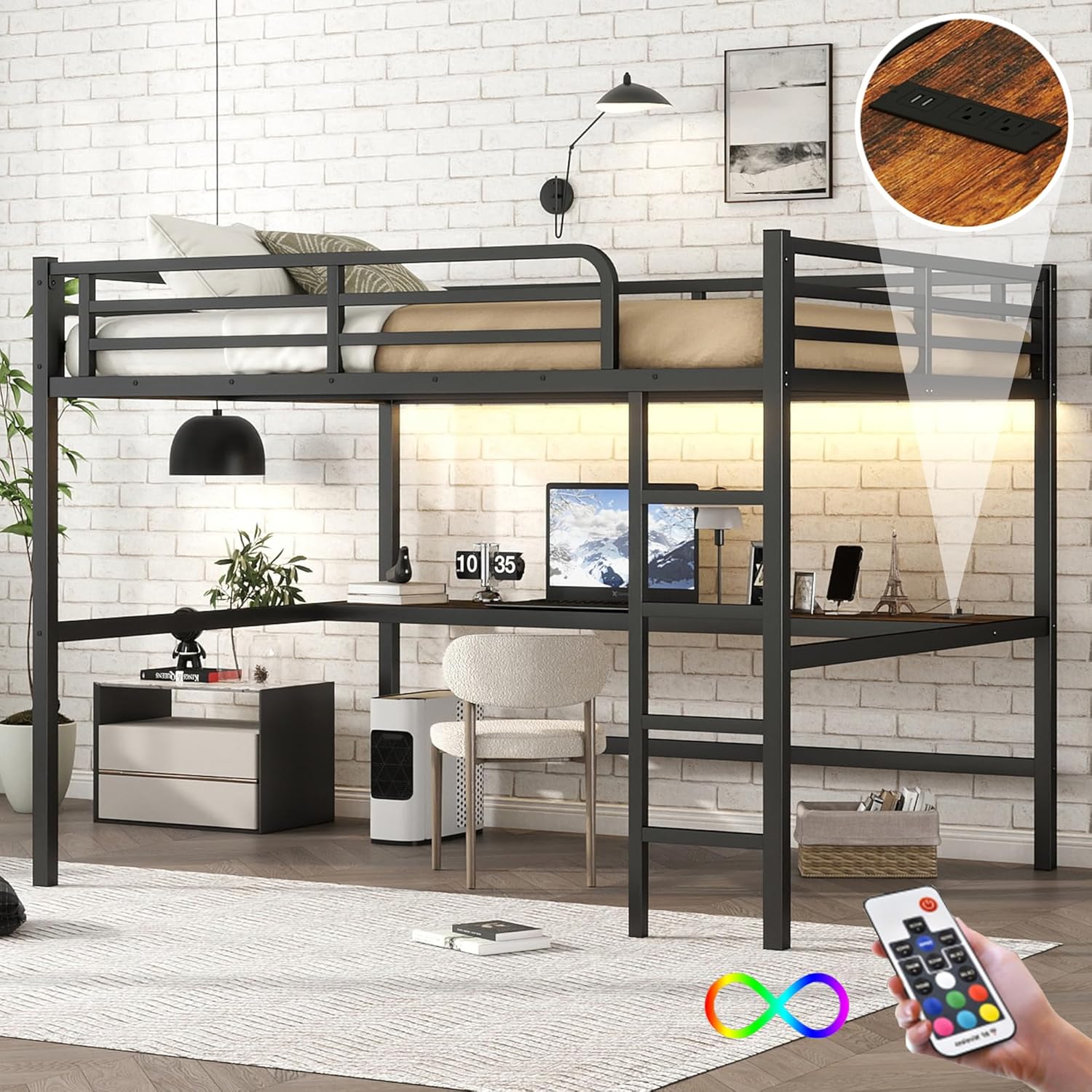
Figure 3.1: Loft Bed with Integrated Desk. This image highlights the spacious desk area beneath the elevated bed, suitable for a computer setup or study space.

Figure 3.2: Desk with USB and LED Features. A close-up view of the desk surface, showing the integrated USB charging port and the subtle glow of the LED lighting strip.
4. Gosod a Chynulliad
The Bellemave Loft Bed is designed for easy assembly. It is highly recommended to have at least two adults for the assembly process, especially during the final stages of connecting larger components.
- Dadbacio a Gwirio Rhannau: Carefully unpack all components and hardware. Refer to the included parts list in your assembly manual to ensure all pieces are present and undamaged. If any parts are missing or damaged, contact customer support immediately.
- Dilynwch y Cyfarwyddiadau: Adhere strictly to the step-by-step instructions provided in the separate assembly manual. Each part is numbered for easy identification.
- Defnyddiwch yr Offer a Ddarperir: All necessary tools for assembly are included. Do not use power tools unless explicitly stated in the assembly manual, as this may overtighten fasteners and damage the frame.
- Cysylltiadau Diogel: Ensure all bolts and screws are tightened securely, but do not overtighten. Periodically check and retighten connections after assembly.
For detailed visual guidance, please refer to the assembly manual included in your product packaging.
5. Cyfarwyddiadau Gweithredu
Using the features of your Bellemave Loft Bed is straightforward:
- Defnydd Desg: The integrated desk provides a stable surface for your computer, books, or other items. Ensure items are placed securely and do not obstruct the ladder access.
- Gorsaf Codi Tâl USB: Locate the USB ports on the desk surface. Simply plug your device's USB cable into the port to begin charging. Ensure the bed's power output is connected to a wall outlet.
- Goleuadau LED: The DIY smart light system is controlled via a remote or a dedicated app (refer to the LED light's specific instructions for pairing and usage). You can select various light modes and colors to personalize your space.
6. cynnal
To ensure the longevity and safety of your Bellemave Loft Bed, follow these maintenance guidelines:
- Glanhau: Wipe down the metal frame and desk surfaces with a soft, damp brethyn. Osgowch lanhawyr sgraffiniol neu gemegau llym a allai niweidio'r gorffeniad.
- Gwiriad Strwythurol: Periodically inspect all structural components, including the frame, slats, and ladder, for any signs of wear, damage, or loose connections.
- Tynhau Caewyr: Every 3-6 months, re-tighten all bolts and screws to maintain the bed's stability and prevent wobbling.
- Guardrail Integrity: Ensure guardrails are always securely attached and free from damage.
7. Datrys Problemau
If you encounter any issues with your loft bed, refer to the following common problems and solutions:
| Problem | Achos Posibl | Ateb |
|---|---|---|
| Mae'r gwely'n teimlo'n sigledig neu'n ansefydlog. | Loose bolts or uneven assembly. | Ensure all bolts and screws are fully tightened. Verify the bed is on a level surface. Consider securing the bed to a wall using appropriate anchors if wobbling persists (wall mounting hardware may be included or purchased separately). |
| Rhannau ar goll wrth eu danfon. | Shipping error or multiple package delivery. | Check if the product was shipped in multiple boxes and if all have arrived. Contact Bellemave customer support with your order details and a list of missing parts. |
| USB charging station not working. | Not plugged in, faulty cable, or overloaded. | Ensure the bed's power output is securely plugged into a functional wall outlet. Try a different USB cable or device. Avoid plugging in too many high-power devices simultaneously. |
| Goleuadau LED ddim yn gweithio. | Power issue, remote battery, or connection problem. | Check if the LED power adapter is properly connected and plugged in. Replace remote batteries if applicable. Refer to the LED light's specific manual for troubleshooting pairing or connection issues. |
If you experience issues not listed here or if the suggested solutions do not resolve the problem, please contact Bellemave customer support for further assistance.
8. manylebau
Detailed specifications for the Bellemave Queen Size Metal Loft Bed:

Figure 8.1: Product Dimensions Diagram. This diagram provides a detailed view of the loft bed's measurements in inches, including length, width, height, and specific dimensions for the desk and ladder.
| Priodoledd | Manylyn |
|---|---|
| Brand | Clochfaen |
| Rhif Model | FST00146-Q-AB1 |
| Maint | Frenhines |
| Lliw | Du |
| Dimensiynau Cynnyrch (L x W x H) | 82.7"H x 60.6"L x 68.9"U |
| Pwysau Eitem | 47 Bunt |
| Cydrannau wedi'u Cynnwys | Desk, Guardrails, Slat, Ladders |
| Math Gorffen | lacr |
| UPC | 197793838498 |
9. Cefnogaeth i Gwsmeriaid
For any questions, concerns, or assistance with your Bellemave Loft Bed, please contact our customer support team. You can also visit the official Bellemave store for more information and products.
Bellemave Store: Visit the Bellemave Store on Amazon
Ask a question about this manual
Ask about setup, troubleshooting, compatibility, parts, safety, or missing instructions. Manuals+ will review the question and use this page’s manual context to help answer it.