
CJ TECH 25305-EV
CJ TECH 750mA Automatic Float Battery Charger/Maintainer (Model 25305-EV) User Manual
Rhagymadrodd
This manual provides detailed instructions for the safe and effective use of your CJ TECH 750mA Automatic Float Battery Charger/Maintainer, Model 25305-EV. This device is designed to charge and maintain 6V and 12V lead-acid batteries, including AGM and GEL types, ensuring optimal battery performance and extending battery life. Please read this manual thoroughly before operation and retain it for future reference.
Gwybodaeth Diogelwch
RHYBUDD: Darllenwch yr holl rybuddion a chyfarwyddiadau diogelwch. Gall methu â dilyn y rhybuddion a’r cyfarwyddiadau arwain at sioc drydanol, tân a/neu anaf difrifol.
- Defnyddiwch y gwefrydd mewn man sydd wedi'i awyru'n dda bob amser.
- Avoid sparks, flames, or smoking near the battery during charging, as batteries can produce explosive gases.
- Gwisgwch ddillad amddiffyn llygaid a dillad amddiffynnol wrth weithio gyda batris.
- Disconnect the AC power supply before making or breaking connections to the battery.
- This charger is designed for 6V and 12V lead-acid batteries only. Do not use it to charge dry-cell batteries that are commonly used with home appliances, as these may burst and cause injury to persons and damage to property.
- Keep the charger and its components out of reach of children.
- The charger has an IP64 water-resistant rating, meaning it is protected from dust and splashing water. It is not designed to be submerged in water.
- Peidiwch â defnyddio'r gwefrydd os yw wedi derbyn ergyd sydyn, wedi cael ei ollwng, neu wedi'i ddifrodi mewn unrhyw ffordd arall.
Cynnwys Pecyn
Gwiriwch fod yr holl eitemau yn bresennol yn eich pecyn:
- CJ TECH 750mA Automatic Float Battery Charger/Maintainer Unit
- Batri Clamp Cysylltydd
- Cysylltydd Terfynell Ring

Image: The CJ TECH 750mA Automatic Float Battery Charger unit shown with its two interchangeable connection accessories: battery clamps and ring terminal connectors.
Cynnyrch Drosview
The CJ TECH 750mA Automatic Float Battery Charger/Maintainer is a compact and durable device designed for efficient battery care. It features automatic voltage detection and multiple safety protections.
Dangosyddion LED
- LED COCH: Yn dangos bod y batri yn gwefru ar hyn o bryd.
- LED GWYRDD: Indicates the battery is fully charged and the charger is in maintenance (float) mode.
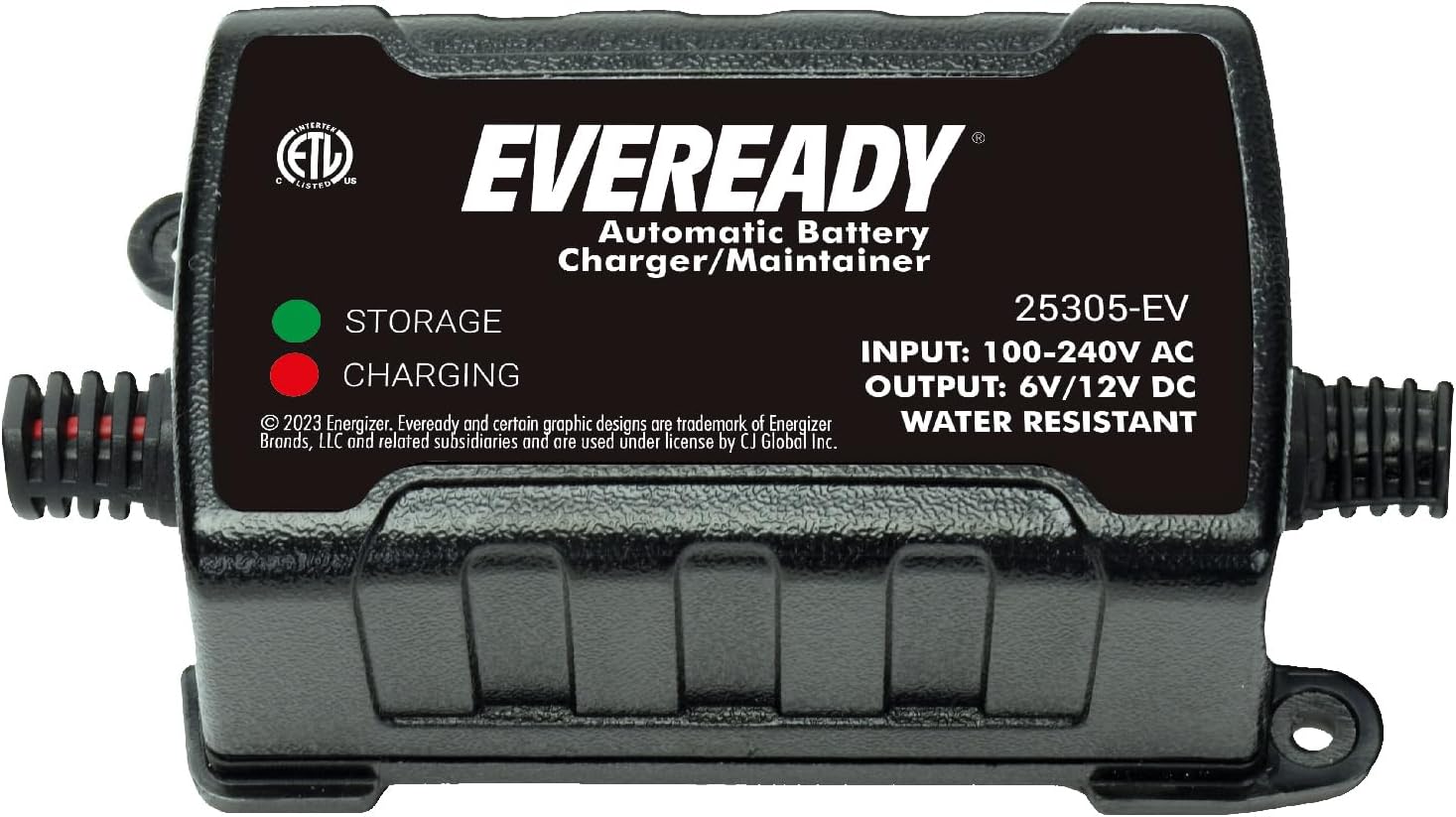
Delwedd: Manwl view of the charger unit, highlighting the LED indicators for 'CHARGING' (red) and 'STORAGE' (green), along with input/output specifications.
Gosod
- Identify Battery Voltage: Determine if your battery is 6V or 12V. The charger automatically detects the voltage once connected.
- Choose Connector: Dewiswch naill ai'r batri clamp connector or the ring terminal connector based on your battery's terminals.
- Cysylltu â'r Batri:
- Cysylltwch y COCH positive (+) connector to the positive (+) battery terminal.
- Cysylltwch y DUW negative (-) connector to the negative (-) battery terminal.
Ensure a secure connection. Avoid touching the positive and negative connectors together.
- Cysylltu â Phŵer AC: Plug the charger's AC power cord into a standard 100-240V AC electrical outlet.

Image: The charger unit shown connected to an ATV battery using the battery clamp connectors, illustrating a typical setup scenario.
Cyfarwyddiadau Gweithredu
The CJ TECH charger operates automatically once connected to a battery and power source.
- Vol Awtomatigtage Canfod: The charger will automatically detect if the connected battery is 6V or 12V. It requires an activation voltage of 4V for 6V batteries and 8V for 12V batteries to begin charging.
- Modd Codi Tâl: When the battery is charging, the LED COCH will illuminate. The charger delivers a constant current of 0.75A ±0.1A during this phase.
- Maintenance (Float) Mode: Once the battery reaches full charge, the charger automatically switches to maintenance mode, and the LED GWYRDD will illuminate. In this mode, the charger provides a small, continuous current to keep the battery at optimal charge without overcharging, preventing sulfation and extending battery life.
- Datgysylltu: To disconnect the charger, first unplug it from the AC power outlet, then disconnect the negative (-) battery connector, followed by the positive (+) battery connector.

Image: An illustration showing the charger's connection diagram to a battery and AC power, alongside a table detailing input voltage, allbwn cyftage, charging current, battery types, activation voltage, and housing protection.
Cynnal a chadw
Proper maintenance ensures the longevity and reliable operation of your charger and batteries.
- Glanhau: Keep the charger unit clean and free from dust and debris. Use a dry cloth to wipe the exterior. Do not use solvents or abrasive cleaners.
- Archwiliad cebl: Regularly inspect the power cord and battery connectors for any signs of damage, fraying, or corrosion. Replace damaged components immediately.
- Storio: When not in use, store the charger in a cool, dry place, away from direct sunlight and extreme temperatures. Ensure cables are neatly coiled to prevent damage.
- Gofal Batri: For optimal battery life, ensure battery terminals are clean and free of corrosion before connecting the charger.
Datrys problemau
Os byddwch chi'n dod ar draws problemau gyda'ch gwefrydd, cyfeiriwch at y problemau a'r atebion cyffredin canlynol:
| Problem | Achos Posibl | Ateb |
|---|---|---|
| Charger not turning on / No LEDs illuminated | No AC power; Battery voltage too low for activation. | Check AC outlet and power cord connection. Ensure battery voltage is above 4V (for 6V) or 8V (for 12V). |
| RED LED stays on indefinitely | Battery is deeply discharged or damaged; Incorrect battery connection. | Allow more time for charging. Check battery connections for proper polarity. If the issue persists, the battery may be faulty. |
| GREEN LED is on, but battery seems low | Battery is faulty and cannot hold a charge. | Test the battery with a battery tester. The battery may need replacement. |
| Charger gets warm during operation | Gweithrediad arferol. | A slight increase in temperature is normal during charging. Ensure adequate ventilation around the charger. |
Manylebau
- Rhif Model: 25305-EV
- Mewnbwn Voltage: AC 100-240V, 50/60Hz
- Allbwn Voltage: 6V DC / 12V DC (Automatic Detection)
- Cyfredol Codi Tâl: 0.75A ± 0.1A
- Mathau o Batri: 6V/12V Lead-Acid Batteries (AGM, GEL)
- Activation Voltage: 4V for 6V batteries, 8V for 12V batteries
- Diogelu Tai: IP64 Gwrth-ddŵr
- Dimensiynau Cynnyrch: 3 x 3 x 5 modfedd
- Pwysau Eitem: 9.9 owns
- Tystysgrifau: CETL / CE-EMC / CE-LVD / ROHS
Gwarant a Chefnogaeth
For warranty information or technical support, please refer to the documentation included with your purchase or contact CJ TECH customer service. Keep your proof of purchase for warranty claims.
Ask a question about this manual
Ask about setup, troubleshooting, compatibility, parts, safety, or missing instructions. Manuals+ will review the question and use this page’s manual context to help answer it.