
1. Rhagymadrodd
Thank you for choosing the ZIHNIC AI Translation Earphones S11A. These earphones are designed to provide seamless communication across language barriers with real-time translation capabilities. This manual will guide you through the setup, operation, and maintenance of your device to ensure optimal performance.
2. Cynnyrch Drosview
2.1 Cynnwys Pecyn
- ZIHNIC AI Translation Earphones S11A
- Cebl Codi Tâl
- Llawlyfr Defnyddiwr
2.2 Nodweddion Allweddol
- 3 Smart Translation Modes: Supports real-time translation in up to 138 languages.
- Sgôr gwrth-ddŵr IPX5: Resistant to sweat and rain, suitable for various environments.
- Rheolaeth Gyffwrdd sythweledol: Manage music, calls, and voice assistant with simple taps.
- Bluetooth Wireless Freedom: Stable and quick pairing with compatible devices.
- Dyluniad Clust Agored Cyfforddus: Flexible earhooks ensure a secure and comfortable fit for extended wear.
- Sain Stereo HiFi: Delivers clear audio quality for music and calls.
- HD Noise-Canceling Calls: Yn gwella eglurder galwadau trwy leihau sŵn cefndir.

Image: ZIHNIC AI Translation Earphones S11A and charging case. The earphones are shown with text indicating translation capabilities.

Image: Diagram illustrating HiFi Stereo Sound and Voice Assistant features of the earphones.

Image: Diagram highlighting 360-degree surround sound quality, HD Noise-canceling Calls, Open Ear Design, IPX5 Water Resistance, and Convenient Touch Control.
3. Gosod
3.1 Gwefru'r Clustffonau
Before first use, fully charge the earphones and their charging case. Connect the provided charging cable to the charging case and a USB power source. The indicator lights on the case will show the charging status.
3.2 Gwisgo'r Clustffonau
For optimal comfort and sound quality, ensure the earphones are worn correctly.
- Take out the earbud from the charging case.
- Hang the end of the earbud on the ear bone.
- Turn the earbud and slide it behind the ear.
- Adjust the ear hook to fit your ears securely.

Image: Step-by-step guide on how to wear the earphones for a secure and comfortable fit.
3.3 Pâr Bluetooth
- Open the charging case; the earphones will automatically enter pairing mode.
- Ar eich ffôn clyfar neu ddyfais, galluogwch Bluetooth a chwiliwch am y dyfeisiau sydd ar gael.
- Select "ZIHNIC S11A" from the list to connect.
- Ar ôl cysylltu, byddwch yn clywed sŵn sain, a bydd y golau dangosydd ar y clustffonau yn newid.
3.4 App Installation for Translation
To utilize the full translation features, you will need to download and install the dedicated ZIHNIC translation application on your smartphone. Refer to the QR code provided in the product packaging or search for the official ZIHNIC translation app in your device's app store. Follow the in-app instructions for setup and language selection.
4. Cyfarwyddiadau Gweithredu
4.1 Rheolaethau Cyffwrdd
The ZIHNIC S11A earphones feature intuitive touch controls on each earbud. Specific functions may vary slightly based on the connected device and app settings.
- Chwarae/Seibiant Cerddoriaeth: Tap sengl ar y naill glust neu'r llall.
- Ateb / Diwedd Galwad: Tap sengl ar y naill glust neu'r llall.
- Gwrthod Galwad: Pwyswch a daliwch y naill glust neu'r llall am 2 eiliad.
- Trac Nesaf: Tapiwch y earbud dde ddwywaith.
- Trac Blaenorol: Tapiwch y earbud chwith ddwywaith.
- Ysgogi Cynorthwyydd Llais: Tapiwch driphlyg ar y naill glustffon neu'r llall.
- Addasu Cyfrol: Typically controlled via your connected device. Some apps may offer in-app volume control.
4.2 Dulliau Cyfieithu
The earphones support multiple translation modes through the dedicated ZIHNIC translation app:
- Cyfieithu Wyneb yn Wyneb: Ideal for direct conversations. One person speaks, and the earphones provide real-time translation to the other person.
- AI Automatic Translation: For continuous conversations, the earphones automatically detect pauses in speech and provide translations.
- Modd Sgwrs AI: Use the app to type or speak, and the earphones will translate and output the audio.
To initiate translation, open the ZIHNIC translation app, select the desired mode and languages, then follow the on-screen prompts. A simple tap on the earbud may activate the translation function within the app.

Image: Illustration of face-to-face translation using the earphones, showing translated text on screen.

Image: Depiction of automatic AI translation in a business setting, with the app interface visible.
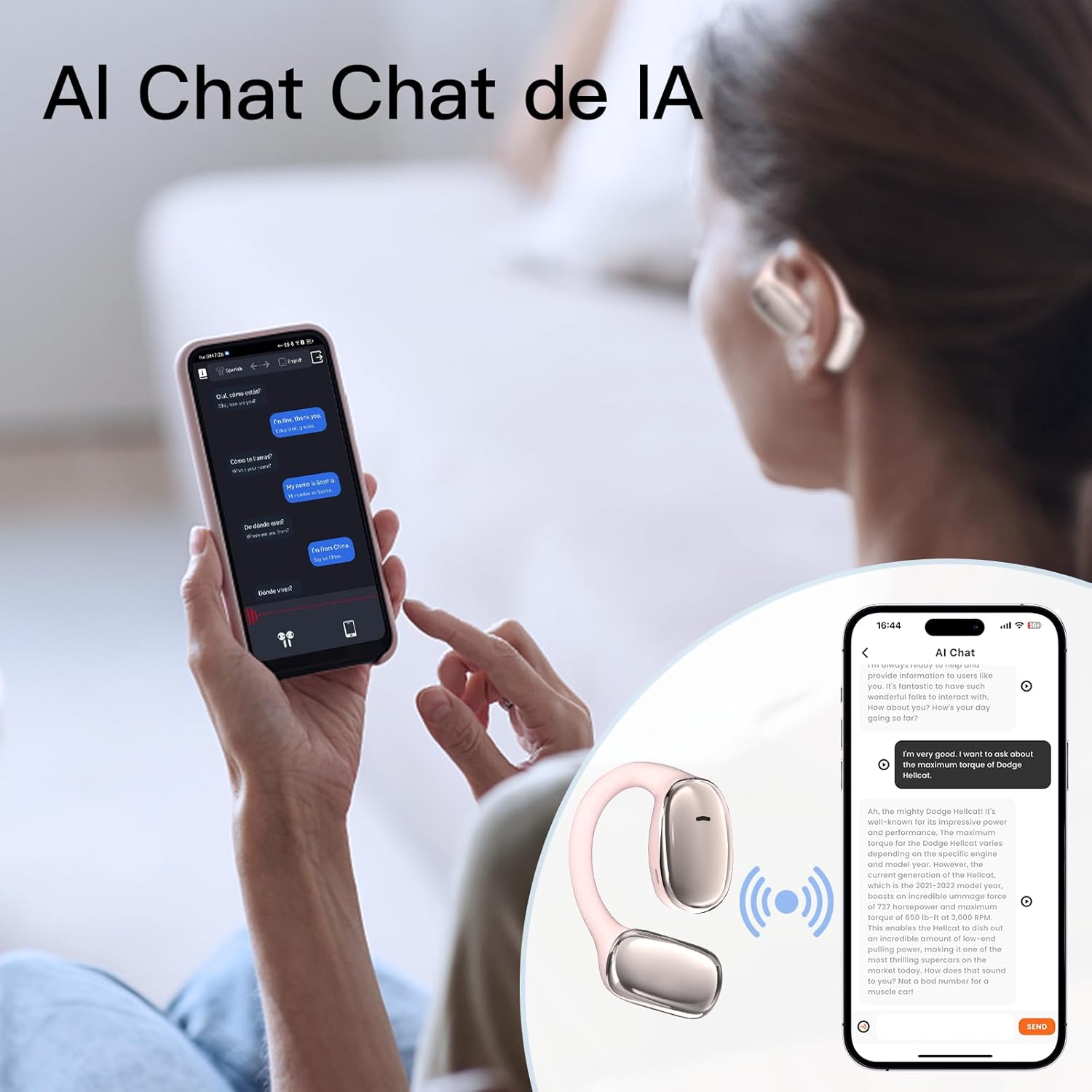
Image: User interacting with an AI chat application on a smartphone, with the earphones providing translation.

Image: A woman using the earphones with a smartphone showing real-time translation in a chat interface.
5. cynnal
5.1 Glanhau
- Sychwch y clustffonau a'r cas gwefru yn ysgafn gyda lliain meddal, sych, heb lint.
- Peidiwch â defnyddio glanhawyr sgraffiniol, alcohol na thoddyddion cemegol.
- Gwnewch yn siŵr bod y cysylltiadau gwefru yn lân ac yn rhydd o falurion.
5.2 Storio
- Storiwch y clustffonau yn eu cas gwefru pan nad ydynt yn cael eu defnyddio i'w hamddiffyn a'u cadw'n wefredig.
- Avoid storing in extreme temperatures, direct sunlight, or high humidity.
5.3 Gwrthsefyll Dŵr
The earphones have an IPX5 waterproof rating, meaning they are resistant to sweat and light splashes of water. They are not designed for submersion in water or use during swimming. Ensure the earphones are dry before placing them back in the charging case to prevent damage.
6. Datrys Problemau
If you encounter issues with your ZIHNIC AI Translation Earphones S11A, please refer to the following common solutions:
| Problem | Ateb Posibl |
|---|---|
| Clustffonau ddim yn paru/cysylltu |
|
| Dim sain neu ansawdd sain gwael |
|
| Cyfieithiad ddim yn gweithio |
|
| Earphones not charging or holding charge |
|
| Mae rheolyddion cyffwrdd yn anymatebol |
|
7. manylebau
- Model: S11A
- Pwysau Eitem: 1.76 owns (tua 50 gram)
- Dimensiynau Pecyn: 4.92 x 3.82 x 1.54 modfedd
- Math o batri: Polymer Lithiwm (wedi'i gynnwys)
- Sgôr dal dŵr: IPX5
- Ieithoedd Cyfieithu: Hyd at 138 o ieithoedd
- Cysylltedd: Di-wifr Bluetooth

Image: Illustration indicating long battery life, with a 450mAh battery capacity likely referring to the charging case.
8. Gwybodaeth Gwarant
ZIHNIC products are covered by a limited warranty. Please refer to the warranty card included in your product packaging or visit the official ZIHNIC websafle am delerau ac amodau gwarant manwl. Cadwch eich derbynneb prynu fel prawf o brynu ar gyfer hawliadau gwarant.
9. Cefnogaeth i Gwsmeriaid
For further assistance, technical support, or inquiries regarding your ZIHNIC AI Translation Earphones S11A, please contact ZIHNIC customer service through the following channels:
- Swyddogol Websafle: Visit the ZIHNIC official websafle ar gyfer Cwestiynau Cyffredin, adnoddau cymorth, a ffurflenni cyswllt.
- Cefnogaeth E-bost: Cyfeiriwch at becynnu eich cynnyrch neu'r swyddfa websafle ar gyfer cyfeiriad e-bost cymorth cwsmeriaid.