
1. Rhagymadrodd
Thank you for choosing the Auusda T156A 15.6-inch Business Laptop. This manual provides essential information for setting up, operating, and maintaining your new laptop. Please read this manual thoroughly before using the device to ensure proper function and longevity. This laptop is designed for productivity and portability, featuring a 4-core processor, 8GB DDR4 RAM, and a 512GB M.2 PCIe NVMe SSD, all running on Windows 11 Pro.
2. Cynnwys Pecyn
Gwiriwch fod yr holl eitemau yn bresennol yn y pecyn:
- Auusda T156A Laptop
- Addasydd Pŵer a Chebl
- Transparent Keyboard Cover
- Spanish Keyboard Cover
- Llawlyfr Cyfarwyddiadau (y ddogfen hon)

Image: The laptop, power adapter, and keyboard covers as included in the package.
3. Cynnyrch Drosview
3.1 Nodweddion Allweddol
- Perfformiad pwerus: Equipped with a 4-core N95 processor (1.7-3.4 GHz) and 8GB DDR4 RAM for efficient multitasking.
- Ampgyda Storio: Features a 512GB M.2 PCIe NVMe SSD for fast data access and sufficient storage.
- Vibrant Full HD Display: A 15.6" Full HD IPS LCD screen offers clear visuals with wide viewing onglau.
- Nodweddion Cyfleus: Includes a backlit keyboard for low-light use and a fingerprint reader for secure access.
- Connectivity & Versatility: Offers Bluetooth, an SD card reader, and essential ports for various devices.

Delwedd: Drosoddiadview of the Auusda T156A laptop with its main features labeled.
3.2 Processor and Memory
The laptop is powered by an Intel N95 4-core processor, capable of speeds up to 3.4 GHz, ensuring smooth operation for business and academic tasks. It comes with 8GB of DDR4 RAM and a 512GB M.2 PCIe NVMe Solid State Drive (SSD) for quick boot times and application loading.

Image: A visual representation of the 4-core N95 processor chip.

Image: The laptop highlighting its 8GB RAM and 512GB SSD configuration.
3.3 Arddangos
Experience clear and vibrant visuals on the 15.6-inch Full HD (1920x1080) IPS LCD display. The screen features a narrow bezel and supports 16 million colors, providing an immersive viewing experience. A privacy shutter is integrated for the webcam.

Image: The laptop's 15.6-inch Full HD IPS LCD display and its features.
3.4 Bysellfwrdd a Phad Cyffwrdd
The laptop features a full-size backlit keyboard, allowing comfortable typing in various lighting conditions. The integrated touchpad includes a fingerprint sensor for secure and quick login.

Image: The backlit keyboard and the fingerprint ID sensor on the touchpad.
3.5 Porthladdoedd a Chysylltedd
The Auusda T156A offers a range of connectivity options:
- Mewnbwn Pwer DC
- USB-A Ports (multiple)
- Allbwn HDMI
- Darllenydd Cerdyn microSD
- Jack clustffon
- Bluetooth and Wi-Fi (802.11ac, 802.11ax)
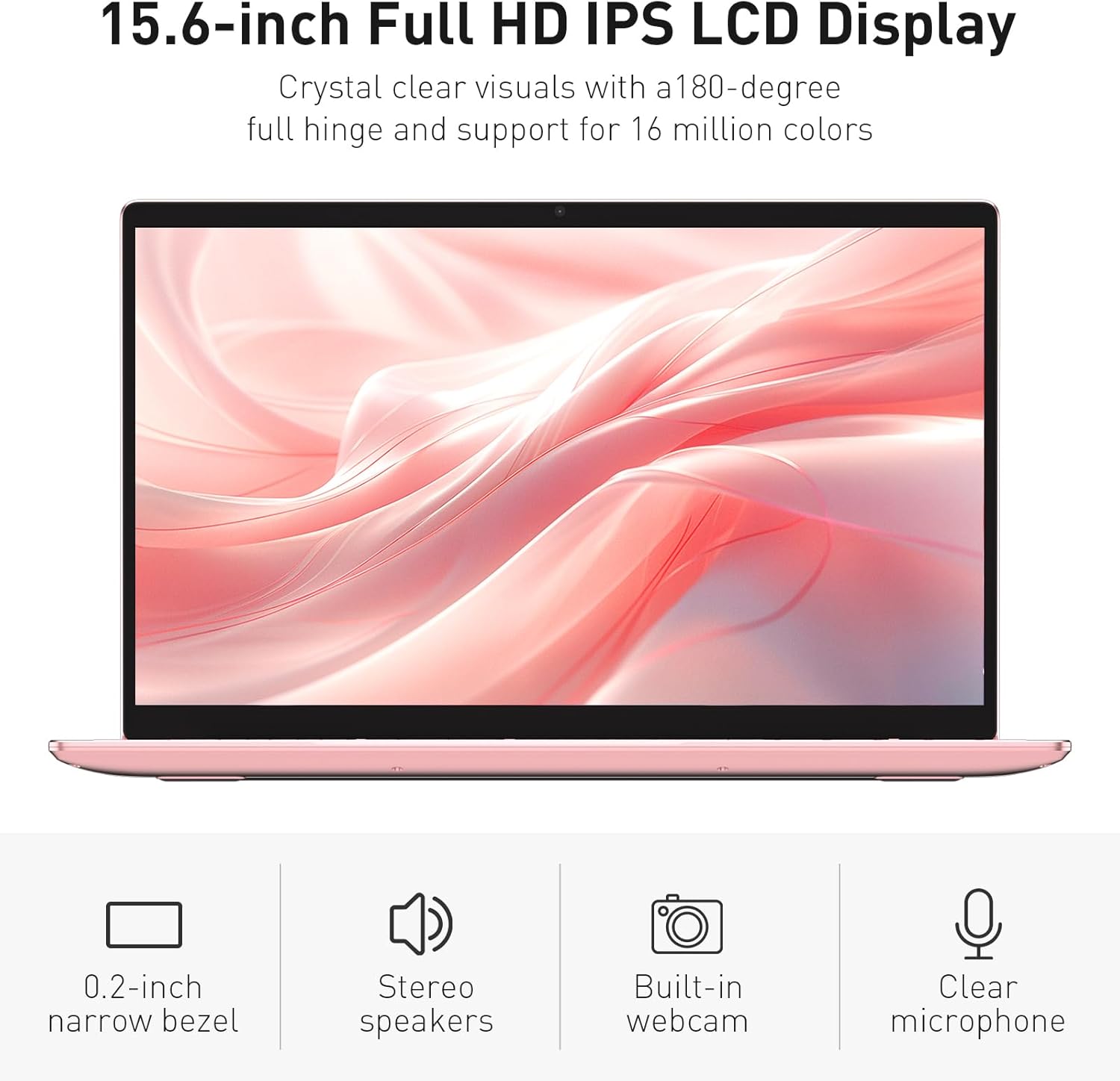
Image: The various ports available on the sides of the laptop.
4. Gosod
4.1 Pŵer Ymlaen a Gwefru Cychwynnol
- Unpack the laptop and power adapter from the box.
- Connect the power adapter to the DC power input port on the laptop and then to a power outlet.
- Allow the laptop to charge for at least 30 minutes before initial use, or until the charging indicator light shows a full charge.
- Pwyswch y botwm pŵer i droi'r gliniadur ymlaen.
4.2 Windows 11 Pro Setup
Follow the on-screen instructions to complete the initial Windows 11 Pro setup. This will include:
- Dewis eich rhanbarth a chynllun eich bysellfwrdd.
- Cysylltu â rhwydwaith Wi-Fi.
- Derbyn y cytundeb trwydded.
- Creu cyfrif defnyddiwr neu fewngofnodi gyda chyfrif Microsoft.
4.3 Gosod Synhwyrydd Olion Bysedd
For enhanced security, set up the fingerprint sensor:
- Once Windows is set up, navigate to Settings > Accounts > Sign-in options.
- Under 'Windows Hello Fingerprint', click Sefydlu.
- Follow the on-screen prompts to register your fingerprint. You will be asked to lift and place your finger multiple times on the sensor until it is fully registered.
5. Gweithredu'r Gliniadur
5.1 Defnydd Sylfaenol
- Pŵer ymlaen / i ffwrdd: Press the power button located on the top right of the keyboard to turn the laptop on or off.
- Modd Cwsg: Caewch y caead neu pwyswch y botwm pŵer yn fyr i roi'r gliniadur mewn modd cysgu.
- Restart/Shut Down: Access these options from the Start Menu in Windows.
5.2 Backlit Keyboard Control
The keyboard backlight can be adjusted or turned off using the function keys. Look for the key with a keyboard icon (often F5 or F6) to cycle through brightness levels or toggle the backlight on/off.
5.3 WebCam Preifatrwydd Shutter
Mae'r integredig webcam includes a physical privacy shutter. Slide the small cover located directly above the webcam lens to open or close it, ensuring your privacy when the camera is not in use.
5.4 Cysylltu Dyfeisiau Allanol
Use the available ports to connect peripherals:
- Dyfeisiau USB: Plug USB drives, mice, or keyboards into the USB-A ports.
- Arddangosfa Allanol: Connect an external monitor or projector using the HDMI port.
- Sain: Use the headphone jack for headphones or external speakers.
- Cerdyn MicroSD: Insert a microSD card into the dedicated slot for additional storage or data transfer.
5.5 Perfformiad Hapchwarae
The Auusda T156A is capable of handling light gaming and provides a smooth experience for many popular titles. For optimal performance, ensure your drivers are updated and close unnecessary background applications.
Video: Demonstration of the Auusda T156A laptop's light gaming capabilities.
Fideo: Clip byr yn dangosasing the laptop's performance during racing games.
6. cynnal
- Glanhau: Defnyddiwch frethyn meddal, di-flwff i lanhau'r sgrin a'r tu allan. Ar gyfer staeniau ystyfnig, dampgolchwch y lliain gyda dŵr neu lanhawr sy'n ddiogel i sgriniau. Osgowch gemegau llym.
- Gofal Batri: To prolong battery life, avoid fully discharging the battery frequently. It is recommended to keep the battery charged between 20% and 80% when possible. Store the laptop in a cool, dry place.
- Diweddariadau Meddalwedd: Regularly check for and install Windows updates and driver updates to ensure optimal performance and security.
- Awyru: Ensure the laptop's vents are not obstructed to prevent overheating. Use the laptop on a hard, flat surface.
- Copi wrth gefn o ddata: Gwnewch gopïau wrth gefn o ddata pwysig yn rheolaidd i yriant allanol neu storfa cwmwl i atal colli data.
7. Datrys Problemau
This section addresses common issues you might encounter with your Auusda T156A laptop.
| Problem | Ateb Posibl |
|---|---|
| Nid yw'r gliniadur yn troi ymlaen. | Ensure the power adapter is securely connected and the outlet is working. Try charging the laptop for a while before attempting to power it on again. |
| Mae'r sgrin yn wag neu'n ddu. | Check if the laptop is powered on. Try pressing Fn + F1 (or the display toggle key) to ensure the display is not turned off. Connect to an external monitor to check if the issue is with the laptop's screen. |
| Problemau cysylltiad Wi-Fi. | Gwnewch yn siŵr bod Wi-Fi wedi'i alluogi yng ngosodiadau Windows. Ailgychwynwch eich llwybrydd a'r gliniadur. Gwiriwch am yrwyr Wi-Fi wedi'u diweddaru. |
| Synhwyrydd olion bysedd ddim yn gweithio. | Ensure your finger is clean and dry. Re-register your fingerprint in Windows settings. Check for driver updates for the fingerprint sensor. |
| Nid yw cefn golau'r bysellfwrdd yn gweithio | Press the dedicated backlight function key (e.g., Fn + F5 or F6) to toggle or adjust brightness. |
| Mae'r gliniadur yn rhedeg yn araf. | Close unnecessary applications. Check Task Manager for resource-intensive processes. Ensure sufficient free space on the SSD. Run a malware scan. |
8. manylebau
Detailed technical specifications for the Auusda T156A laptop:
| Nodwedd | Manylyn |
|---|---|
| Brand | Auusda |
| Enw Model | T156A |
| Maint Sgrin | 15.6 modfedd |
| Maint y ddisg galed | 512 GB (SSD) |
| Model CPU | Intel N95 (4-Core, 1.7 GHz base, up to 3.4 GHz turbo) |
| Maint Cof RAM wedi'i Gosod | 8 GB DDR4 |
| System Weithredu | Windows 11 Pro |
| Nodweddion Arbennig | Backlit Keyboard, Fingerprint Reader |
| Cydbrosesydd graffeg | UHD Graphics (Integrated) |
| Technoleg Cysylltedd | Bluetooth, Wi-Fi (802.11ac, 802.11ax) |
| Nifer y Porthladdoedd | 2 (USB-A, HDMI, microSD, Headphone Jack) |
| Math Cell Batri | Polymer Lithiwm (6000 mAh) |
| Dimensiynau Eitem (L x W x Trwch) | 14"H x 9"L x 0.7"Tr |
| Datrysiad Brodorol | 1920 x 1080 picsel |
| Cyfradd Adnewyddu | 60 Hz |
| Webcam Capability | Yes (with privacy shutter) |
9. Gwarant a Chefnogaeth
9.1 Gwarant Cynnyrch
The Auusda T156A laptop comes with a Gwarant Gwneuthurwr 2 Flwyddyn. Please retain your proof of purchase for warranty claims. For detailed warranty terms and conditions, refer to the documentation provided with your product or contact Auusda customer support.
9.2 Cefnogaeth i Gwsmeriaid
For technical assistance, troubleshooting, or service inquiries, please visit the official Auusda Store or contact their customer support channels. You can find more information and support resources at the Auusda Official Store on Amazon.
Video: A short promotional video from the Auusda Official Store, showcasing the laptop's features for college students.