
Rhagymadrodd
This manual provides essential information for the setup, operation, maintenance, and troubleshooting of your Onn 22 inch 1080P 100 Hz FHD LED Monitor. Please read this guide thoroughly before using the product to ensure optimal performance and safety.
The Onn 22 inch FHD LED Monitor is designed for a variety of applications, offering a vivid 1920x1080 resolution, a 100Hz refresh rate, and a 6.5ms response time for efficient performance. Its slim profile and T-shaped base are ideal for saving desk space.
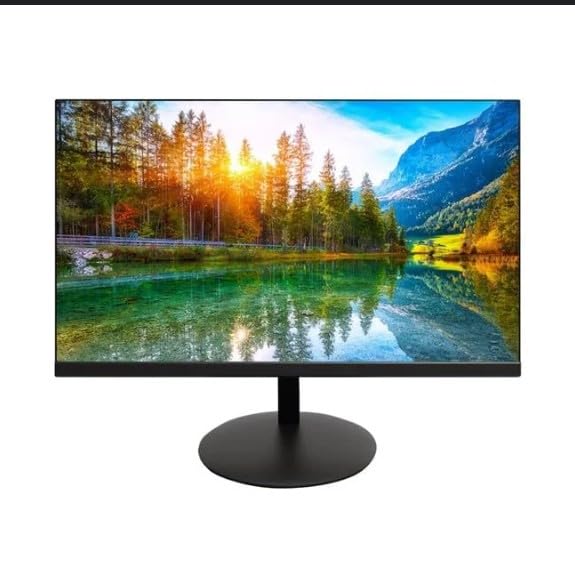
The image shows the Onn 22 inch FHD LED Monitor, highlighting its 100Hz refresh rate and 1080p resolution. The monitor features a slim design and a T-shaped base.
Cyfarwyddiadau Gosod
- Dadbacio: Carefully remove the monitor and all accessories from the packaging. Ensure all components are present: monitor, T-shaped base, HDMI cable, and power adapter.
- Cydosod y Stondin: Attach the T-shaped base to the monitor. The design is screw-less for easy assembly. Ensure it is securely fastened.
- Cysylltu â Dyfais:
The monitor supports both HDMI and VGA inputs. Connect the provided HDMI cable from your computer's HDMI output to the HDMI IN port on the monitor. Alternatively, use a VGA cable for VGA input.

This image displays the rear panel of the Onn monitor, illustrating the available input ports: HDMI IN, VGA IN, and the DC 12V power input. These ports are essential for connecting the monitor to a computer or other devices.
- Cysylltiad Pwer: Connect the power adapter to the DC 12V input port on the monitor, then plug the adapter into a power outlet.
- Addasu'r Monitor: The monitor is capable of swivel, tilt, rotation, and height adjustment. Adjust the screen to your preferred viewing ongl ar gyfer cysur ergonomig.
- Gosod Monitor Deuol: This monitor is suitable for a fully functioning dual monitor setup. Connect a second monitor using the appropriate cables and configure your operating system's display settings.
Cyfarwyddiadau Gweithredu
- Pŵer ymlaen / i ffwrdd: Press the power button, usually located on the bottom or back of the monitor, to turn it on or off.
- Dewis Mewnbwn: If the monitor does not automatically detect the input source, use the On-Screen Display (OSD) menu buttons to manually select between HDMI and VGA inputs.
- Llywio Dewislen OSD: Use the physical buttons on the monitor (typically on the back or bottom edge) to navigate the OSD menu. This allows you to adjust settings such as brightness, contrast, color temperature, and input source.
- Datrysiad a Chyfradd Adnewyddu: The monitor supports a native resolution of 1920x1080 at a 100Hz refresh rate. Ensure your computer's display settings are configured to these specifications for the best visual experience.
- Cysoni Addasol: The monitor features Adaptive Sync for gaming, which helps to reduce screen tearing and stuttering. Ensure this feature is enabled in your graphics card settings if supported.
Cynnal a chadw
- Glanhau'r sgrin: Sychwch y sgrin yn ysgafn gyda lliain meddal, di-flwff. Ar gyfer marciau ystyfnig, sychwch yn ysgafnampen the cloth with water or a non-abrasive, monitor-specific cleaning solution. Avoid spraying liquids directly onto the screen.
- Glanhau'r Casing: Defnyddiwch frethyn meddal, sych i lanhau'r monitor casing. Do not use strong detergents or solvents, as they may damage the finish.
- Awyru: Gwnewch yn siŵr nad yw agoriadau awyru'r monitor wedi'u blocio i atal gorboethi.
- Storio: Pan nad yw'n cael ei ddefnyddio am gyfnodau hir, storiwch y monitor mewn lle oer, sych, i ffwrdd o olau haul uniongyrchol a thymheredd eithafol.
Datrys problemau
- Dim pŵer:
- Gwiriwch a yw'r cebl pŵer wedi'i gysylltu'n ddiogel â'r monitor a'r allfa bŵer.
- Sicrhewch fod yr allfa bŵer yn gweithio'n gywir.
- Dim Arwydd:
- Ensure the video cable (HDMI or VGA) is firmly connected to both the monitor and the computer.
- Select the correct input source using the monitor's OSD menu.
- Gwiriwch a yw'ch cyfrifiadur wedi'i droi ymlaen ac nad yw mewn modd cysgu.
- Flickering Screen or Poor Image Quality:
- Gwiriwch y cebl fideo am ddifrod neu gysylltiadau rhydd.
- Adjust the resolution and refresh rate settings on your computer to match the monitor's specifications (1920x1080, 100Hz).
- Ailosod gosodiadau'r monitor i ddiofynion y ffatri drwy'r ddewislen OSD.
- Botymau Ddim yn Ymateb:
- Unplug the monitor from the power outlet, wait for 30 seconds, and then plug it back in.
If problems persist, please refer to the support information provided in the "Support and Warranty" section.
Manylebau
| Brand | Onn |
| Rhif Model | 100140681 |
| Enw Model | OTTO |
| Maint Sgrin | 21.5 modfedd |
| Math Arddangos | LED, LCD |
| Datrysiad | 1920 x 1080 (FHD 1080p) |
| Cyfradd Adnewyddu | 100 Hz |
| Amser Ymateb | 6.5 o filieiliadau |
| Rhyngwyneb Caledwedd | HDMI, VGA |
| Nodweddion Arbennig | Addasiad Uchder |
| Viewongl ing | 160 Gradd |
| Cymhareb Agwedd | 16:9 |
| Dimensiynau Cynnyrch | 49.2 x 20 x 37.2 cm; 3.24 kg |
Cefnogaeth a Gwarant
For technical support, product inquiries, or warranty information, please visit the official Onn support websafle neu cysylltwch â'u gwasanaeth cwsmeriaid.
- Cefnogaeth Swyddogol Websafle: onnsupport.ca
- Gwarant: Specific warranty details may vary by region and purchase date. Please refer to the documentation included with your product or visit the support websafle am y wybodaeth warant ddiweddaraf.


