
Thunderobot ML903
Thunderobot ML903 Wireless Gaming Mouse User Manual
Model: ML903
1. Rhagymadrodd
Thank you for choosing the Thunderobot ML903 Wireless Gaming Mouse. This manual provides detailed instructions for setting up, operating, maintaining, and troubleshooting your device. The ML903 is designed for high-performance gaming, featuring a PixArt PAW3395 sensor, tri-mode connectivity, an ultra-lightweight design, and a 4K polling rate with a magnetic charging dock.

Thunderobot ML903 Wireless Gaming Mouse on its RGB charging dock.
2. Cynnyrch Drosview
2.1 Nodweddion Allweddol
- Next-Gen Optical Sensor: Equipped with PixArt PAW3395 sensor for 26,000 DPI, 650 IPS, and 50G acceleration.
- Ultra-Fast 4000Hz Polling Rate: Ensures real-time responsiveness and zero-latency gameplay.
- Ergonomic & Ultra-Lightweight Design: Weighs just 65 grams for comfortable, extended use.
- Cysylltedd Tri-Modd: Supports Wired USB-C, 2.4GHz wireless, and Bluetooth connections.
- Bywyd batri hir: Over 70 hours of continuous gameplay on a single charge.
- Doc Gwefru Magnetig: Convenient RGB charging dock with DPI indicator.
- Switshis Gwydn: 80-million click lifecycle for enduring performance.

Key features of the ML903 mouse, including its lightweight design, optical sensor, and connectivity options.
2.2 Cynnwys Pecyn
- Thunderobot ML903 Wireless Gaming Mouse
- Magnetic RGB Charging Dock (with 4K Hz Transceiver)
- USB-C i USB-A Cebl
- 2.4GHz Wireless Receiver (dongle)
- Llawlyfr Defnyddiwr (y ddogfen hon)
3. Gosod
3.1 Gwefru'r Llygoden
Before first use, it is recommended to fully charge the mouse. The ML903 offers two charging methods:
- Doc Gwefru Magnetig: Place the mouse onto the magnetic charging dock. Ensure the mouse aligns correctly with the charging pins. The RGB lighting on the dock will indicate charging status.
- Cebl USB-C: Connect the provided USB-C cable directly to the mouse's USB-C port and the other end to a powered USB port on your computer or a USB wall adapter.
The mouse features an intuitive battery indicator and a low-power reminder that activates below 10% battery level.

The Thunderobot ML903 mouse being charged on its magnetic RGB charging dock.

Features of the Thunderobot Wireless Charging Dock 4K, including magnetic charging, RGB lighting, and DPI indicator.
3.2 Moddau Cysylltedd
The ML903 supports three connectivity modes:
- Modd Gwifredig (USB-C):
Connect the USB-C cable directly from the mouse to your computer. The mouse will function immediately, and it will charge simultaneously. This mode is plug-and-play. - Modd Diwifr 2.4GHz:
For optimal performance, use the magnetic charging dock which acts as a 4K Hz transceiver. Connect the dock to your computer via USB. The mouse will automatically connect to the dock. Alternatively, you can use the smaller 2.4GHz USB dongle directly plugged into your computer for standard 1K Hz polling rate. Ensure the mouse's mode switch (located on the underside) is set to 2.4G. - Modd Bluetooth:
Turn the three-position switch on the underside of the mouse to the right (Bluetooth mode). Long press the Bluetooth coding key (usually a small button near the switch or on the underside) to enter pairing mode. The mouse's indicator light will flash. On your computer or device, search for Bluetooth devices and select "Thunderobot ML903" to pair.

Image demonstrating the tri-mode connectivity of the ML903 mouse, connected to a laptop and a monitor setup.

Visual guide to the three connectivity modes: Bluetooth, 2.4G, and Wired.
4. Gweithrediad
4.1 Addasiad DPI
The ML903 mouse features a dedicated DPI button, typically located behind the scroll wheel. Press this button to cycle through different DPI sensitivity levels. Each DPI level is often indicated by a distinct RGB color on the mouse or charging dock, providing quick visual confirmation of your current precision setting.
4.2 Cyfradd Pleidleisio
The ML903 supports up to a 4000Hz polling rate when used with its magnetic charging dock/transceiver. This high polling rate minimizes input lag, providing extremely smooth and responsive tracking, crucial for competitive gaming. When using the standard 2.4GHz dongle or Bluetooth, the polling rate will be lower (typically 1000Hz or less).
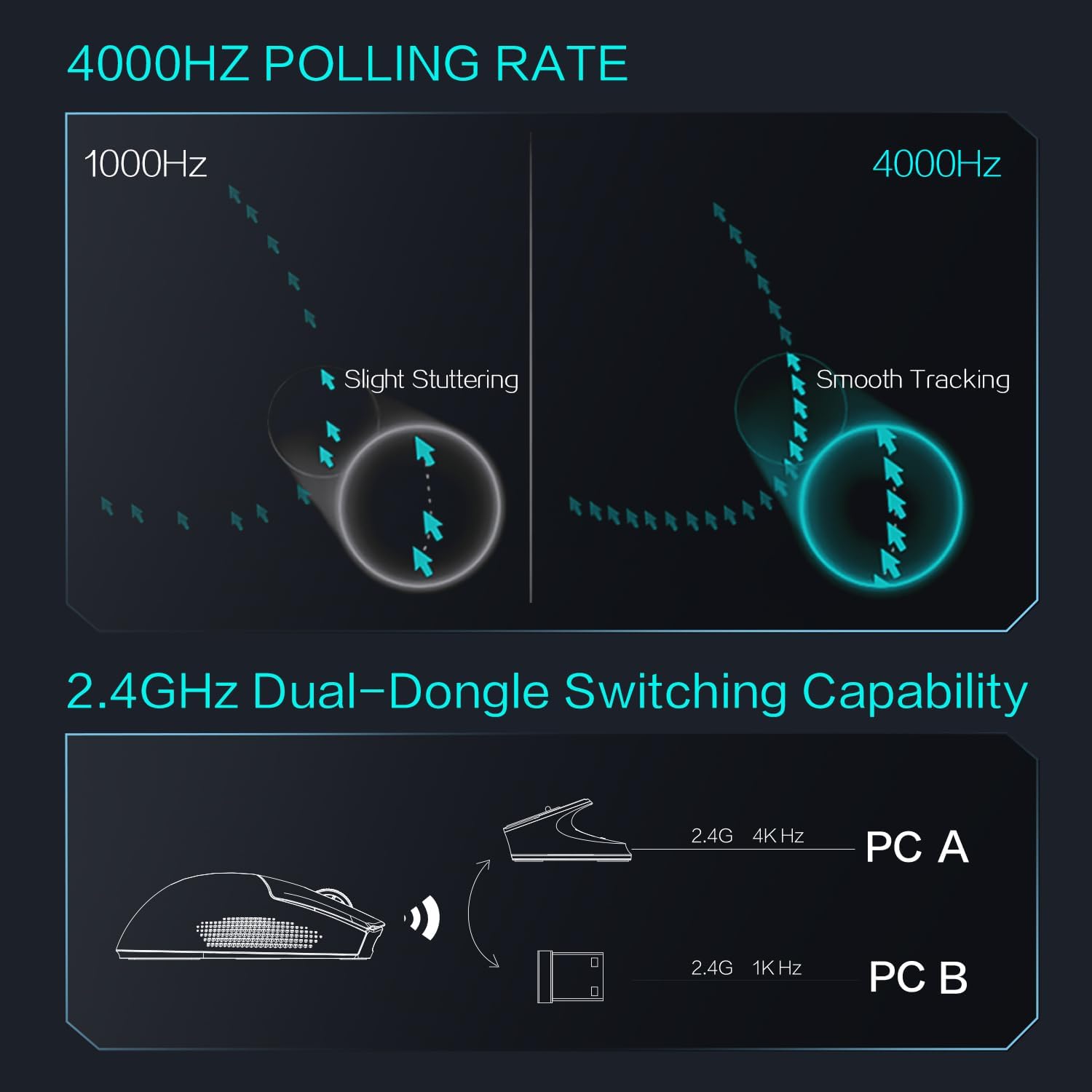
Diagram illustrating the 4000Hz polling rate and 2.4GHz dual-dongle switching capability.

Comparison of polling rates (1000Hz, 2000Hz, 4000Hz) demonstrating smoother tracking at higher rates.
4.3 Ergonomeg a Gafael
The ML903 features an ergonomic, ultra-lightweight design (65g) with a refined structural design. It is crafted for comfort during long gaming sessions and is suitable for various grip styles including palm, fingertip, and claw grips.

Ergonomic design features of the ML903 mouse, showing frontal trapezoidal elevation and midsection waistline.

Diagram illustrating different grip styles (palm, fingertip, claw) compatible with the ML903's lightweight symmetrical design.
5. cynnal
To ensure the longevity and optimal performance of your Thunderobot ML903 mouse, follow these maintenance guidelines:
- Glanhau: Use a soft, dry cloth to wipe the surface of the mouse and charging dock. For stubborn dirt, slightly dampen the cloth with water or a mild electronic cleaner. Avoid using harsh chemicals or abrasive materials.
- Glanhau Synhwyrydd: Occasionally, use a cotton swab or compressed air to gently clean the optical sensor on the underside of the mouse to prevent tracking issues.
- Storio: Pan nad ydynt yn cael eu defnyddio am gyfnodau hir, storiwch y llygoden a'r doc mewn lle oer, sych i ffwrdd o olau haul uniongyrchol a thymheredd eithafol.
- Gofal Cebl: Avoid sharp bends or kinks in the USB-C cable to prevent internal damage.
- Traed Llygoden: The ML903 uses 100% PTFE mouse feet for smooth glide. If they become worn, replacement feet can be purchased from authorized retailers.

Ochr isaf view of the ML903 mouse, showing 100% PTFE mouse feet, paracord cable, Type-C port, and receiver extender.
6. Datrys Problemau
If you encounter issues with your Thunderobot ML903 mouse, please refer to the following common troubleshooting steps:
- Llygoden Ddim yn Ymateb:
- Gwnewch yn siŵr bod y llygoden wedi'i gwefru.
- Check the connectivity mode switch on the underside of the mouse (Wired, 2.4G, Bluetooth).
- For 2.4GHz wireless, ensure the receiver/dock is properly connected to your computer. Try a different USB port.
- For Bluetooth, ensure Bluetooth is enabled on your device and the mouse is paired. Try re-pairing.
- If in wired mode, ensure the USB-C cable is securely connected to both the mouse and the computer.
- Tracking Issues / Cursor Lag:
- Glanhewch y synhwyrydd optegol ar ochr isaf y llygoden.
- Ensure you are using a suitable mouse pad or surface.
- Check for interference if using 2.4GHz wireless (e.g., other wireless devices).
- Ensure the 4000Hz polling rate is enabled if using the charging dock.
- Problemau Codi Tâl:
- Ensure the magnetic dock is properly connected to a power source.
- Verify the mouse is correctly seated on the charging dock, making good contact with the pins.
- If charging via USB-C, try a different USB port or cable.
- Goleuadau RGB Ddim yn Gweithio:
- Gwnewch yn siŵr bod gan y llygoden ddigon o wefr batri.
- Check if any software settings have disabled RGB lighting.
If the issue persists after trying these steps, please contact Thunderobot customer support.
7. manylebau
| Nodwedd | Manyleb |
|---|---|
| Model | ML903 |
| Synhwyrydd | Synhwyrydd Optegol PixArt PAW3395 |
| DPI (Dotiau Fesul Fodfedd) | Hyd at 26,000 |
| IPS (Modfeddi yr Eiliad) | 650 Uchafswm |
| Cyflymiad | 50G Uchafswm |
| Cyfradd Bleidleisio | 4000Hz (with charging dock/transceiver), 1000Hz (with standard dongle/Bluetooth) |
| Pwysau | 65 gram |
| Cysylltedd | Gwifredig (USB-C), Di-wifr 2.4GHz, Bluetooth |
| Bywyd Batri | 70+ hours (continuous gameplay) |
| Switsys | 80-million click lifecycle |
| Traed Llygoden | 100% PTFE |
| Codi tâl | Doc Gwefru Magnetig, USB-C |

Detailed specifications of the PixArt PAW3395 sensor, including resolution, speed, acceleration, and tracking accuracy.
8. Gwarant a Chefnogaeth
Thunderobot products are designed and manufactured to the highest quality standards. For information regarding warranty coverage and terms, please refer to the warranty card included with your product or visit the official Thunderobot websafle.
For technical support, troubleshooting assistance, or to inquire about replacement parts, please contact Thunderobot customer service through their official channels. You can find more information and support resources by visiting the Thunderobot Store on Amazon neu eu brand swyddogol websafle.
Ask a question about this manual
Ask about setup, troubleshooting, compatibility, parts, safety, or missing instructions. Manuals+ will review the question and use this page’s manual context to help answer it.