1. Rhagymadrodd
The CrossBeats Hawk Gaming TWS in-Ear Buds are designed to provide an immersive audio experience for gaming and music. Featuring ultra-low latency, dynamic RGB lighting, and environmental noise cancellation, these earbuds offer high-performance audio and clear communication. This manual provides detailed instructions for setup, operation, and maintenance to ensure optimal use of your device.
2. Beth sydd yn y Bocs
- CrossBeats Hawk Gaming TWS Earbuds
- Charging Case with Type-C Dongle
- Cebl Codi Tâl USB
- Llawlyfr Defnyddiwr
- Clustogau Clust (amrywiol feintiau)
- Cerdyn Gwarant
3. Cynnyrch Drosview
Familiarize yourself with the components and features of your CrossBeats Hawk earbuds.
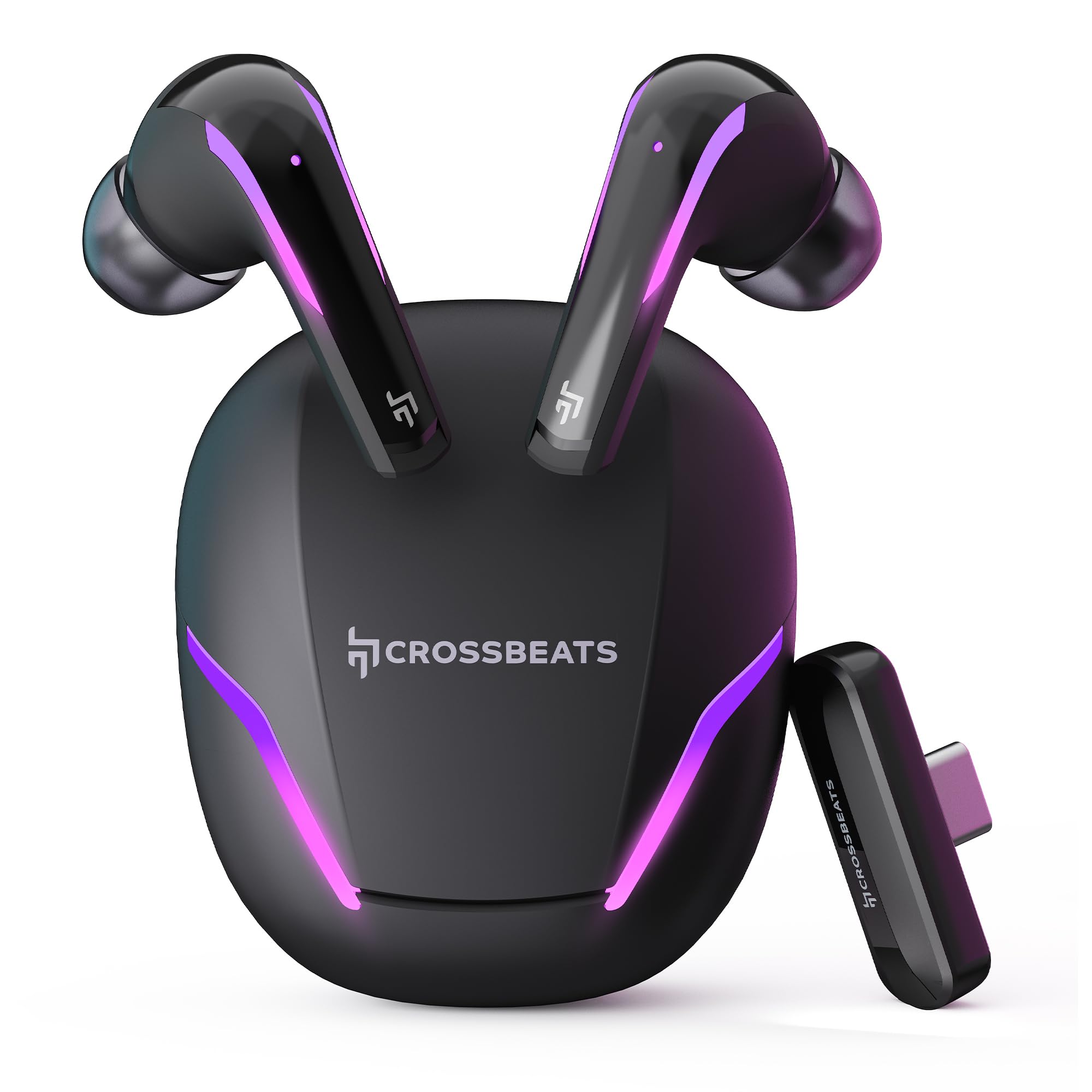
Figure 1: CrossBeats Hawk Gaming TWS Earbuds and Charging Case with highlighted features.
3.1 Charging Case and Dongle

Figure 2: The 2.4G Type C Dongle for direct connection to compatible devices.
3.2 Earbud Design and Features

Ffigur 3: Mewnol view of an earbud showcasing the 14mm Titanium Driver.

Figure 4: Earbud with Dedicated Gaming DSP for optimized audio processing.

Figure 5: Earbud with AI Environmental Noise Cancellation (ENC) for clear calls.

Figure 6: Illustration of Music Mode and Gaming Mode.
4. Gosod
4.1 Paru Bluetooth Cychwynnol
- Sicrhewch fod y clustffonau wedi'u gwefru.
- Open the charging case. The earbuds will automatically enter pairing mode, indicated by flashing RGB lights.
- On your device (smartphone, tablet, laptop), go to Bluetooth settings and turn on Bluetooth.
- Chwiliwch am available devices and select "CrossBeats Hawk" from the list.
- Ar ôl cysylltu, bydd y clustffonau'n dynodi paru llwyddiannus.
4.2 Connecting via Type-C Dongle (2.4GHz Wireless)
For ultra-low latency gaming, use the included Type-C dongle.
- Remove the Type-C dongle from its slot in the charging case.
- Plug the dongle into the Type-C port of your compatible gaming device (smartphone, tablet, PC, console).
- The earbuds will automatically connect to the dongle, entering dedicated Game Mode.
- Ensure your device's audio output is set to the dongle if necessary.
Video 1: Demonstration of connecting the Type-C dongle to a smartphone and launching a mobile game, showcasing the seamless integration for gaming.
5. Cyfarwyddiadau Gweithredu
5.1 Pŵer Ymlaen/Diffodd
- Pŵer Ymlaen: Agorwch y cas gwefru, neu tynnwch y clustffonau allan o'r cas. Byddant yn troi ymlaen yn awtomatig.
- Pwer i ffwrdd: Rhowch y clustffonau yn ôl yn y cas gwefru a chau'r caead. Byddant yn diffodd yn awtomatig.
Video 2: Visual guide on opening the CrossBeats Hawk charging case, removing the earbuds, and observing the dynamic RGB lighting effects.
5.2 Rheolaethau Cyffwrdd
The CrossBeats Hawk earbuds feature touch controls for various functions:
- Chwarae/Seibiant: Tap sengl ar y naill glust neu'r llall.
- Trac Nesaf: Tapiwch ddwywaith ar y glustffon dde.
- Trac Blaenorol: Tapiwch ddwywaith ar y glustffon chwith.
- Ateb / Diwedd Galwad: Tap sengl ar y naill glust neu'r llall.
- Gwrthod Galwad: Pwyswch a daliwch y naill glust neu'r llall am 2 eiliad.
- Ysgogi Cynorthwyydd Llais: Tapiwch driphlyg ar y naill glustffon neu'r llall.
- Switch EQ Mode (Music/Gaming): Pwyswch a dal y earbud dde am 2 eiliad.
5.3 Switching EQ Modes
The earbuds support two Equalizer (EQ) modes: E-Sports (Gaming) and Music. To switch between modes, press and hold the right earbud for 2 seconds. A voice prompt will confirm the mode change.
6. Gaming Mode with Dongle
The dedicated Game Mode, activated via the Type-C dongle, provides ultra-low latency (under 10ms) for a synchronized audio and video experience, crucial for competitive gaming.

Figure 7: Ultra-low latency for instant action in gaming.

Figure 8: Sonic-Link Technology for high-speed wireless connection.
When the dongle is connected, the earbuds prioritize the 2.4GHz wireless connection for minimal audio delay. This mode is ideal for fast-paced games where audio cues are critical.
7. Codi tâl
To charge the CrossBeats Hawk earbuds and charging case:
- Rhowch y ddau glustffon yn y cas gwefru. Gwnewch yn siŵr eu bod wedi'u gosod yn iawn.
- Cysylltwch y cebl gwefru USB Math-C a ddarperir â'r porthladd gwefru ar y cas ac â ffynhonnell bŵer.
- The RGB lights on the case will indicate charging status. A full charge takes approximately 2 hours.
- The earbuds offer up to 10 hours of listening time on a single charge, with the charging case extending total playtime to 100 hours.

Figure 9: Charging case and earbuds illustrating extended battery life.
8. cynnal
To ensure the longevity and performance of your earbuds:
- Glanhau: Glanhewch y clustffonau a'r cas gwefru yn rheolaidd gyda lliain meddal, sych, heb lint. Peidiwch â defnyddio cemegau llym na deunyddiau sgraffiniol.
- Cynghorion Clust: Tynnwch a glanhewch flaenau'r clustiau o bryd i'w gilydd. Gwnewch yn siŵr eu bod yn hollol sych cyn eu hailgysylltu.
- Cysylltiadau Codi Tâl: Keep the charging contacts on both the earbuds and the case clean and free of debris.
- Storio: Pan nad ydynt yn cael eu defnyddio, storiwch y clustffonau yn eu cas gwefru i'w hamddiffyn a'u cadw'n wefredig.
- Gwrthiant Dŵr: Mae'r clustffonau'n dal dŵr, ond nid yn dal dŵr. Osgowch eu trochi mewn dŵr na'u hamlygu i law trwm. Sychwch nhw'n drylwyr os ydyn nhw'n gwlychu.
9. Datrys Problemau
If you encounter issues with your CrossBeats Hawk earbuds, refer to the following common solutions:
- Dim Sain/Cysylltiad:
- Gwnewch yn siŵr bod y clustffonau wedi'u gwefru ac wedi'u troi ymlaen.
- Check Bluetooth settings on your device and ensure "CrossBeats Hawk" is connected.
- If using the dongle, ensure it is securely plugged in and your device's audio output is directed to the dongle.
- Try resetting the earbuds by placing them in the case, closing the lid for 10 seconds, then reopening.
- Clustffonau Ddim yn Codi Tâl:
- Gwnewch yn siŵr bod y cebl gwefru wedi'i gysylltu'n ddiogel â'r cas a'r ffynhonnell bŵer.
- Verify the charging contacts on the earbuds and case are clean.
- Rhowch gynnig ar gebl gwefru neu addasydd pŵer gwahanol.
- Low Latency Issues:
- Ensure you are using the Type-C dongle for Game Mode. Bluetooth connection will have higher latency.
- Minimize interference by staying close to your device.
- Materion meicroffon:
- Gwnewch yn siŵr nad yw'r meicroffonau wedi'u rhwystro.
- Check your device's audio input settings to confirm the earbuds are selected.
10. manylebau
| Nodwedd | Manyleb |
|---|---|
| Enw Model | Hawk (CB-Hawk) |
| Technoleg Cysylltedd | Wireless (Bluetooth 5.4, 2.4GHz Dongle) |
| Fersiwn Bluetooth | 5.4 |
| Amrediad Bluetooth | 10 Metr |
| Math Gyrrwr Sain | 14mm Titanium Dynamic Driver |
| Cudd | Ultra Low <10ms (with Dongle) |
| Meicroffonau | 6 (4 with AI ENC) |
| Bywyd Batri | Hyd at 100 awr (gyda chas gwefru) |
| Amser Codi Tâl | 2 Awr |
| Rheoli Sŵn | Sound Isolation, AI ENC |
| Math o Reoli | Rheoli Cyffwrdd |
| Lefel Gwrthsefyll Dŵr | Gwrth-ddŵr |
| Pwysau Eitem | 48 gram |
| Deunydd | Plastig |
| Nodweddion Arbennig | RGB Lights, AI ENC, Ultra-Low Latency Gaming Mode, Water Resistance |
11. Gwarant a Chefnogaeth
Your CrossBeats Hawk Gaming TWS in-Ear Buds come with a manufacturer's warranty. Please refer to the included Warranty Card for detailed terms and conditions. For technical support, product inquiries, or warranty claims, please contact CrossBeats customer service through their official websafle neu'r wybodaeth gyswllt a ddarperir ar y cerdyn gwarant.