
1. Rhagymadrodd
Thank you for choosing the taopodo M13-BK Bluetooth Speaker. This portable speaker combines powerful audio with dynamic RGB lighting, designed for an enhanced listening experience. Featuring Bluetooth 5.4 connectivity, IPX7 waterproofing, and a long-lasting battery, it is suitable for various environments, from indoor gatherings to outdoor adventures.

2. Nodweddion Cynnyrch
- 30W Dual Dynamic Audio: Experience rich and powerful sound with dual bass drivers.
- Goleuadau RGB deinamig: Features 3 dynamic RGB light modes with 5 change patterns and 30 light variations to enhance your listening atmosphere.
- Bluetooth 5.4: Provides stable and efficient wireless connectivity with compatible devices.
- Dal dŵr IPX7: Designed to withstand immersion in water up to 1 meter for 30 minutes, making it ideal for outdoor use.
- Up to 30 Hours Operating Time: Enjoy extended music playback on a single charge (up to 24 hours at 50% volume with lights off).
- Meicroffon adeiledig: Allows for hands-free calling.
- Paru TWS (Stereo Di-wifr Gwirioneddol): Connect two M13-BK speakers for an immersive stereo sound experience.
- Dulliau Chwarae Lluosog: Supports Bluetooth, AUX input, and TF Card playback.


3. Cynnwys Pecyn
Ticiwch y blwch ar gyfer yr eitemau canlynol:
- taopodo Bluetooth Speaker (M13-BK)
- Cebl Codi Tâl USB
- Canllaw Cychwyn Cyflym
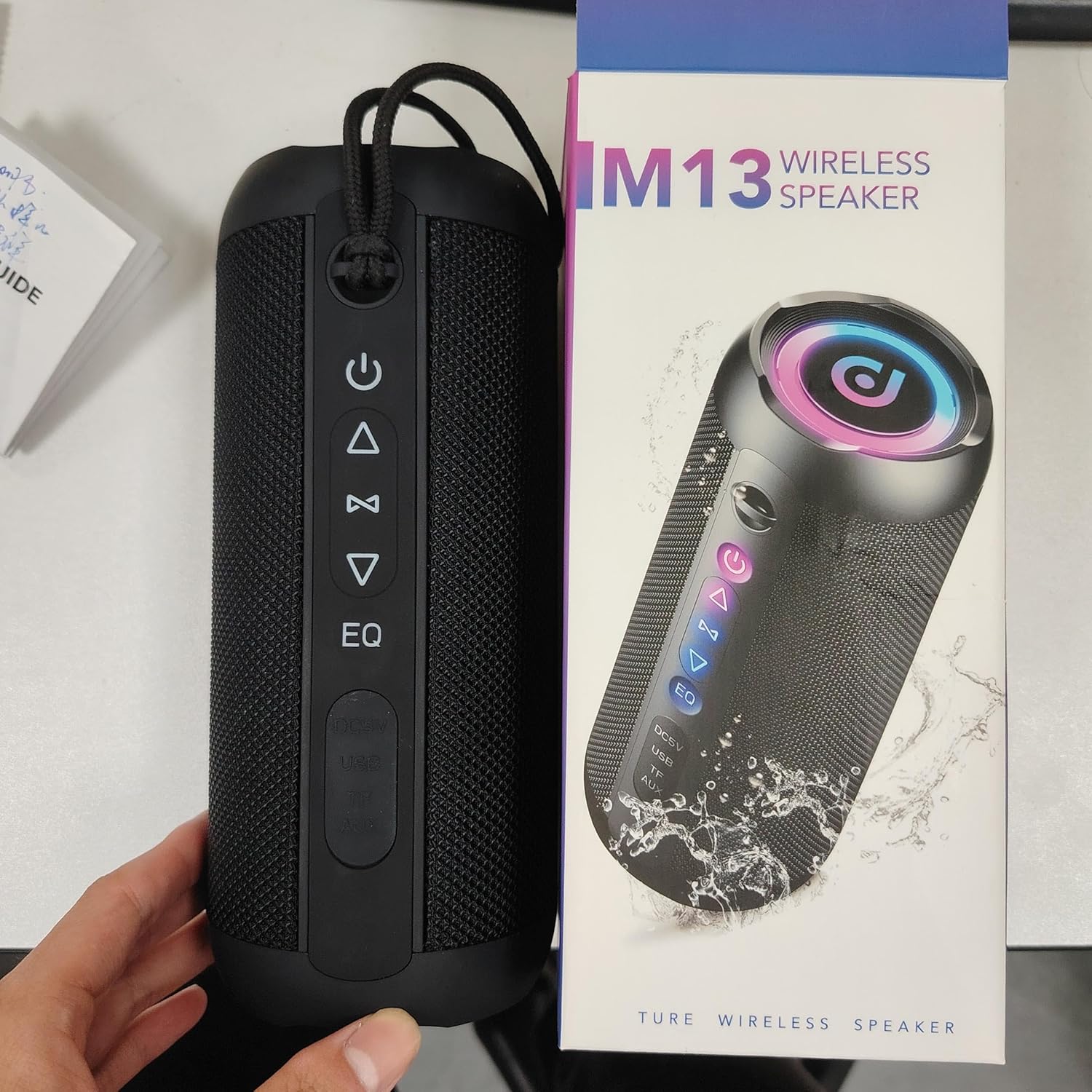
4. Gosod
4.1 Gwefru'r Siaradwr
Before first use, fully charge the speaker. Connect the provided USB charging cable to the DC5V port on the speaker and the other end to a USB power adapter (not included) or a computer USB port. The charging indicator light will show the charging status and turn off when fully charged.
4.2 Pweru Ymlaen/Diffodd
- Pŵer Ymlaen: Pwyswch a dal y Botwm pŵer () for 2-3 seconds until you hear an audible prompt and the lights illuminate.
- Pwer i ffwrdd: Pwyswch a dal y Botwm pŵer for 2-3 seconds until you hear an audible prompt and the lights turn off.
4.3 Pâr Bluetooth
- Gwnewch yn siŵr bod y siaradwr wedi'i bweru ymlaen ac yn y modd paru Bluetooth (a nodir gan olau sy'n fflachio neu awgrym clywadwy).
- Ar eich dyfais symudol, llywiwch i'r gosodiadau Bluetooth.
- Chwiliwch am available devices and select "M13" or "taopodo M13-BK" from the list.
- Once connected, you will hear a confirmation sound. The speaker is now ready for audio playback.
Paru 4.4 TWS (Stereo Di-wifr Gwirioneddol)
To pair two M13-BK speakers for stereo sound:
- Gwnewch yn siŵr bod y ddau siaradwr wedi'u troi ymlaen ac nad ydynt wedi'u cysylltu ag unrhyw ddyfais Bluetooth.
- Ar un siaradwr (hwn fydd y prif siaradwr), pwyswch a daliwch y botwm TWS (often indicated by an infinity symbol or two interlocking circles) for a few seconds.
- The speakers will automatically search and pair with each other. You will hear a confirmation sound once connected.
- Connect your device to the primary speaker via Bluetooth as described in section 4.3. Audio will now play through both speakers in stereo.
5. Cyfarwyddiadau Gweithredu
5.1 Swyddogaethau Botwm
The control panel on the speaker features several buttons:
- Botwm Pŵer (): Pwyswch a daliwch i droi ymlaen/diffodd. Pwyswch yn fyr i chwarae/oedi cerddoriaeth neu ateb/dod i ben galwadau.
- Volume Down / Previous Track (): Pwyswch yn fyr i ostwng y sain. Pwyswch yn hir i fynd i'r trac blaenorol.
- Volume Up / Next Track (): Short press to increase volume. Long press to go to the next track.
- Botwm Modd (M): Short press to switch between Bluetooth, AUX, and TF Card modes.
- EQ Button (EQ): Short press to cycle through different equalizer sound modes.
- Botwm Golau (): Short press to change RGB light patterns. Long press to turn lights on/off.
5.2 Chwarae Sain
- Modd Bluetooth: After successful pairing, open your music app and start playback.
- Modd AUX: Insert a 3.5mm audio cable into the AUX port on the speaker and connect the other end to your audio source. The speaker will automatically switch to AUX mode.
- Modd Cerdyn TF: Insert a TF (MicroSD) card with pre-loaded music filei mewn i'r slot cerdyn TF. Bydd y siaradwr yn canfod ac yn chwarae cerddoriaeth o'r cerdyn yn awtomatig.
5.3 Galwadau Di-ddwylo
When connected via Bluetooth, you can use the speaker for hands-free calls:
- Ateb Galwad: Byr wasg y Botwm pŵer.
- Galwad Diwedd: Byr wasg y Botwm pŵer yn ystod galwad.
- Gwrthod Galwad: Pwyswch yn hir y Botwm pŵer when an incoming call rings.
6. cynnal
6.1 Glanhau
Sychwch y siaradwr â meddal, champ cloth. Do not use harsh chemicals, cleaning solvents, or strong detergents. Ensure all ports are dry before charging or connecting cables.
6.2 Storio
Store the speaker in a cool, dry place away from direct sunlight and extreme temperatures. If storing for an extended period, charge the battery every 3-6 months to maintain battery health.
6.3 Gwrthsefyll Dŵr
The speaker is IPX7 waterproof. This means it can be immersed in water up to 1 meter for 30 minutes. However, it is not designed for continuous underwater use. Ensure the charging port cover is securely closed before exposing the speaker to water.
7. Datrys Problemau
- Nid yw'r siaradwr yn troi ymlaen: Gwnewch yn siŵr bod y batri wedi'i wefru. Cysylltwch y siaradwr â ffynhonnell bŵer a rhoi cynnig arall arni.
- Dim sain: Check the volume level on both the speaker and your connected device. Ensure the speaker is in the correct mode (Bluetooth, AUX, TF Card).
- Mae paru Bluetooth yn methu: Ensure the speaker is in pairing mode and within range (up to 20 meters). Turn off Bluetooth on your device and speaker, then turn them back on and try pairing again. Disconnect from other Bluetooth devices if necessary.
- Afluniad sain: Reduce the volume on your device or the speaker. Ensure the audio source is not distorted.
- Mae paru TWS yn methu: Ensure both speakers are M13-BK models and are not connected to any other Bluetooth device before attempting TWS pairing.
8. manylebau
| Paramedr | Gwerth |
|---|---|
| Enw Model | M13 |
| Rhif Model yr Eitem | M13-BK |
| Brand | taopodo |
| Lliw | Du |
| Dimensiynau Cynnyrch | 8.5D x 8.5W x 20.8U cm |
| Pwysau Eitem | 750 g |
| Llefarydd Uchafswm Pŵer Allbwn | 40 Wat |
| Mewnbwn Voltage | 5 folt |
| rhwystriant | 4 Ohm |
| Ymateb Amlder | 16000 Hz |
| Technoleg Cysylltedd | Bluetooth |
| Fersiwn Bluetooth | 5.4 |
| Ystod Di-wifr Uchaf | 20 Millimeters (likely 20 meters, common typo) |
| Ffurfweddiad Sianel Sain Amgylch | 2.0 |
| Batris | 2 AAA batteries required (Note: This may refer to a remote, as the speaker itself has a rechargeable battery for 30 hours playtime) |
| Nodweddion Arbennig | Bas amplification, lightweight, stereo pairing, shockproof, portable, waterproof, USB port |
| Dyfeisiau Cydnaws | Desktop, TV, karaoke machine, laptop, projector, smartphone, tablet |
9. Gwarant a Chefnogaeth
The taopodo M13-BK Bluetooth Speaker comes with a 2-year active warranty. Please register your product within 14 days of purchase to activate the warranty.
For product support, warranty claims, or any inquiries, please contact taopodo customer service:
- E-bost: taopodo@gmail.com
- WhatsApp: +86 13242960237. XNUMX
- Facebook: facebook.com/Taopodo
Cadwch eich prawf prynu ar gyfer gwasanaeth gwarant.


