
Rhagymadrodd
This manual provides detailed instructions for the installation, operation, maintenance, and troubleshooting of your ETLFUCyber 1 DIN Car Stereo. Please read this manual thoroughly before using the product to ensure proper function and safety.
Cynnwys Pecyn
Gwiriwch fod yr holl eitemau a restrir isod wedi'u cynnwys yn eich pecyn. Os oes unrhyw eitemau ar goll neu wedi'u difrodi, cysylltwch â chymorth cwsmeriaid.
- 1 DIN Car Stereo Unit with 9-inch Touchscreen
- Cebl Pŵer
- Cebl Corn
- Llawlyfr Defnyddiwr
- Meicroffon
- Cefn View Camera
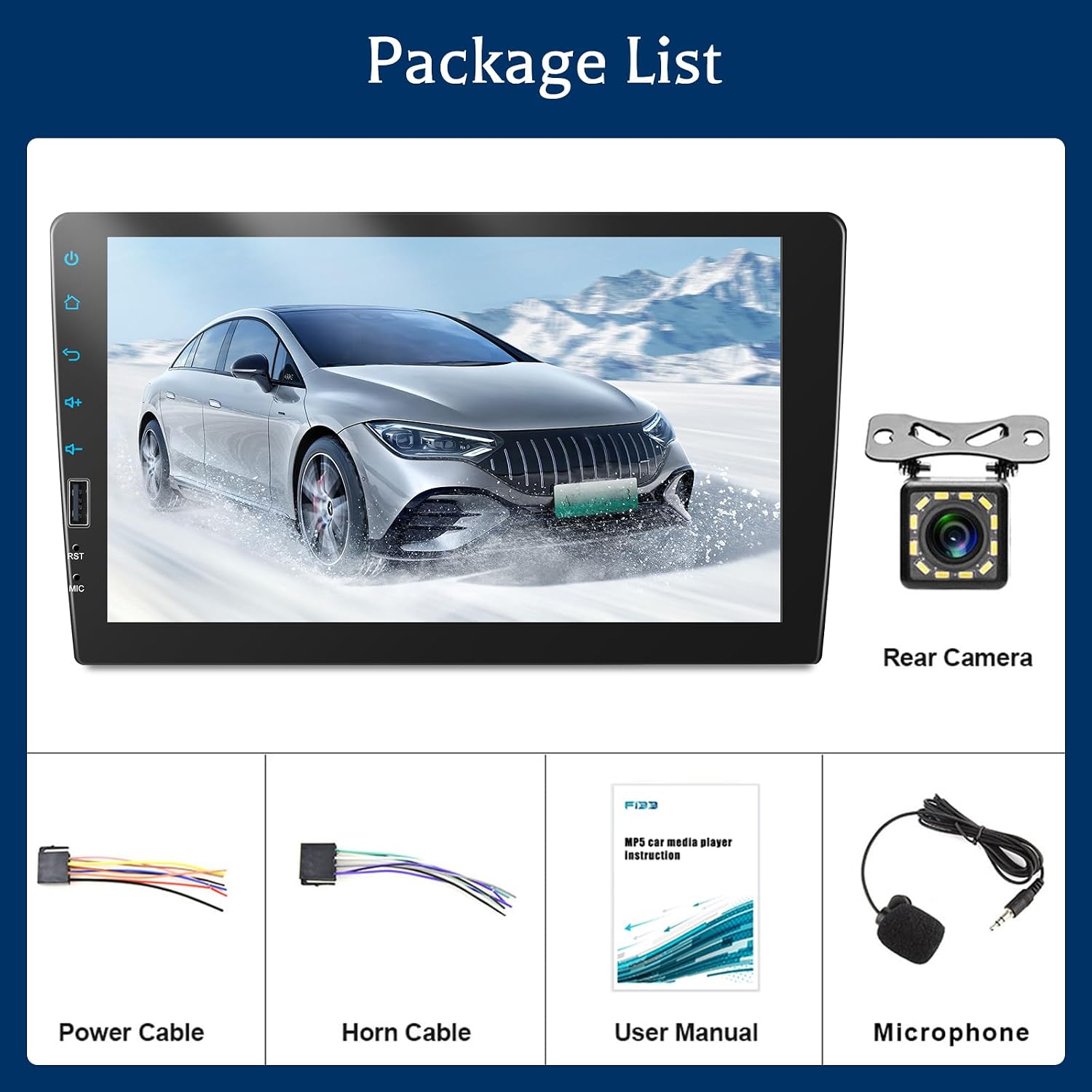
Ffigur 1: Cydrannau sydd wedi'u cynnwys yn y pecyn.
Gosod a Gosod
This section covers the physical installation and wiring of the car stereo. Professional installation is recommended.
Dimensiynau a Mowntio
The car stereo has an installation size of 178 mm x 50 mm (7.0 x 1.97 inches), designed to fit most 1 DIN car dashboards. Ensure your vehicle's dashboard opening is compatible before installation.
Rear Interface Definition
Refer to the diagram below for the rear interface connections. Correct wiring is crucial for proper operation.

Figure 2: Rear Interface Definition and Dimensions.
- 1. ISO Power Cable Interface: Connects to the vehicle's power harness.
- 2. Fuse (10A): Diogelu overcurrent.
- 3. meicroffon: Mewnbwn meicroffon allanol.
- 4. Left Audio Output: RCA output for left audio channel.
- 5. Video Output 1: RCA video output.
- 6. Cefn View Mewnbwn Camera: RCA input for backup camera video.
- 7. Right Audio Output: RCA output for right audio channel.
- 8. Video Output 2: RCA video output.
- 9. Video Input: RCA video input.
- 10. Radio Antenna: Connects to the vehicle's FM/AM antenna.
Cysylltiad Camera Wrth Gefn
To connect the backup camera, follow these steps:
- Cysylltwch y Red Cable (1) of the camera to the positive pole of the car's reversing light cable.
- Cysylltwch y Black Cable (2) of the camera to the negative pole of the car's reversing light cable.
- Cysylltwch y Reversing Trigger Wire Cable (4) (usually pink) to the red cable (3) which is an extension of the video input wire.
- Connect the camera's video output to the Cefn View Camera Input (6) on the stereo's rear interface.

Figure 3: Backup Camera Wiring Diagram.
Cyfarwyddiadau Gweithredu
CarPlay ac Android Auto
The car stereo supports both wired CarPlay and Android Auto. Connect your smartphone via a USB data cable to access these features. This allows you to control navigation, music, calls, and messages directly from the stereo's touchscreen or via voice commands.
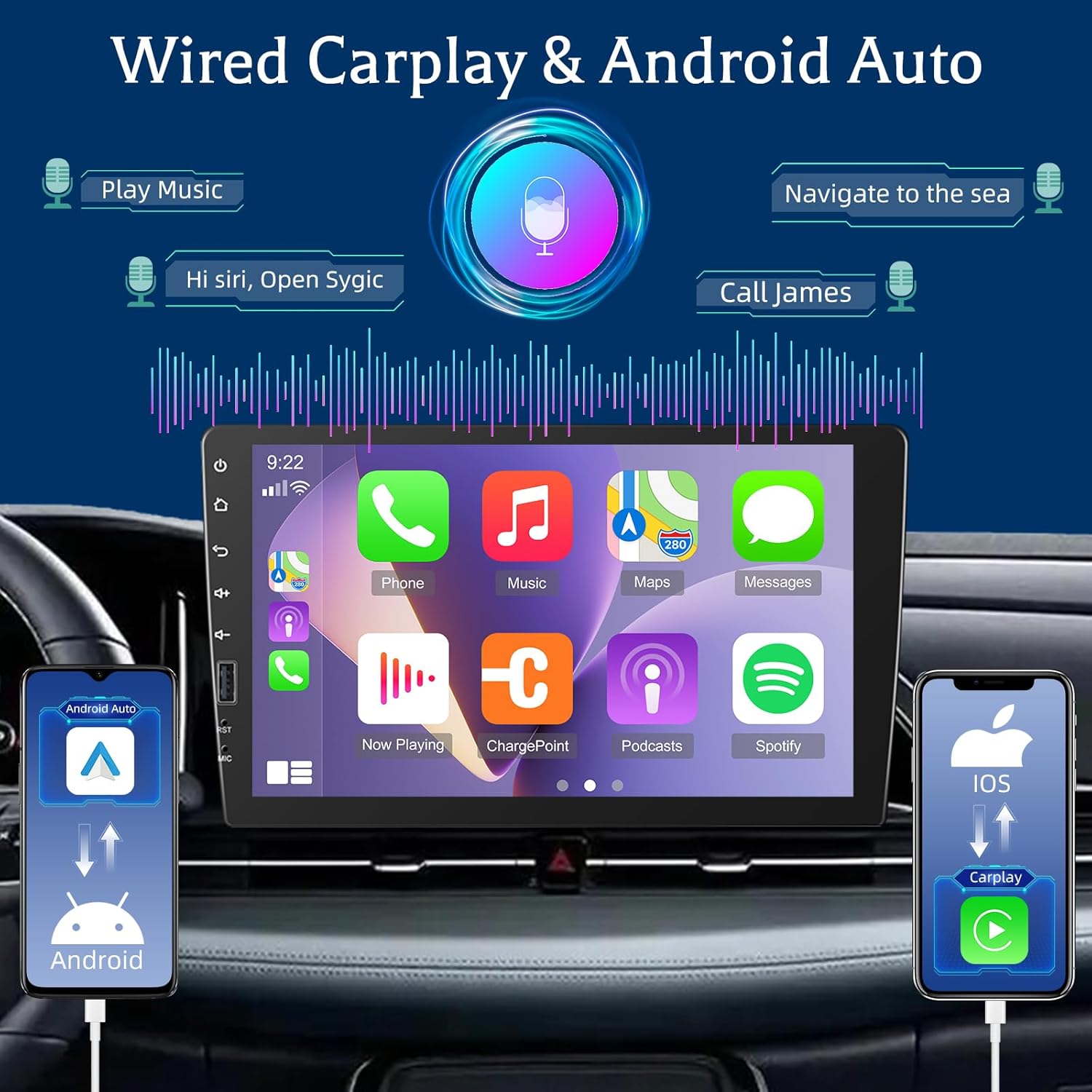
Figure 4: CarPlay and Android Auto Interface.
Cysylltedd Bluetooth
Pair your phone via Bluetooth for hands-free calling and audio streaming. You can answer and make calls directly from the stereo and play music stored on your device.

Figure 5: Bluetooth Calling and FM Radio Interface.
Radio FM
The 1 DIN radio supports automatic searching for FM stations and allows you to save up to 18 stations for quick access. Tune in to news, weather forecasts, and real-time traffic information.
Gosodiadau Cyfartalwr (EQ)
Adjust the audio output using the built-in equalizer. The multiband graphic equalizer allows you to customize sound profiles for various music genres or personal preferences, enhancing bass, midrange, and treble.

Figure 6: Equalizer Settings Interface.
Dolen Drych
Connect your phone via USB cable to mirror its screen onto the car stereo display. This feature allows you to view your phone's content, such as videos or navigation apps, on the larger 9-inch screen.

Ffigur 7: Swyddogaeth Cyswllt Drych.
Rheoli Llais
Utilize voice control through CarPlay or Android Auto to manage various functions. Activate your phone's assistant (Siri or Google Assistant) to play music, get navigation directions, make calls, and send messages, all while keeping your focus on the road.

Figure 8: Voice Control Interface.
Rheolydd Olwyn Lywio (SWC)
After installing the car stereo, you need to configure the steering wheel buttons in the system settings. Navigate to Setting > Steer to learn the buttons. This allows you to control functions like volume, track changes, and calls directly from your steering wheel for safer operation.

Figure 9: Steering Wheel Control Setup.

Figure 10: Learning Steering Wheel Buttons.
Backup Camera Functionality
When the vehicle is shifted into reverse, the connected rear camera automatically activates, displaying a clear view on the 9-inch screen. This assists in safe parking and maneuvering.
Ffigur 11: Camera Wrth Gefn View (part of image 711-0hPa5tL).
Cynnal a chadw
- Glanhau'r sgrin: Defnyddiwch frethyn meddal, di-flwff i sychu'r sgrin gyffwrdd yn ysgafn. Peidiwch â defnyddio glanhawyr sgraffiniol na thoddyddion.
- Glanhau cyffredinol: Keep the unit free from dust and debris. Use a dry cloth for external surfaces.
- Diweddariadau Meddalwedd: Gwiriwch y gwneuthurwr website periodically for any available software updates to ensure optimal performance and compatibility.
- Osgoi Tymheredd Eithafol: Peidiwch ag amlygu'r uned i wres neu oerfel eithafol, gan y gall hyn effeithio ar ei pherfformiad a'i hoes.
Datrys problemau
| Problem | Achos Posibl | Ateb |
|---|---|---|
| Dim pŵer | Incorrect wiring; Blown fuse; Vehicle power issue. | Gwiriwch gysylltiadau cebl pŵer. Archwiliwch a newidiwch y ffiws os oes angen. Gwiriwch gyflenwad pŵer y cerbyd. |
| Dim sain | Volume too low; Mute activated; Incorrect speaker wiring. | Cynyddwch y sain. Gwiriwch a yw mud ymlaen. Gwiriwch gysylltiadau siaradwyr. |
| CarPlay/Android Auto ddim yn cysylltu | Faulty USB cable; Phone not compatible; Software issue. | Use a high-quality USB data cable. Ensure your phone's OS is up to date. Restart both phone and stereo. |
| Camera wrth gefn ddim yn dangos | Incorrect camera wiring; Camera malfunction; Trigger wire issue. | Check all camera connections, especially the trigger wire. Test camera with another display if possible. |
| Steering Wheel Control not working | Not configured; Incorrect wiring. | Perform the SWC learning procedure in settings. Verify SWC wiring. |
Os yw'r broblem yn parhau ar ôl rhoi cynnig ar yr atebion hyn, cysylltwch â chymorth cwsmeriaid.
Manylebau
| Brand | ETLFUCyber |
| Rhif Model | 43439307-23bc-4fe1-805d-d83da78b6766 |
| Arddangos | Sgrin gyffwrdd 9 modfedd |
| Maint Gosod | 1 DIN (178 mm x 50 mm) |
| Technoleg Cysylltedd | Bluetooth, USB, Jac 3.5mm |
| Nodweddion Arbennig | CarPlay, Android Auto, Mirror Link, Backup Camera Support, EQ, FM Radio, Steering Wheel Control, Microphone |
| Dyfeisiau Cydnaws | Smartphone, Tabled |
| Modd Allbwn Sain | Stereo (5.1 Surround Sound Channels) |
| Amgodio Fideo | H.264 |
| Pwysau Cynnyrch | 1140 Gram (1.14 kg) |
| Dimensiynau Pecyn | 23 x 14 x 10 cm |
| Gwlad Tarddiad | Tsieina |
Gwarant a Chefnogaeth
Your ETLFUCyber car stereo comes with a 2-year technical support guarantee. We are committed to providing excellent customer service.
- 24-hour Email Response Service: For any inquiries or issues, our customer service team aims to respond within 24 hours.
- 30-day Unconditional Refund Policy: Os nad ydych chi'n fodlon â'ch pryniant, efallai y byddwch chi'n gymwys i gael ad-daliad o fewn 30 diwrnod.
If you have any questions or encounter problems, please feel free to contact us. We are here to help you resolve any issues.

Figure 12: Service Guarantee Information.