
HETP HX160Q2
HETP Wireless Power Bank User Manual
Model: HX160Q2
Rhagymadrodd
Thank you for choosing the HETP Wireless Power Bank. This 40800mAh portable charger is designed to provide versatile and efficient power for your electronic devices. Featuring 7-in-1 charging capabilities, including built-in cables, multiple output ports, and wireless charging, it ensures your devices remain powered on the go. Please read this manual carefully before use to ensure proper operation and maintenance.

Delwedd: Blaen view of the HETP Wireless Power Bank, displaying its LCD screen with 100% charge and the wireless charging pad. The side shows the built-in cables.
Nodweddion Cynnyrch
- Cynhwysedd Uchel: 40800mAh premium Li-polymer battery for multiple device charges.
- Tâl 7-mewn-1: Simultaneously charge up to 7 devices.
- Ceblau wedi'u hadeiladu i mewn: Includes iOS, USB-C, and Micro USB cables for convenience.
- Porthladdoedd allbwn lluosog: Two USB-A ports and one USB-C port.
- Codi Tâl Di-wifr: 15W wireless charging compatible with all wireless-enabled devices.
- Codi Tâl Cyflym: 25W PD 3.0 and QC 4.0 fast charging technology.
- Arddangosfa LCD: Clear digital display showing battery percentage.
- Nodweddion Diogelwch: Multi-security protection for safe charging.

Image: Diagram illustrating the wide compatibility of the power bank with various electronic devices, including smartphones, tablets, smartwatches, and earbuds.
Cynnwys Pecyn
- 1 x HETP Wireless Portable Charger Power Bank (40800mAh)
- 1 x Product Instruction Manual (this document)
Rhagofalon Diogelwch
- Peidiwch ag amlygu'r banc pŵer i dymheredd eithafol (poeth neu oer), golau haul uniongyrchol, na thân.
- Peidiwch â dadosod, addasu na thrwsio'r ddyfais eich hun.
- Cadwch draw oddi wrth ddŵr a hylifau eraill.
- Osgoi gollwng neu orfodi'r banc pŵer i effeithiau cryf.
- Storio mewn lle oer, sych pan nad yw'n cael ei ddefnyddio.
- Cadwch allan o gyrraedd plant.
Gosod a Defnydd Cychwynnol
Codi tâl ar y Banc Pŵer
Before first use, fully charge the power bank. The LCD display will show the charging progress and battery percentage.
- Gan ddefnyddio'r Cebl USB-C Mewnol: Connect the built-in USB-C cable from the power bank to a USB wall adapter (not included).
- Using the USB-C Input Port: Connect a USB-C cable (not included) from a USB wall adapter to the USB-C input port on the power bank.
The LCD screen will illuminate and display the charging percentage. Once it reaches 100%, the power bank is fully charged.

Image: Illustration demonstrating two methods to recharge the power bank: via its integrated USB-C cable or by connecting an external USB-C cable to the dedicated input port.
Cyfarwyddiadau Gweithredu
Dyfeisiau Codi Tâl
The HETP Wireless Power Bank offers multiple ways to charge your devices simultaneously.
1. Wired Charging (Using Built-in Cables)
- Pull out the appropriate built-in cable (iOS, USB-C, or Micro USB) from its slot.
- Connect the cable to your device's charging port.
- The power bank will automatically begin charging your device. The LCD display will show "OUT" indicating output.
2. Wired Charging (Using Output Ports)
- Use your device's original charging cable or a compatible cable.
- Connect one end of the cable to one of the power bank's output ports (USB-A1, USB-A2, or USB-C).
- Cysylltwch y pen arall â'ch dyfais.
- Bydd y codi tâl yn cychwyn yn awtomatig.
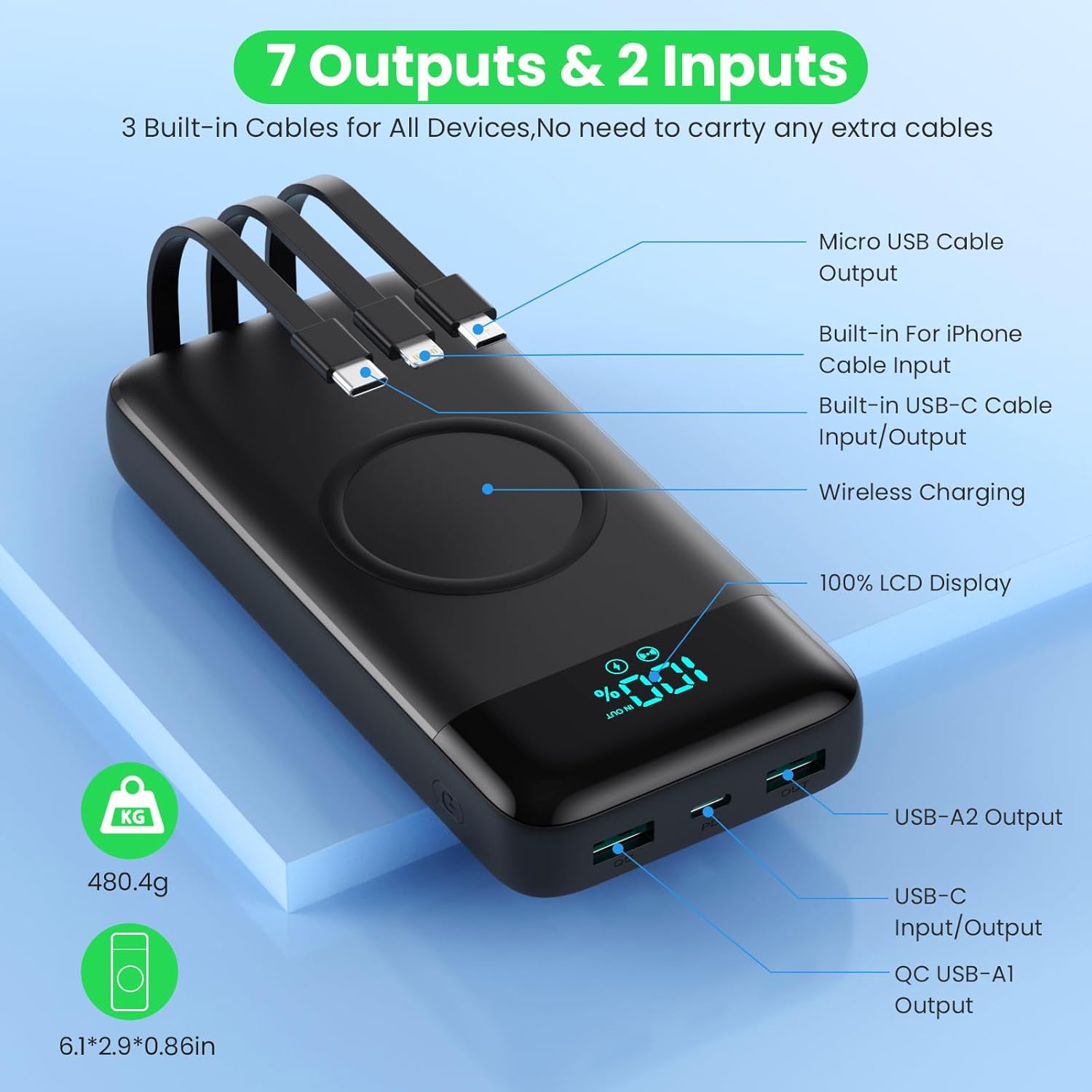
Image: Detailed diagram highlighting all 7 output options (3 built-in cables, 3 USB ports, 1 wireless) and 2 input options (built-in USB-C cable, USB-C port) on the power bank, along with the LCD display.
3. Codi Tâl Di-wifr
- Sicrhewch fod eich dyfais yn cefnogi codi tâl di-wifr.
- Place your wireless-enabled device directly onto the wireless charging pad located on the top surface of the power bank.
- Align the device centrally on the pad for optimal charging.
- The power bank will automatically detect and begin wireless charging.

Image: A smartphone being wirelessly charged on the power bank, illustrating the fast wireless charging feature and supported wattages.
Codi Tâl ar y Pryd
The HETP Wireless Power Bank is designed to charge multiple devices concurrently using a combination of its built-in cables, output ports, and wireless charging pad.

Delwedd: Uwchben view showing the power bank simultaneously charging a tablet, multiple smartphones, and a smartwatch using its various charging methods.
Cynnal a chadw
- Glanhau: Use a soft, dry cloth to clean the surface of the power bank. Do not use abrasive cleaners or solvents.
- Storio: If storing for an extended period, charge the power bank to approximately 50-70% capacity. Recharge every 3-6 months to maintain battery health.
- Gofal Cebl: When retracting built-in cables, do so gently to avoid damage.
Datrys problemau
| Problem | Achos Posibl | Ateb |
|---|---|---|
| Banc pŵer ddim yn codi tâl | Charging cable or adapter faulty; power bank fully discharged; input port issue. | Try a different charging cable and wall adapter. Ensure the power bank is connected correctly. Allow a few minutes for the LCD to activate if fully discharged. |
| Dyfais ddim yn codi tâl o'r banc pŵer | Power bank low on charge; device cable faulty; device not compatible; incorrect port used; wireless charging misalignment. | Check power bank's charge level. Try a different cable. Ensure device is compatible. For wireless charging, reposition device on the pad. |
| Codi tâl araf | Nid yw'r cebl yn cefnogi gwefru cyflym; nid yw'r ddyfais yn cefnogi gwefru cyflym; mae sawl dyfais yn gwefru ar yr un pryd. | Use a fast-charging compatible cable. Ensure your device supports fast charging. Charging multiple devices may reduce individual charging speeds. |
| Arddangosfa LCD ddim yn gweithio | Power bank off; internal issue. | Press the power button to activate the display. If problem persists, contact customer support. |
Manylebau
| Nodwedd | Manylyn |
|---|---|
| Rhif Model | HX160Q2 |
| Gallu Batri | 40800mAh |
| Math Batri | Li-polymer |
| Dimensiynau Cynnyrch | 10.58 x 6.78 x 1.31 cm |
| Pwysau Eitem | 100 g |
| Mewnbwn (USB-C) | Gwefru Cyflym PD 25W |
| Allbwn (USB-C) | Gwefru Cyflym PD 25W |
| Allbwn (USB-A) | QC 4.0 Fast Charging |
| Allbwn Di-wifr | 15W (5W, 7.5W, 10W, 15W compatible) |
| Ceblau Adeiledig | iOS, USB-C, Micro USB |
| Arddangos | Arddangosfa Ddigidol LCD |
| Lliw | Du |
Gwarant a Chefnogaeth
Each HETP product is safety certified. If you encounter any problems or have questions regarding your Wireless Power Bank, please do not hesitate to contact our customer support team. We are committed to providing professional after-sales service and satisfactory solutions within 12 hours.
Cyfeiriwch at eich dogfennaeth prynu am delerau gwarant penodol a gwybodaeth gyswllt.
Ask a question about this manual
Ask about setup, troubleshooting, compatibility, parts, safety, or missing instructions. Manuals+ will review the question and use this page’s manual context to help answer it.