
1. Cynnyrch Drosview
The seenda SKM64-2 Bluetooth Keyboard and Mouse Combo is designed for seamless integration with Apple devices, offering multi-device connectivity, quiet operation, and a slim, portable design. This combo is ideal for enhancing productivity across your Mac, MacBook, and iPad.

2. Cynnwys Pecyn
- seenda SKM64-2 Bluetooth Keyboard
- seenda Bluetooth Mouse
- Cebl Codi Tâl USB-C
- Silicone Keyboard Cover (for noise reduction and protection)
- Llawlyfr Defnyddiwr
3. Gosod a Pharu
3.1 Gwefru'r Dyfeisiau
Both the keyboard and mouse are equipped with built-in rechargeable batteries. Use the provided USB-C cable to charge them. A full charge provides up to 200 hours of standby time. The charging port for the keyboard is located on the top edge, and for the mouse, it is on the front edge, allowing use while charging.

3.2 Pâr Bluetooth
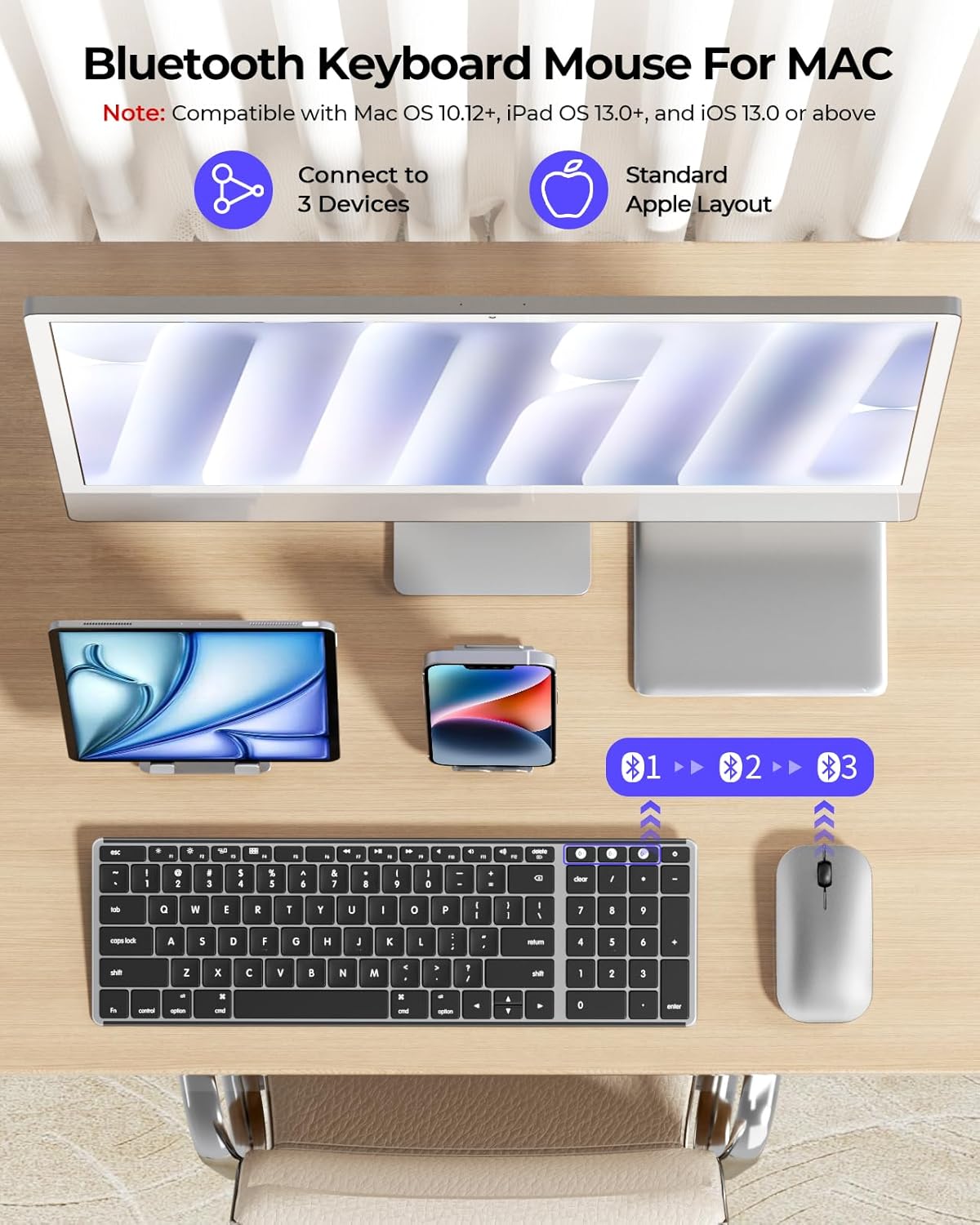
The combo supports up to three devices via Bluetooth channels (BT1, BT2, BT3). Ensure your device has Bluetooth 4.0 or above. To pair:
- Turn on the keyboard/mouse using the ON/OFF switch.
- Press and hold the desired Bluetooth channel button (BT1, BT2, or BT3) on the device until the indicator light flashes, indicating pairing mode.
- On your Mac, MacBook, or iPad, go to Bluetooth settings and select the 'seenda Keyboard' or 'seenda Mouse' from the list of available devices.
- Ar ôl cysylltu, bydd y golau dangosydd yn rhoi'r gorau i fflachio.

4. Cyfarwyddiadau Gweithredu
4.1 Swyddogaethau Bysellfwrdd
The keyboard features a standard Apple layout with quiet scissor-switch keys for a comfortable typing experience. Function keys (F1-F12) provide quick access to media controls, brightness, and other system functions. The integrated numeric keypad is convenient for data entry.

4.2 Swyddogaethau'r Llygoden
The mouse offers smooth, silent clicking and adjustable DPI settings (1000-1600-2400) to control cursor speed. Use the DPI button on the underside of the mouse to cycle through sensitivity levels.

4.3 Newid Rhwng Dyfeisiau
To switch between paired devices, simply press the corresponding Bluetooth channel button (BT1, BT2, or BT3) on the keyboard or mouse. The device will automatically connect to the last paired device on that channel.
5. cynnal
To maintain the longevity and performance of your seenda keyboard and mouse:
- Glanhau: Use a soft, dry cloth to clean the surfaces. For the keyboard, the included silicone cover can be removed and cleaned separately.
- Diogelu: Utilize the provided silicone keyboard cover to protect against dust, spills, and reduce typing noise.
- Storio: When not in use for extended periods, turn off the devices using the ON/OFF switch to conserve battery life. The devices also feature an auto-sleep function after 30 minutes of inactivity.
6. Datrys Problemau
- Dyfais ddim yn cysylltu: Ensure both the keyboard and mouse are fully charged and powered on. Verify that Bluetooth is enabled on your host device (Mac, MacBook, iPad). Try re-pairing the devices by following the 'Bluetooth Pairing' steps.
- Cysylltiad oedi neu ysbeidiol: Ensure the devices are within the optimal Bluetooth range (typically up to 10 meters). Minimize interference from other wireless devices.
- Keys or mouse not responding: Check battery levels and recharge if necessary. Restart the keyboard/mouse and your host device.
7. manylebau
| Nodwedd | Manylyn |
|---|---|
| Rhif Model | SKM64-2 |
| Brand | seenda |
| Technoleg Cysylltedd | Triple Bluetooth |
| Dyfeisiau Cydnaws | MacBook Pro, MacBook Air, Mac, iPad, iPhone (macOS 10.12+, iPadOS 13.0+, iOS 13.0+) |
| Nodweddion Arbennig | Designed for Mac, Rechargeable, Slim, Portable, Quiet Keys |
| Ffynhonnell Pwer | Battery Powered (Type-C Rechargeable) |
| Cynllun Bysellfwrdd | QWERTY |
| Trwch bysellfwrdd | 0.12 modfedd |
| Mouse Thickness | 0.9 modfedd |
| Pwysau | 0.74 Cilogram |
8. Gwarant a Chefnogaeth
The seenda SKM64-2 Bluetooth Keyboard and Mouse Combo comes with a Gwarant 24 mis. For any product inquiries or support, please contact seenda customer service.
Yn ogystal, a Polisi dychwelyd 30 diwrnod is available through Amazon for eligible purchases.
For further assistance, visit the official seenda store: seenda Store on Amazon