
1. Rhagymadrodd
Thank you for choosing the DreamSky Wooden Digital Alarm Clock, Model DS2208. This clock combines modern design with essential features to enhance your daily routine. With its large, easy-to-read display, adjustable brightness, and customizable alarm volume, it is designed for convenience and reliability. Please read this manual carefully to ensure proper setup and operation.
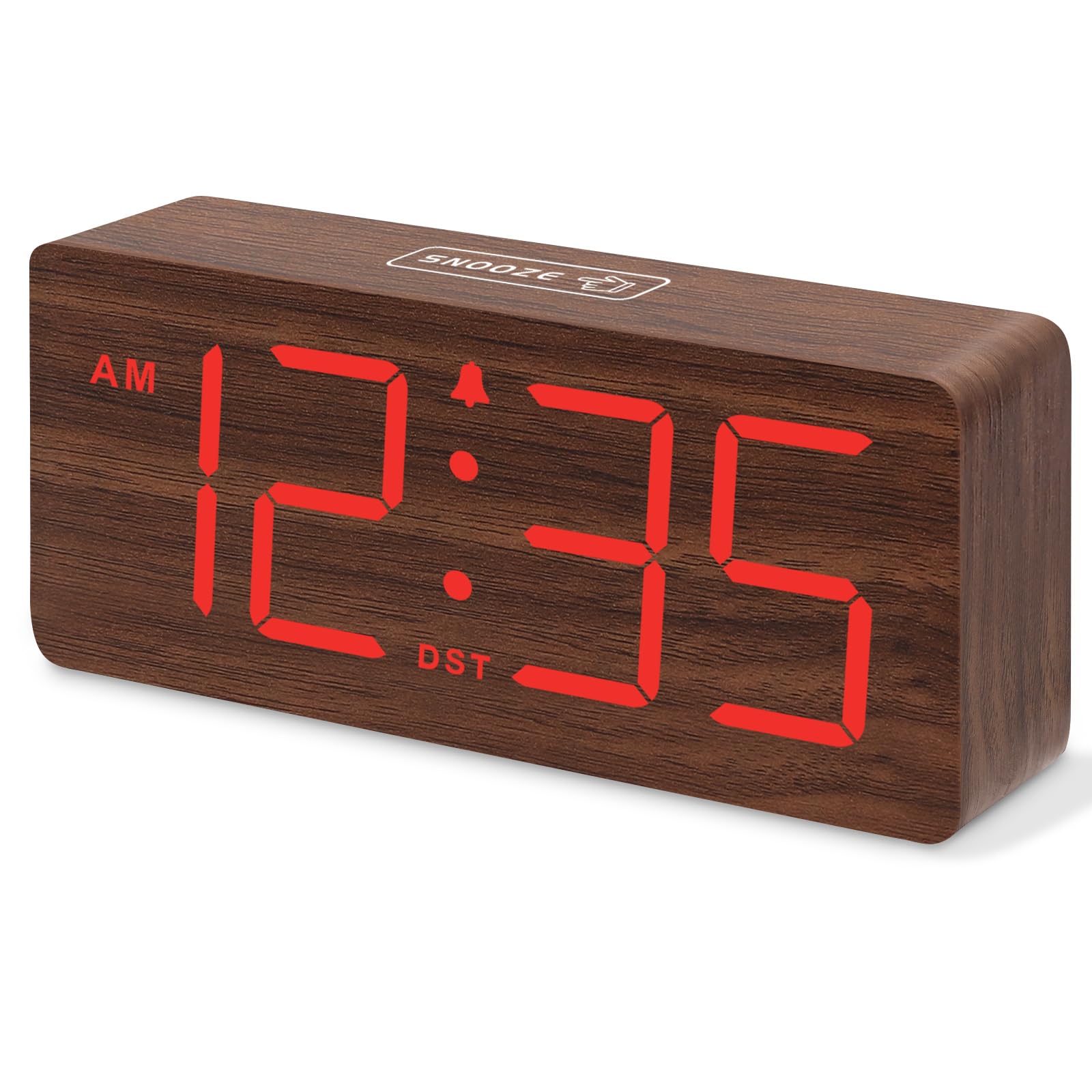
Ffigur 1: DreamSky Wooden Digital Alarm Clock (Red)
2. Nodweddion Cynnyrch
- Arddangosfa Ddigidol Fawr: Features 1.8-inch bold numbers for easy readability across the room.
- 6 Dimmable Brightness Levels: Adjust the display brightness from off to bright, suitable for day and night use.
- 5 Adjustable Alarm Volume Levels: Customize alarm volume from 70dB to 105dB, catering to both light and heavy sleepers.
- Swyddogaeth Snooze: Provides an extra 9 minutes of rest after the alarm sounds.
- Plug-in Power with Battery Backup: Primarily powered by an included adapter, with battery backup (batteries not included) to maintain time settings and trigger alarms during power outages.
- DST and 12/24 Hour Format: Easy one-click switching for Daylight Saving Time and between 12-hour and 24-hour time formats.
- Modern Wooden Design: An elegant and space-saving design that complements various home and office decors.
3. Cynnwys Pecyn
Gwiriwch y pecyn am yr eitemau canlynol:
- DreamSky Wooden Digital Alarm Clock (Model DS2208)
- Addasydd Pŵer 5V/1.2A
- Llawlyfr Defnyddiwr (y ddogfen hon)
4. Cyfarwyddiadau Gosod
4.1 Pweru'r Cloc
The DreamSky alarm clock is designed to be continuously powered by the included 5V/1.2A power adapter. For stable operation and continuous display, always keep the clock plugged into a power outlet.

Ffigur 2: Clock powered by electricity.
4.2 Batri Wrth Gefn
Ar gyfer copi wrth gefn yn ystod pŵer outages, insert 2 AAA batteries (not supplied) into the battery compartment located on the back of the clock. The battery backup ensures that alarm settings are saved and the alarm will still function, though the display will not be lit to conserve power.

Ffigur 3: Battery backup functionality.
4.3 Rheolaeth Drosview
The control buttons are located on the back panel of the clock. Familiarize yourself with these buttons for easy operation:

Ffigur 4: Rear panel controls and power input.
4.4 Gosod yr Amser
- Pwyswch a dal y SET AMSER button for 2 seconds to enter time setting mode. The hour digits will flash.
- Defnyddiwch y + or - botymau i addasu'r awr.
- Gwasgwch SET AMSER eto i gadarnhau'r awr a symud i osod munudau. Bydd y digidau munud yn fflachio.
- Defnyddiwch y + or - botymau i addasu'r cofnodion.
- Gwasgwch SET AMSER to save the time and exit setting mode.
4.5 Gosod y Larwm
- Pwyswch a dal y SET ALARM button for 2 seconds. The alarm hour digits will flash.
- Defnyddiwch y + or - botymau i addasu'r awr larwm.
- Gwasgwch SET ALARM again to confirm the alarm hour and move to alarm minute setting. The minute digits will flash.
- Defnyddiwch y + or - botymau i addasu munudau'r larwm.
- Gwasgwch SET ALARM to save the alarm time. The alarm icon will appear on the display, indicating the alarm is active.
4.6 Fformat 12/24 Awr
To switch between 12-hour (AM/PM) and 24-hour (military) time formats, simply press the 12/24HR botwm.
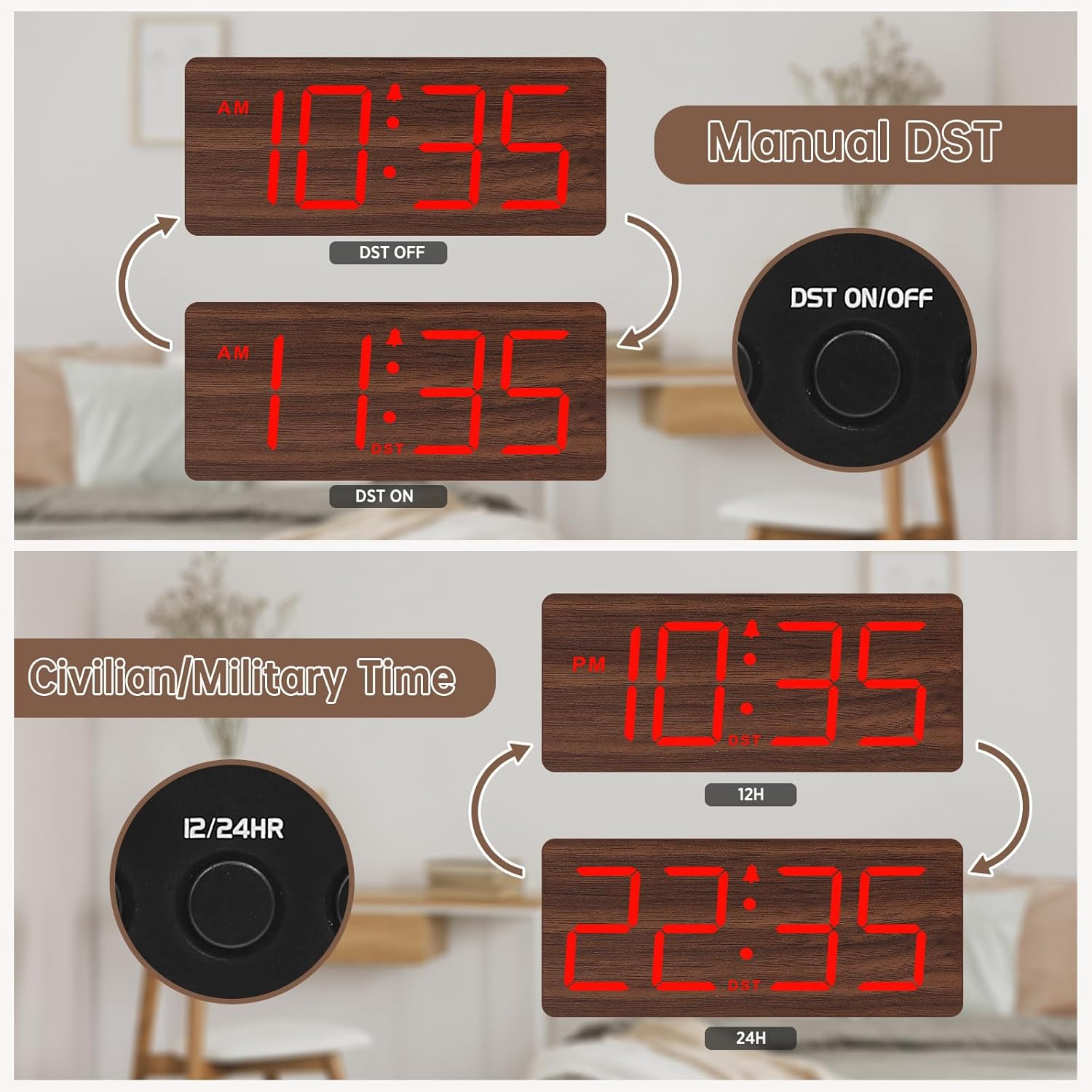
Ffigur 5: Manual DST and 12/24 Hour Time Switch.
4.7 Amser Arbed Golau Haf (DST)
To activate or deactivate Daylight Saving Time, press the DST AR / ODDI button. The display will adjust by one hour forward or backward, and a 'DST' indicator will appear or disappear.
4.8 Addasu Disgleirdeb yr Arddangosfa
The clock offers 6 levels of display brightness (L1 to L5, plus OFF). Press the DIMMER button repeatedly to cycle through the brightness levels. Select a level that is comfortable for your environment, from bright during the day to dim or off at night.

Ffigur 6: Adjustable Display Brightness Levels.
4.9 Addasu Cyfaint y Larwm
The alarm volume can be adjusted to 5 different levels (V1 to V5). Use the VOL+ a VOL- buttons to set your preferred alarm volume. This feature is ideal for heavy sleepers who need a louder alarm or for light sleepers who prefer a softer tone.

Ffigur 7: 5 Adjustable Alarm Volume Levels.
5. Cyfarwyddiadau Gweithredu
5.1 Swyddogaeth Snooze
Pan fydd y larwm yn canu, pwyswch y botwm mawr SNOOZE button on the top of the clock to temporarily silence the alarm for 9 minutes. The alarm will sound again after the snooze period ends.
5.2 Turning Alarm On/Off
I droi’r larwm ymlaen neu i ffwrdd, pwyswch y YMLAEN / I FFWRDD button. The alarm icon on the display will indicate whether the alarm is currently active.
6. cynnal
To maintain your DreamSky Wooden Digital Alarm Clock:
- Sychwch y cloc gyda lliain meddal, sych.
- Ceisiwch osgoi defnyddio glanhawyr neu doddyddion sgraffiniol.
- Keep the clock away from direct sunlight, extreme temperatures, and moisture.
7. Datrys Problemau
- Display not lit: Ensure the power adapter is securely plugged into both the clock and a working power outlet. If using battery backup, the display will not light up to conserve power.
- Larwm ddim yn seinio: Check if the alarm is set and the alarm icon is visible on the display. Ensure the alarm volume is not set to the lowest level (V1) or muted.
- Amser anghywir: Re-enter time setting mode and adjust the time as described in Section 4.4. If using battery backup, ensure batteries are fresh.
8. manylebau
| Nodwedd | Manylyn |
|---|---|
| Brand | Ystyr geiriau: DreamSky |
| Rhif Model | DS2208 |
| Lliw | Red (Plug-in) |
| Math Arddangos | Digidol |
| Dimensiynau Cynnyrch | 6.1"L x 2.8"U |
| Ffynhonnell Pwer | Corded Electric (5V/1.2A adapter included) |
| Batri wrth gefn | 2 x batris AAA (heb eu cynnwys) |
| Deunydd | Pren |
| Pwysau Eitem | 10.2 owns |
9. Fideo Cynnyrch Swyddogol
Fideo 1: Mae drosoddview of the DreamSky Wooden Digital Clock, demonstrating its features and aesthetic appeal. This video is provided by DreamSky Direct.
10. Gwarant a Chefnogaeth
DreamSky products are designed for durability and performance. For any questions, technical support, or warranty inquiries, please contact DreamSky customer support at: gwybodaeth@dreamsky4u.com.