
1. Rhagymadrodd
This manual provides essential information for the safe and efficient use of your MESWAO 15.6 Inch Pro Android 14 Tablet. Please read this manual thoroughly before operating the device and retain it for future reference.
2. Gwybodaeth Diogelwch
- Peidiwch ag amlygu'r dabled i dymheredd eithafol, golau haul uniongyrchol, na lleithder uchel.
- Osgowch ollwng y dabled neu roi effaith ddifrifol iddi.
- Use only the provided power adapter and Type-C cable for charging.
- Cadwch y dabled i ffwrdd o ddŵr a hylifau eraill.
- Do not attempt to disassemble or repair the tablet yourself. Contact customer support for assistance.
- Ensure proper ventilation when using the tablet for extended periods.
3. Cynnwys Pecyn
Gwiriwch fod yr holl eitemau yn bresennol yn y pecyn:
- 1 x MESWAO 15.6 inch Android Tablet
- 1 x Addasydd Pŵer
- 1 x Cebl Math C
- 1 x Llawlyfr Defnyddiwr
- 1 x Math-C i addasydd USB
- 1 x Stuck pin
4. Dyfais Drosoddview
Familiarize yourself with the physical components of your MESWAO tablet.
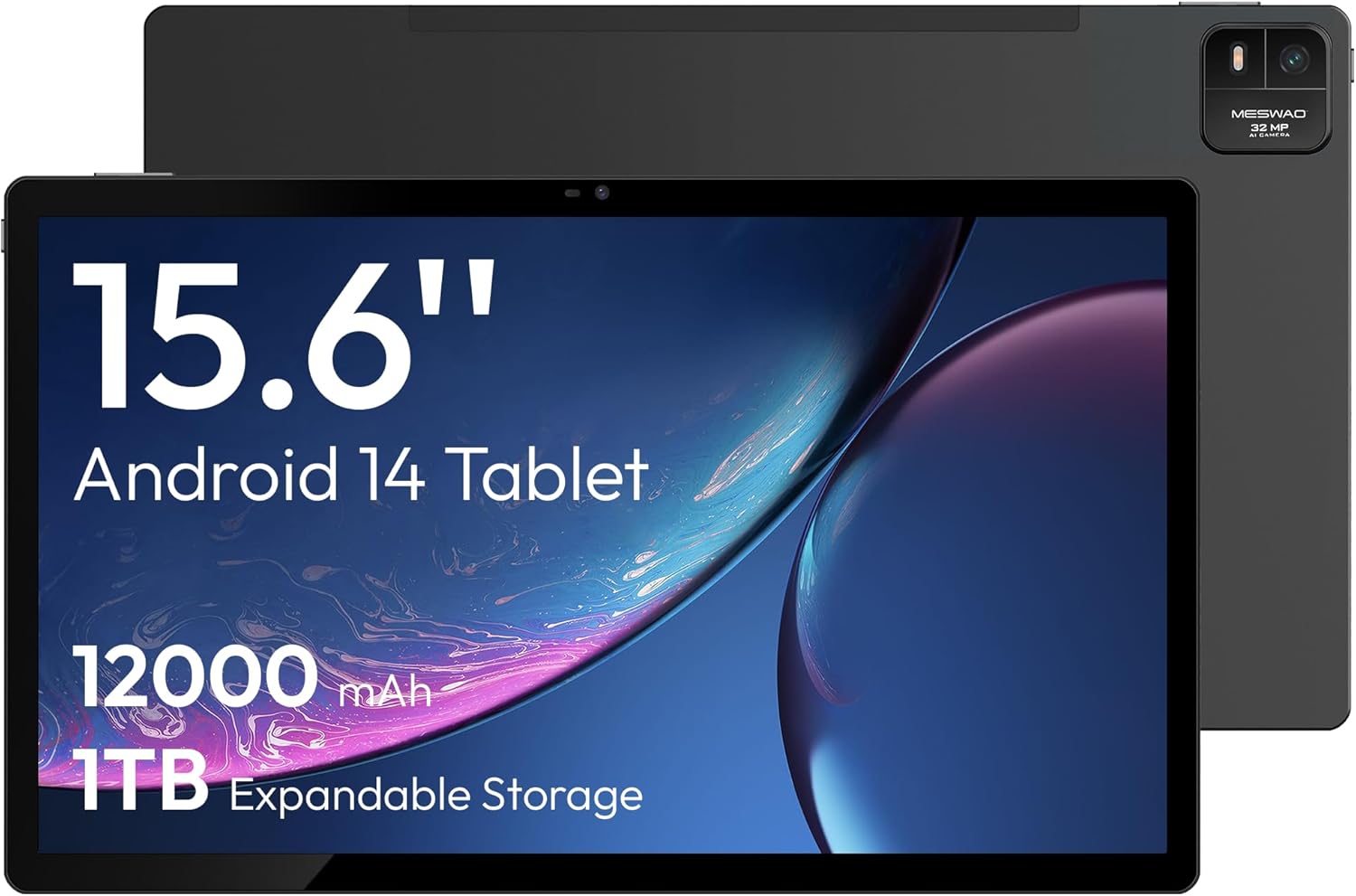
Ffigur 4.1: Blaen view of the MESWAO 15.6-inch Android 14 Tablet, highlighting the large display and key specifications such as 12000mAh battery and 1TB expandable storage.
Ffigur 4.2: Ochr a chefn view of the tablet, indicating the location of the quad speakers, Type-C port, TF card slot, power button, volume controls, and front/rear cameras.
Cydrannau Allweddol:
- 15.6-inch FHD IPS Display: Large screen for immersive viewing.
- Camera blaen: Ar gyfer galwadau fideo a hunluniau.
- Camera Cefn (32MP): For capturing photos and videos.
- Botwm Pŵer: To turn the tablet on/off or put it to sleep.
- Botymau Cyfrol: I addasu lefelau sain.
- Porthladd Math-C: Ar gyfer codi tâl a throsglwyddo data.
- Slot Cerdyn TF: For expandable storage (MicroSD card).
- Quad Speakers: Ar gyfer allbwn sain.
5. Gosod
5.1 Codi Tâl Cychwynnol
Before first use, fully charge the tablet. Connect the provided Type-C cable to the tablet's Type-C port and the power adapter to a wall outlet. The tablet supports 30W fast charging.

Ffigur 5.1: The tablet connected to its charger, showing the charging indicator on the screen.
5.2 Pŵer Ymlaen/Diffodd
- I Bweru Ymlaen: Pwyswch a dal y botwm Power nes bod y sgrin yn goleuo.
- I Bweru i ffwrdd: Pwyswch a daliwch y botwm Pŵer, yna dewiswch 'Diffoddwch' o'r opsiynau ar y sgrin.
- To Sleep/Wake: Pwyswch y botwm Power yn fyr.
5.3 Ffurfweddiad Cychwynnol
Upon first power-on, follow the on-screen prompts to set up your Android 14 operating system. This includes selecting your language, connecting to Wi-Fi, and signing in with your Google account.
5.4 Cysylltiad Wi-Fi
- Ewch i Gosodiadau > Rhwydwaith a rhyngrwyd > Wi-Fi.
- Togglo Wi-Fi On.
- Dewiswch eich rhwydwaith dymunol o'r rhestr.
- Rhowch y cyfrinair os gofynnir amdano a thapiwch Cyswllt. The tablet supports dual-band Wi-Fi (2.4GHz and 5GHz).
5.5 Mewnosod Cerdyn MicroSD
To expand storage up to 1TB, insert a MicroSD card:
- Locate the TF card slot on the side of the tablet.
- Use the provided stuck pin to gently press into the small hole next to the slot to eject the tray.
- Place the MicroSD card into the tray with the gold contacts facing down.
- Ail-osodwch y hambwrdd yn ofalus i'r dabled.

Ffigur 5.2: Illustration of the tablet's internal storage and the option for expandable storage via MicroSD card.
6. Gweithredu'r Tabled
6.1 Mordwyo Sylfaenol
The Android 14 operating system uses touch gestures for navigation:
- Tap: Dewiswch eitem neu agorwch ap.
- Swipe: Sgroliwch drwy sgriniau neu restrau.
- Pinsiad: Chwyddo i mewn neu allan ar ddelweddau a web tudalennau.
- Gwasg Hir: Mynediad i ddewislenni cyd-destunol neu symud eiconau.
6.2 Nodweddion Arddangos
The 15.6-inch FHD IPS display offers a resolution of 1920 x 1080 pixels, providing clear and vibrant visuals for various applications.

Ffigur 6.1: Comparison of the MESWAO 15.6-inch display size to an A4 sheet of paper and a smaller tablet, emphasizing its expansive viewing ardal.
6.3 Perfformiad
Powered by the Helio G99 octa-core processor and 8GB RAM, the tablet delivers efficient performance for multitasking, gaming, and media consumption.

Ffigur 6.2: An illustration of the Helio G99 Octa-Core chipset, detailing its technical specifications and performance benefits.
6.4 Defnyddio'r Camera
The tablet features a 32MP rear camera and a 5MP front camera. Open the Camera app to capture photos and videos.
6.5 Sain
The quad speakers provide clear audio. You can connect Bluetooth headphones or use the Type-C port for audio output with a suitable adapter.
6.6 Nodweddion Android 14
The tablet runs on Android 14, offering features such as:
- Smooth Multitasking: Efficiently switch between applications.
- Rheolaeth Rhieni: Manage content and usage for children.
- Enhanced Privacy & UI: Improved security and user interface experience.

Ffigur 6.3: The Android 14 operating system interface, showcasing various applications and system features.
7. cynnal
7.1 Glanhau'r Dyfais
Defnyddiwch frethyn meddal, di-flwff i lanhau'r sgrin a chorff y dabled. Osgowch ddefnyddio cemegau llym neu ddeunyddiau sgraffiniol.
7.2 Diweddariadau Meddalwedd
Gwiriwch yn rheolaidd am ddiweddariadau system i sicrhau perfformiad a diogelwch gorau posibl. Ewch i Gosodiadau > System > Diweddariad system.
7.3 Gofal Batri
I ymestyn oes y batri:
- Osgowch ollwng y batri'n llwyr yn aml.
- Do not expose the tablet to high temperatures.
- Datgysylltwch y gwefrydd unwaith y bydd y batri yn llawn.
8. Datrys Problemau
8.1 Tabled Ddim yn Troi Ymlaen
- Gwnewch yn siŵr bod y batri wedi'i wefru. Cysylltwch y gwefrydd ac aros ychydig funudau cyn ceisio ei droi ymlaen.
- Pwyswch a daliwch y botwm Pŵer am o leiaf 10-15 eiliad i orfodi ailgychwyn.
8.2 Problemau Cysylltiad Wi-Fi
- Ailgychwynwch eich llwybrydd Wi-Fi.
- Anghofiwch y rhwydwaith yng ngosodiadau'r tabled ac ailgysylltwch.
- Gwnewch yn siŵr bod y dabled o fewn cyrraedd y signal Wi-Fi.
8.3 Perfformiad Araf
- Caewch gymwysiadau cefndir diangen.
- Clirio data storfa ar gyfer apiau.
- Sicrhewch fod digon o le storio rhydd.
8.4 Sgrin yn Anymatebol
- Ailgychwyn y tabled.
- Gwnewch yn siŵr bod y sgrin yn lân ac yn rhydd o falurion.
9. manylebau
| Nodwedd | Manyleb |
|---|---|
| Enw Model | MES-B3 |
| System Weithredu | Android 14 |
| Maint Arddangos | 15.6 modfedd |
| Cydraniad Sgrin | 1920 x 1080 picsel (FHD) |
| Prosesydd | MediaTek Helio G99 Octa-Core |
| Cydbrosesydd graffeg | Mali-G75 |
| HWRDD | 8GB |
| Storio Mewnol (ROM) | 256GB |
| Storfa Ehangadwy | Hyd at 1TB trwy gerdyn MicroSD |
| Camera Cefn | 32MP |
| Camera blaen | 5MP |
| Gallu Batri | 12000mAh |
| Codi tâl | 30W Codi Tâl Cyflym |
| Cysylltedd Di-wifr | Dual-Band Wi-Fi (802.11a/b/ac/ad/ax), Bluetooth |
| Pwysau Eitem | 4.55 pwys |
| Dimensiynau Cynnyrch | 14.49 x 8.66 x 0.39 modfedd |
10. Gwarant a Chefnogaeth
10.1 Gwybodaeth Gwarant
Your MESWAO tablet comes with a Gwarant 12 mis covering manufacturing defects. Please retain your proof of purchase for warranty claims.
10.2 Cefnogaeth i Gwsmeriaid
For technical assistance, troubleshooting, or warranty inquiries, please contact MESWAO customer support. Our support team is available to assist you.
- Cefnogaeth Cwsmer 24 Awr: Mae cymorth ar gael o gwmpas y cloc.
- Local After-sales Centers: Service centers are available in regions including the US, Germany, Japan, and more.
- Quick Response Flow: Issues reported receive a team response within 24 hours, aiming for prompt problem resolution or replacement.