
1. Rhagymadrodd
Thank you for choosing the MESWAO 15.6 inch Android 14 Tablet Pro. This tablet is designed to provide a superior visual and performance experience with its large Full HD display, powerful octa-core processor, and extended battery life. This manual will guide you through the setup, operation, maintenance, and troubleshooting of your new device, ensuring you get the most out of its advanced features.
2. Beth sydd yn y Bocs
Gwiriwch gynnwys eich pecyn. Os oes unrhyw eitemau ar goll neu wedi'u difrodi, cysylltwch â chymorth cwsmeriaid.
- 1 x MESWAO 15.6 inch Android Tablet
- 1 x Addasydd Pŵer
- 1 x Cebl Math-C
- 1 x Llawlyfr Defnyddiwr
- 1 x Math-C i addasydd USB
- 1 x Stuck pin (SIM ejector tool)

Image: Visual representation of the MESWAO tablet and its included accessories.
3. Cynnyrch Drosview
3.1 Nodweddion Allweddol
- 15.6-inch 1080P FHD IPS Display: Large screen with 1920x1080p resolution, 16:9 aspect ratio, 85% screen-to-body ratio, and 350 nits adjustable brightness for clear visuals.
- Android 14 OS: Latest Android version for faster app launches, intuitive user interface, split-screen multitasking, and GMS certification for Google Play access.
- MediaTek Helio G99 CPU: Octa-core processor (6nm, up to 2.2GHz) and ARM Mali-G57 GPU for smooth performance in multitasking, streaming, and gaming.
- 12,000mAh Mega Battery & 30W Fast Charging: Provides up to 15 hours of video playback and 12+ hours of daily use, with 90% charge in 3 hours.
- 6GB RAM + 128GB ROM (Expandable to 1TB): Ample storage for apps, photos, and videos, with expandable memory via microSD card (FAT32 format).
- Dual-band Wi-Fi & Bluetooth 5.0: High-speed 2.4G/5G Wi-Fi and efficient Bluetooth connectivity for peripherals.
- 5MP Front + 32MP Rear Cameras: Capture moments and conduct clear video calls.
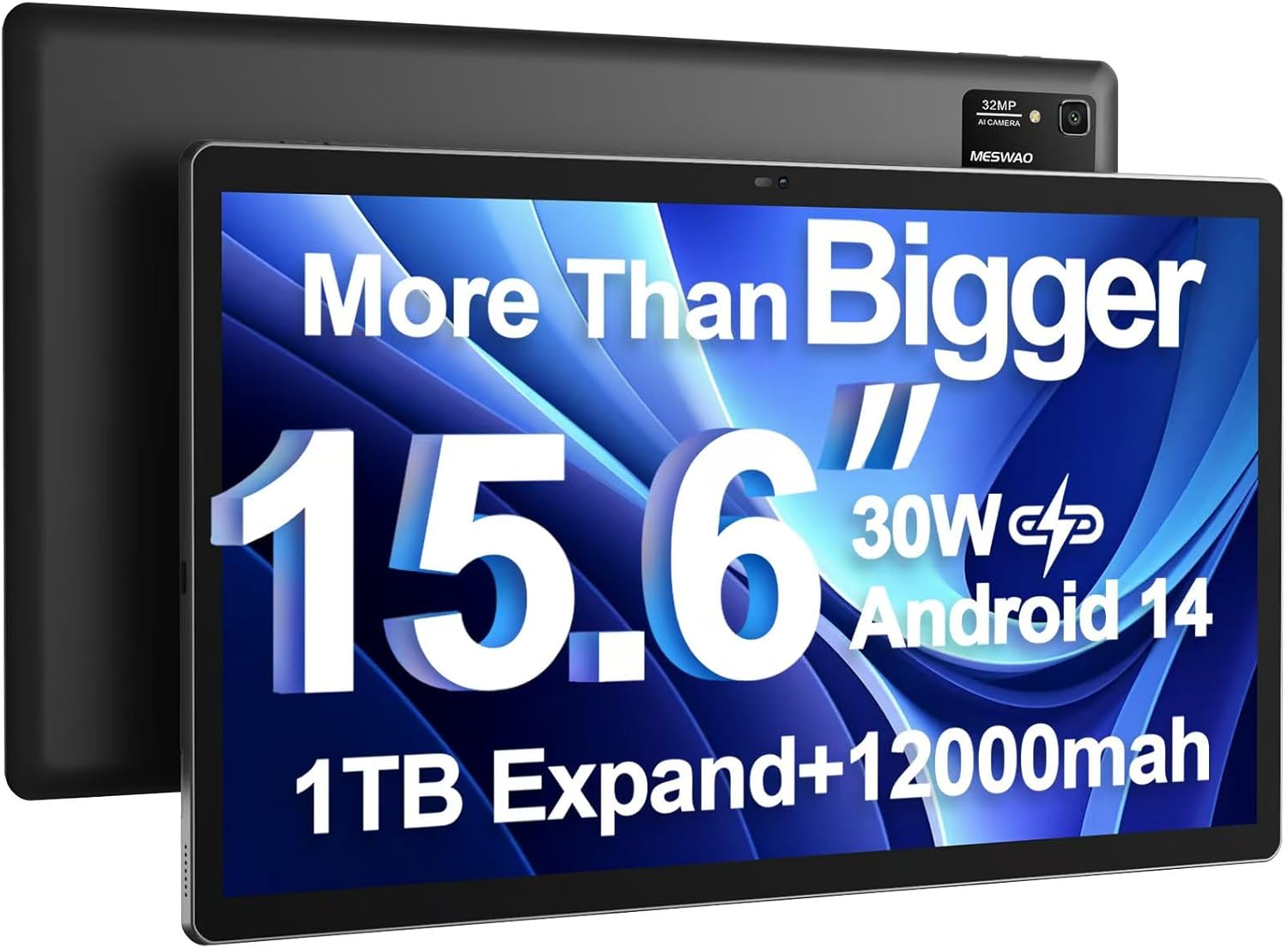
Image: The MESWAO 15.6 inch Android 14 Tablet Pro, showcasing its large display and rear camera module.

Image: Visual comparison highlighting the significantly larger screen area of the 15.6-inch tablet compared to a standard 10-inch tablet.

Image: Illustration of the tablet's 12,000mAh ultra-large capacity battery and 30W fast charging, indicating quick charge times and extended usage.
3.2 Cydrannau'r Tabled
Familiarize yourself with the physical components of your MESWAO tablet:
- Botwm Pŵer: Located on the side, used to turn the tablet on/off or wake/sleep the screen.
- Botymau Cyfrol: Addaswch lefelau allbwn sain.
- Camera blaen: Camera 5MP ar gyfer galwadau fideo a hunluniau.
- Camera Cefn: 32MP camera with flash for high-resolution photos and videos.
- Porthladd Math-C: Ar gyfer codi tâl a throsglwyddo data.
- Slot Cerdyn TF: For expanding storage with a microSD card.
- Siaradwyr Stereo: Pedwar siaradwr ar gyfer profiad sain gwell.
- Jack clustffon 3.5mm: For wired audio connection (requires included Type-C to 3.5mm adapter).
4. Gosod
4.1 Pŵer Cychwynnol Ymlaen
- Pwyswch a dal y Botwm Pŵer until the MESWAO logo appears on the screen.
- Dilynwch yr awgrymiadau ar y sgrin i ddewis eich iaith, rhanbarth, a chysylltu â rhwydwaith Wi-Fi.
- Sign in with your Google account or create a new one to access Google Play Store and other services.
4.2 Gwefru'r Tabled
Before first use, fully charge the tablet. Use the provided power adapter and Type-C cable.
- Connect the Type-C cable to the tablet's Type-C port.
- Plygiwch yr addasydd pŵer i mewn i allfa wal.
- The charging indicator will appear on the screen. A full charge takes approximately 3 hours with the 30W fast charger.
4.3 Mewnosod Cerdyn MicroSD
To expand storage, insert a microSD card (FAT32 format, up to 1TB, sold separately).
- Locate the TF card slot on the side of the tablet.
- Use the provided stuck pin to gently press into the small hole next to the slot to eject the tray.
- Place the microSD card into the tray with the gold contacts facing down.
- Ail-osodwch yr hambwrdd yn ofalus yn y slot nes ei fod yn clicio i'w le.
5. Cyfarwyddiadau Gweithredu
5.1 Mordwyo Sylfaenol
- Sgrin Cartref: Sweipiwch i'r chwith neu'r dde i lywio rhwng sgriniau cartref.
- Drôr Ap: Access all installed applications (if using a launcher with an app drawer, otherwise apps are on home screens).
- Hysbysiadau a Gosodiadau Cyflym: Swipe down from the top of the screen to access notifications and quick settings toggles (Wi-Fi, Bluetooth, Brightness, etc.).
- Apiau Diweddar: Tapiwch yr eicon sgwâr (neu swipe i fyny a daliwch o'r gwaelod os ydych chi'n defnyddio llywio ystum) i view a newid rhwng apiau a ddefnyddiwyd yn ddiweddar.
5.2 Multitasking with Split Screen
The Android 14 OS supports split-screen functionality for enhanced productivity.
- Agorwch yr ap cyntaf rydych chi am ei ddefnyddio.
- Go to the Recent Apps view.
- Tap the app icon at the top of the first app's card and select 'Split screen'.
- Choose the second app from your recent apps or app drawer to open it in the other half of the screen.
- Addaswch faint pob ap trwy lusgo'r rhannwr yn y canol.

Delwedd: Drosoddview of key features of the Android 14 operating system on the tablet, including multitasking capabilities.
5.3 Cysylltedd
- Wi-Fi: Ewch i Gosodiadau > Rhwydwaith a'r rhyngrwyd > Wi-Fi to connect to available networks. Supports 2.4Ghz and 5Ghz bands.
- Bluetooth: Ewch i Gosodiadau> Dyfeisiau cysylltiedig> Dewisiadau cysylltiad> Bluetooth to pair with Bluetooth headphones, keyboards, or other devices.
- Castio Sgrin: The tablet supports wireless screen casting to compatible displays. Access this feature from Quick Settings or Settings > Connected devices > Connection preferences > Cast.

Image: Depiction of the tablet's stable dual-band Wi-Fi and Bluetooth 5.0 capabilities, enabling seamless wireless connections.
6. cynnal
6.1 Gofal Batri
- Osgowch dymheredd eithafol (poeth neu oer) gan y gallant ddirywio oes y batri.
- Peidiwch â gadael i'r batri ddraenio'n llwyr yn aml. Gwefrwch ef cyn iddo gyrraedd 0%.
- Use only the provided charger or a certified 30W PD fast charger.
6.2 Glanhau
- Defnyddiwch frethyn meddal, di-lint i lanhau'r sgrin a'r corff.
- Ar gyfer smwtshis ystyfnig, ychydig yn dampgolchwch y lliain gyda dŵr neu lanhawr sgrin. Osgowch gemegau llym.
- Do not spray liquids directly onto the tablet.
6.3 Diweddariadau Meddalwedd
Chwiliwch am ddiweddariadau system a'u gosod yn rheolaidd i sicrhau perfformiad a diogelwch gorau posibl.
- Connect your tablet to a stable Wi-Fi network.
- Ewch i Gosodiadau > System > Diweddariad system.
- Dilynwch y cyfarwyddiadau ar y sgrin i lawrlwytho a gosod unrhyw ddiweddariadau sydd ar gael.
7. Datrys Problemau
If you encounter issues with your tablet, refer to the following common solutions:
| Problem | Achos Posibl | Ateb |
|---|---|---|
| Ni fydd y tabled yn troi ymlaen | Batri isel; Damwain system | Gwefrwch y dabled am o leiaf 30 munud. Pwyswch a daliwch y botwm Pŵer am 10-15 eiliad i orfodi ailgychwyn. |
| Perfformiad araf/Oedi | Gormod o apiau yn rhedeg; Lle storio isel; Meddalwedd sydd wedi dyddio | Cau apiau cefndir. Clirio'r storfa. Rhyddhewch le storio. Gwiriwch am ddiweddariadau system. |
| Materion cysylltiad Wi-Fi | Incorrect password; Router issue; Tablet Wi-Fi off | Ensure Wi-Fi is on. Re-enter password. Restart router. Forget and reconnect to network. |
| Mae'r batri yn draenio'n gyflym | High screen brightness; Background apps; Heavy usage | Reduce screen brightness. Close unused apps. Limit background data. Check battery usage in settings. |
| Touchscreen unresponsive/Phantom touches | Temporary software glitch; Defective unit | Restart the tablet. If the issue persists, contact MESWAO customer support for assistance. |
If the problem persists after trying these solutions, please contact MESWAO customer support for further assistance.
8. manylebau
| Nodwedd | Manylyn |
|---|---|
| Enw Model | MES-B3 Pro |
| System Weithredu | Android 14 |
| Maint Sgrin | 15.6 modfedd |
| Cydraniad Sgrin | 1920 x 1080 picsel (IPS HD Llawn) |
| Prosesydd | MediaTek Helio G99 Octa-core (up to 2.2GHz) |
| Cydbrosesydd graffeg | ARM Mali-G57 |
| HWRDD | 6 GB |
| Storio Mewnol (ROM) | 128 GB |
| Storfa Ehangadwy | Up to 1TB via MicroSD card (FAT32 format) |
| Gallu Batri | 12,000mAh |
| Bywyd Batri (Cyfartaledd) | 13 Hours (up to 15 hours video playback) |
| Codi tâl | Gwefru Cyflym PD 30W |
| Cysylltedd Di-wifr | 802.11a/b/ac/ax (2.4G/5G Dual-band Wi-Fi), Bluetooth 5.0 |
| Camera blaen | 5MP |
| Camera Cefn | 32MP |
| Pwysau Eitem | 4.42 pwys (tua 2 kg) |
| Dimensiynau Cynnyrch | 14.49 x 8.66 x 0.39 modfedd (36.8 x 22 x 1 cm) |
9. Gwarant a Chefnogaeth
MESWAO products come with a standard manufacturer's warranty. Please refer to the warranty card included in your package for specific terms and conditions. For technical support, troubleshooting assistance, or warranty claims, please contact MESWAO customer service through the contact information provided on the official MESWAO websafle neu'ch platfform prynu.
Gwybodaeth Gyswllt: Please visit the official MESWAO website or refer to the support card included in your product packaging for the most up-to-date contact details.