
1. Rhagymadrodd
This manual provides comprehensive instructions for the VINABTY RM-C3607 infrared replacement remote control. It is designed to function as a direct replacement for your original JVC TV remote, requiring no complex programming or setup. This remote control offers a user-friendly experience with clear buttons and an ergonomic design.
2. Gwybodaeth Diogelwch
- Cadwch fatris allan o gyrraedd plant.
- Peidiwch â chymysgu batris hen a newydd, na gwahanol fathau o fatris.
- Ensure correct battery polarity (+/-) when inserting.
- Tynnwch y batris os na fydd y teclyn rheoli o bell yn cael ei ddefnyddio am gyfnod hir.
- Gwaredwch batris ail-law yn unol â rheoliadau lleol.
- Osgowch amlygu'r teclyn rheoli o bell i olau haul uniongyrchol, ffynonellau gwres, neu leithder.
3. Cynnwys Pecyn
- 1 x VINABTY RM-C3607 Replacement Remote Control
Note: Batteries are not included and must be purchased separately. Two AAA 1.5V alkaline batteries are required.
4. Nodweddion Cynnyrch
- Technoleg Isgoch: Operates via infrared sensor, ensuring reliable communication with your TV.
- Dim Angen Rhaglennu: Ready to use directly out of the box after battery insertion.
- Dyluniad sy'n Gyfeillgar i Ddefnyddwyr: Features clear, well-arranged buttons for intuitive operation.
- Ystod Estynedig: Effective transmission distance of approximately 8 to 10 meters.
- Ergonomic and Lightweight: Comfortable to hold and use for extended periods.
- Adeiladu Gwydn: Made from robust ABS material for long-lasting performance.
5. Gosod: Gosod Batri
Follow these steps to install batteries into your remote control:
- Lleolwch y clawr compartment batri ar gefn y teclyn rheoli o bell.
- Llithrwch y clawr i lawr neu pwyswch y clicied i'w agor.
- Insert two new AAA 1.5V alkaline batteries, ensuring that the positive (+) and negative (-) terminals align correctly with the markings inside the compartment.
- Llithrwch glawr adran y batri yn ôl i'w le nes ei fod yn clicio'n ddiogel.
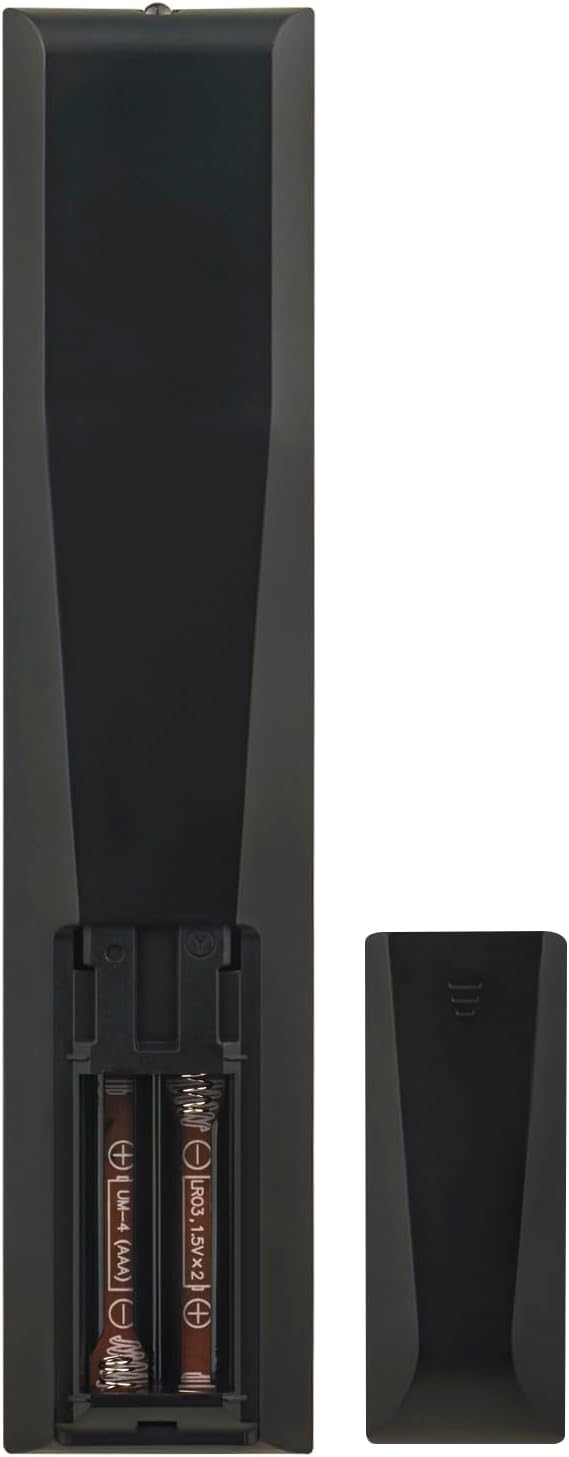
Ffigur 1: Yn ol view y teclyn rheoli o bell gyda'r adran batri ar agor, gan ddangos mewnosod batri yn gywir.
Once batteries are installed, the remote control is ready for immediate use with compatible JVC TV models without any further programming.
6. Cyfarwyddiadau Gweithredu
To operate your JVC TV with the VINABTY RM-C3607 remote control, point the remote directly towards the TV's infrared receiver. Ensure there are no obstructions between the remote and the TV.
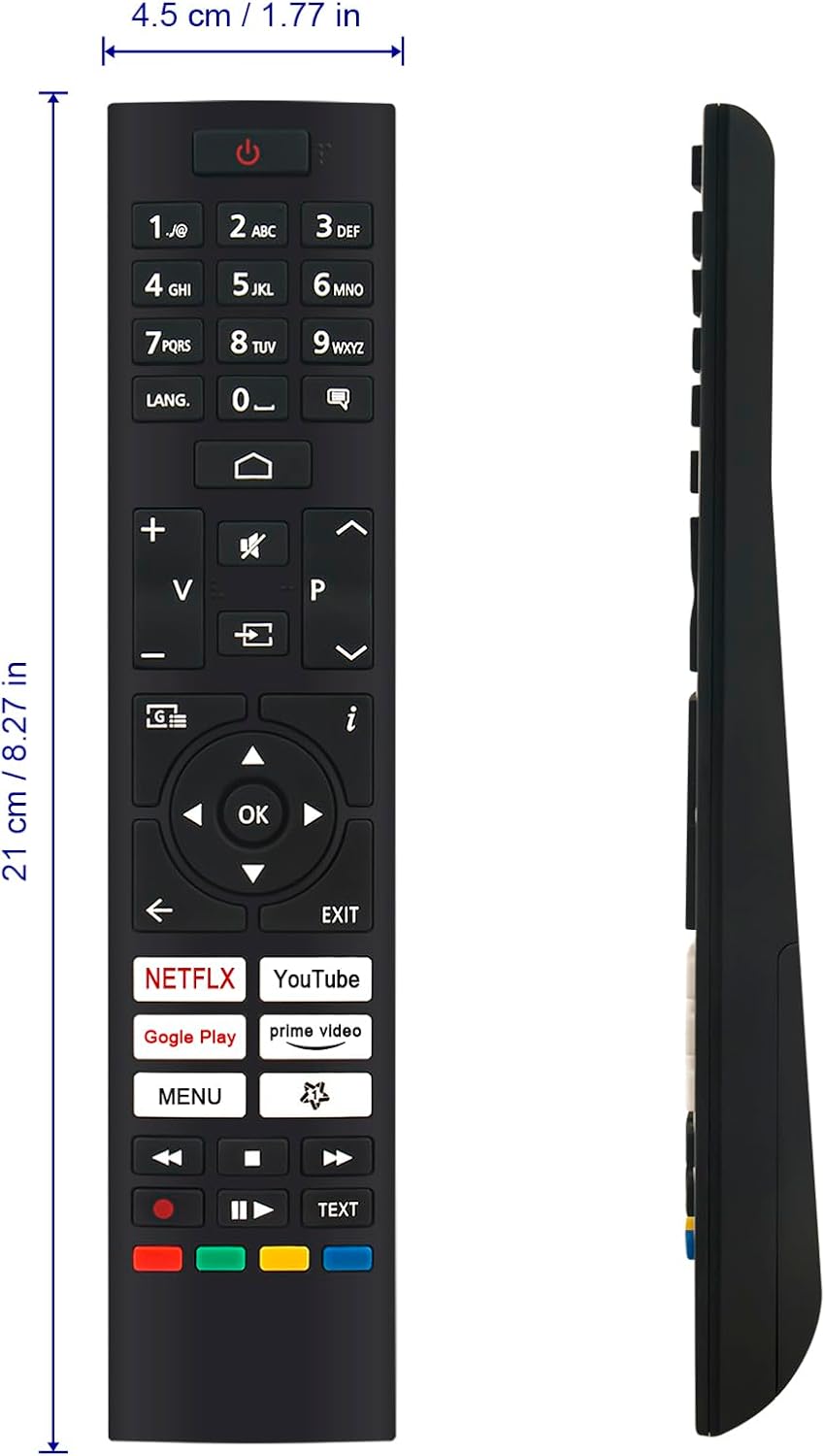
Ffigur 2: Blaen view of the VINABTY RM-C3607 remote control with button layout.
Swyddogaethau botwm:
- Botwm Pŵer (⏻): Yn troi'r teledu ymlaen neu i ffwrdd.
- Botymau Rhif (0-9): Yn dewis sianeli yn uniongyrchol.
- LANG. Button: Changes audio language or subtitle options.
- Cyfaint i Fyny/I Lawr (+ / -): Yn addasu cyfaint y teledu.
- Botwm Tewi (🔇): Yn mudo neu'n dad-fud sain y teledu.
- Sianel Fyny/I lawr (⌃ / ⌄): Yn newid sianeli teledu yn olynol.
- Navigation Buttons (◀ ▶ ▲ ▼): Llywio trwy ddewislenni ac opsiynau.
- Botwm Iawn: Yn cadarnhau dewisiadau mewn bwydlenni.
- Back Button (←): Yn dychwelyd i'r ddewislen neu'r sgrin flaenorol.
- Botwm YMADAEL: Yn gadael y ddewislen neu'r rhaglen gyfredol.
- NETFLIX / YouTube / Gogle Play / Prime Video Buttons: Direct access to streaming applications.
- Botwm BWYDLEN: Yn agor prif ddewislen y teledu.
- Media Control Buttons (⏮ ⏸ ⏹ ⏭): Chwarae, Oedi, Stopio, Symud Ymlaen yn Gyflym, Dirwyn yn ôl ar gyfer chwarae cyfryngau.
- TEXT Button: Accesses Teletext services.
- Botymau Lliw (Coch, Gwyrdd, Melyn, Glas): Functionality varies depending on the TV menu or application.
7. Compatible JVC TV Models
The VINABTY RM-C3607 remote control is compatible with the following JVC TV models:
- LT-39VAH3055
- LT-42VAF3055
- LT-24VAH3335
- LT-32VAH3035
- LT-43VA3335
- LT-43VAQ6235
- LT-50VA3300
- LT-55VA3200
- LT-43VA3000
- LT-43VA3200
- LT-43VA3205I
- LT-65VA3205I
- LT-50VAQ6235
- LT-50VAQ7235
- LT-55VAQ6235
- LT-55VAQ7235
- LT-55VAQ8235
- LT-65VAO9335
- LT-65VAQ6235
- LT-65VAQ8235
- LT-70VAQ7235
- LT-75VA6335
- LT24VAH3335
- LT32VAH3035
- LT43VA3335
- LT43VAF3335
- LT43VAQ6235
- LT50VA3300
- LT50VAQ6235
- LT50VAQ7235
- LT55VAQ6235
- LT55VAQ7235
- LT55VAQ8235
- LT65VAQ8235
- LT70VAQ7235
- LT75VA6335
- LT65VAO9335
- LT65VAQ6235
8. cynnal
- Glanhau: Use a soft, dry cloth to clean the remote control. Do not use liquid cleaners, abrasive pads, or chemical solvents, as these may damage the surface or internal components.
- Amnewid Batri: Replace batteries promptly when the remote's response becomes sluggish or inconsistent. Always replace both batteries at the same time.
- Storio: Os na fydd y teclyn rheoli o bell yn cael ei ddefnyddio am gyfnod hir, tynnwch y batris allan i atal gollyngiadau a difrod posibl. Storiwch mewn lle oer, sych.
9. Datrys Problemau
| Problem | Achos Posibl | Ateb |
|---|---|---|
| Nid yw rheolaeth bell yn gweithio. |
|
|
| Buttons are unresponsive or delayed. |
|
|
10. manylebau
| Brand | VINABTY |
| Model | RM-C3607 |
| Dimensiynau (L x W x H) | 18 x 5 x 1 cm (tua 7.09 x 1.97 x 0.39 modfedd) |
| Pwysau | 60 gram (tua 2.12 owns) |
| Technoleg Cysylltedd | Is-goch (IR) |
| Math Batri | 2 x Batris Alcalin AAA 1.5V (heb eu cynnwys) |
| Ystod Uchaf | 10 metr (tua 33 troedfedd) |
| Nifer y Botymau | 25 |
| Deunydd | ABS |
11. Cymorth a Chyswllt
If you encounter any issues with your VINABTY RM-C3607 remote control or have questions regarding its compatibility, please contact the seller or manufacturer's customer support for assistance. Providing your TV model number may help expedite support.
For general inquiries or to verify compatibility before purchase, please reach out to customer service.