
1. Gwybodaeth Bwysig am Ddiogelwch
Darllenwch yr holl gyfarwyddiadau yn ofalus cyn eu cydosod a'u defnyddio. Gall methu â dilyn y cyfarwyddiadau hyn arwain at anaf neu ddifrod i'r cynnyrch.
- Always keep children and pets away from the desk when in motion.
- Use the child lock feature (if available) to prevent unintended height adjustments.
- Be aware of the anti-collision feature; do not force the desk to move if it encounters an obstacle.
- Ensure all cables are properly managed to avoid entanglement during height adjustments.
- Do not overload the desk. The maximum weight capacity is 180 lbs.
- Only use the desk on a level surface.
2. Cynnwys Pecyn
Gwiriwch fod yr holl gydrannau yn bresennol cyn dechrau cydosod. Os oes unrhyw rannau ar goll neu wedi'u difrodi, cysylltwch â chymorth cwsmeriaid.
- Desktop (0.6" thick, Rustic Brown)
- Coesau Desg (2)
- Padiau Traed (2)
- Crossbar/Frame Assembly
- Control Panel with LED Touchscreen
- Addasydd Pŵer a Chebl
- Bachyn Clustffon
- Assembly Hardware (screws, L-shaped installation tools)
- Llawlyfr Defnyddiwr
3. Cyfarwyddiadau Cymanfa
The DEVAISE ASJZ021 desk is designed for quick and simple assembly, typically within 15 minutes. All holes are pre-drilled, and accessories are clearly labeled.
Offer Angenrheidiol:
- Tyrnsgriw pen Phillips (heb ei gynnwys)
- L-shaped installation tools (included)
Cynulliad cam wrth gam:
- Dadbacio Cydrannau: Tynnwch yr holl rannau o'r pecynnu yn ofalus a'u gosod ar arwyneb glân, meddal i atal crafiadau.
- Atodwch Padiau Traed: Sicrhewch y padiau traed i waelod pob coes desg gan ddefnyddio'r sgriwiau a ddarperir.
- Ffrâm Cydosod: Connect the desk legs to the crossbar/frame assembly. Ensure all connections are tight and secure.
- Atodi Bwrdd Gwaith: Carefully place the desktop onto the assembled frame. Align the pre-drilled holes on the desktop with the frame. Secure the desktop to the frame using the provided screws.
- Gosod Panel Rheoli: Mount the LED touchscreen control panel to the underside of the desktop in the designated location. Connect the control panel cable to the motor.
- Pwer Cysylltu: Plug the power adapter into the desk's motor and then into a wall outlet.
- Atodwch fachyn clustffonau: Install the headphone hook to the side of the desk as desired.

Delwedd: Ffrwydrodd view of desk components illustrating the 15-minute quick installation process.
4. Cyfarwyddiadau Gweithredu
The DEVAISE ASJZ021 Electric Standing Desk features a tri-motor system for smooth and quiet height adjustments and a smart LED touchscreen controller.
Panel Rheoli Drosview:

Delwedd: Manwl view of the multi-function control panel with LED display, up/down arrows, memory presets (1, 2, 3), and 'S' button.
- Arddangosfa LED: Shows the current desk height in real-time.
- Saethau i Fyny/I Lawr (▲ / ▼): Pwyswch a daliwch i addasu uchder y ddesg â llaw. Rhyddhewch i stopio ar yr uchder a ddymunir.
- Rhagosodiadau Cof (1, 2, 3): Store and recall up to three personalized height settings.
- 'S' Button: Used for saving memory presets and activating the child lock function.
Addasiad Uchder:
The desk can be adjusted between 28.35 inches (sitting height) and 46.45 inches (standing height).

Image: Comparison of the desk at its minimum height of 28.35 inches and maximum height of 46.45 inches.
- Addasiad â llaw: Press and hold the ▲ (Up) or ▼ (Down) button until the desk reaches your desired height.
- Gosod Rhagosodiadau Cof:
- Addaswch y ddesg i'ch uchder dewisol gan ddefnyddio'r botymau I Fyny/I Lawr.
- Press the 'S' button. The LED display will show 'S-'.
- Immediately press one of the memory buttons (1, 2, or 3). The display will show 'S-1', 'S-2', or 'S-3' to confirm the height is saved.
- Adalw Rhagosodiadau Cof: Simply press the corresponding memory button (1, 2, or 3) once. The desk will automatically move to the saved height.
Gweithrediad Tawel:
The tri-motor system operates quietly, typically below 50dB, ensuring minimal disruption in your workspace.

Image: Graphic illustrating the quiet operation of the desk, comparing its sound level (below 50dB) to soft breaths (10dB), whisper (25dB), and car horns (80dB).
5. manylebau
Detailed technical specifications for the DEVAISE ASJZ021 Electric Standing Desk.
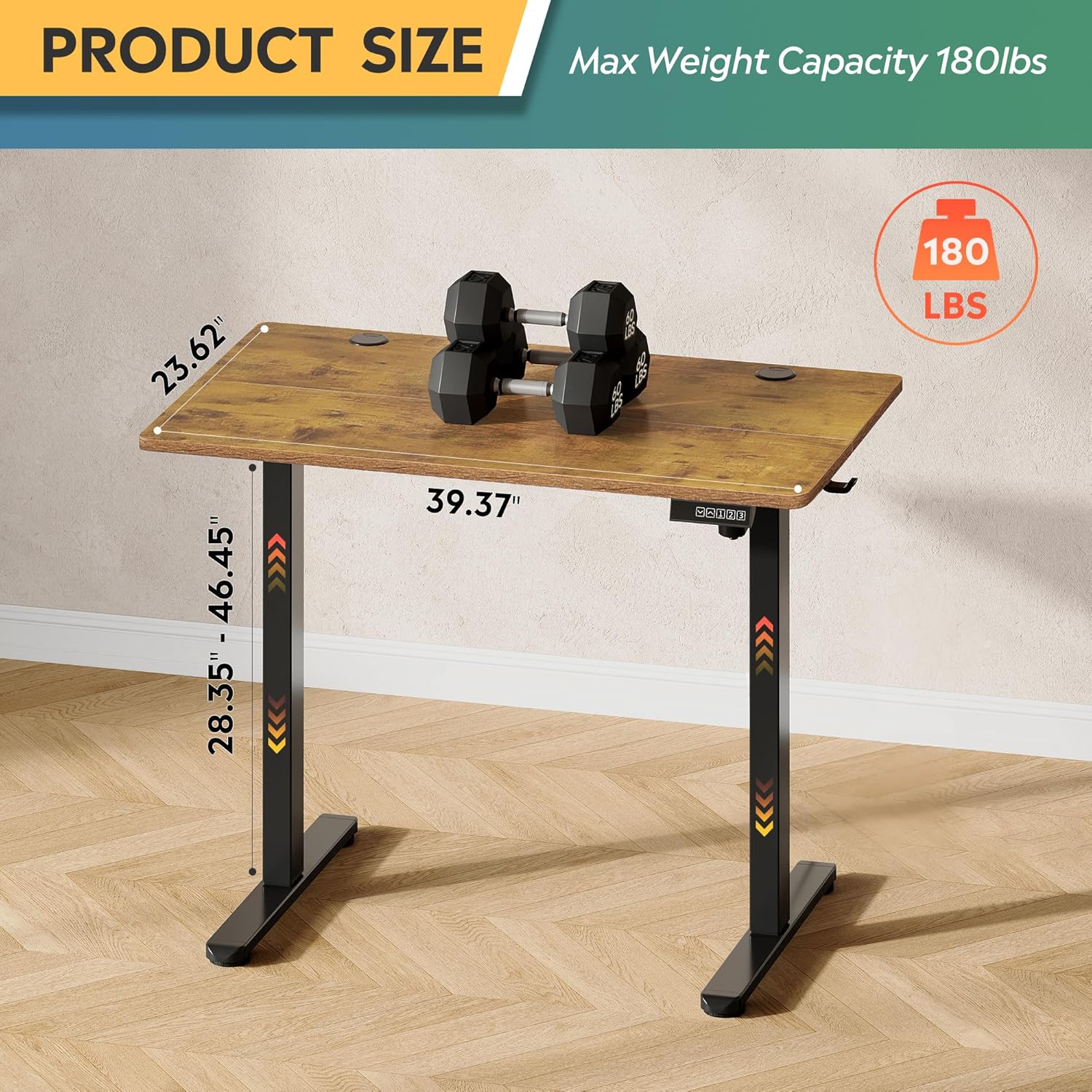
Image: Product dimensions (39.37"W x 23.62"D) and height range (28.35"-46.45"), highlighting the 180 lbs maximum weight capacity.
| Nodwedd | Manyleb |
|---|---|
| Rhif Model | ASJZ021 |
| Dimensiynau Cynnyrch (D x W x H) | 23.62"D x 39.37"W x 28.34"H |
| Isafswm Uchder | 28.35 modfedd |
| Uchder Uchaf | 46.45 modfedd |
| Trwch Pen Bwrdd | 0.6 modfedd |
| Argymhelliad Pwysau Uchaf | 180 Bunt |
| Pwysau Eitem | 37 Bunt |
| Mecanwaith Codi | Electric (Tri-motor system) |
| Nifer y Swyddi Uchder | 3 Rhagosodiadau Cof |
| Lefel Sŵn | <50dB |
| Math o Ddeunydd Gorau | Pren peirianyddol |
| Deunydd Sylfaenol | Haearn |
| Lliw | Brown Gwladaidd (Bwrdd Gwaith), Du (Sylfaen) |
| Nodweddion Arbennig | Adjustable Height, Compact, Electric, LED Touchscreen |
6. cynnal
Regular maintenance helps ensure the longevity and optimal performance of your standing desk.
- Glanhau: Sychwch y bwrdd gwaith a'r ffrâm gyda lliain meddal, damp brethyn. Osgowch gemegau llym neu lanhawyr sgraffiniol a allai niweidio'r gorffeniad.
- Rheoli Ceblau: Periodically check and organize cables to prevent them from snagging or getting pinched during height adjustments.
- Tyndra Sgriw: Gwiriwch yr holl sgriwiau a bolltau o bryd i'w gilydd i sicrhau eu bod yn dal yn dynn. Ail-dynhau os oes angen.
- Archwiliad Modur: Listen for any unusual noises during operation. If you notice any issues, refer to the troubleshooting section or contact support.
7. Datrys Problemau
If you encounter any issues with your DEVAISE ASJZ021 Electric Standing Desk, please refer to the following common problems and solutions.
| Problem | Achos Posibl | Ateb |
|---|---|---|
| Nid yw'r ddesg yn symud | Cebl pŵer wedi'i ddatgysylltu; Gorlwytho; Gwall modur | Gwiriwch y cysylltiadau pŵer. Lleihewch y pwysau ar y ddesg. Datgysylltwch am 10 eiliad, yna plygiwch yn ôl i mewn. |
| Addasiad uchder anwastad | Obstruction; Sensor issue | Clear any obstructions. Perform a reset (refer to control panel instructions or contact support). |
| Mae'r arddangosfa'n dangos cod gwall | Specific system error | Note the error code and consult the DEVAISE support websafle neu cysylltwch â gwasanaeth cwsmeriaid i gael canllawiau penodol. |
| Desk stops moving unexpectedly | Anti-collision activated; Overheating protection | Check for obstructions. Allow the motor to cool down for 20 minutes before attempting to operate again. |
If the problem persists after attempting these solutions, please contact DEVAISE customer support.
8. Gwarant a Chefnogaeth
DEVAISE is committed to providing quality products and customer satisfaction. Your purchase is backed by our support services.
- Cefnogaeth i Gwsmeriaid: For any questions, concerns, or assistance with assembly or operation, please contact our 24/7 US-based support team. Refer to your purchase documentation for contact details.
- Gwybodaeth Gwarant: Specific warranty terms and conditions may vary. Please refer to the warranty card included with your product or visit the official DEVAISE websafle am wybodaeth fanwl.