
1. Rhagymadrodd
Thank you for choosing the Amazon Basics Bluetooth Speaker. This compact and portable speaker is designed to deliver premium sound with enhanced bass, featuring IPX5 waterproofing for versatile indoor and outdoor use. This manual provides essential information for setting up, operating, and maintaining your speaker.

Figure 1: Amazon Basics Bluetooth Speaker highlighting key features.
2. Gwybodaeth Diogelwch
- Peidiwch ag amlygu'r siaradwr i dymheredd eithafol na golau haul uniongyrchol.
- Osgoi gollwng neu orfodi'r siaradwr i effeithiau cryf.
- Keep the speaker away from water sources, despite its IPX5 rating, to prevent damage to internal components.
- Peidiwch â cheisio dadosod na thrwsio'r siaradwr eich hun. Cysylltwch â phersonél gwasanaeth cymwys.
- Defnyddiwch y cebl gwefru USB-C a ddarperir neu gyfwerth ardystiedig yn unig.
3. Cynnwys Pecyn
Sicrhewch fod yr holl eitemau yn bresennol yn y pecyn:
- Amazon Basics Bluetooth Speaker
- 30cm USB Charging Cable
- Strap arddwrn
- Canllaw Gosod Cyflym (QSG)
- Llawlyfr Defnyddiwr (y ddogfen hon)
4. Cynnyrch Drosview
4.1 Rheolyddion a Phorthladdoedd

Figure 2: Top control panel of the speaker.
- Botwm Bluetooth: Pwyswch a dal i fynd i mewn i'r modd paru.
- Cyfrol i Lawr (-): Pwyswch yn fyr i ostwng y sain. Pwyswch yn hir am y trac blaenorol.
- Cyfrol i Fyny (+): Pwyswch yn fyr i gynyddu'r gyfrol. Pwyswch yn hir am y trac nesaf.
- Botwm Pŵer: Pwyswch a daliwch i droi ymlaen/diffodd. Pwyswch yn fyr i chwarae/oedi.
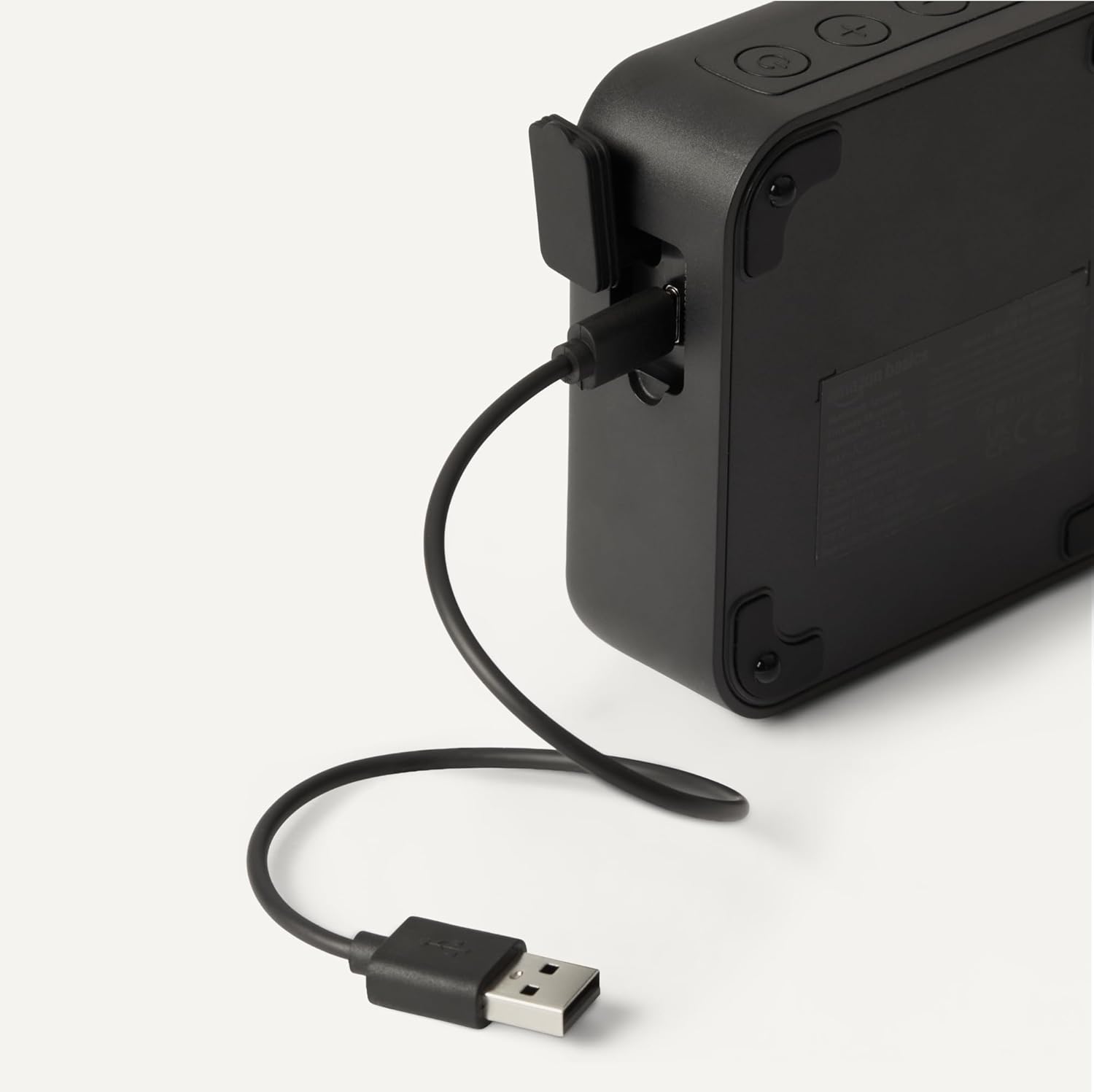
Figure 3: USB-C charging port.
- Porthladd codi tâl USB-C: Connect the provided USB-C cable for charging.
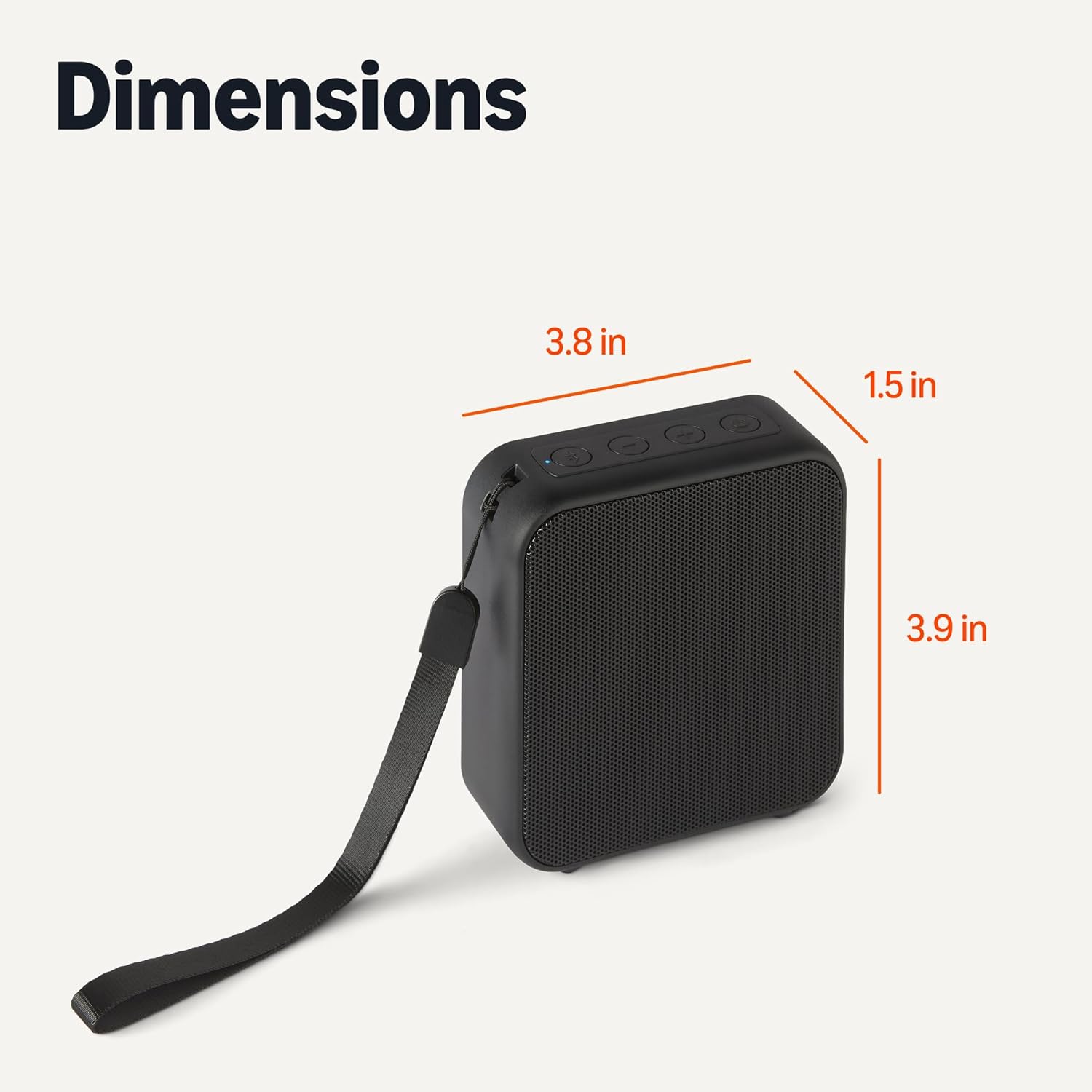
Figure 4: Speaker with wrist strap.
- Strap arddwrn: Attach the included wrist strap for easy portability.
5. Gosod
5.1 Gwefru'r Siaradwr
- Connect the small end of the USB-C charging cable to the speaker's USB-C port.
- Cysylltwch ben mawr y cebl USB ag addasydd pŵer USB (heb ei gynnwys) neu borthladd USB cyfrifiadur.
- Bydd y dangosydd LED yn dangos statws y gwefru. Mae gwefr lawn yn cymryd tua 3 awr.
5.2 Pâr Bluetooth
- Gwnewch yn siŵr bod y siaradwr wedi'i wefru a'i ddiffodd.
- Press and hold the Power button to turn on the speaker. The speaker will enter pairing mode automatically, indicated by a flashing blue LED.
- Ar eich dyfais sydd wedi'i galluogi gan Bluetooth (ffôn clyfar, tabled, gliniadur), ewch i'r gosodiadau Bluetooth.
- Chwiliwch am available devices and select "Amazon Basics BT Speaker" from the list.
- Once connected, the blue LED will stop flashing and remain solid. You will hear an audible confirmation.
- Bydd y siaradwr yn ailgysylltu'n awtomatig â'r ddyfais a barwyd ddiwethaf pan gaiff ei throi ymlaen, os yw'r ddyfais o fewn cyrraedd a bod Bluetooth wedi'i alluogi.
6. Gweithrediad
6.1 Pŵer Ymlaen/Diffodd
- I Bweru Ymlaen: Pwyswch a daliwch y botwm Pŵer am 2-3 eiliad.
- I Bweru i ffwrdd: Pwyswch a daliwch y botwm Pŵer am 2-3 eiliad.
6.2 Chwarae Sain
- After successful Bluetooth pairing, open your music application on your device and start playing audio.
- Chwarae/Seibiant: Short press the Power button to play or pause the audio.
6.3 Rheoli Cyfaint a Thrac
- Cynyddu Cyfrol: Pwyswch y botwm "+" yn fyr.
- Gostwng y Gyfrol: Pwyswch y botwm "-" yn fyr.
- Trac Nesaf: Pwyswch y botwm "+" yn hir.
- Trac Blaenorol: Pwyswch y botwm "-" yn hir.
7. cynnal
7.1 Glanhau a Storio
- Sychwch y siaradwr gyda lliain meddal, sych. Peidiwch â defnyddio glanhawyr sgraffiniol na thoddyddion.
- Storiwch y siaradwr mewn lle oer, sych i ffwrdd o olau haul uniongyrchol a thymheredd eithafol.
- If not used for extended periods, charge the speaker at least once every three months to maintain battery health.
8. Datrys Problemau
Cyfeiriwch at y tabl isod am broblemau cyffredin a'u datrysiadau:
| Problem | Ateb |
|---|---|
| Nid yw'r siaradwr yn troi ymlaen. | Gwnewch yn siŵr bod y siaradwr wedi'i wefru'n llawn. Cysylltwch â ffynhonnell bŵer a rhoi cynnig arall arni. |
| Methu paru gyda dyfais Bluetooth. | Make sure the speaker is in pairing mode (flashing blue LED). Ensure Bluetooth is enabled on your device and it is within 10 meters of the speaker. Forget the device in your phone's Bluetooth settings and try pairing again. |
| Dim sain na chyfaint isel. | Gwiriwch lefelau'r sain ar y siaradwr a'ch dyfais gysylltiedig. Gwnewch yn siŵr bod y siaradwr wedi'i baru'n iawn. |
| Afluniad sain. | Move the speaker closer to your device to reduce interference. Lower the volume on both the speaker and your device. |
| Speaker disconnects frequently. | Ensure the speaker and your device are within Bluetooth range (10 meters) and there are no significant obstacles. Check for other interfering wireless devices. |
9. manylebau
Detailed technical specifications for the Amazon Basics Bluetooth Speaker:
| Nodwedd | Manylyn |
|---|---|
| Enw Model | Amazon Basics BT Speaker |
| Rhif Model yr Eitem | AMZ-B5520A |
| Technoleg Cysylltedd | Bluetooth 5.3 |
| Amrediad Bluetooth | Hyd at 10 metr (33 troedfedd) |
| Math o Siaradwr | Llefarydd Cludadwy |
| Modd Allbwn Sain | Stereo |
| Llefarydd Uchafswm Pŵer Allbwn | 3 Wat |
| Maint Siaradwr | 1.75 modfedd |
| Ffynhonnell Pwer | Wedi'i Bweru â Batri |
| Gallu Batri | 800 mAh |
| Amser Codi Tâl | Tua 3 awr |
| Amser chwarae | Hyd at 6 awr (cyfaint o 50%) |
| Lefel Gwrthsefyll Dŵr | IPX5 (Dŵr) |
| Dimensiynau Cynnyrch (LxWxH) | 3.90 x 3.78 x 1.46 modfedd (9.9 x 9.6 x 3.7 cm) |
| Pwysau Eitem | 10 owns (283.5 gram) |
| Lliw | Du |
10. Gwybodaeth Gwarant
This Amazon Basics Bluetooth Speaker comes with a Limited Warranty. For specific details regarding warranty coverage, duration, and terms, please refer to the warranty card included in your product packaging or visit the official Amazon Basics websafle.
11. Cefnogaeth i Gwsmeriaid
For further assistance, troubleshooting, or product inquiries, please contact Amazon Basics customer support through the Amazon website or your purchase platform. Have your product model number (AMZ-B5520A) and purchase details ready.