
HETP HX100N9
HETP Portable Charger User Manual
Model: HX100N9
1. Rhagymadrodd
Thank you for choosing the HETP Portable Charger. This device is designed to provide convenient and fast charging for a wide range of electronic devices, including smartphones, tablets, and Apple Watches. Featuring built-in cables and multiple output options, it is an ideal companion for travel and daily use. Please read this manual carefully before using the product to ensure safe and optimal performance.
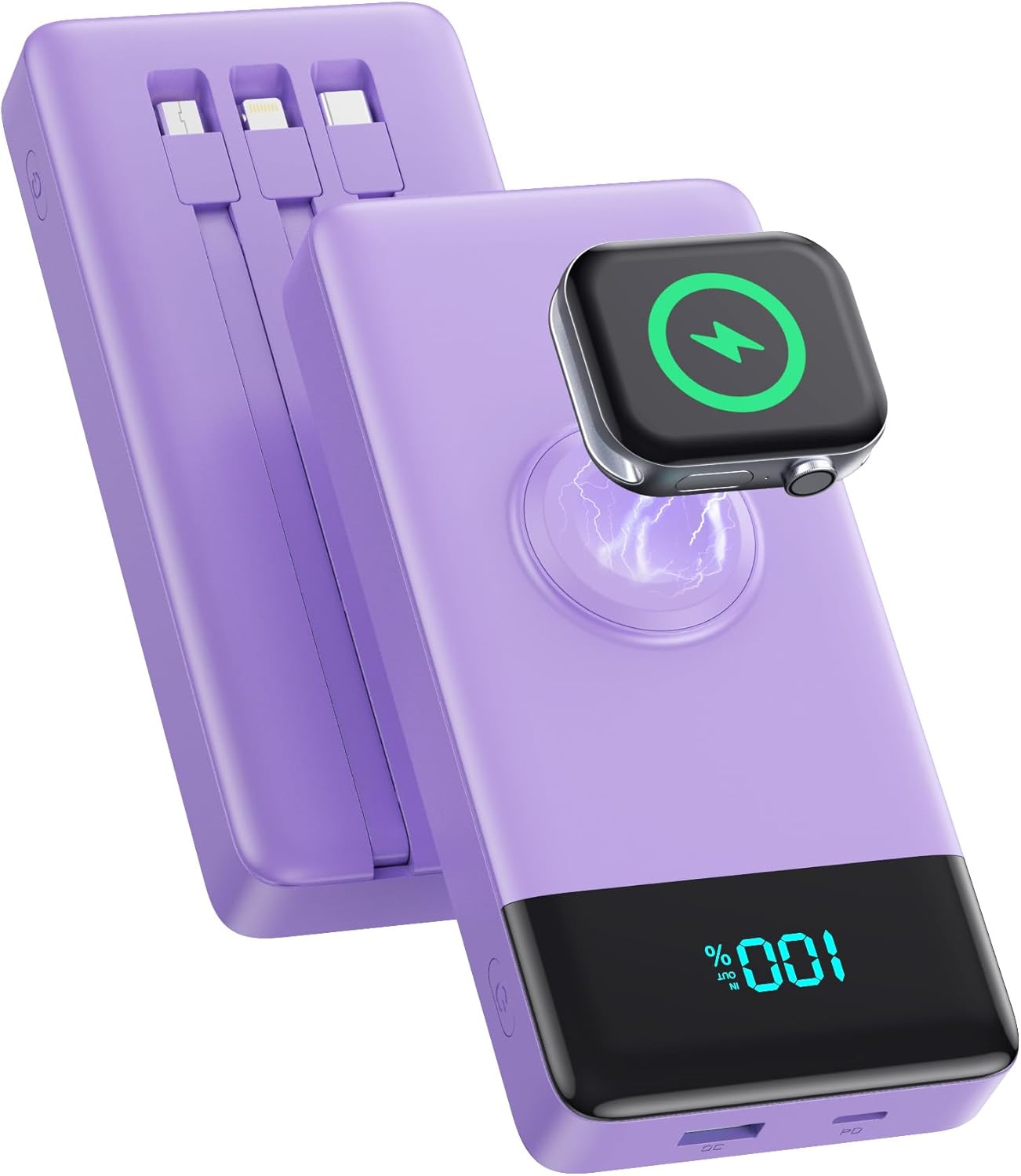
Image: The HETP Portable Charger, showcasing its compact design, built-in cables, and integrated iWatch charging pad. The device is purple with a black display showing "100%".
2. Gwybodaeth Diogelwch
Er mwyn atal anaf neu ddifrod i'ch dyfais, dilynwch y rhagofalon diogelwch canlynol:
- Peidiwch ag amlygu'r banc pŵer i dymheredd eithafol (uwchlaw 60°C/140°F) na golau haul uniongyrchol.
- Peidiwch â dadosod, addasu, na cheisio atgyweirio'r ddyfais eich hun.
- Cadwch y banc pŵer i ffwrdd o ddŵr, lleithder a deunyddiau fflamadwy.
- Osgoi gollwng neu orfodi'r ddyfais i effeithiau cryf.
- Defnyddiwch geblau ac addaswyr gwefru ardystiedig yn unig.
- Cadwch allan o gyrraedd plant.
- Dispose of the power bank according to local regulations; do not dispose of it with household waste.

Image: Diagram illustrating the multi-protection smart microchip features of the power bank, including temperature, over-current, overvoltage, overcharge, recovery, over-power, short circuit, and over-discharge protection.
3. Cynnwys Pecyn
Gwiriwch y pecyn am yr eitemau canlynol:
- 1 x HETP Portable Charger (10800mAh) with 3 Built-in Cables (USB-C, iOS, Micro USB) and iWatch Charger
- 1 x Llawlyfr Defnyddiwr
4. Cynnyrch Drosview
The HETP Portable Charger is equipped with multiple features for versatile charging:
- Ceblau wedi'u hadeiladu i mewn: Includes USB-C, iOS (Lightning), and Micro USB cables for direct connection to various devices.
- iWatch Wireless Charger: Integrated magnetic charging pad for Apple Watch.
- USB-C Port (PD 25W): Supports both input and output for fast charging.
- USB-A Port (QC Output): Provides Quick Charge output for compatible devices.
- Arddangosfa Ddigidol LED: Yn dangos y canran batri sy'n weddilltage.
- Botwm Pŵer: Yn actifadu'r banc pŵer a'r arddangosfa.

Image: A detailed diagram of the HETP Portable Charger highlighting its various ports and built-in cables, including USB C Cable Input/Output, iOS Cable Output, Micro USB Cable Output, Charge for iWatch, Power On/Off button, PD USB-C Input/Output, and QC USB-A Output. The LED display shows "100% IN OUT".

Image: Two images demonstrating the compact size and lightweight nature of the HETP Portable Charger. One shows it fitting into a pant pocket, and the other shows it fitting into a small handbag, with dimensions 6.02x2.8x0.59 inches and weight 280g indicated.
5. Gosod
The HETP Portable Charger comes ready for use. Before first use, it is recommended to fully charge the power bank.
5.1 Gwefru Cychwynnol y Banc Pŵer
To ensure optimal performance, fully charge your power bank before its first use.
- Connect the power bank to a wall charger (not included) using either the built-in USB-C cable or an external USB-C cable plugged into the USB-C port.
- The LED display will show the charging progress. It is fully charged when the display shows "100%".

Image: A visual guide demonstrating two methods to recharge the HETP Portable Charger: using the dedicated Type-C input port with an external cable and adapter, or using the built-in Type-C input cable with an adapter.
6. Cyfarwyddiadau Gweithredu
6.1 Codi Tâl ar Eich Dyfeisiau
The HETP Portable Charger offers multiple ways to charge your devices simultaneously.
- Defnyddio Ceblau Mewnol:
- Pull out the appropriate built-in cable (USB-C, iOS, or Micro USB) for your device.
- Connect the cable to your device's charging port.
- The power bank will automatically begin charging.
- Defnyddio porthladdoedd USB:
- Connect your device's charging cable to either the USB-C (PD) or USB-A (QC) output port on the power bank.
- Cysylltwch ben arall y cebl â'ch dyfais.
- The power bank will automatically begin charging.
- Codi tâl ar Apple Watch:
- Place your Apple Watch onto the magnetic wireless charging pad on the power bank.
- Ensure the watch is properly aligned for charging to begin.
The power bank supports charging up to 6 devices simultaneously. The LED display will show the remaining battery percentage yn ystod codi tâl.

Image: The HETP Portable Charger actively charging multiple devices at once, including three smartphones via built-in cables, an Apple Watch on its wireless pad, a tablet via the USB-C port, and AirPods via the USB-A port, demonstrating its capability to charge 6 devices simultaneously.

Image: A visual representation of the PD 25W fast charging capability of the HETP Portable Charger, showing an iPhone charging rapidly. A graph indicates that it can charge an iPhone to 50% in 30 minutes, significantly faster than standard charging.
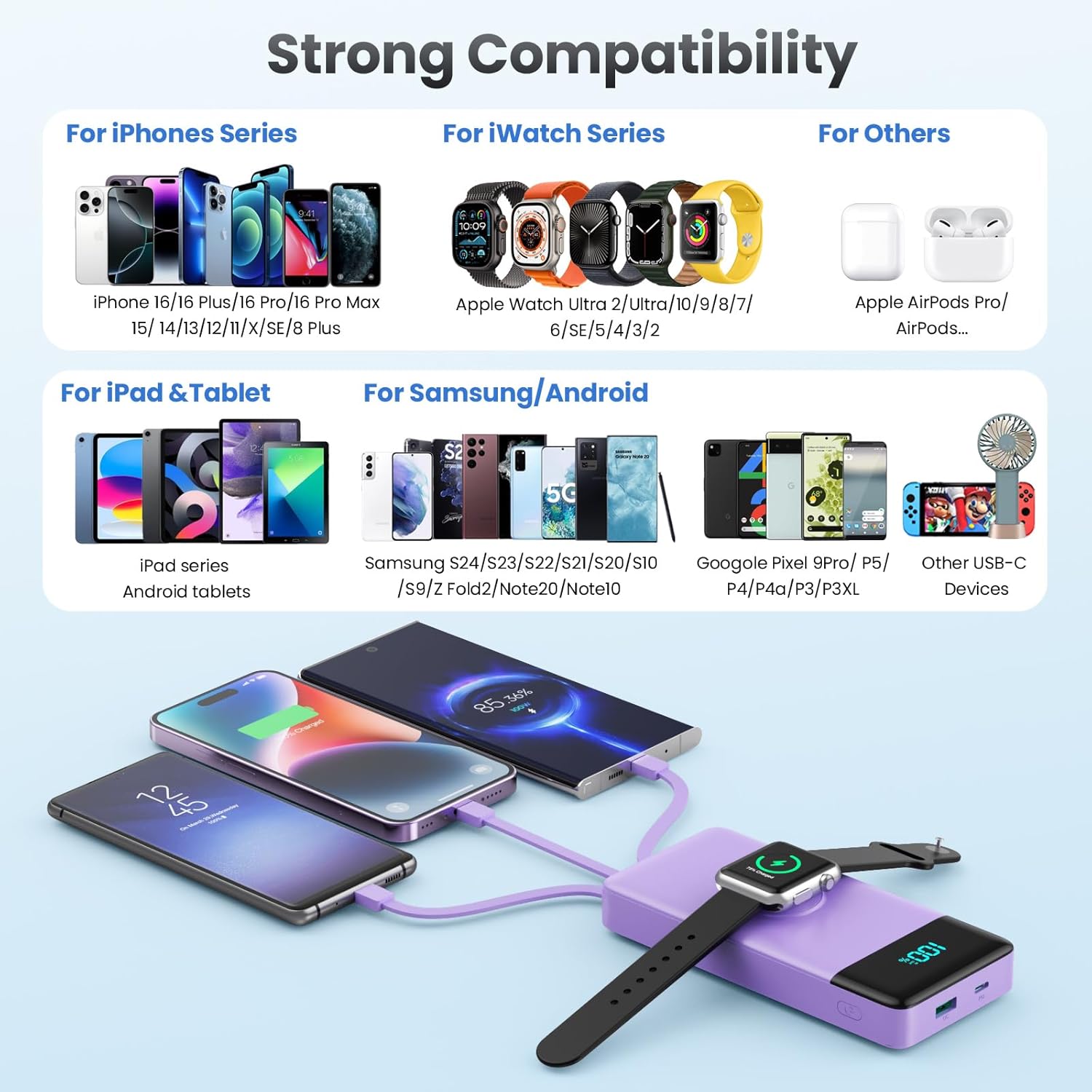
Image: A comprehensive compatibility chart for the HETP Portable Charger, categorizing compatible devices for iPhone Series, iWatch Series, iPad & Tablet, Samsung/Android, and other USB-C devices, illustrating its wide range of support.
7. cynnal
Proper care will extend the life of your HETP Portable Charger:
- Glanhewch y ddyfais gyda lliain meddal, sych. Peidiwch â defnyddio glanhawyr sgraffiniol na thoddyddion.
- Storiwch y banc pŵer mewn lle oer, sych pan nad yw'n cael ei ddefnyddio.
- If the device will not be used for an extended period, charge it to about 50% every three months to maintain battery health.
8. Datrys Problemau
| Problem | Achos Posibl | Ateb |
|---|---|---|
| Banc pŵer ddim yn gwefru. | Charging cable or adapter faulty; power bank battery depleted; connection issue. | Try a different cable or adapter. Ensure connections are secure. Allow power bank to charge for a few minutes. |
| Dyfais ddim yn gwefru o'r banc pŵer. | Power bank battery depleted; cable faulty; device not compatible; power bank in standby. | Check power bank battery level. Try a different cable. Ensure your device is compatible. Press the power button to activate the power bank. |
| Codi tâl araf. | Cable or adapter not supporting fast charging; multiple devices charging simultaneously; device's charging input limit. | Use a fast-charging compatible cable and adapter. Disconnect other devices to test speed. Check your device's charging specifications. |
| iWatch not charging wirelessly. | Watch not aligned correctly; watch case interfering; power bank battery depleted. | Adjust watch position on the charging pad. Remove any thick cases. Ensure power bank has sufficient charge. |
9. manylebau
| Nodwedd | Manylyn |
|---|---|
| Rhif Model | HX100N9 |
| Gallu Batri | 10800mAh |
| Mewnbwn (Porthladd USB-C) | PD 25W Uchafswm |
| Allbwn (Porthladd USB-C) | PD 25W Uchafswm |
| Output (USB-A Port) | QC Compatible |
| Ceblau Adeiledig | USB-C, iOS (Lightning), Micro USB |
| Gwefrydd iWatch | Codi Tâl Di-wifr Magnetig |
| Dimensiynau | 6.02 x 2.8 x 0.59 modfedd |
| Pwysau | 11.7 owns (280g) |
| Lliw | Porffor |
10. Gwarant a Chefnogaeth
Your HETP Portable Charger comes with a Gwarant 24 mis from the date of purchase. This warranty covers manufacturing defects and workmanship. It does not cover damage caused by misuse, accidents, unauthorized modifications, or normal wear and tear.
For technical support, warranty claims, or any questions regarding your product, please contact HETP customer service. Refer to the contact information provided on the product packaging or the official HETP websafle.
Cymorth technegol gydol oes ar gael ar gyfer y cynnyrch hwn.
Ask a question about this manual
Ask about setup, troubleshooting, compatibility, parts, safety, or missing instructions. Manuals+ will review the question and use this page’s manual context to help answer it.