
LAUNCH LAUNCH X431 CRP919 EV
LAUNCH X431 CRP919 EV Scanner User Manual
Model: LAUNCH X431 CRP919 EV
Brand: LANSIO
1. Rhagymadrodd
The LAUNCH X431 CRP919 EV is a state-of-the-art diagnostic scan tool designed for both traditional internal combustion engine (ICE) vehicles and the rapidly growing new energy vehicle (NEV) market, including hybrid and electric vehicles (EVs). This intelligent scanner provides comprehensive system diagnostics, advanced service functions, and bidirectional control capabilities, making it an essential tool for professional technicians and advanced DIY enthusiasts.
Equipped with an Android 10.0 operating system, a 7.0-inch touch screen, and robust hardware, the CRP919 EV offers fast, efficient, and accurate vehicle diagnostics. It supports modern communication protocols like CANFD and DOIP, ensuring broad compatibility with vehicles up to the latest models.

Figure 1.1: LAUNCH X431 CRP919 EV Scanner and its protective carrying case.
2. Gwybodaeth Diogelwch
Always observe the following safety precautions when operating the LAUNCH X431 CRP919 EV scanner to prevent personal injury or damage to the device or vehicle:
- Ensure the vehicle's ignition is off before connecting or disconnecting the diagnostic cable.
- Do not operate the scanner in wet conditions or with wet hands.
- Keep the device away from strong magnetic fields and high temperatures.
- Always refer to the vehicle manufacturer's service manual for specific diagnostic procedures and safety warnings, especially when working with high-voltage EV systems.
- Use appropriate personal protective equipment (PPE) when performing vehicle diagnostics.
- Do not attempt to disassemble or modify the scanner. Refer all servicing to authorized personnel.
3. Beth sydd yn y Bocs
Wrth agor y pecyn, gwiriwch fod yr holl gydrannau canlynol wedi'u cynnwys:
- LAUNCH X431 CRP919 EV Main Unit
- Main Diagnostic Cables
- Gwefrydd Math-C
- Power Adaptors (various regional types)
- Llawlyfr Defnyddiwr
- Canllaw Cychwyn Cyflym
- Achos Cario Amddiffynnol
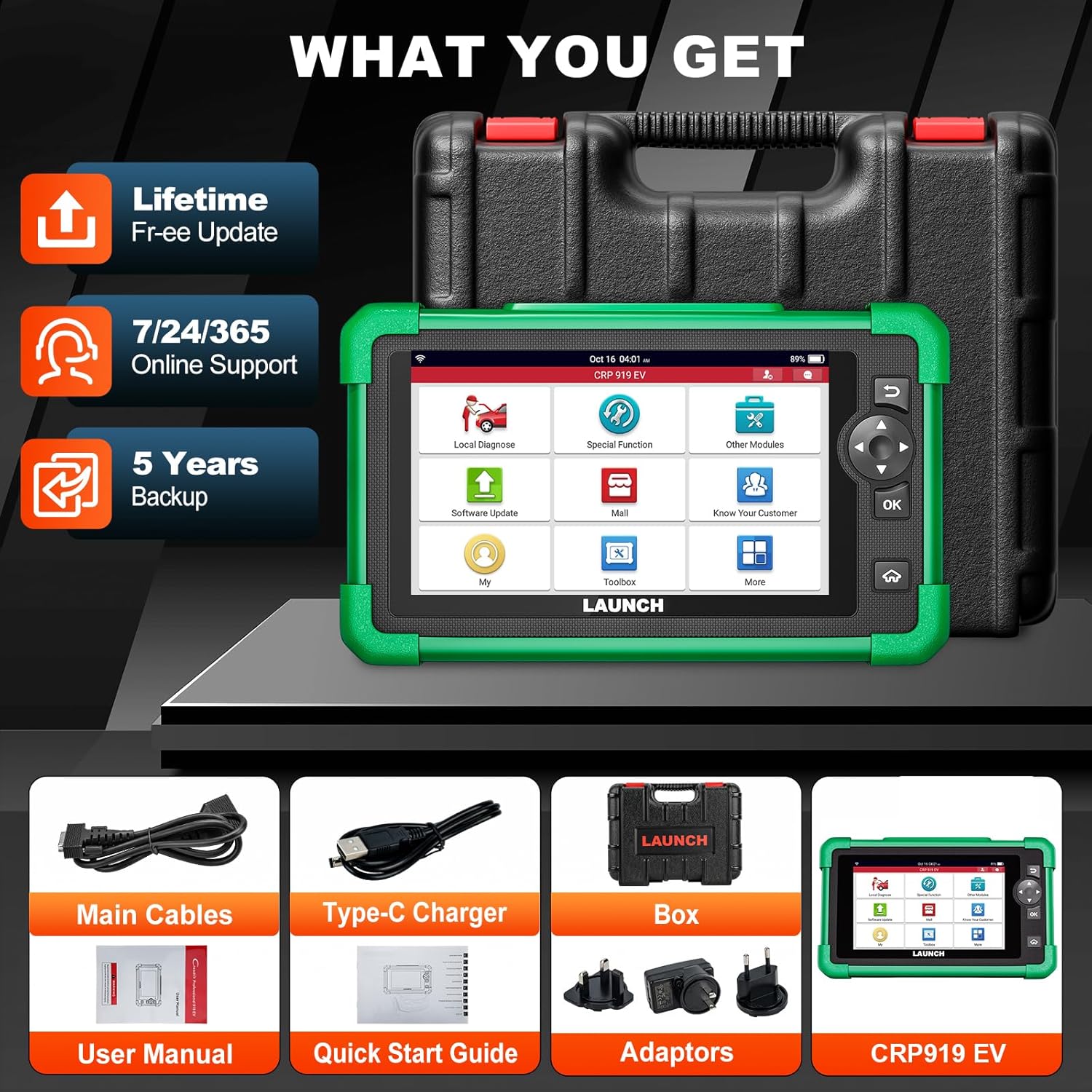
Figure 3.1: Included components with the LAUNCH X431 CRP919 EV scanner.
4. Gosod
4.1 Codi Tâl Cychwynnol
Before first use, fully charge the CRP919 EV scanner. Connect the Type-C charger to the device's charging port and plug it into a power outlet. The charging indicator will show the charging status. A full charge can provide up to 15 hours or more of battery life.
4.2 Pweru Ymlaen/Diffodd
- I Bweru Ymlaen: Press and hold the Power button located on the side of the device until the screen illuminates.
- I Bweru i ffwrdd: Press and hold the Power button until a power-off menu appears. Select "Power Off" and confirm.
4.3 Cysylltiad Rhwydwaith
For software updates, online feedback, and cloud services, connect the device to a Wi-Fi network:
- From the main menu, tap "Settings".
- Dewiswch "Wi-Fi" a'i droi ymlaen.
- Dewiswch eich rhwydwaith Wi-Fi dymunol o'r rhestr a nodwch y cyfrinair os gofynnir i chi wneud hynny.
- Confirm connection. The device supports 2.4GHz and 5GHz dual-band Wi-Fi for faster transmission.
4.4 Diweddariadau Meddalwedd
Regular software updates are crucial for optimal performance, new vehicle coverage, and bug fixes. The CRP919 EV offers 2 years of free updates.
- Ensure the device is connected to Wi-Fi.
- From the main menu, tap "Software Update".
- The system will check for available updates. Follow the on-screen prompts to download and install them.

Figure 4.1: Software update interface and hardware optimization.
5. Cyfarwyddiadau Gweithredu
The LAUNCH X431 CRP919 EV provides a wide range of diagnostic and service functions. Below are key operational aspects:
5.1 Cysylltu â Cherbyd
- Locate the vehicle's OBD-II diagnostic port (usually under the dashboard).
- Connect the main diagnostic cable to the CRP919 EV and then to the vehicle's OBD-II port.
- Trowch danio'r cerbyd i'r safle "ON" (injan i ffwrdd).
- On the scanner, select "Local Diagnose" to begin communication.
5.2 Full System Diagnostics (EV & ICE)
This function allows you to scan all available electronic control units (ECUs) in the vehicle, including engine, transmission, ABS, SRS, and specific EV high-voltage systemau.
- Sgan Awtomatig 2.0: The device features an intelligent Auto VIN function that automatically identifies the vehicle's VIN for quick system access.
- Darllen/Clirio Codau: Retrieve diagnostic trouble codes (DTCs) and clear them after repairs.
- Llif Data Byw: View real-time data parameters from various sensors and components in text, graph, or multi-in-one formats.
- EV System Diagnostics: Specifically for EVs, perform battery pack analysis and high-voltage system diagnostics. This includes reading/clearing codes, performing HV parts replacement, and generating HV system diagnostic reports.

Ffigur 5.1: Drosoddview of All System Diagnose capabilities.
5.3 Rheolaeth Dwyffordd (Prawf Gweithredol)
Bidirectional control allows the scanner to send commands to vehicle ECUs to perform specific tests and functions, such as activating solenoids, relays, or motors, to verify system integrity without using the vehicle's controls.
- Access this function from the "Active Test" menu.
- Common tests include activating fuel pumps, cycling ABS solenoids, testing window motors, or operating cooling fans.
- This feature helps in quickly locating faulty components.

Figure 5.2: Bidirectional control functionality for component testing.
5.4 43+ Service Functions
The CRP919 EV supports over 43 common maintenance and reset functions, accelerating repair processes.
- Ailosodiad Olew: Ailosodwch y system oes olew ar ôl newid olew.
- Ailosodiad EPB: Reset the electronic parking brake after brake pad replacement.
- Ailosod SAS: Calibradu'r synhwyrydd ongl llywio.
- Ailosod BMS: Register new battery and clear fault codes.
- Ailosodiad y Throttle: Relearn throttle body position.
- Gwaedu ABS: Perfformio gweithdrefnau gwaedu brêc ABS.
- Ailosod TPMS: Reset tire pressure monitoring system.
- And many more, including Injector Coding, Gear Reset, DPF Regeneration, etc.

Ffigur 5.3: Examples of 43+ service functions available.
5.5 Codio ECU
ECU Coding allows for customization of vehicle settings, module matching, unlocking hidden functions, and module retrofitting. This advanced function requires careful operation and knowledge of vehicle systems.
5.6 CANFD & DOIP Protocols
The CRP919 EV supports the latest CANFD and DOIP communication protocols, ensuring compatibility with newer vehicle models (up to 2024/2025) that utilize these advanced network architectures.
5.7 Awdurdodiad Auto FCA
For FCA (Fiat Chrysler Automobiles) vehicles, the scanner supports FCA AutoAuth, allowing secure access to protected diagnostic functions on these vehicles.

Figure 5.4: Global compatibility and protocol support.
5.8 Nodweddion Ychwanegol
- WiFi Print: Directly print diagnostic reports via Wi-Fi.
- Cloud Health Report: Generate and store vehicle health reports in the cloud for easy access and sharing.
- Adborth Ar-lein: Submit feedback or issues directly to LAUNCH for support.
- DTCs Library: Built-in database for looking up diagnostic trouble code definitions.
- Diagnosio o Bell: Potential for remote assistance (requires additional setup/software).

Figure 5.5: User interface and support features.
6. cynnal
Proper maintenance ensures the longevity and optimal performance of your LAUNCH X431 CRP919 EV scanner:
- Glanhau: Defnyddiwch frethyn meddal, sych i lanhau'r ddyfais. Osgowch lanhawyr neu doddyddion sgraffiniol.
- Storio: Store the scanner in its protective carrying case in a cool, dry place when not in use. Avoid extreme temperatures.
- Gofal Batri: For long-term storage, ensure the battery is charged to approximately 50-70% to preserve its lifespan. Recharge periodically if stored for extended periods.
- Diweddariadau Meddalwedd: Regularly update the software to ensure compatibility with new vehicles and access to the latest features and bug fixes.
- Archwiliad cebl: Periodically inspect diagnostic cables for any signs of wear, damage, or corrosion. Replace damaged cables immediately.
7. Datrys Problemau
This section addresses common issues you might encounter with the CRP919 EV scanner.
| Problem | Achos Posibl | Ateb |
|---|---|---|
| Nid yw'r ddyfais yn pweru ymlaen. | Low battery; Power button not pressed long enough; Device malfunction. | Charge the device; Press and hold the Power button for 3-5 seconds; Contact technical support. |
| Methu cysylltu â'r cerbyd. | Loose cable connection; Vehicle ignition off; Damaged OBD-II port; Vehicle not supported. | Ensure cable is securely connected; Turn ignition ON; Check vehicle's OBD-II port; Verify vehicle compatibility. |
| Software is slow or freezes. | Too many applications running; Low storage; Software bug. | Close unnecessary applications; Clear cache/data; Perform software update; Restart device. |
| Problemau cysylltiad Wi-Fi. | Cyfrinair anghywir; Allan o'r ystod; Problem gyda'r llwybrydd. | Re-enter password; Move closer to router; Restart router; Try another Wi-Fi network. |
| "Mall" features require additional payment. | Certain advanced features or brand-specific software are add-ons. | This is by design. Purchase desired add-ons through the "Mall" section if needed. |
8. manylebau
| Nodwedd | Manylyn |
|---|---|
| Model | LAUNCH X431 CRP919 EV |
| System Weithredu | Android 10.0 |
| Arddangos | 7.0-inch Touch Screen, 1024x600 resolution |
| Prosesydd | 1.8GHz Octa-core Qualcomm Snapdragon CPU |
| Cof/Storio | 64GB (internal) |
| Batri | 6000mAh rechargeable battery (up to 15+ hours) |
| Cysylltedd | 2.4GHz & 5GHz Dual-band Wi-Fi, USB Type-C |
| Dimensiynau (L x W x H) | 12.8" x 5.38" x 11.4" |
| Pwysau Eitem | 6.82 pwys |
| Protocolau â Chymorth | CANFD, DOIP, OBD-II/EOBD, etc. |
| Cwmpas Cerbyd | 150+ car brands, 1996-2025 models (including EV/HEV) |
9. Gwarant a Chefnogaeth
LAUNCH provides comprehensive support for the CRP919 EV scanner:
- Diweddariadau Meddalwedd: Enjoy 2 years of free software updates from the date of activation.
- Cymorth Technegol: Access 7/24/365 online support for any operational or technical queries.
- Adnoddau Ar-lein: Utilize the built-in "Online Library," "FAQ," and "Online Feedback" features for self-help and direct communication with LAUNCH support.
- Gwarant: Refer to your purchase documentation for specific warranty terms and conditions. Typically, LAUNCH products come with a standard manufacturer's warranty covering defects in materials and workmanship.
For further assistance, please visit the official LAUNCH websafle neu cysylltwch â'u gwasanaeth cwsmeriaid yn uniongyrchol.
Ask a question about this manual
Ask about setup, troubleshooting, compatibility, parts, safety, or missing instructions. Manuals+ will review the question and use this page’s manual context to help answer it.