
prunus J-924
PRUNUS J-924 Digital DAB+/FM Emergency Crank Radio
Llawlyfr Defnyddiwr
1. Cynnyrch Drosview
The PRUNUS J-924 is a versatile and portable digital radio designed for both daily use and emergency situations. It integrates multiple essential functions into a compact and durable device, making it an ideal companion for outdoor activities, power outages, and emergency preparedness.

Figure 1: PRUNUS J-924 Digital DAB+/FM Emergency Crank Radio showcasing its 10000mAh power bank capability.
This radio features DAB/DAB+ and FM reception, a powerful 10000mAh internal battery that doubles as a power bank, multiple charging options including USB-C, hand crank, and solar panel, and essential emergency tools like a flashlight, reading lamp, SOS alarm, and an integrated compass. It also functions as a Bluetooth speaker and includes clock and alarm features.
Fideo 1: Dros benview of the PRUNUS J-924 Emergency Radio, demonstrating its key features and functions.
2. Nodweddion Allweddol
2.1. DAB+/FM Digital Radio
The J-924 provides clear reception for both DAB/DAB+ (168-240MHz) and FM (87-108MHz) frequencies. Equipped with a DSP chip and a 52cm retractable antenna, it ensures stable signal reception. The radio supports automatic station scanning and allows manual storage of up to 200 stations (100 DAB, 100 FM) for quick access to your preferred broadcasts.
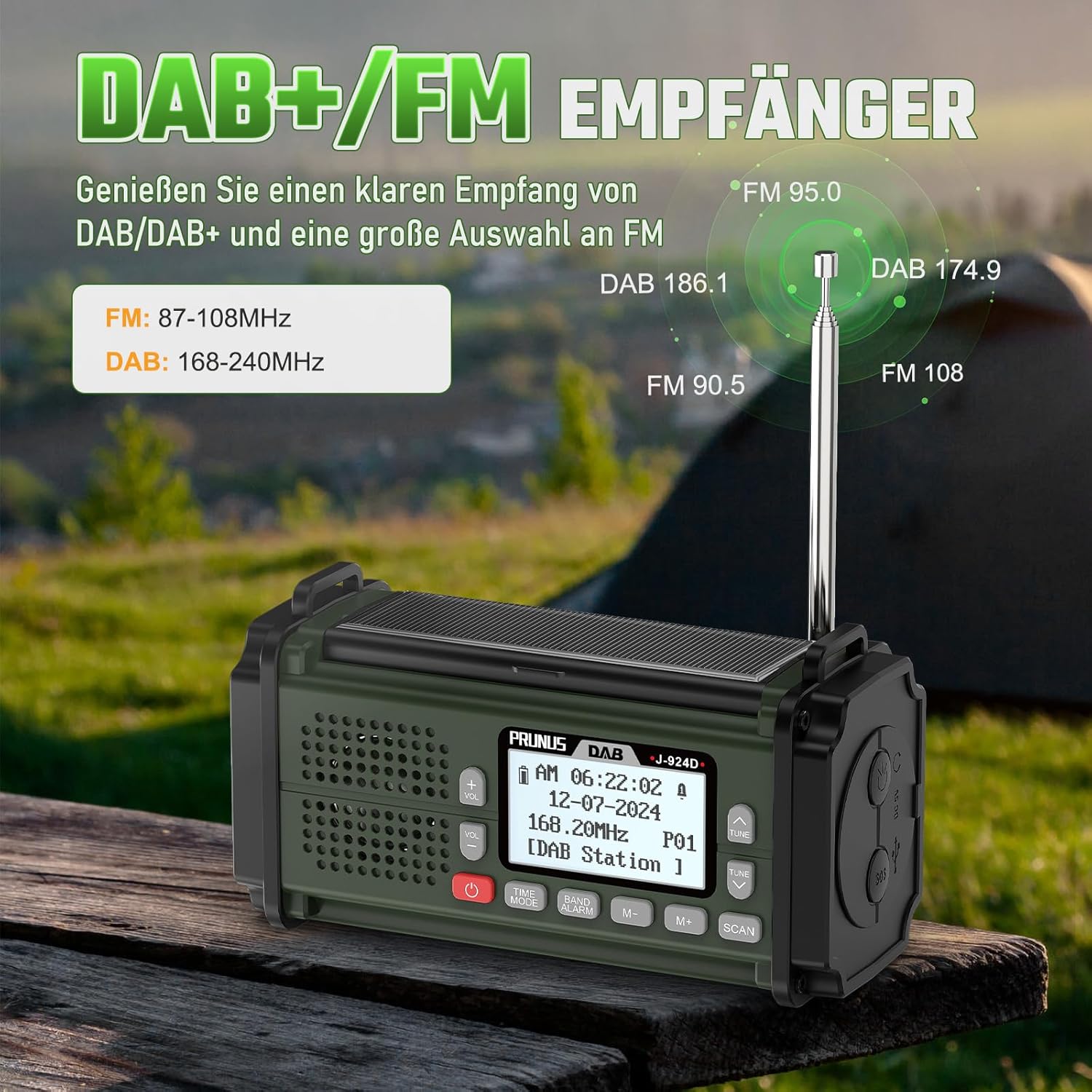
Figure 2: The radio's display showing DAB and FM frequencies, highlighting its strong reception capabilities with the extended antenna.
2.2. Multiple Power Options
This radio is designed with four flexible power options to ensure continuous operation in any situation:
- 10000mAh Internal Battery: A high-capacity built-in battery for extended use and power bank functionality.
- Codi tâl USB-C: Convenient for daily charging via a standard USB-C cable.
- Crank Llaw: Provides emergency power generation by manually cranking the handle.
- Panel Solar: Charges the internal battery using sunlight, ideal for outdoor and emergency scenarios.
- 3 x AAA Batteries: (Not included) An alternative power source for situations where other charging methods are unavailable. Note: Some functions may require AAA batteries even if the internal battery has charge.

Figure 3: Illustration of the five diverse power supply methods for the radio, ensuring reliability in various conditions.

Figure 4: The radio acting as a power bank, charging a smartphone, demonstrating its 10000mAh capacity for emergency phone charging.
2.3. Nodweddion Argyfwng
The J-924 is equipped with critical features for emergency preparedness:
- Larwm SOS: Activates a loud, flashing alarm to attract attention in distress situations.
- Flashlight: A powerful LED flashlight for illumination in dark environments.
- Darllen Lamp: Provides soft, diffused light for reading or general illumination.
- Cwmpawd Integredig: A wrist-mounted compass helps with navigation during outdoor adventures or emergencies.

Figure 5: Demonstrates the utility of the LED flashlight for inspection and the reading lamp for comfortable illumination.

Figure 6: The radio highlighting its loud SOS alarm and integrated compass for emergency signaling and navigation.
2.4. Swyddogaethau Ychwanegol
Beyond its core radio and emergency features, the J-924 offers enhanced usability:
- Llefarydd Bluetooth: Connect your smartphone or other devices wirelessly to enjoy music through the radio's 5W speaker.
- Clock and Alarm: Features a 12/24-hour clock and an alarm function that can wake you up with your favorite radio station.
- Amserydd Auto-Off: Allows you to set a timer for the radio to automatically turn off, conserving battery.
- Jack clustffon 3.5mm: Ar gyfer gwrando preifat.
- TF Card & USB Drive Playback: Supports playing audio files directly from a TF card or USB drive.
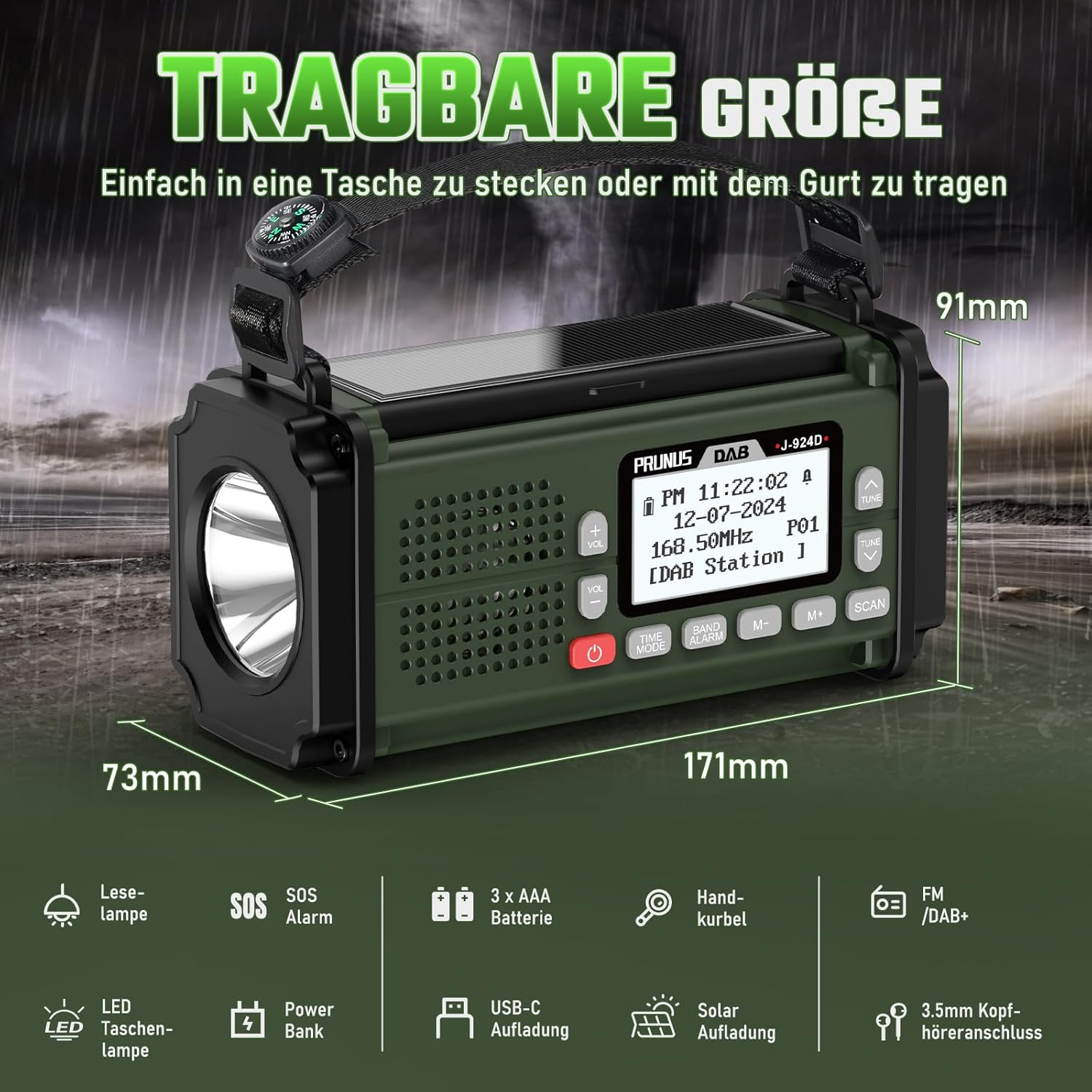
Figure 7: The radio's compact size and a visual summary of its integrated features.
3. Gosod
- Tâl Cychwynnol: Before first use, fully charge the internal 10000mAh battery using the provided USB-C cable and a compatible power adapter (not included). Connect the USB-C cable to the radio's USB-C port and the other end to a power source. The charging indicator on the display will show charging status.
- AAA Battery Installation: For alternative power or to ensure full functionality in all modes, open the battery compartment and insert 3 AAA batteries (not included) according to the polarity markings. Close the compartment securely. Note: Some users have reported that the radio may require AAA batteries to power on even if the internal battery is charged.
- Estyniad Antena: For optimal radio reception, fully extend the telescopic antenna.
4. Cyfarwyddiadau Gweithredu
4.1. Pŵer Ymlaen / I ffwrdd
Pwyswch a dal y Grym button (usually red) to turn the radio on or off.
4.2. Radio Operation (DAB/FM)
- Dewiswch Band: Gwasgwch y BAND/ALARM button to switch between DAB/DAB+ and FM modes.
- Sgan Auto: In either DAB or FM mode, press the SCAN button to automatically search for and store available stations.
- Tiwnio â Llaw: Defnyddiwch y GWYLIWCH a GWYLIWCH I LAWR botymau i addasu'r amledd â llaw.
- Gorsafoedd Rhagosodedig: Defnyddiwch y M+ a M- buttons to navigate through saved preset stations. To save a station, tune to the desired frequency, then press and hold M+ or M- until the display indicates the station is saved to a preset number.
- Rheoli cyfaint: Defnyddiwch y VOL+ a VOL- botymau i addasu'r cyfaint.
4.3. Modd Bluetooth
- Gweithredu Bluetooth: Gwasgwch y MODD AMSER button repeatedly until "Bluetooth" appears on the display.
- Paru: On your mobile device, enable Bluetooth and search for "PRUNUS J-924" (or similar). Select it to pair. The radio will indicate a successful connection.
- Chwarae yn ôl: Once connected, you can play audio from your device through the radio's speaker.
4.4. Fflachlamp a Darllen Lamp
Locate the dedicated button for the flashlight (usually on the side or front). Press it once to turn on the flashlight. Press again to turn on the reading lamp (if applicable, often by opening a panel). Press a third time to turn off the lights.
4.5. Larwm SOS
Pwyswch a dal y SOS button (if present, often labeled SOS) to activate the loud alarm and flashing light. Press it again to deactivate.
4.6. Swyddogaeth y Banc Pŵer
Connect your mobile device to the radio's USB-A output port using your device's charging cable. The radio's internal 10000mAh battery will begin charging your device. Ensure the radio has sufficient charge for this function.
4.7. Gosodiadau Cloc a Larwm
Refer to the on-screen menu for detailed instructions on setting the time, 12/24-hour format, and alarm. Typically, this involves pressing the MODD AMSER button to cycle through modes and using the TUNE UP/DOWN or M+/M- botymau i addasu gwerthoedd.
5. cynnal
- Glanhau: Defnyddiwch frethyn meddal, sych i lanhau tu allan y radio. Peidiwch â defnyddio glanhawyr sgraffiniol na thoddyddion.
- Gofal Batri: To prolong the life of the internal 10000mAh battery, avoid fully discharging it frequently. Recharge it regularly, especially if storing the radio for extended periods. Remove AAA batteries if the radio will not be used for a long time to prevent leakage.
- Storio: Storiwch y radio mewn lle oer, sych i ffwrdd o olau haul uniongyrchol a thymheredd eithafol.
- Antena: Retract the antenna when not in use to prevent damage.
6. Datrys Problemau
| Problem | Achos Posibl | Ateb |
|---|---|---|
| Nid yw'r radio yn troi ymlaen. | Internal battery is depleted; AAA batteries are not installed or depleted. | Charge the internal battery via USB-C. Install fresh AAA batteries. Some functions may require AAA batteries even if the internal battery is charged. |
| Derbyniad radio gwael. | Antenna not fully extended; weak signal area; interference. | Fully extend the telescopic antenna. Relocate the radio to an area with better signal. Avoid placing near electronic devices that may cause interference. |
| Nid yw Bluetooth yn cysylltu. | Radio not in Bluetooth mode; device not in pairing mode; too far from radio. | Ensure the radio is in Bluetooth mode. Make sure your device's Bluetooth is on and in pairing mode. Keep devices within close range (approx. 10 meters). |
| Hand crank/Solar panel not charging effectively. | Insufficient cranking duration/speed; insufficient sunlight; panel obstructed. | Crank continuously for at least 5-10 minutes for minimal power. Ensure solar panel is in direct, strong sunlight and is clean. Note that these methods are primarily for emergency top-ups, not full charges. |
| SOS alarm or lights not working. | Battery too low; button malfunction. | Ensure the radio has sufficient battery charge. If the issue persists, contact customer support. |
7. manylebau
- Rhif Model: J- 924
- Brand: PRUNUS
- Dimensiynau Cynnyrch: 17L x 6W x 9H cm (6 x 8 x 17 cm; 730 Grams)
- Batri: 10000mAh (internal, rechargeable), 3 x AAA batteries (not included)
- Ffynonellau Pwer: Hand-crank, Solar-powered, 3 AAA batteries, Type-C charging
- Technoleg tiwniwr: DAB, DAB+, FM
- Supported Radio Ranges: DAB/DAB+ (168-240MHz), FM (87-108MHz)
- Technoleg Cysylltedd: Bluetooth
- Nodweddion arbennig: SOS Alarm, Flashlight, Reading Lamp, 12/24-hour Clock, Alarm, 200 Presets (100 DAB+100FM), Power Bank Function, Integrated Compass, TF Card & USB Drive Playback, 3.5mm Headphone Jack
- Deunydd: Styren Biwtadïen Acrylonitrile (ABS)
- Cydrannau wedi'u Cynnwys: Llawlyfr Defnyddiwr
8. Gwarant a Chefnogaeth
For warranty information and technical support, please refer to the official PRUNUS website or contact the seller directly through your purchase platform. Keep your purchase receipt as proof of purchase for any warranty claims.
Ask a question about this manual
Ask about setup, troubleshooting, compatibility, parts, safety, or missing instructions. Manuals+ will review the question and use this page’s manual context to help answer it.