
1. Cynnyrch Drosview
The ORIA Bluetooth 5.3 Adapter (Model CP326) is a versatile 2-in-1 device functioning as both a Bluetooth transmitter and receiver. It enables wireless audio streaming for a wide range of devices, from traditional wired systems to modern Bluetooth headphones and speakers. Featuring Bluetooth 5.3 technology and aptX Low Latency support, it ensures stable, high-quality audio with minimal delay.
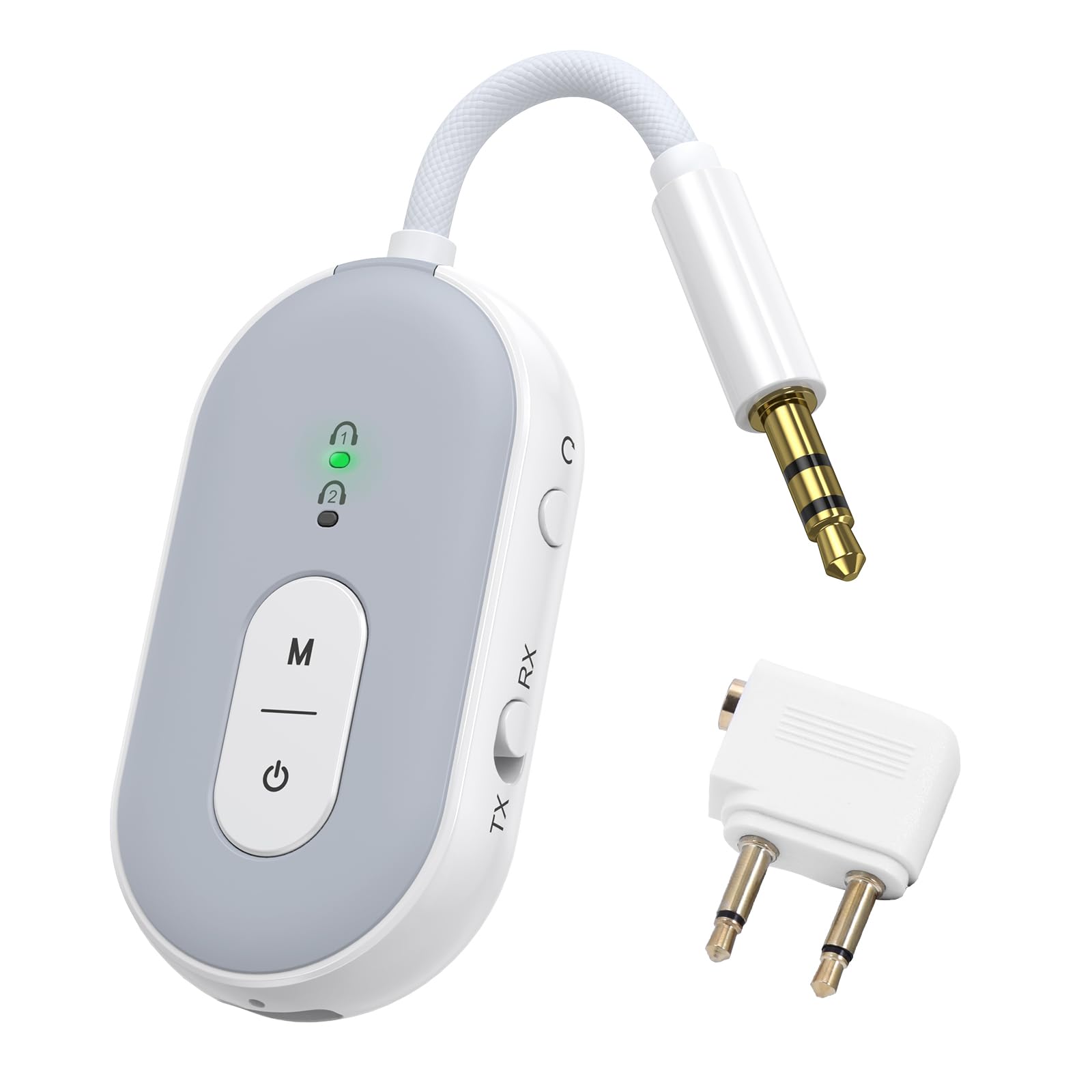
Image: The ORIA Bluetooth 5.3 Adapter, a compact and versatile audio device.
Cynnwys Pecyn
Wrth ddadbocsio, gwnewch yn siŵr bod yr holl eitemau yn bresennol:
- ORIA Bluetooth Adapter (Model CP326)
- Llawlyfr Cyfarwyddiadau (y ddogfen hon)
- Cebl Codi Tâl Math-C
- Airplane Headphone Adapter (dual-pin)
- 3.5mm Female Coupler
- RCA Cable (Red/White to 3.5mm)

Image: The ORIA Bluetooth 5.3 Adapter and its included accessories, such as the Type-C charging cable, airplane adapter, 3.5mm female coupler, and RCA cable.
Fideo: Dros benview of the ORIA Bluetooth 5.3 Adapter and its accessories, demonstrating its compact design and included cables for various connections.
2. Cynllun a Rheolyddion Dyfais
Familiarize yourself with the adapter's components and controls:

Image: Labeled diagram showing the TX/RX mode select button, reset button, audio cable, charging indicator, Type-C charging interface, connection lights (1 and 2), function button (M), and power button.
- TX/RX Mode Select Button: Slide to switch between Transmitter (TX) and Receiver (RX) modes.
- Botwm Pŵer: Pwyswch a daliwch am 4 eiliad i bweru ymlaen / i ffwrdd.
- Function Button (M): Used for dual pairing in TX mode.
- Connection Lights (1 & 2): Indicate pairing status and connected devices.
- Dangosydd Codi Tâl: Yn dangos statws gwefru.
- Rhyngwyneb Codi Tâl Math-C: For connecting the Type-C charging cable.
- Cebl Sain: Integrated 3.5mm audio jack for connecting to audio sources/receivers.
- Botwm Ailosod: Small pinhole button to reset the device.
3. Codi Tâl y Dyfais
Before initial use, fully charge the ORIA Bluetooth Adapter.
- Connect the provided Type-C charging cable to the adapter's Type-C charging interface.
- Cysylltwch ben arall y cebl â ffynhonnell pŵer USB (e.e., porthladd USB cyfrifiadur, addasydd wal USB).
- The charging indicator light will illuminate during charging. It will turn off or change color (depending on model) once fully charged.
A full charge takes approximately 2 hours and provides up to 16 hours of use in TX mode or 18 hours in RX mode.

Image: Diagram illustrating the battery life (16 hours TX, 18 hours RX) and charging time (2 hours for 300mAh battery).
4. Operating Modes and Connection
4.1 Modd Trosglwyddydd (TX)
In TX mode, the adapter transmits audio from a non-Bluetooth device (e.g., TV, computer, airplane entertainment system) to Bluetooth headphones or speakers.
- Newid i Modd TX: Slide the TX/RX switch to the "TX" position.
- Pŵer Ymlaen: Press and hold the power button for 4 seconds to turn on the adapter. The indicator light will flash green, indicating pairing mode.
- Cysylltu â Ffynhonnell Sain: Plug the adapter's 3.5mm audio jack into the audio output port of your non-Bluetooth device. For airplane entertainment systems, use the provided airplane headphone adapter if necessary.
- Paru â Chlustffonau/Siaradwyr Bluetooth: Rhowch eich clustffonau neu siaradwyr Bluetooth yn y modd paru.
- Cysylltu: The adapter will automatically search for and connect to nearby Bluetooth audio devices. Once connected, the indicator light 1 will stay green.
- Dual Pairing (Optional): To connect a second pair of Bluetooth headphones/speakers, press the "M" (Function) button after the first device is connected. Put the second device into pairing mode. Both indicator lights will stay green when two devices are paired.

Image: Visual guide demonstrating the steps to connect the ORIA adapter in Transmitter (TX) mode, including switching the mode, powering on, and pairing with Bluetooth headphones for in-flight entertainment.
Note: Turn off other Bluetooth devices nearby to avoid interference during pairing.

Image: Illustration of the dual pairing capability, allowing two sets of Bluetooth headphones to connect simultaneously to a single audio source via the adapter.

Image: The ORIA Bluetooth 5.3 Adapter connected to an airplane's in-flight entertainment system, enabling wireless audio streaming to personal Bluetooth earbuds.
4.2 Modd Derbynnydd (RX)
In RX mode, the adapter receives audio from a Bluetooth-enabled device (e.g., smartphone, tablet) and outputs it to a non-Bluetooth audio system (e.g., wired speakers, car stereo, HiFi system).
- Newid i'r Modd RX: Slide the TX/RX switch to the "RX" position.
- Pŵer Ymlaen: Press and hold the power button for 4 seconds to turn on the adapter. The indicator light will flash green, indicating pairing mode.
- Connect to Audio Receiver: Plug the adapter's 3.5mm audio jack into the AUX input of your wired speakers, car stereo, or HiFi system. Use the provided RCA cable if your audio system requires RCA inputs.
- Pâr gyda Dyfais Bluetooth: On your smartphone, tablet, or other Bluetooth-enabled device, go to Bluetooth settings and search for "BT-20" (or similar device name). Select it to connect.
- Wedi'i gysylltu: Once connected, the indicator light 1 will stay green.

Image: Visual guide demonstrating the steps to connect the ORIA adapter in Receiver (RX) mode, including switching the mode, powering on, and pairing with a smartphone to stream audio to a wired speaker or car stereo.

Image: The ORIA Bluetooth 5.3 Adapter connected to a wired speaker, receiving audio wirelessly from a smartphone, demonstrating its use in RX mode for home audio or car stereos.

Image: The ORIA Bluetooth 5.3 Adapter connected to wired headphones via a 3.5mm female coupler, allowing a smartphone to stream audio wirelessly to the wired headphones.
5. Nodweddion Uwch
5.1 aptX Low Latency Technology
The ORIA Bluetooth 5.3 Adapter supports aptX-Adaptive and aptX Low Latency codecs. When paired with aptX-enabled Bluetooth headphones or speakers, it significantly reduces audio delay, providing synchronized sound for video and gaming. This ensures a smooth and immersive experience.

Image: Diagram illustrating the supported audio codecs (SBC, aptX, aptX-LL, aptX-HD, aptX Adaptive) for both TX and RX modes, highlighting low latency and high-fidelity audio transmission.
Note: Both the adapter and your Bluetooth audio device must support aptX for optimal low latency performance. Not compatible with S-O-N-Y series devices (LDAC).
5.2 Stable Connection
Equipped with a Bluetooth 5.3 chip, the adapter offers faster pairing and stronger interference resistance. It maintains a stable Bluetooth connection up to 100 meters (328 feet) in open environments, ensuring consistent audio whether you are across a room or on the go.

Image: Visual representation of Bluetooth 5.3 technology, emphasizing faster connection and more stable transmission compared to older Bluetooth versions.
6. Cynnal a Chadw a Gofal
- Cadwch y ddyfais yn sych. Osgowch ddod i gysylltiad â lleithder neu hylifau.
- Glanhewch y ddyfais gyda lliain meddal, sych. Peidiwch â defnyddio cemegau llym na glanhawyr sgraffiniol.
- Storiwch y ddyfais mewn lle oer, sych pan nad yw'n cael ei ddefnyddio.
- Osgoi tymereddau eithafol.
- Peidiwch â cheisio dadosod na thrwsio'r ddyfais eich hun. Bydd hyn yn gwneud y warant yn ddi-rym.
- Always follow battery handling and disposal guidelines for lithium-ion batteries.
7. Datrys Problemau
| Problem | Achos Posibl | Ateb |
|---|---|---|
| Nid yw'r ddyfais yn pweru ymlaen. | Batri isel. | Charge the device for at least 2 hours using the provided Type-C cable. |
| Methu paru gyda dyfais Bluetooth. |
|
|
| Audio quality is poor or delayed. |
|
|
| Dim sain. |
|
|
| Not compatible with S-O-N-Y devices (LDAC). | Inherent compatibility limitation. | The adapter does not support LDAC codec used by some S-O-N-Y devices. No workaround available. |
8. manylebau
| Nodwedd | Manylyn |
|---|---|
| Enw Model | CP326 |
| Fersiwn Bluetooth | Bluetooth 5.3 |
| Safonau a Gefnogir | aptX-Adaptive, aptX-Low Latency |
| Technoleg Cysylltedd | AUX |
| Dulliau Gweithredu | Transmitter (TX), Receiver (RX) |
| Cysylltiad Deuol | Yes (2 Bluetooth headphones/speakers simultaneously) |
| Battery Life (TX Mode) | Hyd at 16 awr |
| Battery Life (RX Mode) | Hyd at 18 awr |
| Amser Codi Tâl | Approx. 2 hours (Type-C) |
| Di-wifr Range | Hyd at 100 metr (amgylchedd agored) |
| Pwysau Eitem | 0.08 Cilogram |
| Dyfeisiau Cydnaws | Car Radios, Cell Phones, Headphones, Home Stereo Systems, Television, Bluetooth-enabled devices |
| Mewnbwn Sain | 3.5mm AUX |
| Modd Allbwn Sain | Stereo |
| Dull Rheoli | Botwm Gwthio |
9. Gwarant a Chefnogaeth
The ORIA Bluetooth 5.3 Adapter (Model CP326) comes with a Gwarant 1 Flwyddyn o'r dyddiad prynu.
For technical support, warranty claims, or further assistance, please contact ORIA customer service through the retailer where the product was purchased or visit the official ORIA websafle.
Cadwch eich prawf prynu i ddilysu'r warant.