
1. Rhagymadrodd
This manual provides detailed instructions for the safe and proper installation, operation, and maintenance of your MOUNTUP MU0057-L Full Motion TV Wall Mount. Please read all instructions carefully before installation to ensure correct setup and to prevent damage or injury. Keep this manual for future reference.
The MOUNTUP MU0057-L is designed to securely mount most 42-75 inch flat or curved screen televisions weighing up to 99 lbs (45 kg). It features a 30-inch extension arm, +/-90° swivel, +5°/-10° tilt, and +/-3° leveling for optimal viewing hyblygrwydd.
2. Gwybodaeth Diogelwch
WARNING: Failure to read and follow these instructions may result in serious personal injury, property damage, or voiding of warranty.
- Cynhwysedd Pwysau: Do not exceed the maximum weight capacity of 99 lbs (45 kg). This mount is intended for use only with the maximum weights indicated. Use with products heavier than the maximum weights indicated may result in instability causing possible injury.
- Maint teledu: This mount is compatible with TVs from 42 to 75 inches.
- Cydnawsedd VESA: Ensure your TV's VESA pattern (mounting hole spacing) is within the range of 150x100mm to 600x400mm.
- Math o Wal: This mount is designed for installation on solid concrete/brick walls or single wood studs. PEIDIWCH â gosod yn drywall yn unig.
- Gosodiad Proffesiynol: If you have any doubts about your ability to safely install this mount, consult a qualified professional.
- Gwiriad Cydran: Before installation, verify that all components are present and undamaged. Do not use damaged or defective parts.
- Offer: Defnyddiwch offer priodol ar gyfer gosod.
3. Cynnwys Pecyn
Please check the package to ensure all parts are included and undamaged. If any parts are missing or damaged, contact MOUNTUP customer service.
- Cynulliad Plât Wal
- Bracedi Teledu (2)
- Pecyn Caledwedd Mowntio (sgriwiau amrywiol, golchwyr, bylchwyr, angorau)
- Lefel Swigen
- Templed Drilio
- Llawlyfr Cyfarwyddiadau
4. manylebau
| Manyleb | Gwerth |
|---|---|
| Model | MU0057-L |
| Cydnawsedd Maint Teledu | 42 - 75 modfedd |
| Gallu Pwysau | Hyd at 99 pwys (45 kg) |
| Cydnawsedd VESA | 150x100mm i 600x400mm |
| Estyniad o'r Wal | 3 modfedd (wedi'i dynnu'n ôl) i 30 modfedd (wedi'i ymestyn) |
| Ystod Swivel | +/- 90° |
| Ystod Tilt | +5° / -10° |
| Addasiad Lefel | +/- 3° |
| Deunydd | Metel |
| Lliw | Du |
| Pwysau Eitem | 13.77 pwys |
Nodyn: The TV plate is offset approximately 8.5 inches (215mm) from the wall plate center. Consider this when positioning your TV on the wall.

Image: TV Plate Offset Diagram
5. Cyfarwyddiadau Gosod
5.1 Gwiriadau Cyn Gosod
- Verify TV Compatibility: Check your TV's size, weight, and VESA mounting pattern. The VESA pattern refers to the four mounting holes on the back of your TV.
- Adnabod Math Wal: Determine if your wall is solid concrete/brick or a single wood stud.
- Check TV Ports: Ensure the mount will not block any necessary ports on your TV.

Image: Available VESA Patterns and TV Mounting Holes

Image: Diverse Wall Compatibility

Image: Ensure Mount Won't Block Ports
5.2 Gosod Cam wrth Gam
The installation process involves three main steps:
- Mount Brackets to TV: Attach the TV brackets to the back of your television using the appropriate screws, washers, and spacers from the hardware kit. Ensure they are securely fastened.
- Gosod Wall Plat: Using the provided drilling template and bubble level, mark and drill pilot holes in your wall. Secure the wall plate assembly to the wall with the appropriate anchors and lag bolts.
- Crogwch y teledu ar blât wal: Carefully lift your TV with the attached brackets and hook them onto the wall plate. Secure the TV to the wall plate using the safety screws or locking mechanisms.


Image: Easy & Quick 3-Step Installation Overview
6. Gweithredu ac Addasiadau
6.1 Estyniad a Thynnu'n Ôl
The mount allows your TV to extend up to 30 inches from the wall and retract to approximately 3 inches, providing flexibility for various viewing positions and saving space when not in use.
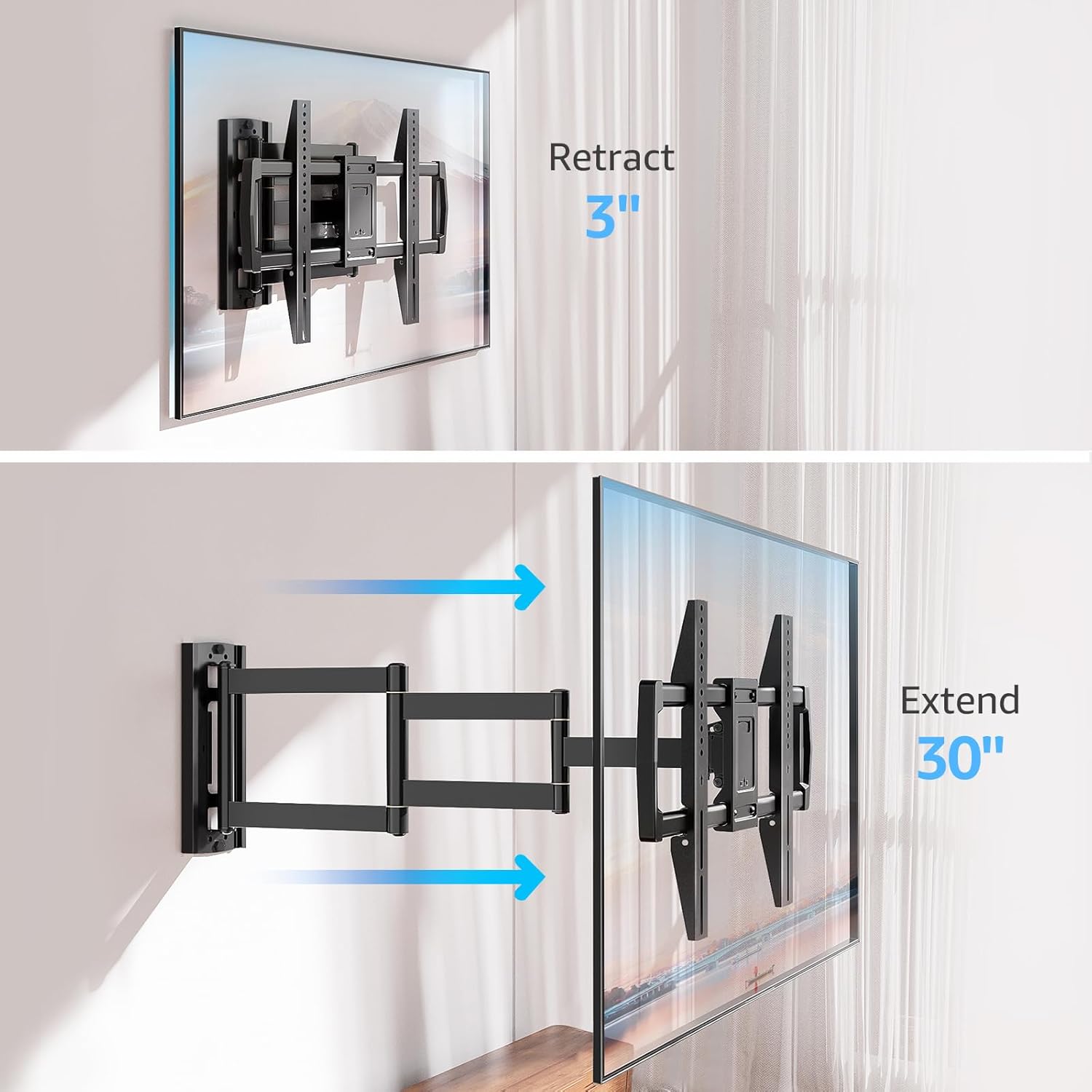
Image: Mount Extension and Retraction
6.2 Addasiad Troelli
The articulating arm allows for a smooth +/-90° swivel, enabling you to adjust the TV's angle to suit different viewing areas within a room, including corner mounting scenarios.
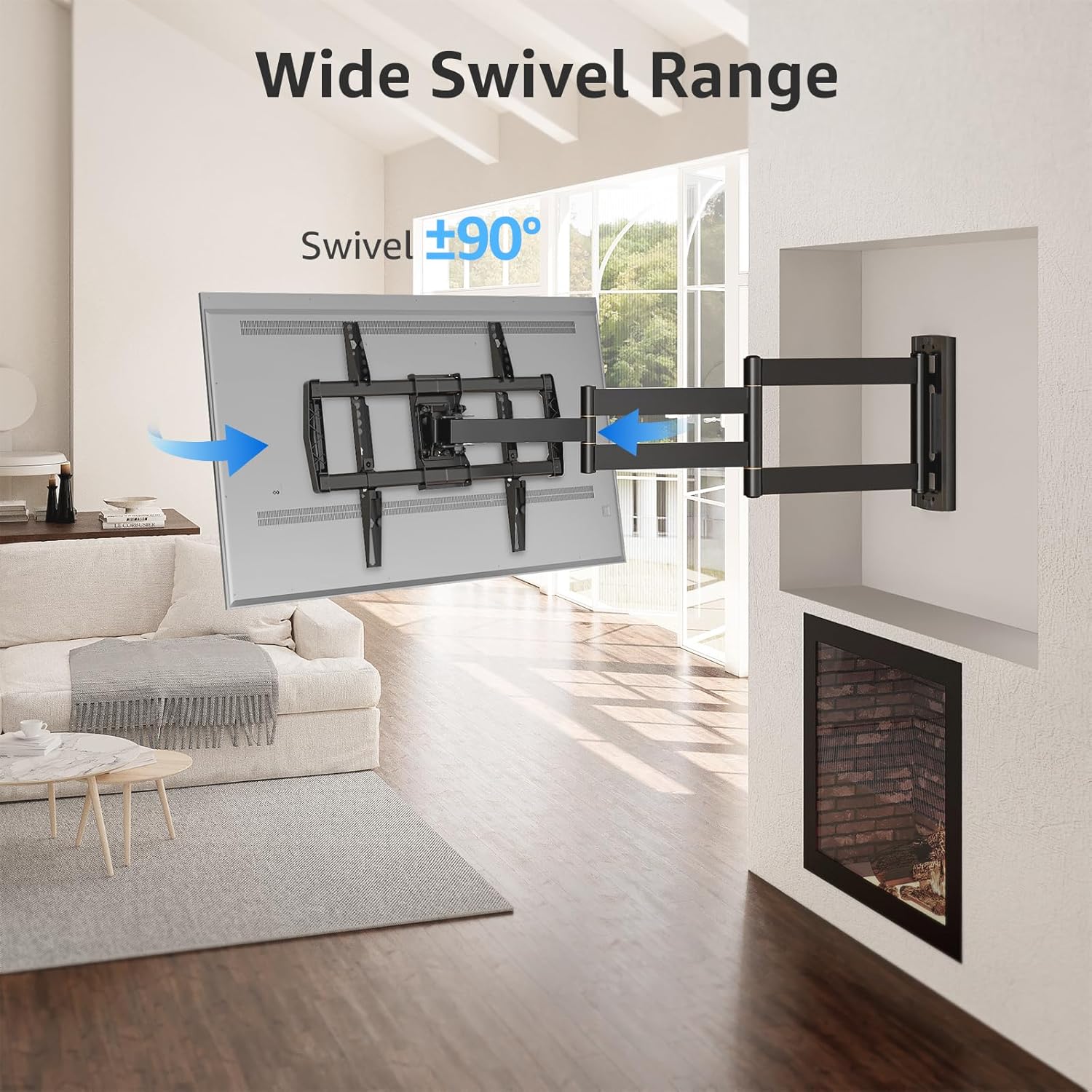
Image: Wide Swivel Range for Corner Mounting
6.3 Addasiad Tilt
Adjust the TV's vertical angle with a +5°/-10° tilt range. This feature helps reduce glare from lights or windows and provides a comfortable viewongl ing.
6.4 Leveling Adjustment
After installation, you can make minor horizontal adjustments of +/-3° to ensure the TV is perfectly level.

Image: Level and Tilt Adjustments
7. cynnal
Mae cynnal a chadw rheolaidd yn sicrhau hirhoedledd a gweithrediad diogel eich mownt wal teledu.
- Glanhau: Sychwch y mowntiad gyda lliain meddal, sych. Osgowch lanhawyr sgraffiniol neu doddyddion a allai niweidio'r gorffeniad.
- Gwiriad Fastener: Periodically check all screws and bolts to ensure they remain tight and secure. Re-tighten if necessary.
- Gwiriad Symudiad: Test the mount's full range of motion (extension, retraction, swivel, tilt) occasionally to ensure smooth operation.
8. Datrys Problemau
Os byddwch chi'n dod ar draws problemau yn ystod neu ar ôl y gosodiad, cyfeiriwch at y problemau a'r atebion cyffredin canlynol:
- Nid yw'r teledu yn lefel: Use the +/-3° post-installation leveling feature to adjust the TV's horizontal position.
- Mae'r mownt yn teimlo'n rhydd: Re-check all wall and TV fasteners to ensure they are securely tightened. Do not overtighten.
- Difficulty moving the arm: The mount's joints may be stiff initially. Apply gentle force. If persistent, ensure no cables are snagged.
- TV not fitting VESA pattern: Double-check your TV's VESA pattern against the mount's specifications (150x100mm to 600x400mm). If incompatible, the mount cannot be used.
9. Gwarant a Chefnogaeth
MOUNTUP is dedicated to providing quality products and customer satisfaction. While specific warranty details are not provided in this document, MOUNTUP offers comprehensive support.
If you have any questions, require assistance with installation, or need to report a missing/damaged part, please contact MOUNTUP customer service. Experts are available 7 days a week to provide support and advanced technology solutions.
For more information or to contact support, please visit the official MOUNTUP store or websafle.