
1. Rhagymadrodd
The UNI-T UT593 and UT595 are advanced multifunction installation testers designed for comprehensive electrical safety testing in accordance with relevant international standards. These devices integrate multiple test functions including insulation resistance, earth-resistance continuity, loop impedance, RCD trip time, and AC/DC voltage measurement, making them indispensable tools for electricians and technicians.
2. Gwybodaeth Diogelwch
Always adhere to local and national safety regulations when using this instrument. Failure to follow safety precautions can result in electric shock, injury, or damage to the instrument.
- Ensure the instrument is in good working condition before each use.
- Peidiwch â defnyddio'r profwr os yw'n ymddangos ei fod wedi'i ddifrodi neu os yw'r gwifrau prawf wedi'u peryglu.
- Always disconnect power to the circuit before performing insulation or continuity tests.
- Gwisgwch offer amddiffynnol personol (PPE) priodol, fel menig wedi'u hinswleiddio a sbectol ddiogelwch.
- The device is rated for CAT III 600V. Do not use it on circuits exceeding this rating.
- Refer to the detailed safety warnings in the full printed manual for comprehensive guidelines.
3. Cynnyrch Drosview
The UT593/UT595 series testers feature a robust design and a clear LCD display for easy reading of measurements. Key components include the display, function buttons, rotary dial, and test lead input terminals.

Ffigur 3.1: Blaen view of the UNI-T UT593 Multifunction Installation Tester, showing the LCD display, rotary dial, and function buttons.
Nodweddion Allweddol:
- 9999-count LCD display with analogue bar: Provides clear digital readings and an analog representation for quick trend observation.
- 250V~1000V DC insulation resistance test: Measures insulation integrity to prevent electrical leakage.
- 200mA earth-resistance continuity test: Verifies the integrity of protective earth conductors.
- Loop impedance/Prospective Fault Current (PFC)/Prospective Short Current (PSC) test: Assesses the fault current path for safety.
- RCD trip time test and data storage: Measures the time taken for Residual Current Devices to trip, with memory function.
- Full/Half wave and count downing (30s) test mode selectable: Offers flexibility in RCD testing.
- 0°/180° phase angle option: Allows detection of the fastest RCD trigger time.
- RCD trip current test: Determines the actual tripping current of an RCD.
- Phase sequence and missing test: Verifies correct phase rotation in three-phase systems.
- AC / DC cyftage auto check and test: Automatically detects and measures AC or DC voltage.
- Connection check with status real-time display: Provides immediate feedback on test lead connections.
- White backlight; auto power off: Enhances visibility in low light and conserves battery life.

Figure 3.2: UNI-T UT595 model highlighting key features such as insulation resistance, loop impedance, and RCD testing capabilities.
4. Gosod
4.1. Gosod Batri
The UT593/UT595 requires 1 Lithium Metal battery (included). To install or replace batteries:
- Ensure the device is powered off and disconnect all test leads.
- Locate the battery compartment cover on the rear of the instrument.
- Defnyddiwch sgriwdreifer i agor y compartment batri.
- Insert the battery, observing correct polarity (+ and -).
- Caewch y gorchudd compartment batri yn ddiogel.
4.2. Cysylltu Gwifrau Prawf
Connect the appropriate test leads to the input terminals of the tester. Ensure connections are firm and secure before beginning any measurements.
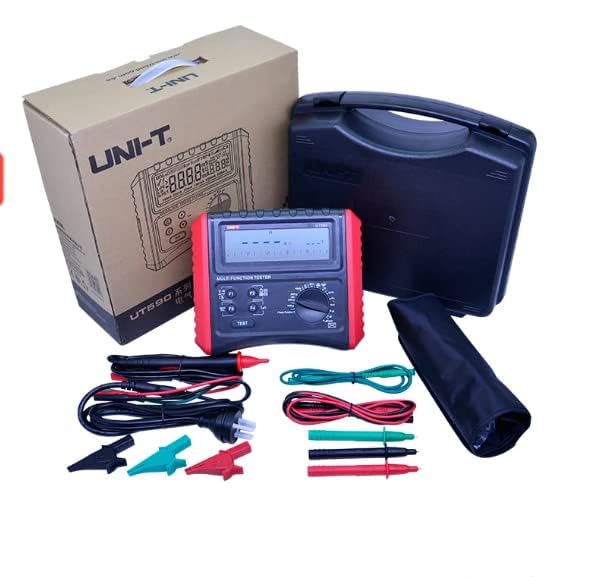
Figure 4.1: The UNI-T Multifunction Installation Tester and its included accessories, such as test leads and carrying case.
5. Cyfarwyddiadau Gweithredu
This section provides general guidance on operating the UNI-T UT593/UT595. For detailed procedures on specific tests, refer to the full instruction manual.
5.1. Pweru Ymlaen / I ffwrdd
Rotate the central dial to the desired function to power on the device. The device will automatically power off after a period of inactivity to conserve battery life.
5.2. Dewis Swyddogaeth
Use the large rotary dial to select the desired measurement function (e.g., Insulation, Continuity, Loop, RCD, Voltage). The selected function will be indicated on the LCD display.
5.3. Performing Tests
After selecting a function and connecting the test leads, press the PRAWF button to initiate the measurement. Observe the readings on the LCD display. Use the function buttons (F1, F2, F3, F4) for additional settings or to cycle through sub-functions within a mode.
- Prawf Gwrthiant Inswleiddio: Select the Insulation mode and desired test voltage (250V, 500V, 1000V). Connect leads and press TEST.
- Prawf Parhad: Select Continuity mode. Connect leads to the circuit under test and press TEST.
- Prawf RCD: Select RCD mode. Choose trip current and wave type (Full/Half). Connect leads to the RCD protected circuit and press TEST.
- Loop/PFC/PSC Test: Select Loop mode. Connect leads to the circuit and press TEST.
- AC / DC Voltage Prawf: The device can auto-detect and measure AC/DC voltage when connected to a live circuit.
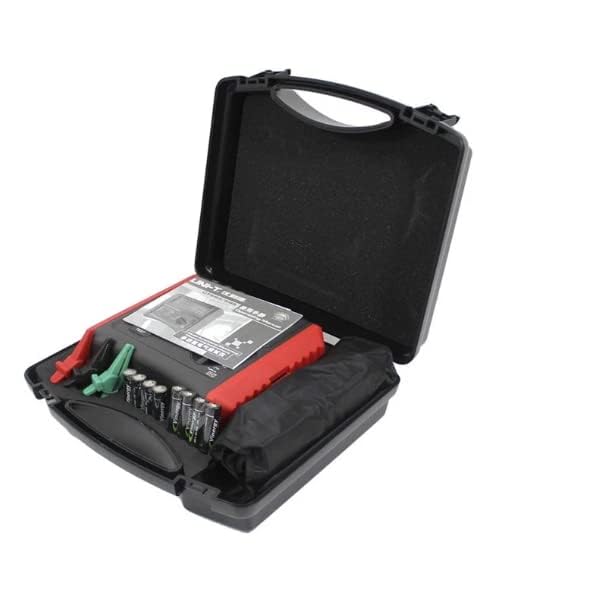
Figure 5.1: The UNI-T Multifunction Installation Tester being held, demonstrating its ergonomic design and portability for field use.
6. cynnal
Proper maintenance ensures the longevity and accuracy of your UNI-T tester.
- Glanhau: Sychwch yr offeryn gydag adamp cloth and mild detergent. Do not use abrasive cleaners or solvents. Ensure the device is dry before storage.
- Amnewid Batri: Replace batteries promptly when the low battery indicator appears. Refer to Section 4.1 for battery installation.
- Storio: Store the tester in a cool, dry place, away from direct sunlight and extreme temperatures. If storing for extended periods, remove the batteries to prevent leakage.
- graddnodi: For continued accuracy, periodic calibration by a qualified service center is recommended.
7. Datrys Problemau
This section addresses common issues you might encounter. If the problem persists, contact UNI-T customer support.
| Problem | Achos Posibl | Ateb |
|---|---|---|
| Nid yw'r ddyfais yn pweru ymlaen. | Batris isel neu farw; gosod batris yn anghywir. | Amnewidiwch y batris; gwnewch yn siŵr bod y polaredd yn gywir. |
| Darlleniadau anghywir. | Poor test lead connection; out of calibration; environmental interference. | Check lead connections; consider professional calibration; test in a stable environment. |
| Mae'r arddangosfa'n wag neu'n dywyll. | Low batteries; backlight off. | Replace batteries; activate backlight if available. |
8. manylebau
The following table outlines the general specifications for the UNI-T UT593/UT595 Multifunction Installation Testers.
| Manyleb | Gwerth |
|---|---|
| Rhif Model | RK-UT593 (UT593/UT595 Series) |
| Brand | UNI-T |
| Dimensiynau Cynnyrch | 9.84 x 5.91 x 3.94 modfedd |
| Pwysau Eitem | 0.5 Cilogram (1.1 Pwys) |
| Ffynhonnell Pwer | Wedi'i Bweru â Batri |
| Batris | 1 batri metel Lithiwm (wedi'i gynnwys) |
| Sgôr Diogelwch | CAT III 600V |
| Arddangos | 9999-count LCD with analogue bar |
| Prawf Gwrthiant Inswleiddio Cyftage | 250V, 500V, 1000V DC |
| Prawf Parhad Cerrynt | 200mA |

Figure 8.1: Comprehensive technical specifications for both UT593 and UT595 models, including ranges for output voltage, insulation resistance, continuity, loop impedance, RCD tests, and safety ratings.
9. Gwarant a Chefnogaeth
For warranty information, technical support, or service inquiries, please contact UNI-T directly or visit their official websafle. Cadwch eich derbynneb prynu fel prawf o brynu ar gyfer hawliadau gwarant.
Gwneuthurwr: UNI-T
Swyddogol Websafle: www.uni-trend.com (Noder: Mae'r ddolen hon yn gyn-ddolenample and may not be the exact support page. Refer to product packaging or official UNI-T documentation for precise contact information.)