
1. Rhagymadrodd
Thank you for choosing the SHANLING M0 Pro Hi-Res MP3 Music Player. This manual provides essential information for the safe and efficient use of your device. Please read it thoroughly before operation and retain it for future reference.
The SHANLING M0 Pro is a compact, high-resolution digital audio player designed for audiophiles. It features dual ESS ES9219C DAC/AMPs, bi-directional Bluetooth 5.0, and a 1.54-inch HD touch screen, offering exceptional audio quality and portability.
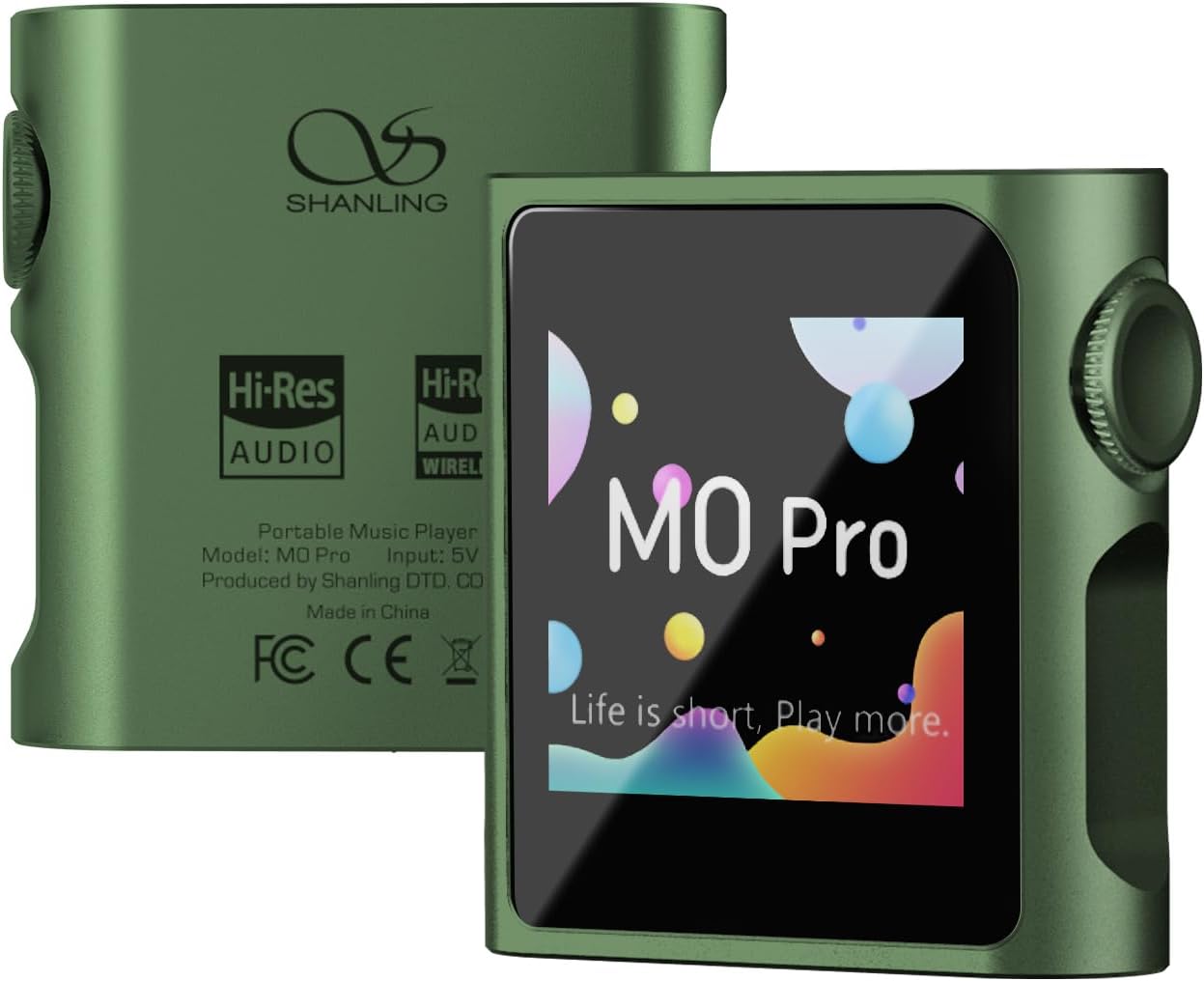
Delwedd 1.1: Blaen a chefn view of the SHANLING M0 Pro Hi-Res MP3 Music Player.
2. Cynnwys Pecyn
Gwiriwch fod yr holl eitemau yn bresennol yn y pecyn:
- 1x SHANLING M0 Pro Digital Audio Player
- Canllaw Cychwyn Cyflym 1x
- 1x Maintenance Card
- 1x Cebl USB A i Math-C
- 2x Front Protective Film (one pre-applied)
3. Dyfais Drosoddview
Familiarize yourself with the physical components of your M0 Pro player.

Image 3.1: SHANLING M0 Pro with labeled controls and ports, including the volume wheel, power button, MicroSD card slot, USB Type-C port, and 3.5mm audio jack.
- Sgrin Gyffwrdd LCD 1.54 modfedd: For navigation and control.
- Volume Wheel/Power Button: Controls power on/off, screen on/off, and volume adjustment.
- Slot Cerdyn MicroSD: Ar gyfer storfa ehangadwy hyd at 2TB.
- Porth USB Math-C: For charging, data transfer, and USB DAC/Dongle functionality.
- Jac Sain 3.5mm: For connecting headphones (single-ended and balanced output with adapter).
4. Gosod
4.1 Codi Tâl ar y Dyfais
Before first use, fully charge the M0 Pro. Connect the included USB Type-C cable to the device and a USB power adapter (not included) or a computer USB port. The screen will indicate charging status.
4.2 Mewnosod Cerdyn MicroSD
The M0 Pro requires a MicroSD card for music storage. Locate the MicroSD card slot on the side of the device. Insert the card with the gold contacts facing down until it clicks into place. The device supports cards up to 2TB.
4.3 Pweru Ymlaen/Diffodd
- I Bweru Ymlaen: Press and hold the volume wheel/power button until the SHANLING logo appears.
- I Bweru i ffwrdd: Press and hold the volume wheel/power button until the power-off prompt appears on the screen, then confirm.
- To Turn Screen On/Off: Briefly press the volume wheel/power button.
5. Cyfarwyddiadau Gweithredu
5.1 Mordwyo Sylfaenol
The M0 Pro uses a 1.54-inch touch screen for navigation. Swipe left/right or up/down to browse menus and tap to select options. The MTouch OS is designed for intuitive control.

Image 5.1: The SHANLING M0 Pro's compact size and touch screen interface.
5.2 Chwarae Cerdd
- Ensure a MicroSD card with music filemewnosodir s.
- From the main menu, select "Music" or "Browse" to access your music library.
- Navigate through folders, artists, albums, or genres to find your desired track.
- Tap on a track to begin playback.
- Use the volume wheel to adjust the playback volume.
The M0 Pro supports various audio formats including DSD (".iso", ".dsf", ".dff"), DXD, APE, FLAC, WAV, AIFF, ALAC, WMA, AAC, OGG, MP2, M4A, CUE, and M3U.
5.3 Cysylltedd Bluetooth
The M0 Pro features bi-directional Bluetooth 5.0, allowing it to act as both a transmitter and a receiver.
- Fel trosglwyddydd: Connect to Bluetooth headphones or speakers.
- Ewch i "Gosodiadau" > "Bluetooth".
- Turn on Bluetooth and select "Bluetooth Transmitter".
- Put your Bluetooth headphones/speaker into pairing mode.
- Dewiswch eich dyfais o'r rhestr i'w pharu.
- Fel Derbynnydd: Receive audio from a smartphone or other Bluetooth source.
- Ewch i "Gosodiadau" > "Bluetooth".
- Turn on Bluetooth and select "Bluetooth Receiver".
- On your smartphone, search for and connect to "SHANLING M0 Pro".
Supported Bluetooth codecs for transmission include LDAC, aptX, AAC, and SBC. For reception, supported codecs are LDAC, SBC, and AAC.
5.4 USB DAC/Dongle Functionality
The M0 Pro can function as an external USB DAC (Digital-to-Analog Converter) when connected to a computer or smartphone, or as a USB dongle for other devices.
- Connect the M0 Pro to your computer or smartphone using the USB Type-C cable.
- On the M0 Pro, select the appropriate USB mode (e.g., "USB DAC" or "USB Dongle") when prompted.
- Ensure your computer or smartphone recognizes the M0 Pro as an audio output device.

Image 5.2: SyncLink application operation process for managing music on the M0 Pro. Note: iOS version may not be available.
6. cynnal
- Glanhau: Defnyddiwch frethyn meddal, sych i lanhau'r ddyfais. Osgowch lanhawyr hylif neu ddeunyddiau sgraffiniol.
- Storio: Storiwch y ddyfais mewn lle oer, sych i ffwrdd o olau haul uniongyrchol a thymheredd eithafol.
- Gofal Batri: Er mwyn ymestyn oes y batri, osgoi rhyddhau'r ddyfais yn llwyr yn aml. Gwefrwch hi'n rheolaidd, hyd yn oed os nad yw'n cael ei defnyddio am gyfnodau hir.
- Diogelu Sgrin: The device comes with protective films. Consider applying one to prevent scratches.
7. Datrys Problemau
| Problem | Achos Posibl | Ateb |
|---|---|---|
| Nid yw'r ddyfais yn pweru ymlaen. | Batri isel; dyfais wedi rhewi. | Charge the device for at least 30 minutes. Press and hold the power button for 10-15 seconds to force a restart. |
| Dim sain o'r clustffonau. | Volume too low; headphones not properly connected; faulty headphones. | Increase volume. Ensure headphones are fully plugged in. Test with different headphones. |
| Bluetooth device fails to connect. | Device not in pairing mode; M0 Pro not in correct Bluetooth mode; interference. | Ensure both devices are in pairing mode. Verify M0 Pro is set to "Bluetooth Transmitter" or "Receiver" as needed. Move closer to the device and away from other wireless signals. Restart both devices. |
| Ni adnabyddir cerdyn microSD. | Card not inserted correctly; card corrupted; unsupported format. | Reinsert the MicroSD card. Try a different card. Ensure the card is formatted to a compatible file system (e.g., FAT32, exFAT). |
8. manylebau
| Cyffredinol | |
|---|---|
| Dimensiynau | 43.8 x 45 x 13.8 mm |
| Pwysau | 36.8 g |
| Sgrin | 1.54-inch 240x240 Touch Screen |
| Bywyd Batri | Up to 14.5h (Single-Ended) / 10h (Balanced) |
| Gallu Batri | 650mAh |
| Cof | MicroSD Card slot, up to 2TB |
| Sain | |
| DAC/AMP | Two ESS ES9219C DAC/AMPs |
| Allbwn | Standard 3.5mm, with option for balanced output via 4.4mm adapter (sold separately) |
| Cefnogaeth Hi-Res | PCM 32bit / 384kHz & DSD128 |
| Fformatau Sain | DSD (".iso", ".dsf", ".dff"), DXD, APE, FLAC, WAV, AIFF, ALAC, WMA, AAC, OGG, MP2, M4A, CUE, M3U |
| Bluetooth | |
| Fersiwn | 5.0 |
| Transmitter Codecs | LDAC, aptX, AAC, SBC |
| Receiver Codecs | LDAC, SBC, AAC |
| Single-Ended Output (3.5mm) | |
| Pŵer Allbwn | 1.7V @ 32 Ohm (90mW) |
| Ymateb Amlder | 20 Hz - 40 KHz (-0.5 dB) |
| THD+N | 0.0006% (A-Weighted @ 720mV) |
| Gwahanu Sianel | 72 dB @ 32 Ohm |
| Ystod Deinamig | 119 dB @ 32 Ohm (A-Weighted) |
| Arwydd-i-Sŵn | 118 dB @ 32 Ohm (A-Weighted) |
| Impedance Allbwn | 0.4 Ohm |
| Balanced Output (via 4.4mm adapter) | |
| Pŵer Allbwn | 2.75V @ 32 Ohm (236mW) |
| Ymateb Amlder | 20 Hz - 40 KHz (-0.5 dB) |
| THD+N | 0.0004% (A-Weighted @ 1V) |
| Gwahanu Sianel | 109 dB @ 32 Ohm |
| Ystod Deinamig | 121 dB @ 32 Ohm (A-Weighted) |
| Arwydd-i-Sŵn | 119 dB @ 32 Ohm (A-Weighted) |
| Impedance Allbwn | 0.8 Ohm |
Nodyn: Gall manylebau newid heb rybudd.
9. Gwarant a Chefnogaeth
SHANLING products are covered by a limited warranty. Please refer to the included Maintenance Card or visit the official SHANLING websafle am delerau ac amodau gwarant manwl sy'n benodol i'ch rhanbarth.
For technical support, troubleshooting assistance, or service inquiries, please contact SHANLING customer support through their official website or the retailer where you purchased the device.
Adnoddau Ar-lein:
- Official SHANLING Websafle: www.shanling.com (Please replace with actual official websafle os yw ar gael)


