
1. Cynnyrch Drosview
The YNF OBD2 Scanner Reader is a Bluetooth wireless auto diagnostic scan tool designed for use with iOS and Android devices. It provides comprehensive vehicle diagnostic capabilities, allowing users to monitor vehicle performance, read and clear error codes, and access live data.
Mae nodweddion allweddol yn cynnwys:
- Comprehensive Performance Testing: Supports fast reading of Diagnostic Trouble Codes (DTCs), electronic emission readiness, turning off Check Engine Light (CEL) or Malfunction Indicator Lamp (MIL), resetting monitors, reading live data, retrieving Vehicle Identification Number (VIN), battery health checks, freeze frame data, sensor data, data streaming, diagnostic reports, and onboard monitoring.
- Intuitive Data Visualization: Displays detected data in clear, easy-to-read charts for engine coolant temperature, engine speed, vehicle speed, and control module voltage.
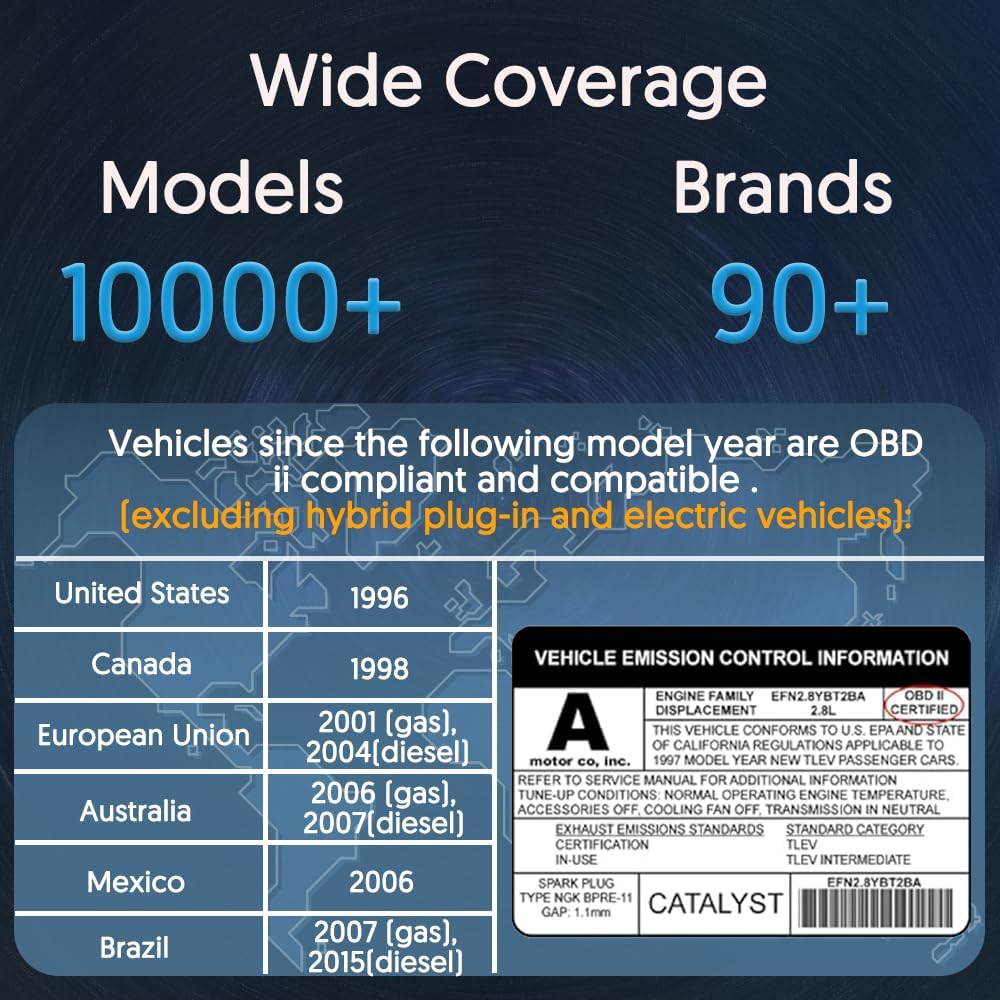
- Cydnawsedd Eang: Supports over 96% of car makes and models from 1996 to the present, including Toyota, Honda, Chevrolet, Ford, Mercedes-Benz, Jeep, BMW, Porsche, Subaru, Nissan, Cadillac, Volkswagen, and Lexus. Supports multiple languages.
- Cysylltedd Bluetooth Uwch: Features an upgraded Bluetooth system for faster and more reliable connections.
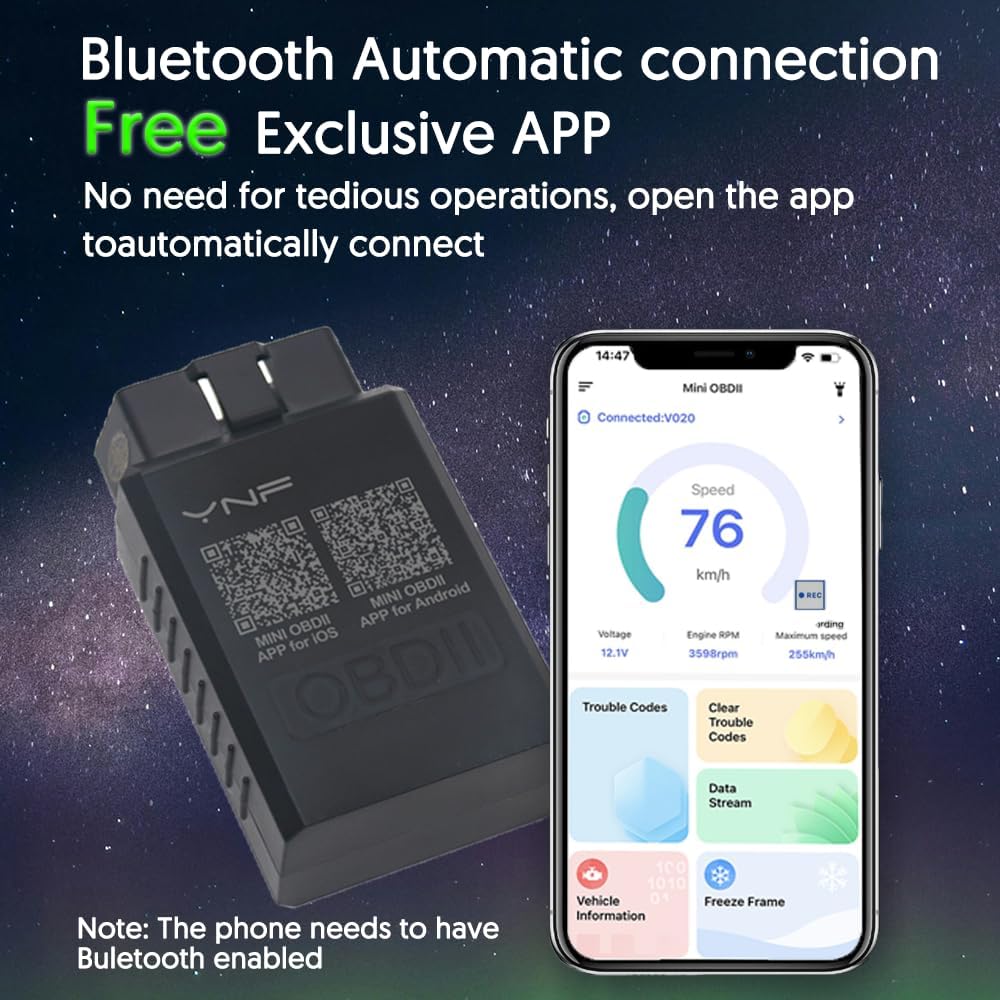
- Exclusive Free App: Dedicated app for Android and Apple systems, downloadable via QR code, designed for smooth user experience and compatibility.

2. Beth sydd wedi'i gynnwys
The product package for the YNF OBD2 Scanner Reader includes:
- YNF OBD2 Scanner Reader device (Model YNF-V01H4)
- Detailed User Manual (this document)
- Access to 24-hour troubleshooting email support
3. Cyfarwyddiadau Gosod
Follow these steps to set up your YNF OBD2 Scanner Reader:
- Step 1: Download the "MINI OBDII" App. Scan the QR code located on the back of your YNF OBD2 Scanner device or search for "MINI OBDII" in the Apple App Store (for iOS) or Google Play Store (for Android). Ensure you download the official app.
- Step 2: Plug in the Scanner and Start the Vehicle. Locate your vehicle's OBD-II port, typically found under the dashboard on the driver's side. Firmly plug the YNF OBD2 Scanner into the port. Once connected, start your vehicle's engine.
- Step 3: Enable Bluetooth on Your Smartphone. Go to your smartphone's settings and ensure Bluetooth is turned on.
- Step 4: Run the App and Connect. Open the "MINI OBDII" app on your smartphone. The app is designed to automatically connect to the YNF OBD2 Scanner via Bluetooth. Wait for the connection to establish.

4. Cyfarwyddiadau Gweithredu
Once the YNF OBD2 Scanner is connected to your vehicle and the app is running, you can begin diagnosing your vehicle. The app provides various functions to monitor and analyze your car's performance.
4.1. Reading and Clearing Error Codes
- Navigate to the "Trouble Codes" section within the app.
- The app will display any detected Diagnostic Trouble Codes (DTCs) along with their descriptions.
- To clear codes and turn off the Check Engine Light (CEL), select the "Clear Trouble Codes" option. Ensure you understand the cause of the code before clearing it, as clearing codes without addressing the underlying issue may lead to recurring problems.
4.2. Viewing Data Byw
- Access the "Data Stream" or "Live Data" section in the app.
- Mae'r nodwedd hon yn caniatáu ichi wneud hynny view real-time sensor data from your vehicle, such as engine RPM, vehicle speed, coolant temperature, fuel system status, and more.
- The data is often presented in graphical format for easier interpretation. Compare these readings against normal operating values to identify potential anomalies.
4.3. Performance Tests and Other Functions
The app offers additional diagnostic functions:
- Parodrwydd I / M: Checks if the various emissions-related systems are operating correctly and are ready for an inspection.
- Prawf batri: Provides information on your vehicle's battery health.
- Rhewi Data Ffrâm: Captures a snapshot of engine conditions at the moment a trouble code was set, aiding in diagnosis.
- Prawf Synhwyrydd O2: Monitors the oxygen sensors to ensure they are functioning within specifications.
- Prawf System EVAP: Checks the Evaporative Emission Control System for leaks.
- Vehicle Information (VIN): Retrieves the Vehicle Identification Number and other vehicle details.
5. cynnal
The YNF OBD2 Scanner Reader is designed for durability and requires minimal maintenance. To ensure its longevity and optimal performance:
- Storio: Storiwch y ddyfais mewn lle oer, sych i ffwrdd o olau haul uniongyrchol a thymheredd eithafol pan nad yw'n cael ei defnyddio.
- Glanhau: Use a soft, dry cloth to clean the exterior of the device. Avoid using harsh chemicals or abrasive cleaners.
- Porth Cysylltiad: Keep the OBD-II connector free from dust and debris.
- Diweddariadau Meddalwedd: Periodically check the "MINI OBDII" app for updates to ensure you have the latest features and compatibility improvements.
6. Datrys Problemau
If you encounter issues with your YNF OBD2 Scanner Reader, refer to the following common troubleshooting steps:
6.1. Dyfais Ddim yn Cysylltu â'r Ap
- Gwirio pŵer: Ensure the scanner is firmly plugged into the vehicle's OBD-II port and the vehicle's ignition is on (or engine running). The device typically draws power from the vehicle.
- Bluetooth wedi'i alluogi: Gwiriwch fod Bluetooth wedi'i alluogi ar eich ffôn clyfar.
- Rhedeg yr Ap: Make sure the "MINI OBDII" app is open and attempting to connect.
- Ailgychwyn: Try restarting both the app and your smartphone's Bluetooth. You may also try unplugging and re-plugging the scanner.
- Fersiwn Ap: Ensure you have the latest version of the "MINI OBDII" app installed.
6.2. Inaccurate or Frozen Data Display
- Cysylltiad Sefydlog: Ensure the Bluetooth connection is stable. Interference from other wireless devices can sometimes affect data transmission.
- Cysondeb Cerbyd: While the device has broad compatibility, ensure your specific vehicle model and year are supported. Refer to the compatibility information in Section 1.
- Ailgychwyn yr Ap: Caewch ac ailagor yr ap.
- Ailosod Dyfais: Unplug the scanner from the OBD-II port for a few seconds, then plug it back in.
6.3. App Compatibility Issues
The "MINI OBDII" app is designed to solve compatibility issues across different systems and models. If you experience persistent compatibility problems, ensure you are using the correct app and that your smartphone's operating system (iOS or Android) meets the minimum requirements (Android 11.0, iOS 10.0 or later).

7. manylebau
| Nodwedd | Manylyn |
|---|---|
| Enw Brand | YNF |
| Rhif Model | YNF-V01H4 |
| Rhif Rhan | YNF-OBD-1 |
| Ffynhonnell Pwer | Corded Electric (via OBD-II port) |
| Cydweddoldeb System Weithredu | Android 11.0, iOS 10.0 and later |
| Nifer yr Eitemau | 1 (Scanner device) |
| Cydrannau wedi'u Cynnwys | Llawlyfr |
8. Gwarant a Chefnogaeth
YNF is committed to manufacturing products to the highest quality standards. The Bluetooth Code Reader comes with a detailed manual and access to dedicated customer support.
- Cefnogaeth i Gwsmeriaid: For any issues or inquiries, please contact our customer service team via email. We offer 24-hour troubleshooting email support. Refer to the product packaging or the official YNF websafle am fanylion cyswllt.
- Sicrwydd Ansawdd: We strive to ensure our products provide both functionality and durability.