
1. Rhagymadrodd
This instruction manual provides essential information for the safe and effective use of your GT POWER AC Adapter, model 602. This power supply is designed to be compatible with the Verizon WNC-CR200A Gateway Router. Please read this manual thoroughly before use and retain it for future reference.
2. Gwybodaeth Diogelwch
WARNING: To reduce the risk of electric shock, fire, or injury, observe the following safety precautions:
- Ensure the power adapter is used with devices that match its voltage a manylebau cyfredol.
- Do not expose the adapter to water, rain, or excessive moisture.
- Do not disassemble or modify the adapter. Refer all servicing to qualified personnel.
- Avoid placing the adapter in areas with poor ventilation or near heat sources.
- Inspect the adapter and cable for damage before each use. Do not use if damaged.
- Cadwch allan o gyrraedd plant.
- Datgysylltwch yr addasydd o'r soced pŵer pan nad yw'n cael ei ddefnyddio am gyfnodau hir.
This adapter features Over Voltage Protection (OVP), Over Current Protection (OCP), and Short Circuit Protection (SCP) to ensure safe operation.
3. Cynnwys Pecyn
- 1 x GT POWER AC Adapter (Model 602)
4. Cynnyrch Drosview
The GT POWER AC Adapter is a compact and reliable power supply designed for specific networking equipment. It converts standard AC wall power to the DC power required by your device.

Ffigur 4.1: Blaen view of the GT POWER AC Adapter, showing the power prongs and the output cable.

Ffigur 4.2: Ochr view of the GT POWER AC Adapter, highlighting the barrel connector at the end of the output cable.
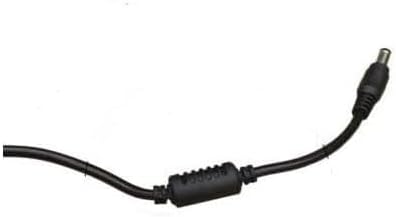
Ffigur 4.3: Yn agos view of the barrel connector, which plugs into the compatible device.
5. Gosod
Follow these steps to properly connect your GT POWER AC Adapter to your Verizon WNC-CR200A Gateway Router.
- Gwirio Cydnawsedd Dyfais: Before connecting, ensure your device is a Verizon WNC-CR200A Gateway Router. The adapter is specifically designed for this model. You can often find the model number on a label at the bottom or back of your router.

Ffigur 5.1: Example of a Verizon WNC-CR200A Gateway Router's bottom label, indicating the model number for compatibility verification.
- Cysylltu â Dyfais: Insert the barrel connector of the GT POWER AC Adapter firmly into the power input port of your Verizon WNC-CR200A Gateway Router.
- Cysylltu â Power Outlet: Plug the AC prongs of the adapter into a standard 100-240V AC wall outlet.
- Pŵer Ymlaen: Once connected, your Verizon WNC-CR200A Gateway Router should power on automatically or can be turned on using its power button, if available.
6. Gweithredu
The GT POWER AC Adapter operates automatically once connected. It provides a stable power supply to your compatible device. No user interaction is required for its operation beyond initial connection.
- Ensure the adapter is always connected to a functioning power outlet.
- Avoid disconnecting the adapter during critical operations of your router to prevent data loss or system instability.
7. cynnal
Proper maintenance ensures the longevity and safe operation of your AC adapter.
- Glanhau: Disconnect the adapter from the power outlet and the device before cleaning. Use a soft, dry cloth to wipe the exterior. Do not use liquid cleaners or solvents.
- Storio: Pan nad yw'n cael ei ddefnyddio, storiwch yr addasydd mewn lle oer, sych, i ffwrdd o olau haul uniongyrchol a thymheredd eithafol. Osgowch goilio'r cebl yn dynn i atal difrod.
- Gofal Cebl: Peidiwch â phlygu, troelli na thynnu'r cebl yn ormodol. Osgowch osod gwrthrychau trwm ar y cebl.
8. Datrys Problemau
If you encounter issues with your GT POWER AC Adapter, refer to the following common problems and solutions:
| Problem | Achos Posibl | Ateb |
|---|---|---|
| Dyfais ddim yn pweru ymlaen. |
|
|
| Mae'r addasydd yn teimlo'n anarferol o boeth. |
|
|
9. manylebau
| Nodwedd | Manylyn |
|---|---|
| Rhif Model | 602 |
| Brand | GRYM GT |
| Mewnbwn Voltage | AC 100-240V (50/60Hz) |
| Allbwn Voltage | DC 12V |
| Allbwn Cyfredol | 3A |
| Wattage | 36 Wat |
| Math o Gysylltydd | Casgen |
| Hyd Cebl | 59 modfedd (tua 1.5 fetr) |
| Nodweddion Gwarchod | OVP (dros Voltag(e Protection), OCP (Amddiffyniad Gor-gyfredol), SCP (Amddiffyniad Cylched Fer) |
| Dyfeisiau Cydnaws | Verizon WNC-CR200A Gateway Router CR200A WiFi6 NKR-LV65C-T3 |
10. Gwarant a Chefnogaeth
This GT POWER AC Adapter comes with a Gwarant Blwyddyn o ddyddiad y pryniant. Yn ogystal, a Gwarant Arian yn Ôl 30-Diwrnod yn cael ei gynnig.
For technical support, warranty claims, or further assistance, please contact your retailer or the manufacturer directly. Please have your purchase information and product model number (602) available when contacting support.
For more information, you may refer to the seller's contact details provided at the point of purchase.