
1. Rhagymadrodd
Diolch am brynuasing the HOCO HA1 Portable Party Speaker. This manual provides essential information for the safe and efficient operation of your device. Please read it thoroughly before use and retain it for future reference.
Gwybodaeth Diogelwch
- Peidiwch ag amlygu'r siaradwr i ddŵr na lleithder gormodol.
- Osgowch osod y siaradwr ger ffynonellau gwres neu mewn golau haul uniongyrchol.
- Peidiwch â cheisio dadosod na thrwsio'r uned eich hun. Cysylltwch â phersonél gwasanaeth cymwys.
- Cadwch allan o gyrraedd plant.
- Defnyddiwch yr ategolion gwefru penodedig yn unig.
2. Cynnwys Pecyn
Gwiriwch fod yr holl eitemau yn bresennol yn y pecyn:
- HOCO HA1 Portable Party Speaker
- Meicroffon Wired
- Charging Cable (USB-A to DC barrel jack, inferred)
- Llawlyfr Cyfarwyddiadau (y ddogfen hon)

Image: The HOCO HA1 speaker packaging, illustrating the speaker and its accessories, including a wired microphone.
3. Cynnyrch DrosviewRheolyddion a Phorthladdoedd
Familiarize yourself with the various controls and connection ports on your HOCO HA1 speaker.

Delwedd: Top view of the HOCO HA1 speaker, highlighting the control panel with buttons, rotary knob, and integrated carrying handle.
Panel Rheoli (Uchaf)
- Botwm Pŵer: Pwyswch a dal i droi'r siaradwr ymlaen / i ffwrdd.
- Botwm Modd: Short press to switch between Bluetooth, USB, AUX, and FM radio modes.
- Knob Cyfrol: Trowch i addasu'r gyfrol meistr.
- Botwm Chwarae/Seibiant: Pwyswch i chwarae neu oedi sain.
- Botymau Trac Blaenorol/Nesaf: Press to skip tracks in Bluetooth/USB mode, or change FM stations.
- Botwm Modd Ysgafn: Press to cycle through different LED light effects or turn them off.

Delwedd: Cefn view of the HOCO HA1 speaker, displaying the various input ports for USB, AUX, and microphone connections.
Porthladdoedd Cefn
- Porth USB: Ar gyfer chwarae sain o yriant fflach USB.
- Mewnbwn AUX (3.5mm): Ar gyfer cysylltu dyfeisiau sain allanol trwy gebl sain.
- Mewnbwn Meicroffon (6.35mm): Ar gyfer cysylltu'r meicroffon â gwifrau.
- Porthladd Codi Tâl DC 5V: Ar gyfer cysylltu'r cebl gwefru.
4. Gosod
4.1 Gwefru'r Siaradwr
- Connect the charging cable to the DC 5V charging port on the rear of the speaker.
- Connect the other end of the charging cable to a compatible USB power adapter (not included) or a USB port.
- Bydd y golau dangosydd gwefru yn goleuo. Caniatewch tua 3-4 awr ar gyfer gwefr lawn.
- Datgysylltwch y cebl gwefru unwaith y bydd wedi'i wefru'n llawn.
4.2 Cysylltu'r Meicroffon
- Locate the Microphone Input (6.35mm) port on the rear of the speaker.
- Insert the microphone cable securely into this port.
- The microphone is now ready for use in Karaoke mode.
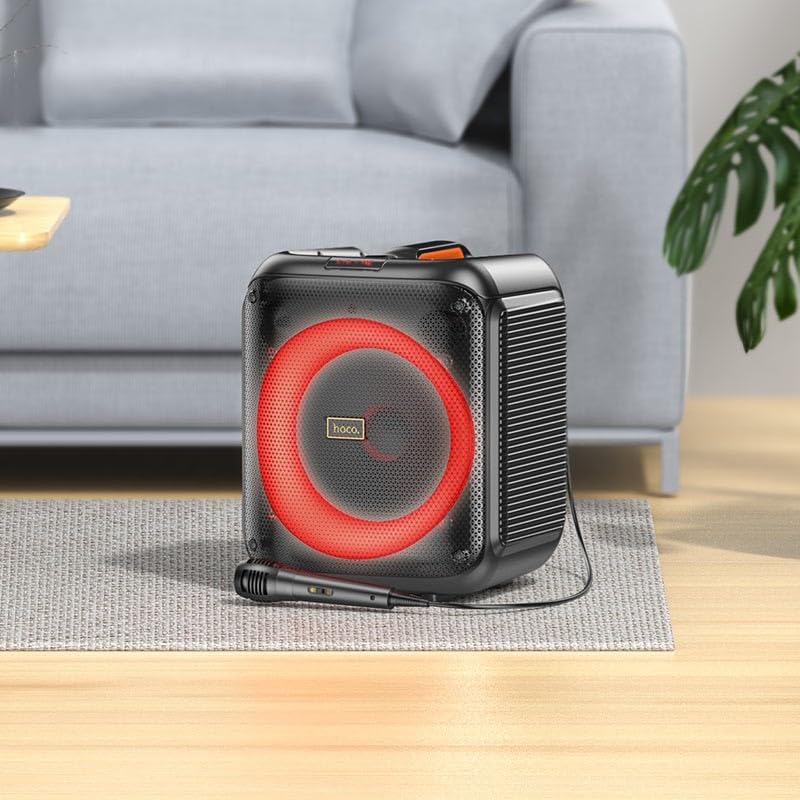
Image: The HOCO HA1 speaker set up with its wired microphone, demonstrating its readiness for karaoke or vocal use.
5. Cyfarwyddiadau Gweithredu
5.1 Pŵer Ymlaen/Diffodd
Pwyswch a dal y Botwm Pŵer on the control panel for approximately 3 seconds to turn the speaker On or Off.
5.2 Pâr Bluetooth
- Trowch y siaradwr ymlaen. Bydd yn mynd i mewn i'r modd paru Bluetooth yn awtomatig, a ddangosir gan LED sy'n fflachio.
- Ar eich dyfais symudol, galluogwch Bluetooth a chwiliwch am y dyfeisiau sydd ar gael.
- Select "HOCO HA1" from the list of devices.
- Ar ôl paru, bydd y siaradwr yn allyrru sain gadarnhau, a bydd y LED yn rhoi'r gorau i fflachio.
- Gallwch nawr chwarae sain o'ch dyfais drwy'r siaradwr.
Chwarae USB 5.3
- Mewnosodwch yriant fflach USB sy'n cynnwys sain MP3 files into the USB port on the rear of the speaker.
- Gwasgwch y Botwm Modd until "USB" mode is selected.
- The speaker will automatically begin playing audio from the USB drive.
- Defnyddiwch y Chwarae/Saib a Trac Blaenorol / Nesaf botymau i reoli chwarae.
5.4 AUX Mewnbwn
- Connect an external audio device (e.g., smartphone, MP3 player) to the AUX Input port using a 3.5mm audio cable (not included).
- Gwasgwch y Botwm Modd until "AUX" mode is selected.
- Play audio from your connected device. The speaker will output the sound.
Radio 5.5 FM
- Gwasgwch y Botwm Modd until "FM" mode is selected.
- I sganio'n awtomatig a chadw gorsafoedd sydd ar gael, pwyswch a daliwch y Botwm Chwarae/Seibiant. The speaker will scan and store stations.
- Defnyddiwch y Previous/Next Track Buttons to navigate between saved FM stations.
5.6 Karaoke Function (Microphone Use)
Once the microphone is connected (as described in Section 4.2), simply speak or sing into it. The microphone audio will be mixed with any music playing through the speaker (Bluetooth, USB, AUX). Adjust the master volume using the Knob Cyfrol.
5.7 Effeithiau Golau LED
Gwasgwch y Botwm Modd Ysgafn on the control panel to cycle through various LED light effects. Pressing it repeatedly will change the pattern or turn the lights off.

Image: The HOCO HA1 speaker showcasing its dynamic, multi-colored LED lighting feature, enhancing the party atmosphere.
6. cynnal
6.1 Glanhau
- Gwnewch yn siŵr bod y siaradwr wedi'i ddiffodd a'i ddatgysylltu cyn ei lanhau.
- Defnyddiwch frethyn meddal, sych i sychu'r arwynebau allanol.
- Peidiwch â defnyddio glanhawyr sgraffiniol, cwyrau na thoddyddion.
6.2 Storio
- Storiwch y siaradwr mewn lle oer, sych i ffwrdd o olau haul uniongyrchol a thymheredd eithafol.
- Os ydych chi'n storio am gyfnod hir, gwefrwch y batri o bryd i'w gilydd (e.e. bob 3 mis) i gynnal iechyd y batri.
7. Datrys Problemau
| Problem | Achos Posibl | Ateb |
|---|---|---|
| Nid yw'r siaradwr yn troi ymlaen. | Mae batri wedi'i ddisbyddu. | Gwefrwch y siaradwr am o leiaf 30 munud. |
| Dim sain o'r siaradwr. | Mae'r gyfrol yn rhy isel; y modd anghywir wedi'i ddewis; y ddyfais heb ei pharu (Bluetooth). | Increase volume; press Mode button to select correct input; re-pair Bluetooth device. |
| Ni all dyfais Bluetooth baru. | Nid yw'r siaradwr yn y modd paru; dyfais yn rhy bell; ymyrraeth. | Ensure speaker is in Bluetooth mode and flashing; move device closer; turn off other Bluetooth devices. |
| Meicroffon ddim yn gweithio. | Microphone not properly connected; microphone switch off (if applicable). | Ensure microphone is fully plugged into the correct port; check if microphone has an On/Off switch. |
| Mae derbyniad radio FM yn wael. | Signal gwan; ymyrraeth amgylcheddol. | Relocate the speaker; try auto-scanning again. |
8. manylebau
| Rhif Model | HA1 (20000463) |
| Brand | HOCO |
| Pŵer Allbwn Siaradwr | 45 Watts (Uchafswm) |
| Cysylltedd | Bluetooth, USB, AUX (3.5mm), FM Radio |
| Mewnbwn meicroffon | Ydw (6.35mm) |
| Math Batri | Ion Lithiwm (1 wedi'i gynnwys) |
| Pwysau Eitem | 3.6 Cilogram |
| Math Mowntio | Stondin pen bwrdd |
9. Gwarant a Chefnogaeth
The HOCO HA1 Portable Party Speaker comes with a standard manufacturer's warranty. For detailed warranty terms and conditions, please refer to the warranty card included with your purchase or visit the official HOCO websafle.
For technical support, troubleshooting assistance beyond this manual, or service inquiries, please contact HOCO customer support through their official channels. Contact information can typically be found on the product packaging or the HOCO official websafle.

