
1. Rhagymadrodd
This manual provides essential information for the safe and efficient operation of your TOPBULL 40A MPPT Solar Charge Controller. This device is designed to optimize power harvesting from your solar panels and efficiently charge various battery types in 12V or 24V systems. It features advanced Maximum Power Point Tracking (MPPT) technology, comprehensive protection functions, and a user-friendly LCD interface.

Delwedd 1: Blaen view of the TOPBULL 40A MPPT Solar Charge Controller, showing the LCD display and control buttons.
2. Cyfarwyddiadau Diogelwch
Please read all safety instructions carefully before installation and operation. Failure to follow these instructions may result in personal injury or damage to the controller or other components.
- Ensure all connections are correct and secure before applying power.
- Do not disassemble or attempt to repair the controller. Refer to qualified personnel for service.
- Gosodwch y rheolydd mewn ardal sydd wedi'i hawyru'n dda, i ffwrdd o ddeunyddiau fflamadwy a lleithder.
- Cysylltwch y batri â'r rheolydd yn gyntaf bob amser, yna'r panel solar, ac yn olaf y llwyth. Datgysylltwch yn y drefn wrthdro.
- Wear appropriate personal protective equipment, including eye protection, when working with batteries and electrical systems.
- The controller includes multiple electronic protections such as reverse polarity, overcharge, over-discharge, overload, short-circuiting, TVS lightning, overpower, reverse current, and overtemperature protection. However, proper installation is crucial for optimal safety.
3. Cynnwys Pecyn
Gwiriwch fod yr holl eitemau yn bresennol yn y pecyn:
- TOPBULL 40A MPPT Solar Charge Controller
- Sgriwiau Mowntio
- Llawlyfr Defnyddiwr (y ddogfen hon)

Image 2: Contents of the product package, showing the controller, user manual, and mounting hardware.
4. Cynnyrch Drosview
The TOPBULL 40A MPPT Solar Charge Controller features a clear LCD display and intuitive buttons for monitoring and configuration. It is equipped with terminals for solar panel input, battery connection, DC load output, and dual USB ports.
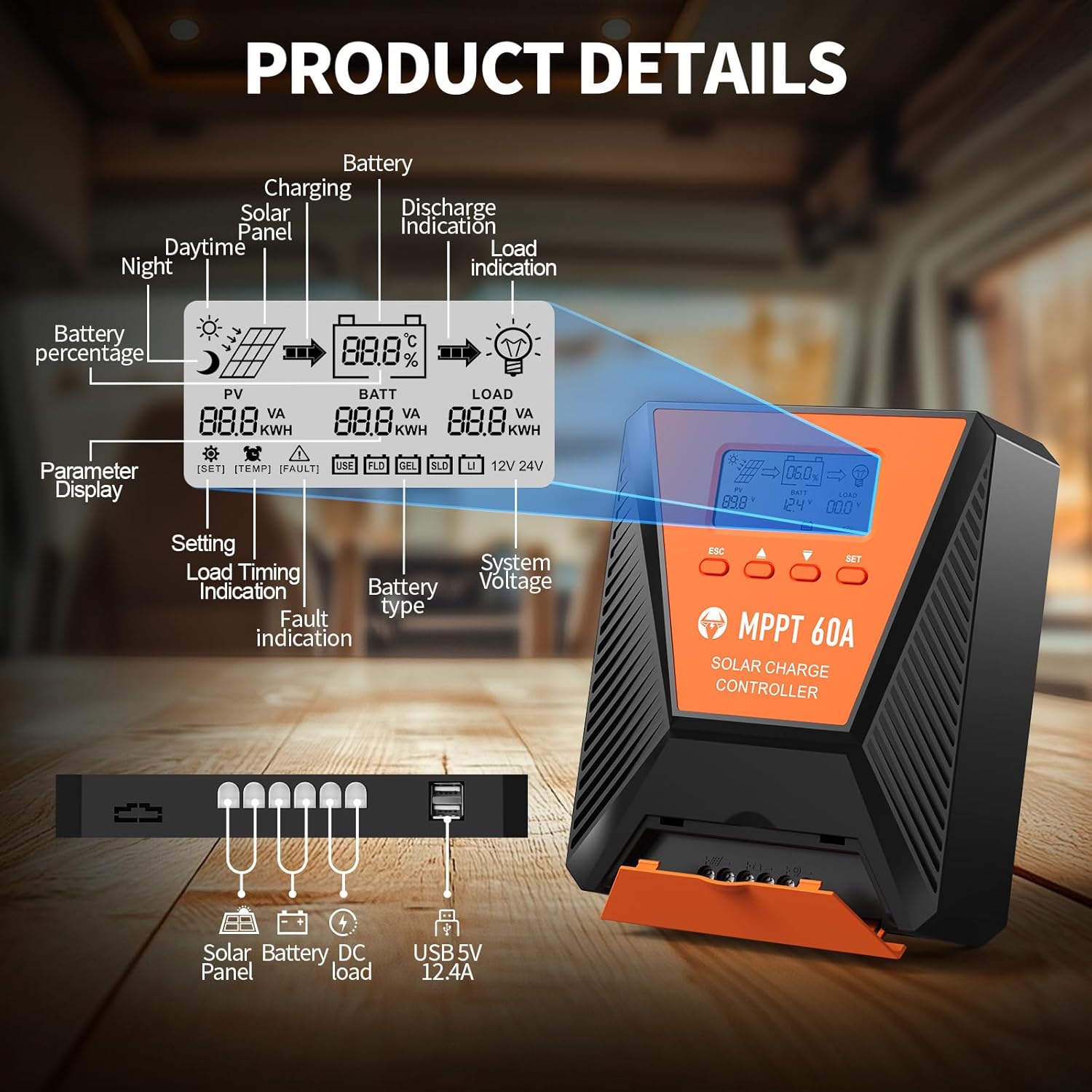
Delwedd 3: Manwl view of the controller's LCD display, showing various indicators and parameters, along with the connection ports at the bottom.
LCD Display Indicators:
- Gohebydd: Panel solar cyftage a grym.
- BATT: Batri cyftage, charge status, and type.
- LLWYTH: Load status and power.
- Percen Batritage: Lefel gwefr y batri ar hyn o bryd.
- Charging/Discharge Indication: Arrows indicating power flow.
- Dynodiad Diffyg: Error codes displayed if issues occur.
- Systemtage: Automatically detected 12V or 24V.
Botymau Rheoli:
- ESC: Exit menu or cancel setting.
- Saethau I FYNY/I LAWR: Navigate menus or adjust values.
- SET: Enter menu or confirm setting.
5. Gosod a Gosod
Dilynwch y camau hyn i osod eich rheolydd gwefr solar yn iawn:
- Mowntio: Choose a suitable location for the controller, ensuring adequate ventilation and protection from direct sunlight, high temperatures, and moisture. Use the provided mounting screws to secure the controller.
- Cysylltiad Batri: Connect the battery to the controller's battery terminals first. Ensure correct polarity (positive to positive, negative to negative). The controller will automatically detect the 12V or 24V system voltage.
- Cysylltiad Panel Solar: Connect the solar panel to the controller's solar input terminals. Ensure correct polarity. The controller will begin charging the battery.
- DC Load Connection (Optional): Connect your DC loads to the load terminals. Ensure correct polarity.

Image 4: Connection diagram illustrating how to connect the solar panel, battery bank, inverter (for AC load), and DC load to the MPPT controller.
The controller supports various deep cycle battery types, including FLD, LiFePO4, SLD, GEL, and AGM. It also supports 0V lithium battery charging (lithium battery activation function).

Image 5: The controller is compatible with various 12V/24V battery types, automatically identifying voltage and supporting custom parameters and 0V lithium battery charging.
6. Cyfarwyddiadau Gweithredu
LCD Display and Parameter Settings:
The LCD display provides real-time information about your solar charging system. Use the four buttons (ESC, UP, DOWN, SET) to navigate menus and adjust parameters.
- Gwasgwch GOSOD i fynd i mewn i'r brif ddewislen.
- Defnydd I FYNY/I LAWR to scroll through options such as battery type, load timer settings, and other customizable parameters.
- Gwasgwch GOSOD again to select an option and then use I FYNY/I LAWR i newid gwerthoedd.
- Gwasgwch GOSOD to confirm changes, or ESC i adael heb gynilo.
Proses Codi Tâl:
The controller utilizes a smart 4-stagproses gwefru e i wneud y gorau o iechyd a hirhoedledd y batri:
- Tâl Swmp: Rapid charging to bring the battery to approximately 80% capacity.
- Tâl Amsugno: Charging at a constant voltage to bring the battery to 100% capacity.
- Tâl arnofio: Maintaining the battery at full charge with a lower voltage.
- Equalization Charge (for specific battery types): Periodically overcharging to balance cell voltages.
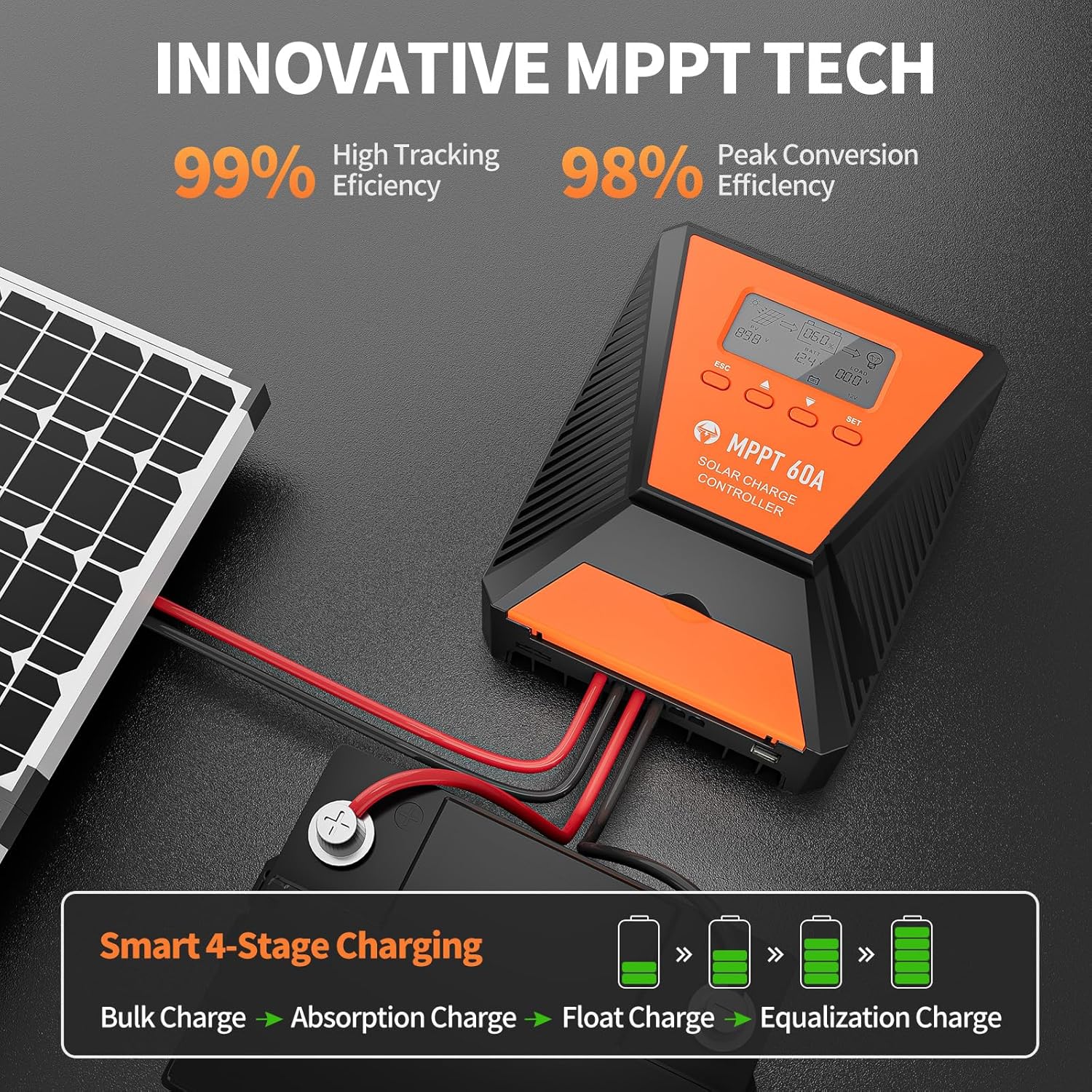
Image 6: The controller features 99% high tracking efficiency and 98% peak conversion efficiency, along with a smart 4-stage broses codi tâl.
Codi tâl USB:
The controller includes dual USB ports for charging electronic devices. These ports provide 5V DC output.
7. cynnal
Regular maintenance ensures optimal performance and extends the lifespan of your solar charge controller and battery system.
- Gwirio Cysylltiadau: Archwiliwch yr holl gysylltiadau gwifrau yn rheolaidd am dyndra a chorydiad.
- Rheolydd Glân: Cadwch y rheolydd yn lân ac yn rhydd o lwch a malurion. Defnyddiwch frethyn sych i'w lanhau.
- Awyru: Ensure the installation area remains well-ventilated to prevent overheating. The controller is designed with a metal case and dual high-speed intelligent fans for enhanced heat dissipation.
- Archwiliad batri: Follow the manufacturer's maintenance guidelines for your specific battery type.
- Iawndal Tymheredd: The controller features a temperature compensation function that automatically adjusts charging and discharging parameters to prolong battery life.
8. Datrys Problemau
If you encounter issues with your controller, refer to the LCD display for error codes and consult the following common troubleshooting steps:
- Dim Arddangosfa: Check battery connections and ensure the battery has sufficient voltage.
- Dim Tâl: Verify solar panel connections and ensure adequate sunlight. Check for any fault indications on the LCD.
- Llwyth Ddim yn Gweithio: Check load connections and ensure the load is within the controller's rated capacity. Verify load timer settings.
- Codau Gwall: The LCD display will show specific error codes for various issues (e.g., overvoltage, undervoltage, overtemperature, short circuit). Refer to the controller's internal error code list (if provided in a separate document) for detailed explanations and solutions.
The controller incorporates 9 intelligent protection features to safeguard your system:
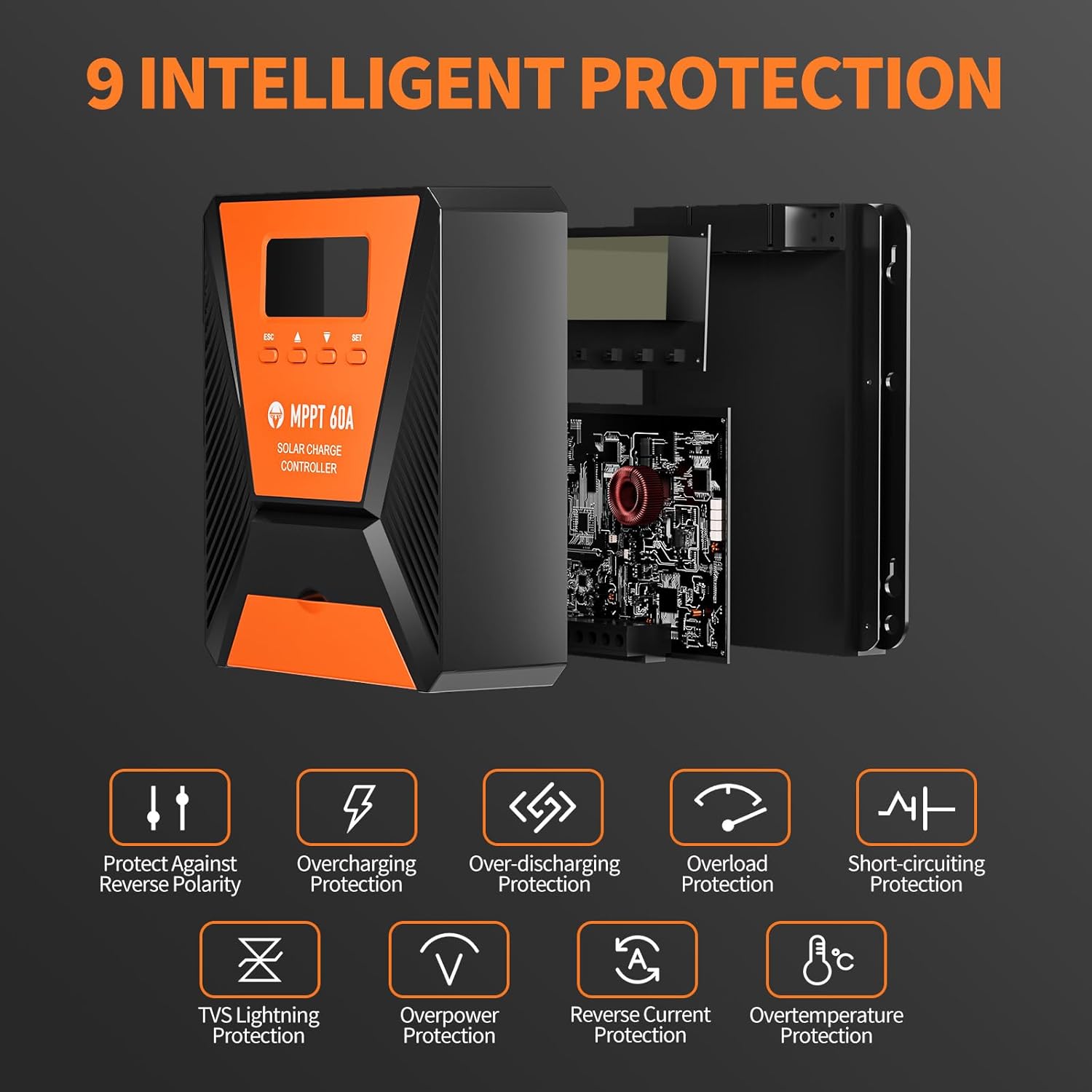
Image 7: The controller provides 9 intelligent protection features, including protection against reverse polarity, overcharging, over-discharging, overload, short-circuiting, TVS lightning, overpower, reverse current, and overtemperature.
9. manylebau
| Nodwedd | Manyleb |
|---|---|
| Model | 40A |
| Brand | TOPBULL |
| Systemtage | 12V/24V Automatic Recognition |
| Effeithlonrwydd Olrhain | >99% |
| Peak Conversion Efficiency | Uchafswm 98% |
| Mathau Batri Cydnaws | FLD, LiFePO4, SLD, GEL, AGM |
| Max Mewnbwn PV Voltage | 100V DC |
| Max Solar Input Power (12V System) | 720W |
| Max Solar Input Power (24V System) | 1440W |
| Allbwn USB | Dual USB Ports, 5V DC |
| Math Arddangos | LCD |
| Dimensiynau (pecyn) | 23.6 x 22.1 x 10.59 cm |
| Pwysau (Pecyn) | 1.25 kg |
| Affeithwyr yn cynnwys | Sgriwiau Mowntio |
10. Gwarant a Chefnogaeth
TOPBULL is committed to providing professional technical support. If you have any questions or require assistance with your MPPT solar charge controller, please contact our customer service. We strive to meet your needs and provide the best possible support.