
1. Rhagymadrodd
Diolch am brynuasing the VBESTLIFE 1080P 16MP Digital Video Camera. This manual provides essential information for the safe and effective operation of your device. Please read it thoroughly before use and retain it for future reference.
2. Gwybodaeth Diogelwch
- Peidiwch â gwneud y camera yn agored i ddŵr neu leithder.
- Osgowch dymheredd eithafol, golau haul uniongyrchol, neu amgylcheddau llwchog.
- Use only the specified battery type and charger.
- Cadwch allan o gyrraedd plant.
- Peidiwch â cheisio dadosod na newid y camera.
- Clean the camera with a soft, dry cloth. Avoid harsh chemicals.
3. Cynnwys Pecyn
Gwiriwch fod yr holl eitemau yn bresennol yn eich pecyn:
- VBESTLIFE Digital Video Camera
- Cebl USB
- Llawlyfr Defnyddiwr (y ddogfen hon)
4. Cynnyrch Drosview
Familiarize yourself with the components of your VBESTLIFE Digital Video Camera.
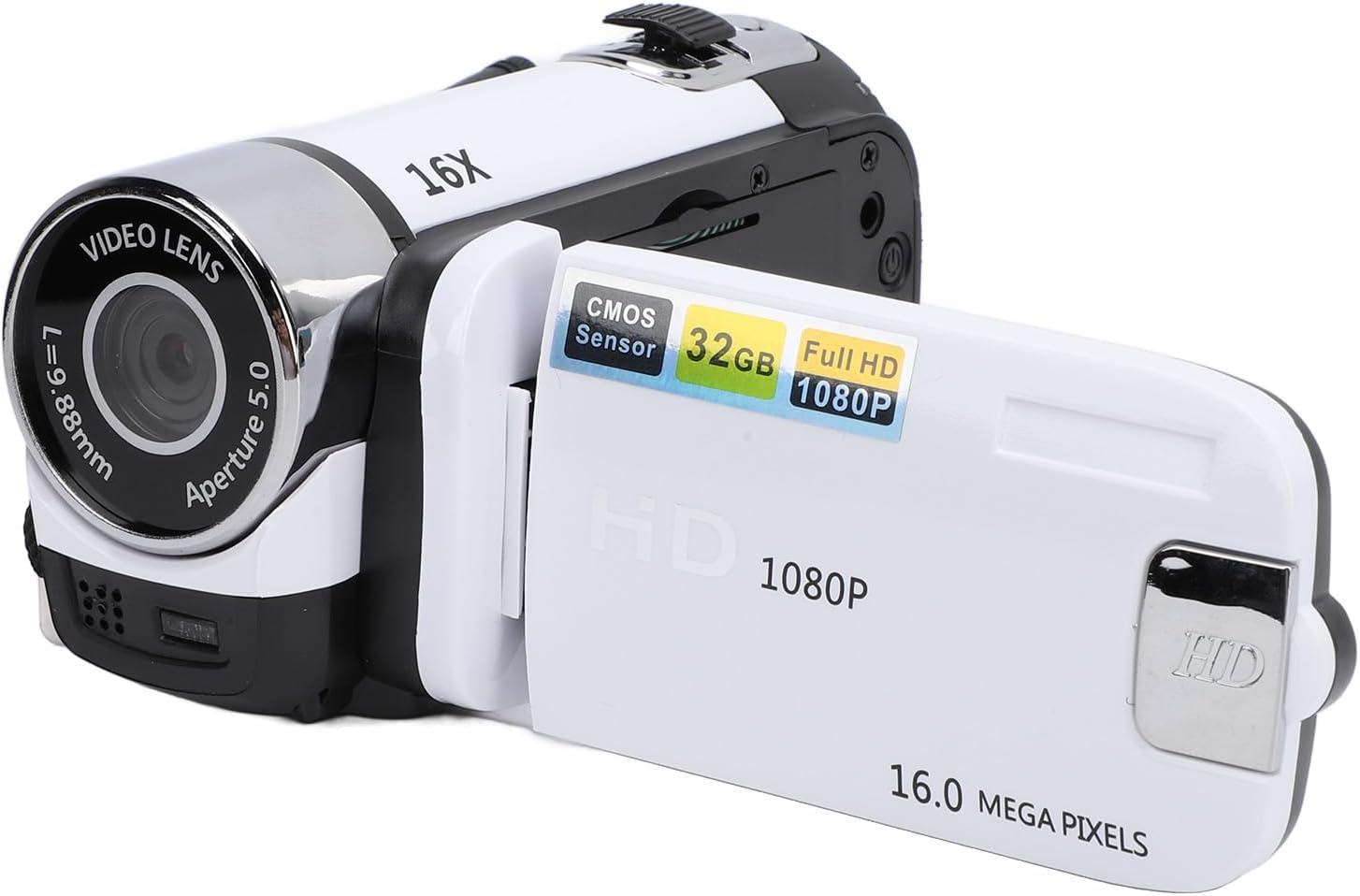
Ffigur 4.1: Blaen view of the VBESTLIFE Digital Video Camera with the 2.4-inch screen rotated open. The lens, 16X digital zoom marking, and screen are visible.
4.1. Front and Side Components

Ffigur 4.2: Yn agos view of the camera's video lens, showing 'VIDEO LENS', 'f=7.9-88mm', and 'Aperture 5.0' markings. The integrated fill light is located below the lens.

Ffigur 4.3: Ochr view of the camera showing the USB port, Menu button, Mode button, and the Power/Shutter button. The speaker grille is also visible.
- Video Lens: Captures images and video.
- Llenwi Golau: Provides additional illumination in low-light conditions.
- Sgrin 2.4 modfedd: Arddangosfeydd byw view, bwydlenni, ac chwarae yn ôl.
- Botwm Pŵer/Caead: Turns the camera on/off and initiates recording/photo capture.
- Botwm Dewislen: Yn cyrchu gosodiadau'r camera.
- Botwm Modd: Switches between video, photo, and playback modes.
- Porth USB: Ar gyfer gwefru a chysylltu â chyfrifiadur.
- Slot Cerdyn Cof: For inserting an SD card (not included).
- Mount trybedd: 1/4 inch threaded hole for external tripods.
5. Gosod
5.1. Gosod y Batri
- Locate the battery compartment cover on the camera.
- Open the cover and insert the battery according to the polarity indicators (+/-).
- Caewch y clawr adran batri yn ddiogel.
5.2. Mewnosod Cerdyn Cof
A memory card (SD card, up to 32GB, not included) is required to save photos and videos.
- Locate the memory card slot, usually near the battery compartment or on the side.
- Insert the memory card with the metal contacts facing the correct direction until it clicks into place.
- I'w dynnu allan, gwthiwch y cerdyn yn ysgafn nes iddo neidio allan.
5.3. Codi Tâl y Camera

Ffigur 5.1: The VBESTLIFE camera shown alongside its included USB cable, used for charging and data transfer.
Connect the camera to a power source (e.g., computer USB port or USB wall adapter) using the provided USB cable. The charging indicator light will illuminate. Charging is complete when the light turns off or changes color.
5.4. Troi ymlaen yn gychwynnol a gosodiadau sylfaenol
- Pwyswch a dal y Pwer / Caead button to turn on the camera.
- If prompted, set the date and time using the navigation buttons and confirm with the Pwer / Caead button. This ensures accurate time stamps ar eich recordiadau.
6. Gweithredu'r Camera
6.1. Recordio Fideo
- Trowch y camera ymlaen.
- Gwasgwch y Modd button until the camera is in video recording mode (indicated by an icon on the screen).
- Gwasgwch y Pwer / Caead botwm i ddechrau recordio. Pwyswch ef eto i stopio recordio.
6.2. Tynnu Lluniau
- Trowch y camera ymlaen.
- Gwasgwch y Modd button until the camera is in photo mode (indicated by an icon on the screen).
- Frame your shot and press the Pwer / Caead botwm i dynnu llun.
6.3. Chwyddo Digidol
Use the zoom controls (often integrated with navigation buttons) to zoom in or out digitally. The camera supports 16X digital zoom.
6.4. Llenwi Golau
The camera features an integrated fill light for improved visibility in dark environments. Locate the fill light button (refer to Figure 4.2 for its position) and press it to activate or deactivate the light.
6.5. Anti-Shake Function
The electronic anti-shake feature helps stabilize your footage. This function is typically enabled or disabled via the camera's menu settings. Refer to the menu section for detailed instructions.
6.6. Recordio Dolen
Loop recording allows the camera to continuously record, overwriting the oldest files when the memory card is full. This feature can be enabled or disabled in the camera's settings menu.
6.7. Modd Hunlun
The rotatable screen allows for easy selfie capture. Rotate the screen towards you to frame yourself. The camera may automatically switch to a selfie-optimized mode or you can adjust settings manually.
6.8. Video Pause Function
During video recording, you can pause and resume recording without creating a new file. This function is typically activated by a short press of the Pwer / Caead button or a dedicated pause button during recording.
6.9. Chwarae
- Gwasgwch y Modd botwm i fynd i mewn i'r modd chwarae.
- Use the navigation buttons to browse through your recorded videos and photos.
- Gwasgwch y Pwer / Caead button to play a video or view llun mewn sgrin lawn.
7. Cysylltu â Chyfrifiadur
I drosglwyddo files i'ch cyfrifiadur:
- Sicrhewch fod y camera wedi'i bweru i ffwrdd.
- Cysylltwch y camera â'ch cyfrifiadur gan ddefnyddio'r cebl USB a ddarperir.
- Power on the camera. It should appear as a removable disk drive on your computer.
- Open the drive to access and copy your photos and videos.
- Safely eject the removable disk from your computer before disconnecting the USB cable.
8. cynnal
8.1. Glanhau
- Defnyddiwch frethyn meddal, di-lint i lanhau corff y camera.
- For the lens, use a specialized lens cleaning cloth and solution. Avoid touching the lens surface with your fingers.
- Peidiwch â defnyddio glanhawyr neu doddyddion sgraffiniol.
8.2. Storio
When not in use for extended periods, remove the battery and store the camera in a cool, dry place away from direct sunlight and dust.
9. Datrys Problemau
| Problem | Achos Posibl | Ateb |
|---|---|---|
| Nid yw'r camera yn troi ymlaen. | Mae'r batri wedi marw neu wedi'i fewnosod yn anghywir. | Gwefrwch y batri neu ail-osodwch ef yn gywir. |
| Methu recordio fideo/tynnu lluniau. | No memory card, card full, or card error. | Insert a memory card, delete files, neu fformatio'r cerdyn (bydd hyn yn dileu'r holl ddata). |
| Mae delweddau/fideos yn aneglur. | Lens is dirty, insufficient light, or camera shake. | Clean the lens, use the fill light, or enable anti-shake. |
| Camera not recognized by computer. | Loose USB connection, camera not in correct mode. | Ensure cable is secure, try a different USB port, or restart camera/computer. |
10. manylebau
| Nodwedd | Manylyn |
|---|---|
| Model | VBESTLIFEgznr0gpfco-13 |
| Sgrin | Sgrin Lliw 2.4 Modfedd |
| Datrysiad Fideo | 1080P |
| Datrysiad Ffotograffau | 16 Megapicsel (AS) |
| Chwyddo Digidol | 16X |
| Nodweddion Arbennig | Electronic Anti-Shake, Loop Recording, Selfie, Fill Light, Video Pause Function, Time Watermark |
| Storio | Supports SD Card up to 32GB (not included) |
| Cysylltedd | USB |
| Pwysau | Tua 8 owns |
| Dimensiynau | Tua 5.12 x 4.33 x 2.76 modfedd |
11. Gwarant a Chefnogaeth
Am wybodaeth am y warant a chymorth technegol, cyfeiriwch at y ddogfennaeth a ddarparwyd ar adeg y pryniant neu cysylltwch â'ch manwerthwr. Cadwch eich prawf prynu ar gyfer unrhyw hawliadau gwarant.