
Rhagymadrodd
Thank you for choosing the MAIWO USB C Hard Drive Enclosure and Laptop Docking Station. This versatile device combines a 2.5/3.5 inch SATA SSD/HDD enclosure with a comprehensive USB hub extension, offering enhanced connectivity and storage solutions for your laptop or desktop. This manual provides detailed instructions for setup, operation, maintenance, and troubleshooting to ensure optimal performance and longevity of your device.
Cynnwys Pecyn
Gwiriwch fod yr holl eitemau yn bresennol yn y pecyn:
- 1x External Hard Drive Enclosure for 2.5/3.5'' HDD SSD
- 1x Type-C to Type-C Data Cable (USB3.1 10Gbps, 31.5inch/80cm)
- 1x 12V/3A Power Adapter (47inch/1.2m)
- Sgriwdreifer 1x
- Sgriwiau
- 1x Llawlyfr Defnyddiwr (y ddogfen hon)

Image: The MAIWO Hard Drive Enclosure, power adapter, and two USB-C cables included in the package.
Nodweddion Cynnyrch
- Cydnawsedd: Supports 2.5-inch and 3.5-inch SATA I/II/III HDD/SSD (7-9mm thickness for 2.5-inch drives).
- Trosglwyddo Cyflymder Uchel: USB 3.1 Gen 2 Type-C port with UASP support, theoretical transfer speed up to 10Gbps. Actual speed for SATA drives is limited to 6Gbps.
- Cysylltedd helaeth:
- 1x USB 3.1 Gen 2 Type-C port (for PC connection)
- 1x USB 3.1 Gen 2 Type-C port (for extension/10Gbps)
- 1x USB 3.0 Type-A port (for mouse, keyboard, USB flash drive)
- Darllenydd Cerdyn SD/TF
- 4K HD-MI output (4K@60Hz)
- 1000Mbps Gigabit Ethernet port (RJ45)
- Porth sain 3.5mm
- Cymorth Capasiti Mawr: Yn cefnogi gyriannau caled hyd at 24TB.
- Cyflenwad Pŵer: Includes a 12V/3A power adapter for stable operation.
- Swyddogaeth Cadwyn Daisy: Allows combining multiple K3527P models for expanded storage.
- Cymorth System Weithredu: Compatible with Windows 7/8/10/11, macOS 10.10.5 and above, Linux.
- Adeiladu Gwydn: Aluminum alloy case with ABS bracket for heat dissipation and protection.

Delwedd: Manwl view of the MAIWO Hard Drive Enclosure's front panel, labeling each port: Power Button, 12V/3A DC IN, USB3.0 Type-A, SD/TF Card slots, USB3.1 GEN2 Type-C (for extension), HD-MI 4K 60Hz, Gigabit Ethernet (RJ45), 3.5mm Audio Port, and USB3.1 GEN2 Type-C (for PC connection).
Canllaw Gosod
1. Installing a Hard Drive/SSD
- Ensure the enclosure is disconnected from power and your computer.
- Gently slide open the enclosure cover to reveal the internal drive bay.
- Align your 2.5-inch or 3.5-inch SATA HDD/SSD with the SATA connector inside the enclosure. Ensure the drive is oriented correctly.
- Carefully push the drive into the connector until it is firmly seated. For 3.5-inch drives, you may need to secure it with the provided screws and screwdriver.
- Llithrwch glawr y lloc yn ôl i'w le nes ei fod yn clicio'n ddiogel.
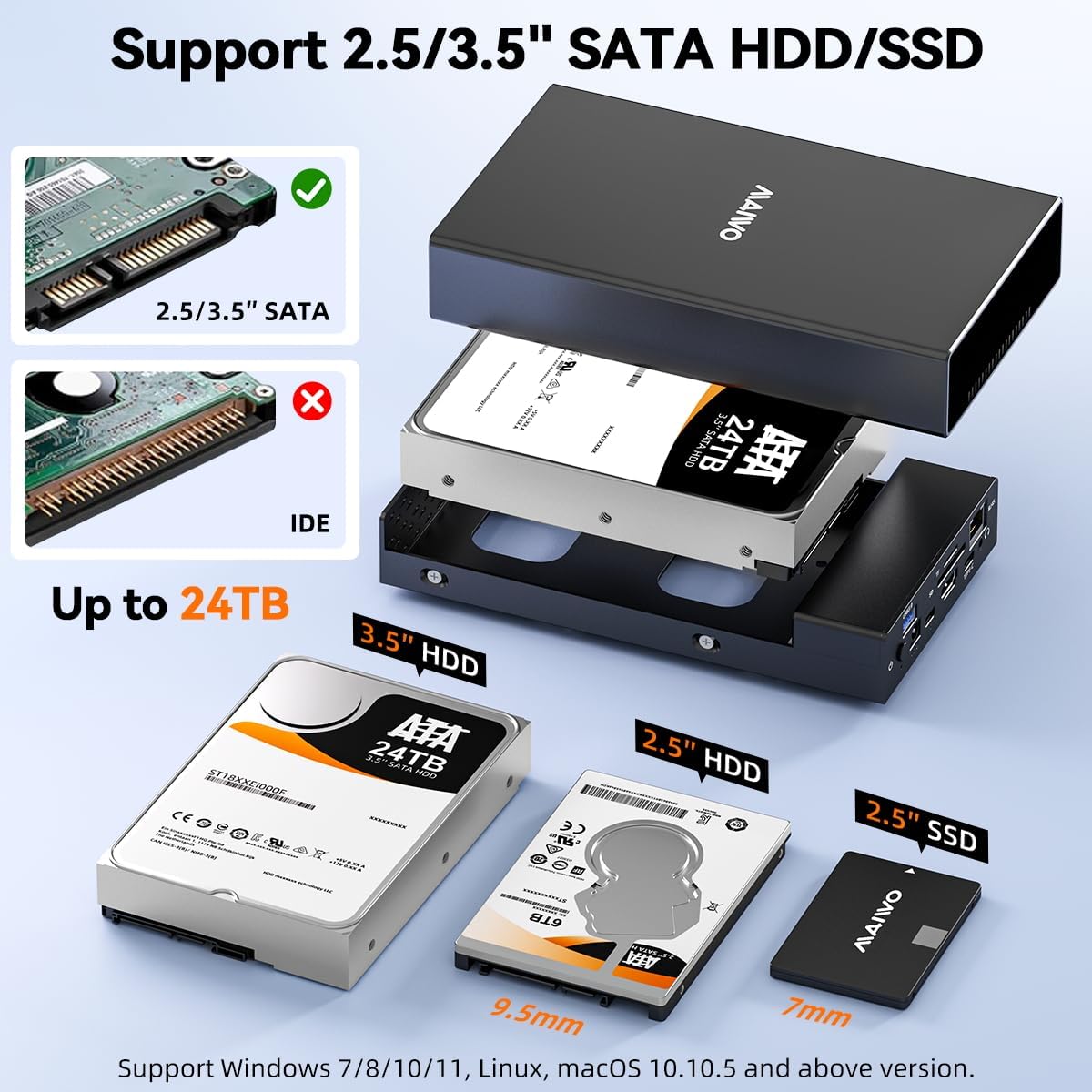
Image: A visual guide demonstrating the process of inserting a 3.5-inch hard disk drive into the MAIWO enclosure. The image highlights the compatibility with both 2.5-inch and 3.5-inch SATA drives and shows an incompatible IDE drive for comparison.
2. Cysylltu â'ch Cyfrifiadur
- Connect the 12V/3A power adapter to the DC IN port on the enclosure and plug it into a power outlet.
- Use the provided Type-C to Type-C data cable to connect the USB 3.1 Gen 2 Type-C port (labeled "For PC") on the enclosure to a compatible USB-C port on your computer.
- Press the power button on the enclosure to turn it on. The power indicator light will illuminate.
- Your computer should automatically detect the device. If a new hard drive is installed, it may need to be initialized and formatted before use. Refer to your operating system's disk management tools for this process.

Image: The MAIWO Hard Drive Enclosure connected to a laptop via a USB-C cable, illustrating the 10Gbps transfer speed capability. The power adapter is also shown connected to the enclosure.
Cyfarwyddiadau Gweithredu
Using the Hard Drive Enclosure Function
Once connected and recognized by your computer, the installed HDD/SSD will appear as an external drive. You can now perform standard file operations such as copying, moving, deleting, and backing up data.
Using the Docking Station Functions
The MAIWO enclosure also functions as a multi-port docking station. Connect your peripherals to the corresponding ports:
- Porthladd Math-A USB 3.0: Connect USB flash drives, external M.2 NVMe enclosures, mice, keyboards, or other USB-A devices.
- Slotiau Cerdyn SD/TF: Insert SD or TF (MicroSD) cards for direct data transfer.
- HD-MI Port: Connect an external monitor or TV using an HD-MI cable for 4K@60Hz video output. Ensure your computer's USB-C port supports DisplayPort Alternate Mode.
- Porthladd Gigabit Ethernet (RJ45): Connect an Ethernet cable for a stable wired network connection.
- Porth Sain 3.5mm: Cysylltwch glustffonau, siaradwyr, neu feicroffon.
- USB 3.1 Gen 2 Type-C Extension Port: This port can be used to connect additional USB-C devices or for daisy-chaining another MAIWO K3527P unit.

Image: A comprehensive diagram illustrating the various ports on the MAIWO Hard Drive Enclosure and their respective functions, including USB 3.0, SD/TF, USB-C Gen2, HD-MI 4K, Gigabit Ethernet, and 3.5mm Audio.
Dileu Diogel
Always safely eject the hard drive from your operating system before disconnecting the enclosure or turning off its power. This prevents data corruption.
Cynnal a chadw
- Glanhau: Use a soft, dry cloth to clean the exterior of the enclosure. Do not use liquid cleaners or aerosols.
- Storio: Storiwch y ddyfais mewn lle oer, sych i ffwrdd o olau haul uniongyrchol a thymheredd eithafol.
- Awyru: Ensure the ventilation holes on the enclosure are not blocked to allow for proper heat dissipation, especially during extended use.
- Diweddariadau Cadarnwedd: Check the official MAIWO website periodically for any available firmware updates that may improve performance or compatibility.
Datrys problemau
| Problem | Achos / Ateb Posibl |
|---|---|
| Dyfais heb ei hadnabod gan y cyfrifiadur. |
|
| Hard drive not detected inside the enclosure. |
|
| Cyflymderau trosglwyddo araf. |
|
| HD-MI output not working. |
|
| Problemau cysylltiad Ethernet. |
|
Manylebau
| Nodwedd | Manylyn |
|---|---|
| Model | K3527P |
| Gyriannau â Chymorth | 2.5" / 3.5" SATA I/II/III HDD/SSD (7-9mm for 2.5") |
| Cynhwysedd Uchaf | Hyd at 24TB |
| Rhyngwyneb Gwesteiwr | USB 3.1 Gen 2 Math-C (10Gbps) |
| Porthladdoedd Estyniad |
|
| Cyflenwad Pŵer | Addasydd Pŵer 12V/3A |
| Deunydd | Aluminum Alloy Case + ABS Bracket |
| Dimensiynau (L x W x H) | 13.8 x 7.5 x 4.3 modfedd (35 x 19 x 11 cm) |
| Pwysau Eitem | 1.39 pwys (0.63 kg) |
| Cymorth System Weithredu | Windows 7/8/10/11, macOS 10.10.5+, Linux |
Gwybodaeth Gwarant
MAIWO products come with a standard manufacturer's warranty. For specific warranty terms and conditions, please refer to the warranty card included with your product or visit the official MAIWO websafle. Cadwch eich derbynneb prynu fel prawf o brynu ar gyfer hawliadau gwarant.
Cefnogaeth i Gwsmeriaid
If you encounter any issues or have questions regarding your MAIWO USB C Hard Drive Enclosure and Laptop Docking Station, please contact MAIWO customer support through the following channels:
- Swyddogol Websafle: Visit the MAIWO official websafle ar gyfer Cwestiynau Cyffredin, gyrwyr, a gwybodaeth gyswllt cymorth.
- Cefnogaeth E-bost: Cyfeiriwch at becynnu eich cynnyrch neu'r swyddfa websafle ar gyfer y cyfeiriad e-bost cymorth.
- Siop Amazon: You can also reach out to the seller "MAIWO STORE" via your Amazon order history for assistance.
When contacting support, please provide your product model (K3527P) and a detailed description of the issue.


