
Rhagymadrodd
Thank you for choosing the BOBLOV A23Pro Body Camera. This compact and versatile device is designed to capture high-quality video and photos in various environments, from daily activities to outdoor adventures. Featuring a 180-degree rotatable lens, 2K/48MP resolution, and advanced night vision, the A23Pro ensures you never miss a moment. This manual provides detailed instructions on how to set up, operate, and maintain your camera to ensure optimal performance.
Beth Sydd yn y Bocs

Image: The package contents include the A23Pro Video Camera, a USB-C Cable, a User Manual, and a Helmet Mount.
- 1x A23Pro Video Camera
- Cebl USB-C 1x
- Llawlyfr Defnyddiwr 1x
- 1x Helmet Mount
Cynnyrch Drosview
Nodweddion Allweddol
- Lens cylchdroadwy 180°: Manually adjust the lens to capture footage from various angles, offering flexibility for different recording scenarios.
- 2K/48MP Resolution: Records ultra-clear video at 2K resolution and captures high-quality 48MP photos, ensuring crisp detail.
- Four Night Vision Lights: Equipped with powerful IR lights for enhanced visibility and clarity in low-light or nighttime conditions.
- Amser Recordio Estynedig: A built-in 2200mAh battery provides up to 7 hours of continuous recording (at 1080P with screen and IR off).
- Cysylltedd USB-C: Modern USB-C port for fast data transfer and efficient charging.
- Compact a Chludadwy: Small and lightweight design makes it easy to carry and discreetly record.
- Recordiad Dolen: Yn trosysgrifo'r hynaf yn awtomatig files when the memory card is full, ensuring continuous recording.
- Storfa Ehangadwy: Supports Micro SD cards up to 256GB (C10 TF card and above recommended).
Cydrannau Cynnyrch

Image: The BOBLOV A23Pro Body Camera shown with its 180-degree rotatable lens, display screen, control buttons, and included accessories like a 64GB Micro SD card, USB drive, and helmet mount.

Image: A visual representation of the camera's 180-degree rotating lens, highlighting its flexibility for capturing various angles. A small inset shows the down button used to change lens direction.

Image: A comparison demonstrating the clarity of 2K resolution versus 1080P, showcasing the superior detail captured by the A23Pro camera.

Image: A graphic illustrating the camera's built-in 2200mAh battery, emphasizing its capacity for up to 7 hours of recording time.

Image: The camera's advanced night vision capability is shown with four IR lights, designed for clear recording in dark environments.

Image: This graphic illustrates the loop recording feature, showing options for video clip durations (5, 10, 15, 20 minutes) and the maximum duration of 20 minutes.

Image: The camera's expandable storage is depicted, showing support for Micro SD cards up to 256GB, with a note to use C10 TF cards or above.
Gosod
- Gwefru'r Camera: Before first use, fully charge the camera using the provided USB-C cable and a compatible power adapter. The charging indicator will show the charging status.
- Mewnosod Cerdyn Micro SD: Open the Micro SD card slot cover. Insert a Class 10 or higher Micro SD card (up to 256GB) into the slot with the gold contacts facing down. Gently push until it clicks into place.
- Pŵer Ymlaen: Press and hold the Power button for a few seconds until the screen lights up and the camera powers on.
- Gosodiadau Cychwynnol: Upon first power-on, you may be prompted to set the date, time, and language. Navigate using the control buttons and confirm your selections.
Cyfarwyddiadau Gweithredu
Recordio Fideo
- Sicrhewch fod y camera wedi'i bweru ymlaen.
- Press the Record button (usually marked with a red dot or camera icon) to start video recording. A red indicator light will typically flash, and a recording icon will appear on the screen.
- Press the Record button again to stop recording. The video file yn cael ei gadw i'r cerdyn Micro SD.
Tynnu Lluniau
- In standby mode, press the Photo button (usually marked with a camera icon) to take a still photo.
- The screen may briefly flash, indicating a photo has been captured.
Activating Night Vision
- While recording or in standby mode, locate the Night Vision button (refer to your camera's specific button layout).
- Press the button to activate the infrared (IR) lights. The screen will switch to a monochrome view, indicating night vision is active.
- Press the button again to deactivate night vision.
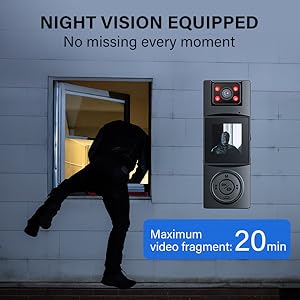
Image: A demonstration of the camera's night vision capability, showing a clear view of a person walking in a dimly lit parking garage.
Chwarae yn ôl
- From the main menu, navigate to the Playback or Gallery option.
- Use the navigation buttons (up/down/left/right) to browse through your recorded videos and photos.
- Pwyswch y botwm Iawn/Cadarnhau i view a selected file.

Image: The camera's 1.3-inch display screen, highlighting its ease of use for reviewing foo wedi'i recordiotage and photos directly on the device.
Defnyddio'r Helmet Mount

Image: The BOBLOV A23Pro Body Camera securely attached to a helmet using the included mount, demonstrating its use as a riding camera.
The included helmet mount allows for hands-free recording during activities like cycling or other outdoor sports. Attach the camera to the mount using the 1/4 nut, then secure the mount to your helmet. Ensure the camera is firmly attached before beginning any activity.
Fideo Cynnyrch Swyddogol
Fideo: Sioe fideo cynnyrch swyddogolasing the key features and uses of the BOBLOV A23Pro 2K Body Camera, including its 2K/48MP resolution, 180-degree rotatable lens, 7-hour recording time, and night vision capabilities.
Cynnal a chadw
- Glanhau: Defnyddiwch frethyn meddal, sych i lanhau corff y camera. Ar gyfer y lens, defnyddiwch frethyn a thoddiant glanhau lens arbenigol i osgoi crafiadau.
- Storio: Store the camera in a cool, dry place away from direct sunlight and extreme temperatures. Remove the Micro SD card if storing for extended periods.
- Gofal Batri: I ymestyn oes y batri, osgoi rhyddhau'r batri'n llwyr yn aml. Gwefrwch y camera'n rheolaidd, hyd yn oed os nad yw'n cael ei ddefnyddio, i gynnal iechyd y batri.
Datrys problemau
| Problem | Achos Posibl | Ateb |
|---|---|---|
| Nid yw'r camera'n troi ymlaen | Batri isel; Damwain system | Charge the camera; Press and hold the Power button for 10 seconds to reset. |
| Cannot record video/take photos | No Micro SD card; SD card full/corrupted; Incorrect mode | Insert/replace SD card; Format SD card (backup data first); Switch to video/photo mode. |
| Ansawdd fideo/llun gwael | Dirty lens; Low light conditions (night vision off); Incorrect resolution setting | Clean the lens; Activate night vision; Check resolution settings in menu. |
| Camera yn rhewi | Software issue; SD card error | Press and hold the Power button to force restart; Try a different SD card. |
Manylebau
| Nodwedd | Manylyn |
|---|---|
| Brand | BOBLOV |
| Rhif Model | A23PRO |
| Datrysiad Dal Fideo | 2K |
| Technoleg Synhwyrydd Ffotograffau | CMOS |
| Cylchdro Lens | 180° Rotatable (Manual) |
| Gallu Batri | Polymer Lithiwm 2200mAh (wedi'i gynnwys) |
| Amser Cofnodi | Up to 7 hours (1080P, Screen & IR Off) |
| Nodweddion Arbennig | Night Vision (Four IR Lights) |
| Math Cof Fflach | Micro SD (Supports up to 256GB, C10 and above) |
| Maint Sgrin | 1.3 modfedd |
| Technoleg Cysylltedd | USB-C |
| Pwysau Eitem | 8.1 owns |
| Dimensiynau Pecyn | 4.92 x 2.99 x 2.32 modfedd |
Gwarant a Chefnogaeth
BOBLOV products are designed for reliability and performance. This product comes with a standard manufacturer's warranty. For specific warranty details, please refer to the warranty card included in your product packaging or visit the official BOBLOV website. If you encounter any issues or require technical assistance, please contact BOBLOV customer support through their official channels. Keep your purchase receipt as proof of purchase for warranty claims.