
Rhagymadrodd
Thank you for choosing the HTRC C6X2 Dual RC Battery Charger. This advanced charger is designed for versatility and efficiency, capable of simultaneously charging two different battery types across its dual channels. It supports a wide range of battery chemistries, including LiPo, LiHV, Li-ion, LiFe, NiCD, NiMH, and PB batteries, making it an ideal solution for RC enthusiasts. This manual provides essential information for safe and effective operation, setup, and maintenance of your charger.
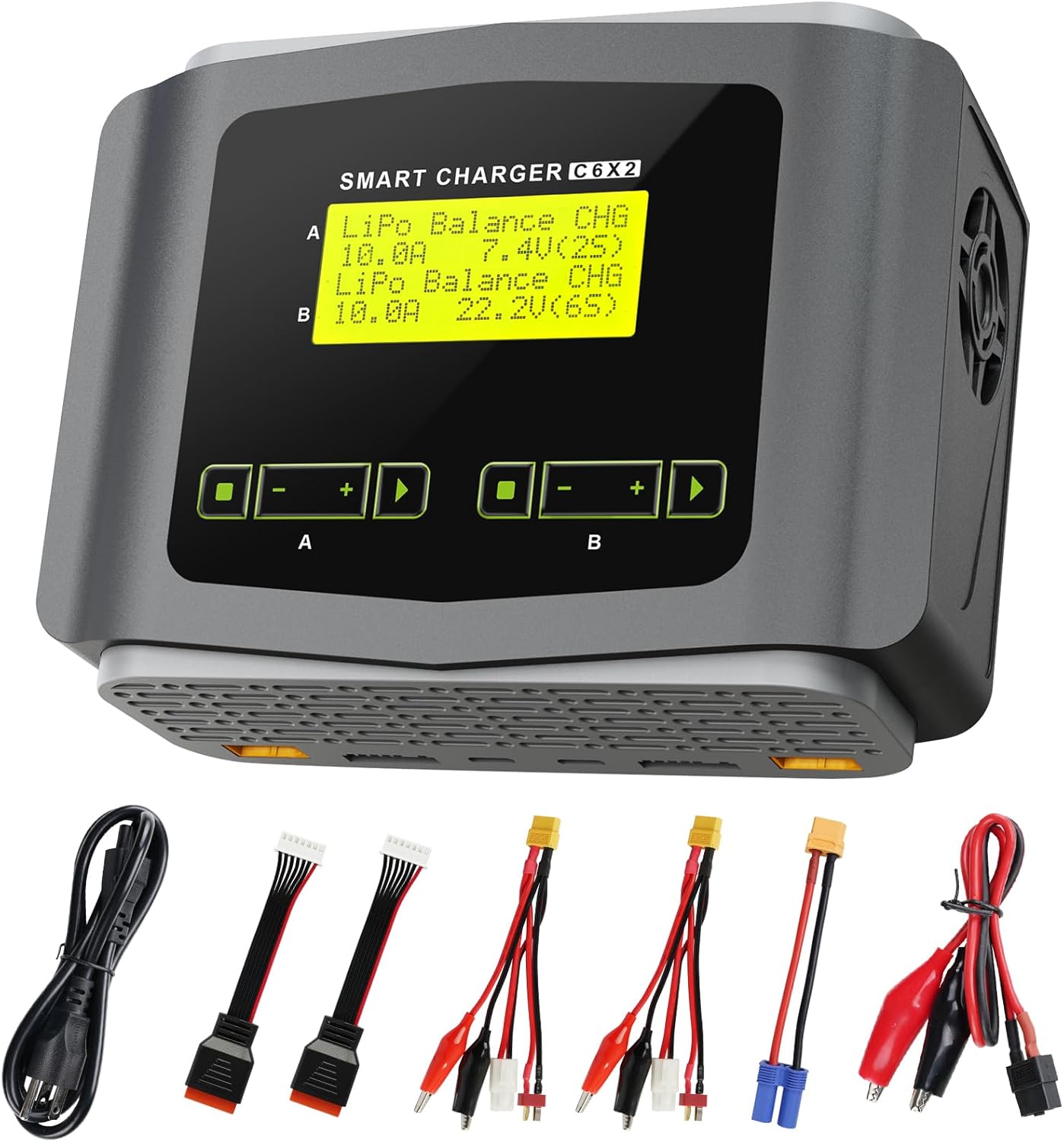
Figure 1: HTRC C6X2 Dual RC Battery Charger with its various connection cables.
Gwybodaeth Diogelwch
Always prioritize safety when operating the charger. Improper use can lead to fire, injury, or property damage.
- Peidiwch byth â gadael batris gwefru heb oruchwyliaeth.
- Ensure the correct battery type and cell count are selected before charging.
- Do not charge two different batteries on the same channel simultaneously. Each channel is designed for one battery at a time.
- Avoid using the AC power cable and DC cable simultaneously.
- Charge batteries in a fire-safe area, away from flammable materials.
- Do not attempt to charge damaged or swollen batteries.
- Cadwch y charger i ffwrdd o ddŵr, lleithder a thymheredd eithafol.
- Sicrhewch awyru priodol o amgylch y charger yn ystod y llawdriniaeth.

Figure 2: Illustration of incorrect charging practices (e.g., connecting multiple batteries to a single channel) and the correct method for safe operation.
Cynnwys Pecyn
Verify that all items are present in the package before use:
- One (1) HTRC C6X2 RC Battery Charger
- One (1) AC Power Cable
- One (1) DC Power Cable
- Two (2) 3-in-1 Convert Cables to XT60 Plugs
- One (1) XT60 to EC5 Cable
- Two (2) Balance Extension Cords
- Un (1) Llawlyfr Cyfarwyddiadau

Figure 3: All components included in the HTRC C6X2 product package.
Nodweddion Cynnyrch a Drosoddview
The HTRC C6X2 is a high-performance dual-channel charger designed for a wide array of RC battery types.
- Dual Channel Charging: Capable of charging two batteries independently and simultaneously.
- Cydnawsedd Batri Eang: Supports 1-6S LiPo, LiHV, Li-ion, LiFe; 1-15S NiCD, NiMH; and 2-20V PB Smart Batteries.
- Dulliau Codi Tâl Lluosog: Includes Charge, Balance Charge, Discharge, and Storage modes.
- Arddangosfa Sgrin Fawr: Provides clear, easy-to-read information for monitoring and setting parameters.
- Load Memory Function: Stores up to 20 different battery profiles for quick recall and charging.
- Automatic Cell Count Detection: Features an "AUTO" function to automatically identify the cell count during charging or discharging.
- Nodweddion Diogelwch: Automatic stop upon full charge, capacity cut-off, and safety timer.

Figure 4: The HTRC C6X2 charger supports various battery types including LiHV, LiPo, Li-ion, LiFe, NiMH, NiCD, and PB/SLA.

Figure 5: The charger's output connectors, including XT60 to EC5 and a multi-connector XT60 charging cable.
Gosod a Chysylltiad
Follow these steps to set up your HTRC C6X2 charger:
- Cysylltiad Pwer: Plug the AC power cable into the charger's AC input port and then into a wall outlet. Alternatively, for DC input, connect the DC cable to a compatible 11-18V DC power source. Do not use both AC and DC inputs simultaneously.
- Cysylltiad Batri:
- Connect the main plug of your battery to the corresponding output port on the charger (Channel A or Channel B).
- Connect the balance extension cord from your battery's balance port to the charger's balance port, ensuring correct polarity (from right to left, as indicated on the charger).
- Pŵer Ymlaen: Turn on the charger using the power switch. The large screen will illuminate.

Figure 6: Detailed steps for connecting the AC line, balance extension cord, and main battery plug to the charger.
Cyfarwyddiadau Gweithredu
The HTRC C6X2 features an intuitive interface for easy operation.
- Dewiswch Math Batri: On the main screen, use the navigation buttons to select the appropriate battery chemistry (e.g., LiPo, NiMH) for the connected battery.
- Dewis Modd: Select the desired operation mode (Charge, Balance Charge, Discharge, Storage). For most LiPo batteries, "Balance Charge" is recommended.
- Addasu Paramedrau: Set the charging current (Amps) a chyftage (Volts) according to your battery's specifications. The charger can automatically detect cell count.
- Dechrau'r Broses: Confirm your settings and initiate the charging/discharging process. The screen will display real-time information such as current, voltage, and elapsed time.
- Monitro Cynnydd: Periodically check the charger's display to monitor the battery's status. The charger will automatically stop when the battery is fully charged or the process is complete.
- Load Memory Function: To use a saved profile, navigate to the memory function, select the desired data, and execute the process directly without manual setting.
Cynnal a chadw
Mae cynnal a chadw priodol yn sicrhau hirhoedledd a pherfformiad gorau posibl eich gwefrydd.
- Glanhau: Use a soft, dry cloth to clean the charger's exterior. Do not use liquid cleaners or solvents.
- Storio: Storiwch y gwefrydd mewn lle oer, sych i ffwrdd o olau haul uniongyrchol a thymheredd eithafol pan nad yw'n cael ei ddefnyddio.
- Archwiliad cebl: Regularly inspect all cables and connectors for signs of wear, damage, or corrosion. Replace any damaged cables immediately.
- Awyru: Ensure the charger's ventilation openings are clear of dust and debris to prevent overheating.
Datrys problemau
If you encounter issues with your HTRC C6X2 charger, refer to the following common problems and solutions:
| Problem | Achos Posibl | Ateb |
|---|---|---|
| Nid yw'r gwefrydd yn troi ymlaen. | Dim cyflenwad pŵer; cysylltiad rhydd; cebl pŵer diffygiol. | Check power outlet/source. Ensure AC/DC cables are securely connected. Try a different power cable if available. |
| "Connection Break" or similar error. | Battery not properly connected; damaged cable. | Verify main and balance connections are secure. Inspect cables for damage. |
| Charging process stops prematurely. | Incorrect battery settings; battery fault; overheating. | Confirm battery type and cell count settings. Check battery health. Ensure adequate ventilation around the charger. |
| Screen displays "ERR ERR ERR". | Internal error or specific fault. | Disconnect power, wait a few minutes, then reconnect. If the error persists, contact customer support. |
Manylebau
Technical specifications for the HTRC C6X2 Dual RC Battery Charger:
| Nodwedd | Manyleb |
|---|---|
| Mewnbwn Voltage | AC 100-240V / DC 11-18V |
| Charge Circuit Power | AC: 150W (CH1+CH2=150W) / DC: 240W (CH1+CH2=240W) |
| Pŵer Rhyddhau | 10W |
| Ystod Cyfredol Codi Tâl | 0.1-10A * 2 |
| Amrediad Cyfredol Rhyddhau | 0.1-2A * 2 |
| LiPo/LiHV/Li-ion/LiFe Cell Count | 1-6S |
| NiCD/NiMH Cell Count | 1-15S |
| PB Battery Voltage | 2-20V |
| Dimensiynau Cynnyrch | 7.8 x 7.8 x 3.1 modfedd |
| Pwysau Eitem | 2.29 pwys |

Ffigur 7: Cyfrol mewnbwntage, charger power, and charge current specifications for the C6X2 dual channel charger.
Gwarant a Chefnogaeth
For warranty information or technical support, please refer to the contact details provided with your purchase or visit the official HTRC websafle. Cadwch eich derbynneb prynu fel prawf o brynu ar gyfer unrhyw hawliadau gwarant.
HTRC Customer Service: For assistance, please contact HTRC support through their official channels.


