
Lamzu Maya X
Lamzu Maya X Wireless Gaming Mouse User Manual
Model: Maya X
Rhagymadrodd
Thank you for choosing the Lamzu Maya X Wireless Gaming Mouse. This manual provides detailed instructions for setting up, operating, maintaining, and troubleshooting your new gaming mouse. Please read this manual thoroughly to ensure optimal performance and longevity of your device.

Image: The Lamzu Maya X Wireless Gaming Mouse, split to show its internal structure and accompanied by its 8K wireless dongle.
Nodweddion Allweddol
- Ultra-ysgafn: Weighing just 47g, the MAYA X mouse is designed to be lightweight yet sturdy, providing ultimate comfort during long gaming sessions.
- Symmetrical Shape Design: It is flexible and equally accommodating for palm, claw, or fingertip grip styles.
- Equipped with Optical Switches and Dust-Proof Encoder: Optical switches last three times longer than mechanical ones and can handle over 70 million cycles, respond quickly, give tactile feedback, and act fast. The Dust-Proof wheel encoder with 30-grid roller outputs 15 pulse signals, making games more precise and responsive.
- Pixart PAW 3950 Sensor: Powered by the latest flagship sensor. It supports up to 30,000 DPI and 750 IPS, with a maximum polling rate of 8,000 Hz when using the 8K dongle.
- Nordic 52840 MCU: Making battery more power efficient, providing fast response times, accurate motion tracking, and seamless performance without any lags during gameplay.
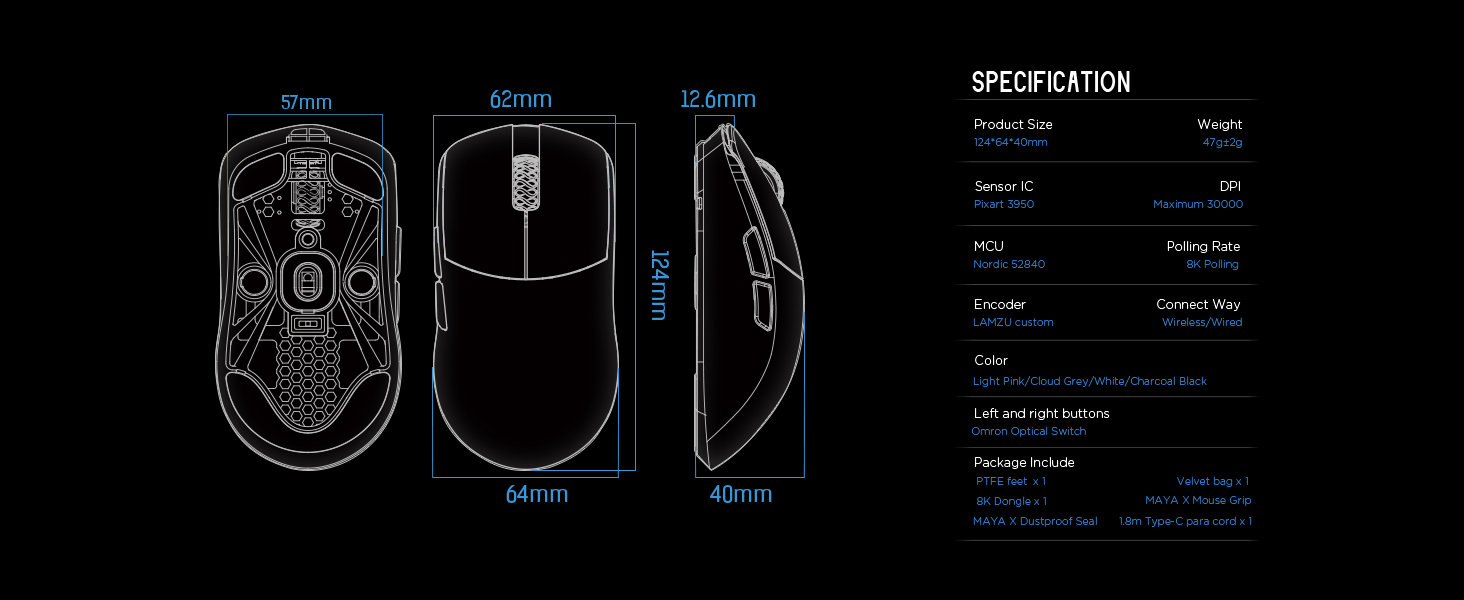
Image: Diagram illustrating the three common mouse grip types (palm, claw, fingertip) and how the symmetrical shape of the Maya X mouse accommodates them.

Delwedd: Llun agos view of the Pixart PAW 3950 sensor integrated circuit, highlighting its advanced technology.

Delwedd: Manwl view of the Nordic 52840 Microcontroller Unit (MCU), emphasizing its role in efficient performance and 8K Polling Rate compatibility.
Canllaw Gosod
Cynnwys Pecyn
- Lamzu Maya X Wireless Gaming Mouse
- PTFE Feet x 1 (extra set)
- 8K Dongle x 1
- Velvet Bag x 1
- MAYA X Mouse Grip
- MAYA X Dustproof Seal
- 1.8m Type-C Paracord x 1 (USB-C cable)
Cysylltiad Cychwynnol
The Lamzu Maya X mouse supports both 2.4G wireless and wired connections.
Cysylltiad Di-wifr 2.4G
- Insert the included 8K dongle into an available USB port on your computer.
- Turn on the mouse using the On/Off switch located on the underside of the mouse.
- The mouse should automatically connect to the dongle. If not, refer to the software section for pairing instructions.
For optimal wireless performance, ensure the dongle is placed close to the mouse and away from sources of interference.
Cysylltiad Wired
- Connect the provided 1.8m Type-C Paracord cable to the USB-C port on the front of the mouse.
- Cysylltwch ben arall y cebl â phorth USB sydd ar gael ar eich cyfrifiadur.
- The mouse will function immediately in wired mode with a 1KHz polling rate.

Image: The Lamzu Maya X mouse demonstrating its dual connectivity modes: 2.4G wireless via dongle and wired via USB-C cable.
Software Installation (Optional but Recommended)
To unlock the full potential of your Lamzu Maya X mouse, including custom DPI settings, macro programming, and polling rate adjustments up to 8000Hz, download the official driver software from the Lamzu website. The software is web-based, eliminating the need for a local installation.
Ymweld: www.lamzu.com/support

Image: Screenshot of the Lamzu Aurora Web Driver interface, showing options for macro programming, button customization, DPI settings, polling rate, and LOD adjustment.
Gweithredu'r Llygoden
Swyddogaethau Botwm
The Lamzu Maya X is a 6-button gaming mouse. Refer to the diagram below for button identification:

Image: Diagram illustrating the six programmable buttons on the Lamzu Maya X mouse: Left Click, Right Click, Scroll Wheel, DPI button, Forward side button, and Back side button. Also shows the On/Off switch on the underside.
- Cliciwch ar y chwith: Botwm gweithredu cynradd.
- Cliciwch ar y dde: Botwm gweithredu eilaidd.
- Olwyn Sgroliwch: Ar gyfer sgrolio a swyddogaeth clic canol.
- Botwm DPI: Cycles through preset DPI levels. Customizable via software.
- Forward Side Button: Default for forward navigation. Customizable.
- Back Side Button: Default for backward navigation. Customizable.
- Switsh ymlaen/i ffwrdd: Located on the underside of the mouse to power on/off.
Addasiad DPI
The mouse features a Pixart PAW 3950 sensor supporting up to 30,000 DPI. You can adjust DPI settings through the dedicated DPI button or more precisely using the Lamzu Aurora Web Driver software.

Image: A stylized view of the Lamzu Maya X mouse highlighting its capability for up to 30,000 DPI, indicating high precision.
Cyfradd Bleidleisio
The Lamzu Maya X supports a maximum polling rate of 8,000 Hz when using the included 8K dongle. This high polling rate ensures smoother cursor movement and reduced input lag.

Image: The Lamzu Maya X mouse and its 8K dongle, promoting the 8K Polling Rate with Aurora Technology for enhanced performance.
Cynnal a chadw
Glanhau
- Defnyddiwch frethyn meddal, sych i sychu wyneb y llygoden.
- Ar gyfer baw ystyfnig, ychydig yn dampgolchwch y lliain gyda dŵr neu doddiant glanhau ysgafn. Osgowch gemegau llym.
- Clean the optical sensor area on the underside regularly with a cotton swab to ensure accurate tracking.
Gofal Batri
- The mouse uses a Lithium Ion battery. Avoid fully discharging the battery frequently to prolong its lifespan.
- Gwefrwch y llygoden gan ddefnyddio'r cebl USB-C a ddarperir.
- Storiwch y llygoden mewn lle oer, sych pan nad yw'n cael ei defnyddio am gyfnodau hir.
Replacing PTFE Feet
The package includes an extra set of PTFE feet. If the existing feet show significant wear, carefully peel them off and apply the new ones, ensuring the surface is clean and dry before application.

Delwedd: Islaw view of the Lamzu Maya X mouse, showing the PTFE feet, optical sensor, and on/off switch.
Datrys problemau
Llygoden Ddim yn Ymateb
- Gwirio pŵer: Ensure the mouse is turned on using the switch on the underside.
- Lefel Batri: Charge the mouse if the battery is low.
- Cysylltiad diwifr: Ensure the 8K dongle is securely plugged into a USB port and within range. Try a different USB port.
- Cysylltiad â gwifrau: Gwnewch yn siŵr bod y cebl USB-C wedi'i gysylltu'n ddiogel â'r llygoden a'r cyfrifiadur. Rhowch gynnig ar borthladd USB gwahanol.
- Ail-baru: If using wireless, try re-pairing the mouse with the dongle via the software.
Inconsistent Tracking or Cursor Jitter
- Synhwyrydd Glân: Glanhewch y synhwyrydd optegol ar ochr isaf y llygoden.
- Arwyneb: Use the mouse on a clean, uniform surface. Avoid highly reflective or transparent surfaces.
- Lleoliad DPI: Adjust DPI settings in the software to a suitable level.
- Cyfradd Bleidleisio: Ensure the polling rate is stable and appropriate for your system.
Botymau Ddim yn Gweithio'n Gywir
- Gwiriad Meddalwedd: Verify button assignments in the Lamzu Aurora Web Driver software.
- Rhwystr Corfforol: Check for any physical debris preventing button presses.
Manylebau
| Nodwedd | Manylyn |
|---|---|
| Dimensiynau Cynnyrch | 4.88 x 2.52 x 0.04 modfedd |
| Pwysau Eitem | 1.66 owns (47g) |
| Rhif Model | Maya X |
| Batris | 1 batri Ion Lithiwm (wedi'i gynnwys) |
| Dyddiad Ar Gael Cyntaf | Medi 28, 2024 |
| Gwneuthurwr | Lamzu |
| Gwlad Tarddiad | Tsieina |
| Lliw | Llwyd |
| Technoleg Cysylltedd | USB, 2.4G Wireless |
| Nodwedd Arbennig | Ysgafn |
| Technoleg Canfod Symudiad | Optical (Pixart PAW 3950) |
| Uchafswm DPI | 30,000 DPI |
| Cyfradd Bleidleisio | Up to 8,000 Hz (with 8K dongle) |
| MCU | 52840 Nordig |
| Switsys | Optical Switches (Omron) |
| Amgodiwr | Dust-Proof Encoder (30-grid) |
Gwarant a Chefnogaeth
Gwybodaeth Gwarant
Lamzu products typically come with a manufacturer's warranty. Please refer to the warranty card included in your product packaging or visit the official Lamzu websafle am delerau ac amodau gwarant manwl sy'n benodol i'ch rhanbarth.
Cefnogaeth i Gwsmeriaid
For technical assistance, troubleshooting, or any inquiries regarding your Lamzu Maya X mouse, please contact Lamzu customer support:
- Websafle: www.lamzu.com/support
- E-bost: Cyfeiriwch at y swyddog websafle ar gyfer e-bost cyswllt.
When contacting support, please have your product model (Maya X) and purchase information ready.
Dogfennau Cysylltiedig - Maya X
 |
LAMZU Inca: Llygoden Hapchwarae Di-wifr 8K Ysgafn Iawn Profwch uchafbwynt perfformiad hapchwarae diwifr gyda'r LAMZU Inca, llygoden ddiwifr 40g ysgafn iawn wedi'i pheiriannu ar gyfer cywirdeb a chyflymder, sy'n cynnwys synhwyrydd Pixart 3950 a chyfradd pleidleisio hyd at 8000Hz. |
 |
Llawlyfr Defnyddiwr Llygoden Hapchwarae Di-wifr Lamzu Maya 8K Llawlyfr defnyddiwr manwl ar gyfer y Llygoden Hapchwarae Di-wifr Lamzu Maya 8K Super Light, yn cwmpasu manylebau, nodweddion a chanllawiau gweithredu. |
 |
LAMZU Atlantis 4K Wireless Gaming Mouse - 26000 DPI Discover the LAMZU Atlantis 4K, a super-light wireless gaming mouse engineered for performance. Featuring a 26000 DPI sensor, 2.4 GHz wireless/wired connectivity, and ergonomic design, it's ideal for esports enthusiasts. Includes detailed specifications and compliance information. |
 |
LAMZU Mini Maya Wireless Mouse Product Manual Technical specifications and safety guidelines for the LAMZU Mini Maya Wireless Mouse, featuring a 3950 optical sensor and lightweight design. |
 |
Llawlyfr Defnyddiwr Llygoden Hapchwarae Di-wifr LAMZU Atlantis Mini 4K Llawlyfr defnyddiwr ar gyfer LAMZU Atlantis Mini 4K Super Light Wireless Gaming Mouse, yn manylu ar ei nodweddion, manylebau, a defnydd. Yn cynnwys gwybodaeth am DPI, bywyd batri, cysylltedd, a mwy. |
 |
Llygoden Hapchwarae Di-wifr Ysgafn Iawn LAMZU MAYAX - Llawlyfr Cynnyrch a Manylebau Llawlydd cynnyrch manwl a manylebau ar gyfer Lymio Hapchwarae Diwifr Super Light LAMZU MAYAX, sy'n cynnwys 30000 DPI, pwysau 47g, a chysylltedd diwifr/gwifrog 2.4GHz. |
Ask a question about this manual
Ask about setup, troubleshooting, compatibility, parts, safety, or missing instructions. Manuals+ will review the question and use this page’s manual context to help answer it.