
CCYLEZ CCYLEZ6gksbyu8q1
CCYLEZ 16MP Digital Camera with Microphone User Manual
Model: CCYLEZ6gksbyu8q1
Rhagymadrodd
Diolch am brynuasing the CCYLEZ 16MP Digital Camera. This manual provides detailed instructions on how to set up, operate, and maintain your camera to ensure optimal performance. This camera is designed for capturing high-resolution photos and 1080P videos, featuring a 16X digital zoom, a 2.4-inch display, and a professional external microphone for enhanced audio recording. Please read this manual thoroughly before using the product.
Gwybodaeth Diogelwch
- Peidiwch â gwneud y camera yn agored i ddŵr neu leithder.
- Osgowch ollwng y camera neu ei rhoi mewn ergydion cryf.
- Cadwch y camera i ffwrdd o dymheredd eithafol a golau haul uniongyrchol.
- Defnyddiwch ategolion ac addasyddion pŵer cymeradwy yn unig.
- Do not attempt to disassemble or repair the camera yourself. Contact customer support for assistance.
- Cadwch allan o gyrraedd plant.
Cynnwys Pecyn
Ticiwch y blwch ar gyfer yr eitemau canlynol:
- 1 x CCYLEZ Digital Camera
- 1 x Camera Accessory (Strap)
- 1 x Gorchudd Llwch
- 2 x Instruction Manuals
- 1 x Professional Microphone
- 1 x Cebl USB
- 1 x Cebl Sain

Image: All included components, including the camera, microphone, cables, and dust cover.
Cynnyrch Drosview
Blaen View
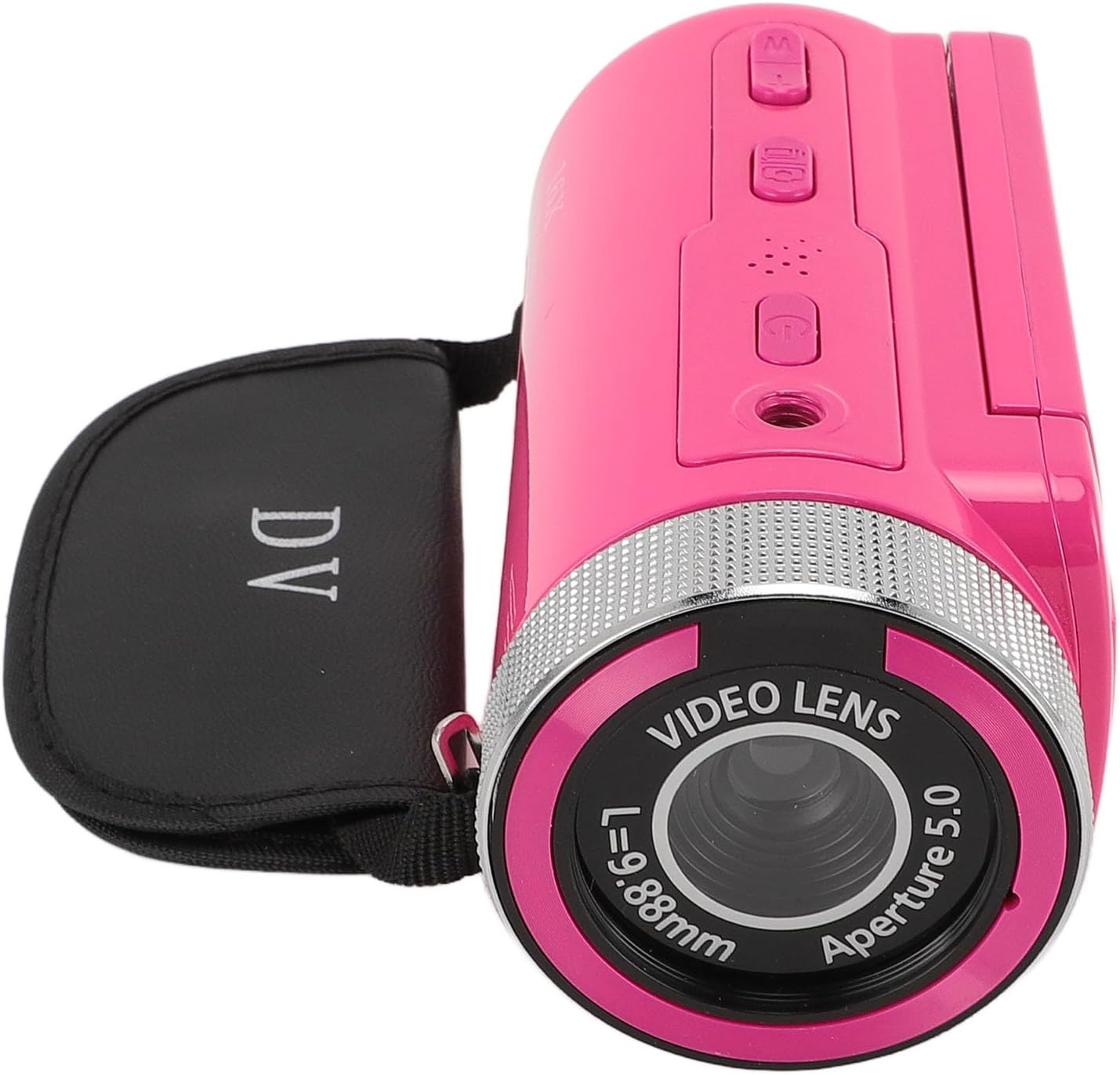
Image: The front of the camera, highlighting the video lens, aperture, and the 16X Digital Zoom label.
- Video Lens: Yn dal delweddau a fideos.
- Gosodiad meicroffon: Point for attaching the external microphone.
- Chwyddo Digidol 16X: Indicates the camera's digital zoom capability.
Cefn View ac Arddangosfa

Image: The camera's rear, showing the open 2.4-inch display and control buttons.
- Arddangosfa HD 2.4 modfedd: Swivel screen for viewing and framing shots.
- Botwm Pŵer: Yn troi'r camera ymlaen/i ffwrdd.
- Botwm Modd: Yn newid rhwng moddau llun a fideo.
- Botymau Llywio: For menu navigation and zoom control.
- Record/Shutter Button: Starts/stops video recording or takes a photo.
Gosod
1. Codi Tâl y Batri
The camera comes with a built-in 1020mAh lithium battery. Before first use, ensure the battery is fully charged. Connect the camera to a power source using the provided USB cable. The charging indicator light will illuminate during charging and turn off when fully charged.
2. Inserting a Storage Card
This camera supports storage cards up to 128GB (not included). Locate the memory card slot, usually on the side or bottom of the camera. Insert the card with the metal contacts facing the correct direction until it clicks into place. To remove, gently push the card in until it springs out.
3. Attaching the Professional Microphone

Image: The camera with the external microphone securely attached, ready for use.
- Locate the microphone mount on top of the camera.
- Slide the microphone into the mount until it is secure.
- Connect the microphone's audio cable to the camera's microphone input jack (typically a 3.5mm port).
- Ensure the connection is firm for optimal audio capture.
4. Troi ymlaen yn gychwynnol
Press and hold the Power button for a few seconds to turn on the camera. The 2.4-inch HD display will light up. You may need to set the date and time during the first startup.
Cyfarwyddiadau Gweithredu
1. Pweru Ymlaen / I ffwrdd
- I Bweru Ymlaen: Pwyswch a dal y botwm Power.
- I Bweru i ffwrdd: Pwyswch a daliwch y botwm Pŵer eto nes bod y sgrin yn diffodd.
2. Switching Modes (Photo/Video)
Press the Mode button to toggle between photo capture mode and video recording mode. The current mode will be indicated on the display.
3. Cipio Lluniau

Image: The camera's 2.4-inch HD display showing a clear image, demonstrating its photo capture capability.
- Sicrhewch fod y camera yn y modd llun.
- Frame your shot using the 2.4-inch display.
- Press the Shutter button to take a picture. The camera supports up to 16MP photos.
4. Recordio Fideos

Image: The camera in use, recording video with the attached microphone, highlighting its 1080P video resolution capability.
- Switch to video recording mode.
- Press the Record button to start recording. A red indicator or timer will appear on the screen.
- Press the Record button again to stop recording. The camera supports 1080P, 720P, and 480P video resolutions.
5. Defnyddio Chwyddo Digidol
While in photo or video mode, use the zoom buttons (often integrated with navigation buttons) to zoom in or out. The camera features 16X digital zoom.
6. Llywio Dewislen
Press the Menu button to access camera settings. Use the navigation buttons to scroll through options and the OK/Shutter button to select. Settings include image resolution, video resolution, timestamp, exposure, and more.
7. Chwarae

Image: The camera's screen displaying a recorded video or photo during playback, showing people shaking hands.
- Press the Playback button (if available, or navigate via Menu) to review your captured photos and videos.
- Defnyddiwch y botymau llywio i sgrolio drwyddo files.
- Press the OK/Shutter button to play videos or view photos in full screen.
8. Cysylltu â Chyfrifiadur
Connect the camera to your computer using the provided USB cable. The camera will typically appear as a removable disk, allowing you to transfer files. Ensure the camera is powered on when connected.
Cynnal a chadw
- Glanhau: Use a soft, dry cloth to clean the camera body. For the lens and screen, use a specialized lens cleaning cloth and solution. Avoid abrasive materials.
- Storio: When not in use, store the camera in a cool, dry place, away from dust and direct sunlight. Remove the memory card if storing for extended periods.
- Gofal Batri: Fully charge the battery before long-term storage and recharge every few months to maintain battery health.
Datrys problemau
| Problem | Achos Posibl | Ateb |
|---|---|---|
| Nid yw'r camera yn troi ymlaen. | Low battery; faulty battery; power button issue. | Charge the battery fully. Ensure the power button is pressed correctly. |
| Methu tynnu lluniau/recordio fideos. | No memory card; memory card full; incorrect mode. | Insert a memory card. Delete unnecessary files or replace the card. Switch to the correct mode. |
| Ansawdd sain gwael. | Microphone not connected properly; microphone settings. | Ensure the microphone is securely attached and connected. Check audio settings in the camera menu. |
| Mae'r camera'n rhewi. | Gwall meddalwedd; problem gyda'r cerdyn cof. | Remove and reinsert the battery (if possible). Format the memory card (back up data first). |
Manylebau
| Nodwedd | Manyleb |
|---|---|
| Brand | CCYLEZ |
| Rhif Model | CCYLEZ6gksbyu8q1 |
| Datrysiad llonydd effeithiol | 16 AS |
| Datrysiad Fideo | 1080P, 720P, 480P |
| Chwyddo Digidol | 16x |
| Maint Sgrin | 2.4 modfedd |
| Storage Card Support | Uchafswm 128GB (heb ei gynnwys) |
| Batri | 1020mAh Lithium Battery (built-in) |
| Meicroffon | Rhyngweithiol Proffesiynolview Microphone (external) |
| Technoleg Cysylltedd | USB |
| File Format (Video) | MP4 |
| File Format (Image) | JPEG |
| Rhyngwyneb Gwaelod | 1/4 standard screw hole |
Gwarant a Chefnogaeth
This product comes with a standard manufacturer's warranty. For detailed warranty information, please refer to the separate warranty card included in your package or visit the official CCYLEZ website. If you encounter any issues or require technical assistance, please contact CCYLEZ customer support through their official channels.
Am gymorth pellach, ewch i'r CCYLEZ Store on Amazon.
Ask a question about this manual
Ask about setup, troubleshooting, compatibility, parts, safety, or missing instructions. Manuals+ will review the question and use this page’s manual context to help answer it.