
1. Rhagymadrodd
Diolch am brynuasing the RCA SP550BT Portable Speaker. This manual provides important information regarding the setup, operation, and maintenance of your new speaker. Please read it thoroughly before use and keep it for future reference.
The RCA SP550BT is a versatile portable speaker featuring 50W output, Bluetooth connectivity, USB playback, FM radio, AUX input, True Wireless Stereo (TWS) function, LED lights, and a microphone input for an enhanced audio experience.
2. Cynnwys Pecyn
Gwiriwch y pecyn am yr eitemau canlynol:
- RCA SP550BT Portable Speaker
- Rheolaeth Anghysbell
- Cebl Pŵer
- Llawlyfr Defnyddiwr (y ddogfen hon)
3. Cynnyrch Drosview
Familiarize yourself with the main components and features of your RCA SP550BT speaker.

Ffigur 3.1: Blaen view of the RCA SP550BT portable speaker. This image displays the speaker in an upright position, highlighting the top control panel and the three prominent speaker cones with red illumination.

Ffigur 3.2: Ochr view of the RCA SP550BT portable speaker. This perspective shows the depth of the speaker and the integrated handle for portability.

Ffigur 3.3: Llorweddol view of the RCA SP550BT portable speaker. This image illustrates the speaker's design when placed on its side, emphasizing the speaker grille and LED lighting.
3.1 Rheoli o Bell
The included remote control allows for convenient operation of the speaker from a distance.
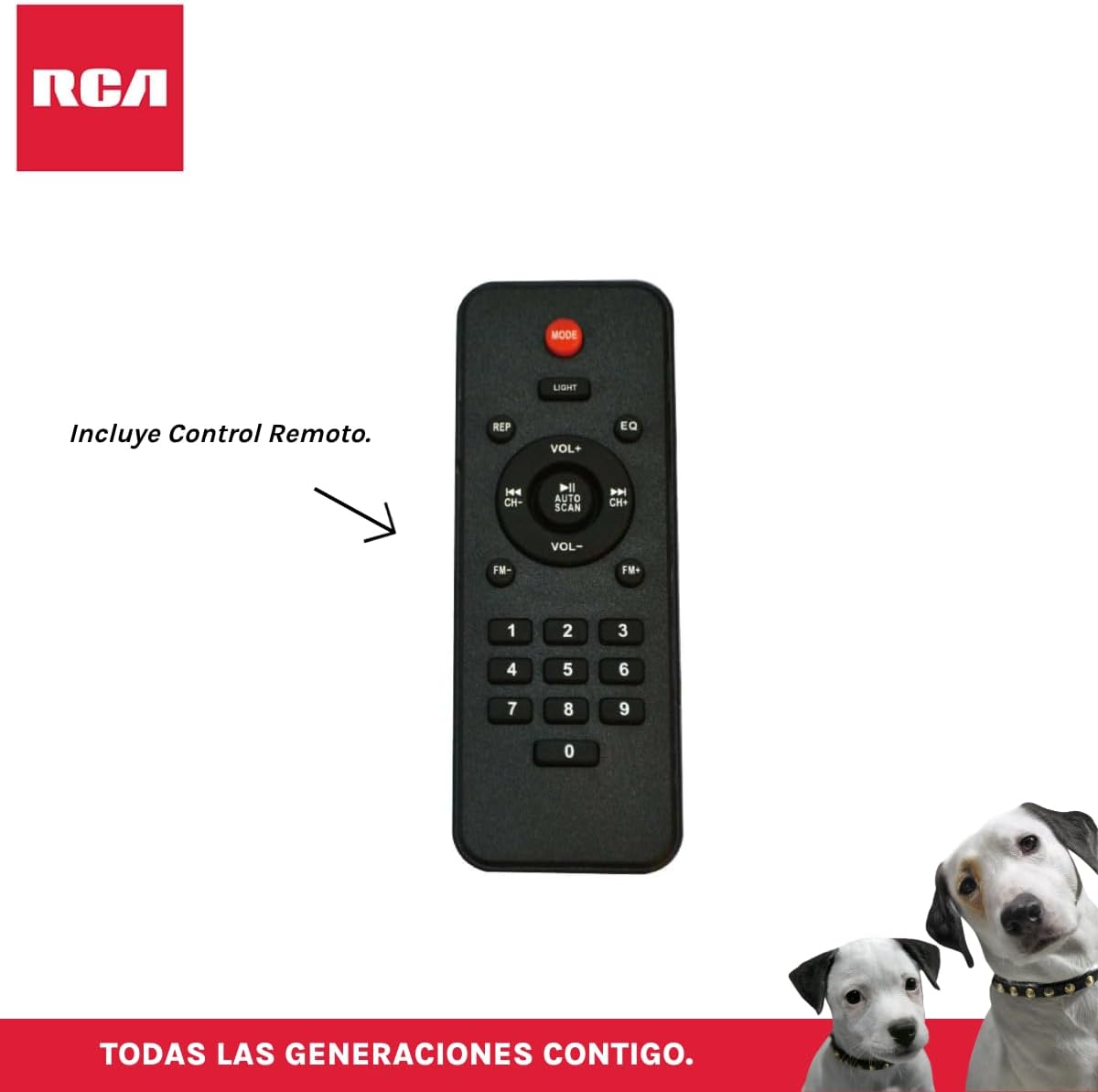
Ffigur 3.4: RCA SP550BT Remote Control. This image displays the full layout of the remote control, including buttons for power, mode selection, volume adjustment, track navigation, equalizer settings, and a numeric keypad.
4. Gosod
4.1 Cysylltiad Pwer
- Ensure the speaker is placed on a stable, flat surface.
- Connect the power cable to the speaker's power input port.
- Plug the other end of the power cable into a standard electrical outlet (AC 100-240V, 50/60Hz).
- Press the power button on the speaker or remote control to turn it on.
5. Cyfarwyddiadau Gweithredu
5.1 Pŵer Ymlaen/Diffodd
- I droi'r siaradwr ymlaen, pwyswch y GRYM button on the control panel or the remote control.
- I ddiffodd y siaradwr, pwyswch y GRYM botwm eto.
5.2 Dewis Modd
Gwasgwch y MODD button on the control panel or remote control to switch between Bluetooth, USB, FM, and AUX input modes.
5.3 Pâr Bluetooth
- Trowch y siaradwr ymlaen a dewiswch y modd Bluetooth gan ddefnyddio'r MODD button. The display will show "BLUE" and a pairing indicator will flash.
- Galluogwch Bluetooth ar eich dyfais symudol (ffôn clyfar, tabled, ac ati).
- Chwiliwch am "RCA SP550BT" in your device's Bluetooth list and select it to pair.
- Once paired, the speaker will emit a confirmation sound, and the Bluetooth indicator will stop flashing.
- Gallwch nawr chwarae sain o'ch dyfais drwy'r siaradwr.
Chwarae USB 5.4
- Insert a USB flash drive (FAT32 format, max 32GB) containing MP3 audio files i mewn i'r porthladd USB.
- The speaker will automatically switch to USB mode and begin playing the first track. If not, press the MODD botwm i ddewis modd USB.
- Defnyddiwch y CHWARAE/SEIBIANT, PREGETH, a NESAF buttons on the control panel or remote to control playback.
Radio 5.5 FM
- Turn on the speaker and select FM mode using the MODD botwm.
- Pwyswch a dal y CHWARAE/SEIBIANT botwm (neu SCAN AUTO on remote) to automatically scan and save available FM stations.
- Defnyddiwch y PREGETH a NESAF botymau i lywio drwy'r gorsafoedd sydd wedi'u cadw.
5.6 AUX Mewnbwn
- Connect an external audio device (e.g., MP3 player, laptop) to the speaker's AUX input port using a 3.5mm audio cable (not included).
- Dewiswch y modd AUX gan ddefnyddio'r MODD botwm.
- Rheoli chwarae a chyfaint o'ch dyfais gysylltiedig.
5.7 Swyddogaeth TWS (Stereo Di-wifr Gwirioneddol)
The TWS function allows you to connect two RCA SP550BT speakers wirelessly for a stereo sound experience.
- Ensure both SP550BT speakers are powered on and in Bluetooth mode, but not yet paired with any device.
- Ar un o'r siaradwyr, pwyswch a daliwch y TWS button (if available, or a dedicated TWS pairing button) until you hear a confirmation tone. The speakers will attempt to pair with each other.
- Once successfully paired, one speaker will act as the master (left channel) and the other as the slave (right channel).
- Now, pair your mobile device with the master speaker via Bluetooth as described in section 5.3.
5.8 Goleuadau LED
Gwasgwch y GOLAU button on the control panel or remote control to cycle through different LED light modes or to turn them off.
5.9 Defnyddio Meicroffon
Connect a wired microphone (not included) to the microphone input port on the speaker. Adjust the microphone volume using the dedicated knob (if available) or the main volume control.
6. cynnal
- Glanhau: Defnyddiwch frethyn meddal, sych i lanhau tu allan y siaradwr. Peidiwch â defnyddio glanhawyr sgraffiniol na thoddyddion.
- Storio: Pan nad yw'n cael ei ddefnyddio am gyfnodau hir, storiwch y siaradwr mewn lle oer, sych i ffwrdd o olau haul uniongyrchol a thymheredd eithafol.
- Amlygiad Dŵr: Nid yw'r siaradwr hwn yn dal dŵr. Osgowch ei amlygu i ddŵr neu leithder gormodol.
7. Datrys Problemau
Os byddwch chi'n dod ar draws problemau gyda'ch siaradwr, cyfeiriwch at y problemau a'r atebion cyffredin canlynol:
| Problem | Achos Posibl | Ateb |
|---|---|---|
| Dim pŵer | Power cable not connected; Power outlet not working; Speaker off. | Check power cable connection; Try a different outlet; Press the POWER button. |
| Dim sain | Cyfaint yn rhy isel; Modd anghywir wedi'i ddewis; Dyfais heb ei chysylltu'n iawn. | Increase volume; Select correct input mode (Bluetooth, USB, AUX); Reconnect device. |
| Mae paru Bluetooth yn methu | Speaker not in pairing mode; Device Bluetooth off; Speaker already paired. | Ensure speaker is in Bluetooth pairing mode; Turn on device Bluetooth; Disconnect from other devices. |
| Chwarae USB ddim yn gweithio | USB drive format incompatible; Corrupt files; USB drive not inserted correctly. | Ensure USB is FAT32 format; Check file integrity; Reinsert USB drive. |
| Derbyniad gwael radio FM | Signal gwan; Ymyrraeth. | Relocate speaker; Extend antenna (if applicable). |
8. manylebau
| Nodwedd | Manyleb |
|---|---|
| Model | SP550BT |
| Brand | RCA |
| Pŵer Allbwn Siaradwr | 50 Wat (Uchafswm) |
| Technoleg Cysylltedd | Bluetooth, USB, AUX |
| Technoleg Di-wifr | Bluetooth |
| Modd Allbwn Sain | Stereo |
| Math o Siaradwr | Portable, Outdoor |
| Math Mowntio | Mynydd Pen bwrdd |
| Dull Rheoli | Rheolaeth Anghysbell |
| Maint Siaradwr | 6.5 modfedd |
| Diamedr Woofer | 6.5 modfedd |
| Gallu Batri | 4400 Miliamp Oriau |
| Ffynhonnell Pwer | Cebl Trydan |
| Dyfeisiau Cydnaws | Gliniadur, Chwaraewr MP3, Ffôn Clyfar, Tabled |
| GTIN / UPC | 044476152061 |
9. Gwarant a Chefnogaeth
This product comes with a limited warranty. Please refer to the warranty card included in your package for specific terms and conditions. For technical support or service inquiries, please contact RCA customer service through their official webgwefan neu'r wybodaeth gyswllt a ddarparwyd gyda'ch pryniant.
Note: Warranty terms may vary by region. Keep your proof of purchase for warranty claims.