
1. Rhagymadrodd
This manual provides essential information for the proper setup, operation, and maintenance of your Azeyou 10.1-inch Android 14 Tablet, model AT1016U5. Please read this manual thoroughly before using your device to ensure optimal performance and safety.

Delwedd 1.1: Blaen a chefn view of the Azeyou 10.1-inch Android 14 Tablet.
2. Gwybodaeth Diogelwch
To prevent damage to your device or injury to yourself and others, observe the following precautions:
- Peidiwch ag amlygu'r dabled i dymheredd eithafol, golau haul uniongyrchol, na lleithder uchel.
- Osgowch ollwng y dabled neu roi’r dabled dan effeithiau cryf.
- Use only the charger and accessories provided or approved by Azeyou.
- Cadwch y dabled i ffwrdd o ddŵr a hylifau eraill.
- Do not attempt to disassemble or repair the tablet yourself. Contact customer support for assistance.
- Gwaredu'r dabled a'i batri yn gyfrifol yn unol â rheoliadau lleol.
3. Cynnwys Pecyn
Gwiriwch fod yr holl eitemau yn bresennol yn y pecyn:
- 1x Azeyou Android 14 Tablet
- 1x TYPE C Cable
- 1x Tablet Adaptor
- Llawlyfr Defnyddiwr 1x

Image 3.1: Contents included in the Azeyou Tablet package.
4. Cynnyrch Drosview
Familiarize yourself with the physical components and controls of your Azeyou Tablet.
4.1. Cynllun Ffisegol

Image 4.1: Diagram showing the location of ports and buttons on the Azeyou Tablet.
- Botwm Pŵer/Cloi: Press to turn on/off the tablet or to lock/unlock the screen.
- Botymau Cyfrol: Addaswch y sain.
- Ailosod twll pin: Use a thin pin to reset the device if it becomes unresponsive.
- Porth USB Math-C: Ar gyfer codi tâl a throsglwyddo data.
- Slot Cerdyn Micro SD: Insert a Micro SD card for expandable storage (up to 1TB, not included).
- Camera: Camerâu blaen (5MP) a chefn (8MP) ar gyfer lluniau a galwadau fideo.
- Siaradwyr: Dual multimedia box speakers for audio output.
4.2. Nodweddion Allweddol
- System Weithredu: Android 14
- Prosesydd: 2.0 GHz Octa-Core Processor (Allwinner A523)
- Arddangos: 10.1-inch IPS Touch Screen, 1280x800 resolution
- Cof: 8GB o RAM (4GB o RAM ffisegol + 4GB o RAM rhithwir)
- Storio: 128GB ROM, expandable up to 1TB via TF card
- Batri: Polymer Lithiwm 6000mAh
- Cysylltedd: Wi-Fi 6 (802.11a/b/g/n/ac), Bluetooth 5.0
- Camerâu: Blaen 5MP, Cefn 8MP
- Ychwanegol: GMS certified, Widevine L1 support

Image 4.2: Visual representation of the tablet's core features including OS, memory, cameras, and connectivity.
5. Gosod
5.1. Codi Tâl y Batri
Before first use, fully charge the tablet. Connect the provided USB Type-C cable to the tablet's charging port and the other end to the tablet adaptor. Plug the adaptor into a power outlet. The charging indicator will show the charging status. A full charge typically takes approximately 1.5 hours.
5.2. Pweru Ymlaen / I ffwrdd
- I Bweru Ymlaen: Press and hold the Power/Lock button until the Azeyou logo appears on the screen.
- I Bweru i ffwrdd: Press and hold the Power/Lock button until the power options menu appears. Select "Power off" and confirm.
- I ailgychwyn: From the power options menu, select "Restart."
5.3. Gosodiad Cychwynnol
Upon first power-on, follow the on-screen prompts to configure your tablet:
- Dewiswch eich iaith.
- Cysylltwch â rhwydwaith Wi-Fi.
- Sign in with your Google account or create a new one. This is necessary to download apps from the Google Play Store.
- Review a derbyn y telerau ac amodau.
- Set up screen lock (PIN, pattern, or password) for security.
5.4. Mewnosod Cerdyn Micro SD
To expand storage, insert a Micro SD card (not included) into the Micro SD card slot. Gently push the card until it clicks into place. Ensure the tablet is powered off before inserting or removing the card.
6. Cyfarwyddiadau Gweithredu
6.1. Llywio Android 14
Your tablet runs on Android 14, offering enhanced privacy controls and a user-friendly interface. Use touch gestures to navigate:
- Tap: Dewiswch eitem.
- Swipe: Sgroliwch drwy sgriniau neu restrau.
- Pinsiad: Chwyddo i mewn neu allan ar ddelweddau a web tudalennau.
- Gwasg Hir: Mynediad i ddewislenni cyd-destunol neu symud eiconau.
6.2. Cysylltedd Wi-Fi a Bluetooth
Access the Quick Settings panel by swiping down from the top of the screen to enable or disable Wi-Fi and Bluetooth. For detailed settings, go to Gosodiadau > Rhwydwaith a'r rhyngrwyd or Gosodiadau > Dyfeisiau cysylltiedig.
6.3. Gosod Cymwysiadau
The Google Play Store is pre-installed. Tap the Play Store icon to browse and download applications. A Google account is required for this process.
6.4. Defnydd Camera
Open the Camera app to take photos or record videos. The tablet features a 5MP front camera and an 8MP rear camera. Tap the screen to focus and press the shutter button to capture.

Delwedd 6.1: Enghraifftamples of camera usage and dual camera setup on the Azeyou Tablet.
6.5. Display and Eye Protection
The 10.1-inch IPS display offers a 1280x800 resolution. It includes low blue light technology to reduce eye strain. Adjust display settings under Gosodiadau > Arddangos.

Image 6.2: The 10.1-inch IPS display of the Azeyou Tablet.
6.6. Rheoli Batri
The 6000mAh battery provides approximately 6 hours of mixed usage. To optimize battery life, reduce screen brightness, disable Wi-Fi/Bluetooth when not in use, and close unused applications.

Image 6.3: Battery capacity and estimated usage times for the Azeyou Tablet.
7. cynnal
7.1. Glanhau'r Tabled
Use a soft, lint-free cloth to clean the screen and body of the tablet. Do not use abrasive cleaners or solvents, as they may damage the surfaces.
7.2. Diweddariadau Meddalwedd
Periodically check for system updates to ensure your tablet has the latest features and security patches. Go to Gosodiadau > System > Diweddariad system.
7.3. Rheoli Storio
Clirio pethau diangen yn rheolaidd files and uninstall unused apps to maintain optimal performance. You can manage storage under Gosodiadau > Storio.
8. Datrys Problemau
If you encounter issues with your tablet, refer to the following common solutions:
| Problem | Ateb |
|---|---|
| Nid yw'r tabled yn troi ymlaen | Ensure the battery is charged. Connect the charger and wait a few minutes before attempting to power on again. If unresponsive, use a thin pin to press the Reset pinhole. |
| Nid yw'r sgrin yn ymateb | Restart the tablet by holding the Power/Lock button. If unresponsive, use the Reset pinhole. |
| Methu cysylltu â Wi-Fi | Ensure Wi-Fi is enabled in settings. Check if the router is working correctly. Try forgetting the network and reconnecting. |
| Apps are crashing or slow | Close background applications. Clear app cache (Settings > Apps > [App Name] > Storage & cache). Ensure sufficient storage space. Restart the tablet. |
| Mae'r batri yn draenio'n gyflym | Reduce screen brightness. Disable Wi-Fi, Bluetooth, and GPS when not in use. Close unused apps. Check battery usage in Settings > Battery. |
If the problem persists, please contact Azeyou customer support for further assistance.
9. manylebau
Detailed technical specifications for the Azeyou 10.1-inch Android 14 Tablet (Model AT1016U5).
| Nodwedd | Manyleb |
|---|---|
| Rhif Model | AT1016U5 |
| System Weithredu | Android 14 |
| Prosesydd | Octa-Core (Allwinner A523), 2 GHz |
| HWRDD | 8 GB (4GB ffisegol + 4GB rhithwir) |
| Storio Mewnol | 128 GB |
| Storfa Ehangadwy | Up to 1 TB via Micro SD card (not included) |
| Maint Sgrin | 10.1 modfedd |
| Cydraniad Sgrin | IPS 1280x800 |
| Camera Cefn | 8 AS |
| Camera blaen | 5 AS |
| Gallu Batri | Polymer Lithiwm 6000 mAh |
| Bywyd Batri Cyfartalog | 6 Hours (mixed usage) |
| Cysylltedd Di-wifr | Wi-Fi 6 (802.11a/b/g/n/ac) |
| Bluetooth | Bluetooth 5.0 |
| Dimensiynau (LxWxH) | 9.5 x 6.3 x 0.32 modfedd |
| Pwysau Eitem | 1.68 pwys |
| Lliw | Llwyd |
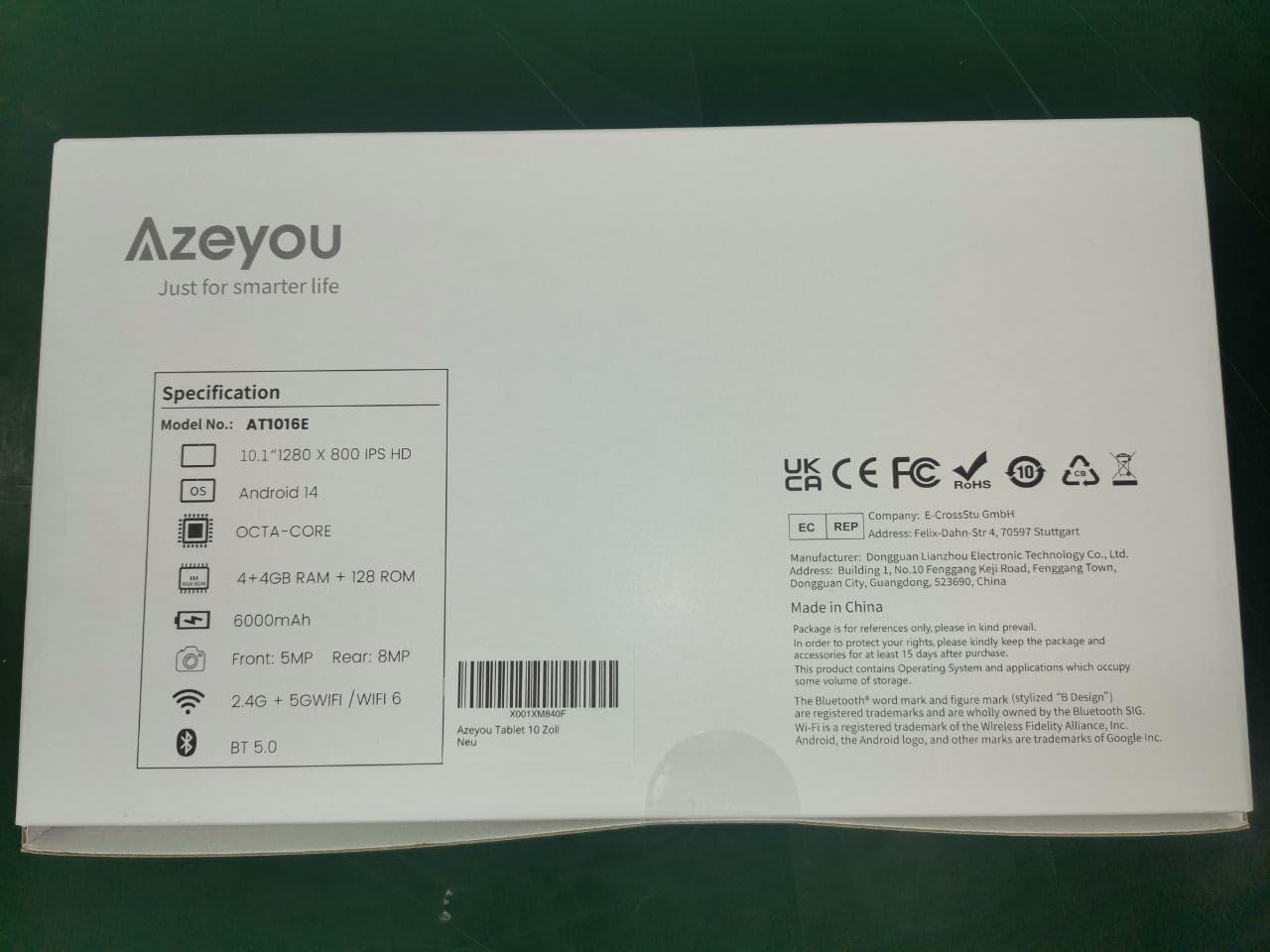
Image 9.1: Back of the product packaging displaying key specifications.
10. Gwarant a Chefnogaeth
Your Azeyou Tablet is covered by a manufacturer's warranty. For specific warranty terms and conditions, please refer to the documentation included with your purchase or visit the official Azeyou website. For technical support, troubleshooting assistance, or warranty claims, please contact Azeyou customer service.
Gallwch ddod o hyd i ragor o wybodaeth a chefnogaeth ar y Azeyou Brand Store.