
1. Rhagymadrodd
This manual provides comprehensive instructions for the safe and effective operation, maintenance, and troubleshooting of your GOYERRNES GR-CA-7200B-YC-NEW Clamp Meter Multimeter. Please read this manual thoroughly before using the device to ensure proper function and to prevent potential hazards.
The GOYERRNES GR-CA-7200B-YC-NEW is a True RMS (TRMS) digital clamp meter designed for accurate measurement of AC/DC amperage, AC/DC cyftage, resistance, frequency, capacitance, continuity, diode, and temperature. It also features Non-Contact Voltage (NCV) detection and continuous data logging capabilities, making it a versatile tool for electrical diagnostics in various applications.
2. Gwybodaeth Diogelwch
Always adhere to basic safety precautions when using electrical testing equipment to reduce the risk of fire, electric shock, or personal injury. Keep this manual for future reference.
- Darllenwch yr holl gyfarwyddiadau: Understand the operation and safety warnings before use.
- Inspect the device: Before each use, check the meter, test leads, and accessories for any damage. Do not use if damaged.
- Do not exceed ratings: Peidiwch byth â gwneud cais cyftage or current that exceeds the maximum specified ratings for the meter.
- Avoid live circuits: Do not measure current on live circuits without proper insulation and safety gear.
- Use proper terminals: Ensure test leads are connected to the correct input terminals for the desired measurement.
- Gwyliwch rhag cyfaint ucheltage: Byddwch yn ofalus iawn wrth weithio gyda chyftaguwchlaw 30V AC RMS, 42V brig, neu 60V DC. Mae'r cyfrolau hyntages yn peri perygl sioc.
- Do not operate in explosive environments: Do not use the meter in environments with explosive gas, vapor, or dust.
- Maintain dry conditions: Keep the meter dry. Do not operate in wet or damp amodau.
- Service by qualified personnel: Repairs or servicing should only be performed by qualified service personnel.
3. Nodweddion Cynnyrch
The GOYERRNES GR-CA-7200B-YC-NEW Clamp Meter Multimeter offers a range of features for comprehensive electrical testing:
- Versatile Measurement: Accurately measures AC/DC Amperage, AC/DC Voltage, Resistance, Frequency or Duty Cycle, Capacitance, and Temperature (℃/℉).
- Cyf. Di-gyswllttagCanfod e (NCV): Provides a safe method for detecting AC voltage heb gysylltiad uniongyrchol.
- Diode and Continuity Tests: Essential functions for circuit diagnostics.
- Continuous Data Logging: Displays AC/DC amps, volts, ohms, capacitance, Hz, and temperature in Max/Min/Avg on the same interface with real-time readings. Includes a curve graph for visual trend analysis.
- Cywirdeb Uchel: Nodweddion 0.1 amp resolution for 0.1 ~ 60A AC/DC current and 1A for 60 ~ 400A, supporting precise current measurements.
- Arddangosfa Ddigidol Fawr: Backlit LCD ensures visibility in dimly lit areas.
- Ystod Tymheredd Eang: Extensible thermocouple probe supports temperature measurements from -4 to 1832℉ (-20 to 1000℃).
- Jaw Caliber Size: 1.77 inches (45mm) for clamping o gwmpas arweinyddion.
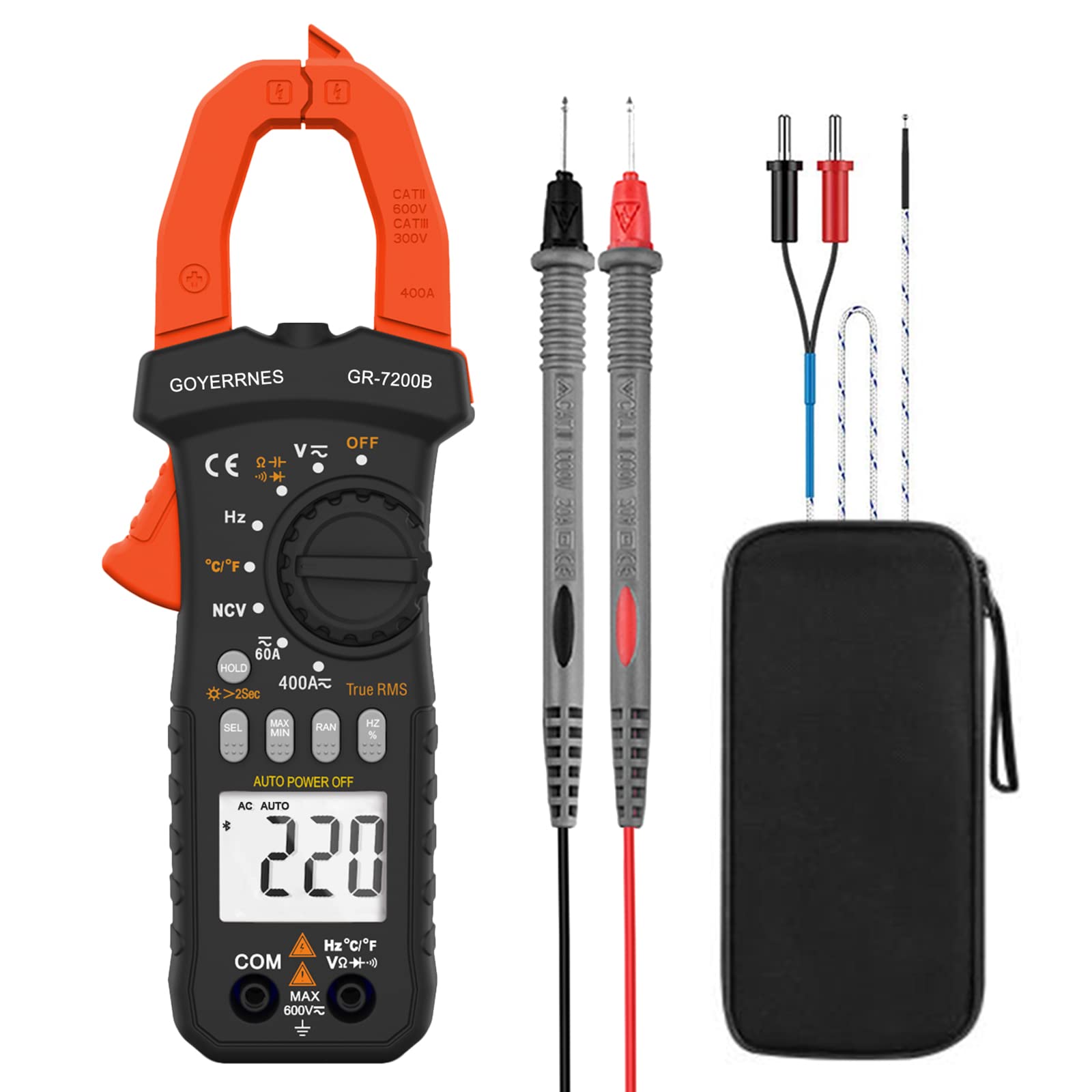
Ffigur 1: Blaen view of the GOYERRNES GR-CA-7200B-YC-NEW Clamp Meter Multimeter, showing the display, function dial, and current clamp gên.
4. Cynllun Dyfais
Familiarize yourself with the main components of your clamp metr:
- Cl cyfredolamp Gên: Wedi'i ddefnyddio ar gyfer mesur cerrynt AC/DC digyswllt.
- Deialu Swyddogaeth: Selects the desired measurement mode (e.g., Voltage, Gwrthsafiad, Ampdileu).
- Arddangosfa LCD: Shows measurement readings, units, and various indicators. Backlit for low-light conditions.
- Jaciau Mewnbwn: Terminals for connecting test leads for voltage, resistance, capacitance, diode, continuity, and temperature measurements.
- Botwm Dal/Golau yn ôl: Freezes the current reading on the display and activates/deactivates the backlight.
- Range/Mode Button: Switches between auto-ranging and manual ranging, or selects sub-functions within a mode (e.g., AC/DC voltaga).
- Synhwyrydd NCV: Located at the top of the meter for non-contact voltage canfod.
Ffigur 2: Manwl view o'r clamp meter, highlighting the display, function dial, and input terminals.
5. Gosod
5.1 Gosod Batri
- Ensure the meter is powered off.
- Lleolwch glawr adran y batri ar gefn y mesurydd.
- Defnyddiwch sgriwdreifer i lacio'r sgriw(iau) a thynnu'r gorchudd.
- Insert new batteries, observing the correct polarity (+ and -).
- Rhowch glawr adran y batri yn ôl a'i sicrhau gyda'r sgriw(iau).
5.2 Gwiriadau Cychwynnol
Before first use, and periodically thereafter, perform the following checks:
- Verify that the meter and test leads are free from any physical damage.
- Ensure the battery is properly installed and has sufficient charge.
- Test the continuity function on a known good conductor to confirm basic operation.
6. Cyfarwyddiadau Gweithredu
6.1 Pŵer Ymlaen/Diffodd
Rotate the function dial from the "OFF" position to any desired measurement function to power on the meter. To power off, rotate the dial back to the "OFF" position.
6.2 AC/DC Cyftage Mesur
- Insert the red test lead into the "VΩHz" jack and the black test lead into the "COM" jack.
- Rotate the function dial to the "V~" (AC Voltage) neu "V-" (Cyfrol DCtage) sefyllfa.
- Cysylltwch y chwiliedyddion prawf yn gyfochrog â'r gylched neu'r gydran rydych chi am ei mesur.
- Darllenwch y cyftage gwerth ar yr arddangosfa LCD.
6.3 Mesur Cerrynt AC/DC (Clamp Swyddogaeth)
Important Safety Note: To measure current with the clamp function, you MUST separate the hot and neutral conductors and clamp around only the LIVE wire. Clamping around both wires will result in a zero amp reading as the currents cancel each other out. For convenience without stripping wires, use an AC Line Splitter.
- Rotate the function dial to the "A~" (AC Current) or "A-" (DC Current) position.
- Pwyswch y sbardun ên i agor y clamp gên.
- Enclose a single conductor (live wire) within the clamp gên.
- Release the trigger to close the jaw securely around the conductor.
- Darllenwch y gwerth cyfredol ar yr arddangosfa LCD.
6.4 Mesur Gwrthiant
- Insert the red test lead into the "VΩHz" jack and the black test lead into the "COM" jack.
- Rotate the function dial to the "Ω" (Resistance) position.
- Sicrhewch fod y gylched neu'r gydran sy'n cael ei phrofi wedi'i dad-egni.
- Cysylltwch y stilwyr prawf ar draws y gydran.
- Darllenwch y gwerth gwrthiant ar yr arddangosfa LCD.
6.5 Mesur Cynhwysedd
- Insert the red test lead into the "VΩHz" jack and the black test lead into the "COM" jack.
- Rotate the function dial to the "CAP" (Capacitance) position.
- Ensure the capacitor is fully discharged before testing to prevent damage to the meter.
- Cysylltwch y stilwyr prawf ar draws terfynellau'r cynhwysydd.
- Darllenwch y gwerth cynhwysedd ar yr arddangosfa LCD.
6.6 Frequency/Duty Cycle Measurement
- Insert the red test lead into the "VΩHz" jack and the black test lead into the "COM" jack.
- Rotate the function dial to the "Hz" (Frequency) position.
- Connect the test probes in parallel to the circuit where you want to measure frequency or duty cycle.
- Read the frequency (Hz) or duty cycle (%) value on the LCD display.
6.7 Prawf Deuod
- Insert the red test lead into the "VΩHz" jack and the black test lead into the "COM" jack.
- Rotate the function dial to the "Diode" position.
- Cysylltwch y stiliwr coch â'r anod a'r stiliwr du â chatod y deuod.
- Bydd yr arddangosfa'n dangos y gyfrol ymlaentage diferyn. Gwrthdrowch y chwiliedyddion; dylai'r arddangosfa ddangos "OL" (Dolen Agored) am ddeuod da.
6.8 Prawf Parhad
- Insert the red test lead into the "VΩHz" jack and the black test lead into the "COM" jack.
- Rotate the function dial to the "Continuity" position (often shared with resistance or diode).
- Cysylltwch y stilwyr prawf ar draws y gylched neu'r gydran.
- If continuity exists (low resistance), the meter will emit an audible beep and display a low resistance value.
6.9 Cyfrol Di-gyswllttage (NCV) Canfod
- Rotate the function dial to the "NCV" position.
- Move the NCV sensor (located at the top of the meter) close to the conductor or outlet you suspect has AC voltage.
- Bydd y mesurydd yn dangos presenoldeb cyfaint ACtage through audible beeps and/or visual indicators on the display.
6.10 Mesur Tymheredd
- Insert the thermocouple probe into the designated temperature input jacks (usually marked with "TEMP" or similar, or shared with VΩHz/COM with specific polarity).
- Rotate the function dial to the "TEMP" (Temperature) position.
- Place the tip of the thermocouple probe on or near the object whose temperature you wish to measure.
- Read the temperature value (in ℃ or ℉) on the LCD display.
6.11 Data Logging (Max/Min/Avg)
This meter supports continuous data logging, displaying maximum, minimum, and average readings on the same interface. A curve graph visually represents changes over time. Refer to the specific button on your device (often labeled "MAX/MIN" or similar) to activate and cycle through these modes. Data logging rates may be adjustable.
7. cynnal
7.1 Glanhau
Sychwch c y mesuryddasing gyda hysbysebamp lliain a glanedydd ysgafn. Peidiwch â defnyddio sgraffinyddion na thoddyddion. Gwnewch yn siŵr bod y mesurydd yn hollol sych cyn ei ddefnyddio.
7.2 Storio
When not in use for extended periods, remove the batteries to prevent leakage. Store the meter in a cool, dry place, away from direct sunlight and extreme temperatures.
7.3 Batri Newydd
When the low battery indicator appears on the display, replace the batteries as described in Section 5.1. Use only the specified battery type.
8. Datrys Problemau
Os byddwch chi'n dod ar draws problemau gyda'ch clamp mesurydd, cyfeiriwch at y problemau a'r atebion cyffredin canlynol:
- No Display/Meter Not Powering On:
- Gwiriwch osodiad a pholaredd y batri.
- Amnewid gyda batris ffres.
- Ensure the function dial is not in the "OFF" position.
- Darlleniadau anghywir:
- Gwiriwch fod y swyddogaeth fesur gywir wedi'i dewis.
- Gwnewch yn siŵr bod y gwifrau prawf wedi'u cysylltu'n iawn â'r jaciau mewnbwn cywir.
- For current measurement, ensure the clamp is around a single live conductor only.
- Check for damaged test leads or probes.
- Arddangosfa "OL" (Gorlwytho):
- The measured value exceeds the meter's range for the selected function. Select a higher range if available, or ensure the input is within the meter's specifications.
- No NCV Detection:
- Ensure the NCV function is selected and the sensor is close enough to the AC voltage ffynhonnell.
- Mae'r cyftage may be too low to detect.
9. manylebau
| Manyleb | Gwerth |
|---|---|
| Brand | GOYERRNES |
| Rhif Model | GR-CA-7200B-YC-NEW |
| Math Mesur | Ammeter (Multimeter functions included) |
| Ffynhonnell Pwer | Wedi'i Bweru â Batri |
| Upper Temperature Rating (Thermocouple) | 1832 Gradd Fahrenheit (1000 Gradd Celsius) |
| Jaw Caliber Size | 1.77 modfedd (45mm) |
| AC/DC Current Resolution (0.1-60A) | 0.1A |
| AC/DC Current Resolution (60-400A) | 1A |
| Manyleb wedi'i Chwrdd | CSA |
| Cydrannau wedi'u Cynnwys | Clamp metr |
10. Gwarant a Chefnogaeth
10.1 Gwybodaeth Gwarant
This GOYERRNES Clamp Meter Multimeter is covered by a 2-FLWYDDYN warranty from the date of purchase. This warranty covers defects in materials and workmanship under normal use. It does not cover damage resulting from misuse, abuse, accident, unauthorized alteration, or improper installation.
10.2 Cefnogaeth i Gwsmeriaid
For technical assistance, warranty claims, or product inquiries, please contact GOYERRNES customer support through the retailer's platform or the official GOYERRNES website. Please have your model number (GR-CA-7200B-YC-NEW) and purchase date available when contacting support.