
Xtorm FS405
Xtorm FS405 Solar Powerbank 20W – 10.000 mAh User Manual
Model: FS405
Rhagymadrodd
The Xtorm FS405 Fuel Series Solar Powerbank 20W – 10.000 mAh is designed to provide portable power for your electronic devices, offering the flexibility to charge via USB-C or its integrated solar panel. This power bank is built for outdoor adventures, featuring a durable, splash-resistant design and a powerful LED flashlight.
Gwybodaeth Diogelwch
- Peidiwch ag amlygu'r banc pŵer i dymheredd eithafol (uwchlaw 45°C neu islaw -10°C).
- Osgowch ollwng, dadosod, neu geisio atgyweirio'r ddyfais eich hun.
- Keep away from water, except for the specified splash resistance (IPX4). Do not submerge.
- Defnyddiwch geblau ac addaswyr gwefru ardystiedig yn unig.
- Cadwch allan o gyrraedd plant.
- Gwaredwch y cynnyrch yn gyfrifol yn unol â rheoliadau lleol.
Cynnwys Pecyn
Gwiriwch y pecyn am yr eitemau canlynol:
- Xtorm FS405 Solar Powerbank
- Cebl gwefru USB-C (0.30m)
- Llawlyfr Defnyddiwr
Cynnyrch Drosview

Blaen View: Shows the main solar charging panel and the Xtorm logo. The robust casing is visible around the edges.

Yn ol View (LED Off): Displays the textured back casing and the integrated LED light panel in its off state.
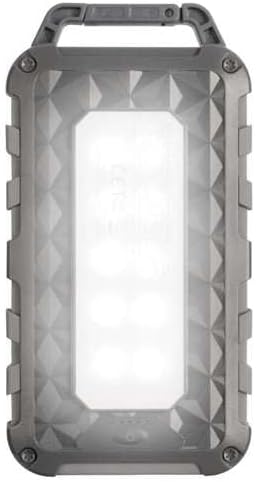
Yn ol View (LED On): Shows the powerful LED light panel fully illuminated, indicating the flashlight function is active.

Brig View: Highlights the sturdy integrated carabiner handle, designed for easy attachment to bags or gear.
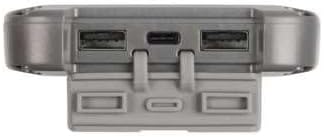
Gwaelod View: Displays the USB-C PD input/output port and two USB-A Quick Charge 3.0 output ports, protected by a cover.
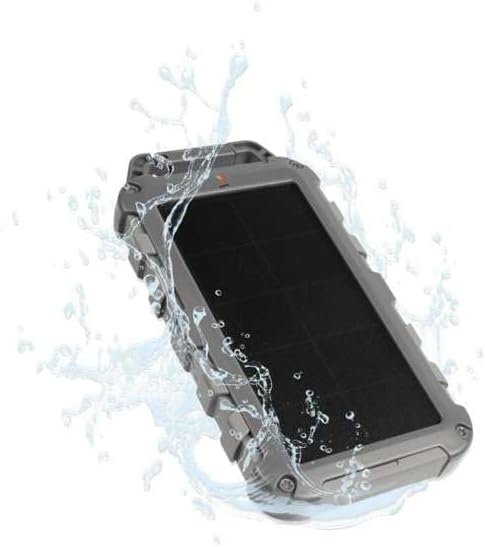
Durability Feature: Illustrates the power bank's splash-resistant design, suitable for outdoor conditions (IPX4 rated).
Gosod
Tâl Cychwynnol
Before first use, it is recommended to fully charge the Xtorm FS405 Solar Powerbank via the USB-C port for optimal performance.
- Cysylltwch y cebl USB-C a ddarperir â'r porthladd USB-C ar y banc pŵer.
- Cysylltwch ben arall y cebl USB-C ag addasydd wal USB cydnaws (heb ei gynnwys) neu borthladd USB cyfrifiadur.
- The LED indicators on the power bank will show the charging status. A full charge via USB-C typically takes approximately 2 hours.
Cyfarwyddiadau Gweithredu
Codi tâl ar y Banc Pŵer
The Xtorm FS405 can be charged using two methods:
1. Via USB-C (Recommended for Fast Charging)
- Connect the power bank to a USB-C power source using the included cable.
- The power bank will begin charging. This method provides the fastest charging speed for the power bank itself.
2. Via Solar Panel
The integrated solar panel allows for convenient charging when outdoors. For best results, place the power bank directly under strong sunlight.
- Place the solar panel facing direct sunlight.
- A small indicator light (usually green) will illuminate when solar charging is active.
- Note on Solar Charging Speed: Solar charging is a supplementary method and is significantly slower than USB-C charging. Factors like season, location, time of day, and cloud cover heavily influence charging speed.
Approximate solar charging times for a full charge:
- Spring/Summer (mostly sunny day): Tua 10 diwrnod
- Autumn/Winter (mostly sunny day): Tua 20 diwrnod
Solar charging is not effective on mostly cloudy days.
Codi Tâl ar Ddyfeisiadau Allanol
The power bank features one USB-C PD (Power Delivery) output and two USB-A Quick Charge 3.0 outputs.

Gallu Codi Tâl Cyflym: The power bank can charge compatible smartphones, such as an iPhone 14 or 12/13, up to 50% in approximately 30 minutes using the 20W USB-C PD output.
- Cysylltwch gebl gwefru eich dyfais ag un o'r porthladdoedd allbwn sydd ar gael (USB-C neu USB-A) ar y banc pŵer.
- Cysylltwch ben arall y cebl â'ch dyfais.
- Bydd y banc pŵer yn dechrau gwefru'ch dyfais yn awtomatig.
- The LED indicators on the power bank will show the remaining battery level.
The 10,000mAh capacity is sufficient to charge most smartphones at least 2 times.
Gan ddefnyddio'r Flashlight LED
The Xtorm FS405 includes a powerful integrated LED flashlight on its back.
- Locate the power button (usually on the side or near the ports).
- Press and hold the power button for a few seconds to turn the flashlight ON.
- Press and hold the power button again to turn the flashlight OFF.
Cynnal a chadw
- Glanhewch y banc pŵer gyda lliain meddal, sych. Peidiwch â defnyddio cemegau llym na deunyddiau sgraffiniol.
- Storiwch y banc pŵer mewn lle oer, sych pan nad yw'n cael ei ddefnyddio.
- For long-term storage, charge the power bank to about 50-70% every 3-6 months to preserve battery health.
- Ensure the port covers are properly sealed when exposed to water splashes.
Datrys problemau
Banc Pŵer Ddim yn Codi Tâl
- Gwirio cebl: Ensure the USB-C cable is securely connected to both the power bank and the power source. Try a different cable.
- Gwiriwch y ffynhonnell pŵer: Verify that the wall adapter or USB port is functioning correctly.
- Codi Tâl Solar: For solar charging, ensure the panel is in direct, strong sunlight. Remember solar charging is slow and not effective in low light or cloudy conditions.
Dyfais Ddim yn Gwefru o'r Banc Pŵer
- Siec Tâl Banc Pŵer: Gwnewch yn siŵr bod digon o wefr ar y banc pŵer.
- Gwirio Ceblau: Use the original charging cable for your device and ensure it's properly connected to both the power bank and your device. Try a different cable.
- Cydnawsedd: Verify that your device is compatible with USB charging.
- Ailgychwyn: Disconnect and reconnect the device.
Flashlight Ddim yn Gweithio
- Siec Tâl Banc Pŵer: Ensure the power bank has some charge remaining.
- Gweithrediad Cywir: Ensure you are pressing and holding the power button correctly to activate the flashlight.
Manylebau
| Nodwedd | Manylyn |
|---|---|
| Model | FS405 |
| Brand | Xtorm |
| Cyfres | Fuel Series 4 |
| Gallu Batri | 10,000 mAh (Polymer Lithiwm) |
| Allbwn Pŵer Uchaf | 20 Gw |
| Output 1 (USB-C PD) | 20 Gw |
| Output 2 (USB-A QC 3.0) | 18 Gw |
| Output 3 (USB-A QC 3.0) | 18 Gw |
| Nifer yr Allbynnau | 3 |
| Math Mewnbwn | USB-C PD |
| Pwer Panel Solar | 1 W (SunPower cells) |
| Dimensiynau (L x W x H) | 17 cm x 9 cm x 2 cm |
| Pwysau | 289 g |
| Deunydd | PC, ABS |
| Gwrthiant Dŵr | IPX4 (Gwrthsefyll Sblasiadau) |
| Flashlight Integredig | Oes |
| Battery Charge Time (USB-C) | Tua. 2 awr |
Gwarant a Chefnogaeth
For warranty information and customer support, please refer to the Xtorm official websafle neu cysylltwch â'ch manwerthwr lleol. Cadwch eich prawf prynu ar gyfer unrhyw hawliadau gwarant.
Cymorth Ar-lein: www.xtorm.eu
Dogfennau cysylltiedigFS405


Ask a question about this manual
Ask about setup, troubleshooting, compatibility, parts, safety, or missing instructions. Manuals+ will review the question and use this page’s manual context to help answer it.